
JOBYNA JB-OZ-S28
JOBYNA Ozone Generator Water Air User Manual
Model: JB-OZ-S28
Introduction
The JOBYNA Ozone Generator is a high-capacity purification machine designed for both air and water treatment. It effectively cleans and deodorizes spaces and water by producing ozone. This manual provides essential information for safe and effective operation, maintenance, and troubleshooting of your device.

Figure 1: The JOBYNA Ozone Generator highlighting its dual Air and Water purification modes.
Important Safety Information
WARNING: USE IN UNOCCUPIED SPACE ONLY.
- Ozone works by attacking biological material. Therefore, it is crucial to avoid breathing in ozone.
- Do not be in the room or area when the ozone generator is operating. Ensure all people and pets are removed from the working area before activation.
- After the machine completes its purification cycle, open doors and windows to ensure proper ventilation for at least 30 minutes before re-entering the treated space. Inhaling too much ozone can be harmful.
- It is strictly prohibited for children to operate this machine.
- When not in use for a long period, turn off the power and unplug the power cord.
- Always refer to the instruction manual for detailed safety considerations and recommended operating times based on area size.

Figure 2: Safety reminder to ensure no one enters the area during operation.

Figure 3: Key safety tips for operating the JOBYNA Ozone Generator.
What's in the Box?
Upon opening your JOBYNA Ozone Generator package, you should find the following items:
- JOBYNA Ozone Air Purifier Unit (Model JB-OZ-S28)
- Instruction Manual
- Air Hose with Air Stone (for Water Mode)
- "Purification Complete" / "Do Not Enter" Door Hanger Tag
- Power Cable
- Spare Fuse
Video 1: An unboxing overview of the JOBYNA Ozone Generator, showing all included components.
Setup
Before operating your ozone generator, ensure it is placed in an appropriate location and connected correctly.
- Placement: For air purification, place the unit in the center of the unoccupied space you wish to treat. For water purification, ensure the unit is near the water source and on a stable surface.
- Power Connection: Connect the power cable to the AC input on the back of the unit and then plug it into a standard 110V/60Hz electrical outlet.
- Water Mode Setup (if applicable): If using the water mode, attach the provided air hose to the "Water" nozzle on the back of the unit. Connect the air stone to the other end of the hose and place the air stone into the water you intend to purify.
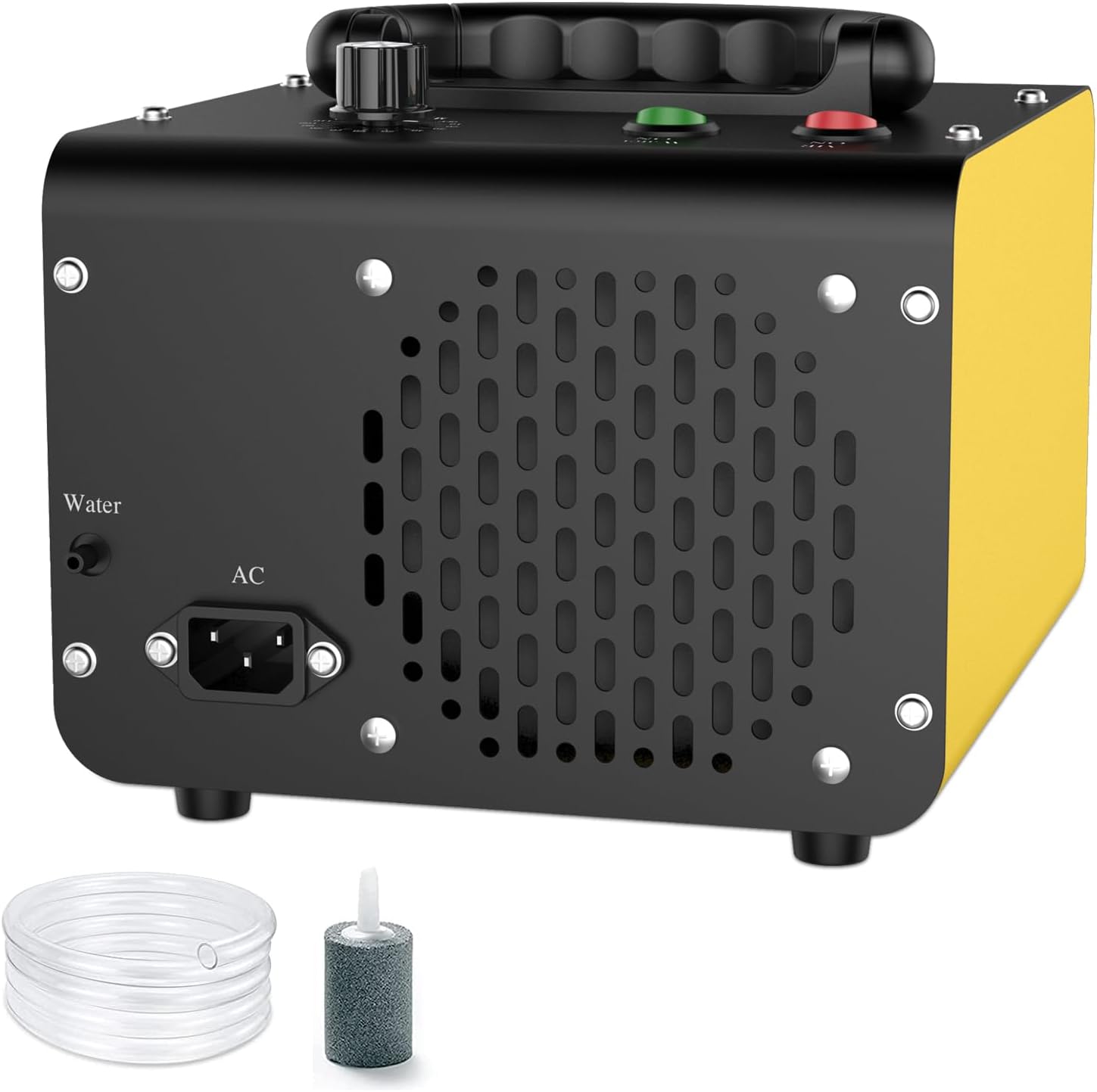
Figure 4: Rear view of the ozone generator with power and water connections.
Operating Instructions
The JOBYNA Ozone Generator features two primary operating modes: Air Mode and Water Mode.
Air Mode Operation
Air Mode is designed for purifying large spaces and removing strong odors.
- Activation: Ensure the unit is plugged in. Press the red "AIR ON" button to activate Air Mode. The corresponding indicator light will illuminate.
- Timer Setting: Use the "MINUTES" dial to set the desired operating time (0-120 minutes). For continuous operation, set the dial to "HOLD".
- Recommended Usage:
Area Size (sq.ft) Recommended Time (min) 500 10 1000 20 1600 30 2100 60 2500 80 3200 100 3700 120 >3700 Hold - Important Note: For optimal results and to prevent over-ozonation, it is often more effective to use shorter periods of operation multiple times rather than one continuous long period.

Figure 5: Air Mode coverage and recommended timing.
Video 2: Demonstration of using the ozone generator in Air Mode for car purification, with important safety warnings.
Water Mode Operation
Water Mode is ideal for purifying water, fruits, vegetables, and small, enclosed spaces like wardrobes or pet beds.
- Activation: Ensure the air hose and air stone are properly connected and the air stone is submerged in water. Press the green "WATER ON" button to activate Water Mode. The corresponding indicator light will illuminate.
- Timer Setting: Use the "MINUTES" dial to set the desired operating time (0-120 minutes). For continuous operation, set the dial to "HOLD".
- Important Note: Do not run Water Mode simultaneously with Air Mode. Ensure only one mode is active at a time.
- Recommended Usage for Water Purification:
Capacity (L) Recommended Time (min) 1 5 5 30 10 50 15 80 20 120 >20 Hold

Figure 6: Water Mode capacity and recommended timing for various applications.
Video 3: Demonstration of using the ozone generator in Water Mode for purifying shoes, highlighting the bubbling action of the air stone.
Maintenance
Regular maintenance ensures the longevity and optimal performance of your JOBYNA Ozone Generator.
- Fuse Replacement: The unit is equipped with a replaceable 3A fuse for overload protection. If the unit does not power on, check and replace the fuse if necessary.
- Take out the fuse with a tool.
- Take out the broken fuse and replace it with a new fuse.
- Reinstall the fuse and continue to use the machine.
- Ceramic Plate Inspection: The ozone is generated by ceramic plates inside the unit. While not user-serviceable for cleaning, regular use in appropriate conditions helps maintain their efficiency.

Figure 7: Steps for replacing the fuse.
Video 4: An introduction to the ozone machine, showing internal components like ceramic plates responsible for ozone generation.
Troubleshooting
| Problem | Possible Cause | Solution |
|---|---|---|
| Unit does not power on. | Blown fuse or power adapter issue. | Replace the fuse (refer to Maintenance section) or check the power adapter connection. |
| Lingering ozone smell after purification. | Ozone has permeated into materials. | Ensure adequate ventilation. Continue to ventilate the area until the smell dissipates. This may take some time. |
| Ineffective purification. | Incorrect operating time or mode; large area for chosen mode. | Refer to the "Operating Instructions" section for recommended times and modes based on area size or water volume. Consider using shorter, multiple cycles. |
Specifications
| Feature | Detail |
|---|---|
| Brand | JOBYNA |
| Model Number | JB-OZ-S28 |
| Product Dimensions | 9 x 8.2 x 6.3 inches |
| Net Weight | 4.8 Pounds |
| Controller Type | Button Control |
| Wattage | 160 Watt-hours |
| Rated Voltage | 110 volts |
| Air Mode Ozone Output | 28,000 mg/h |
| Water Mode Ozone Output | 500 mg/h |
| Timer Settings | 0-120 minutes / Hold |
| Fuse Type | 3A (Replaceable) |

Figure 8: Physical dimensions and electrical specifications.
Warranty and Support
JOBYNA is committed to providing high-quality products and excellent customer service.
- Warranty: Enjoy a 365-day warranty on your JOBYNA Ozone Generator.
- Free Replacement: We offer 365 days of free replacement for eligible issues.
- Free Returns: Benefit from a 30-day free return policy.
- Customer Support: For any inquiries or support needs, please visit the official JOBYNA Store on Amazon: JOBYNA Store.

Figure 9: JOBYNA's commitment to customer satisfaction.
Related documentsJB-OZ-S28

Ask a question about this manual
Ask about setup, troubleshooting, compatibility, parts, safety, or missing instructions. Manuals+ will review the question and use this page’s manual context to help answer it.