
Aiwa WHF-880
Aiwa WHF-880 Wireless RF Headphones User Manual
Model: WHF-880
Introduction
The Aiwa WHF-880 Wireless RF Headphones provide a high-quality audio experience with freedom of movement. Designed for use with various analog and digital audio devices, these over-ear headphones deliver interference-free stereo sound, making them ideal for TV, DVD, Hi-Fi, and other multimedia applications. This manual provides essential information for setup, operation, maintenance, and troubleshooting to ensure optimal performance of your headphones.
Package Contents
Before beginning, please ensure all items are present in the package:
- Aiwa WHF-880 Wireless RF Headphones (Black Headband)
- Wireless RF Transmitter Base Station
- AC/DC Power Adapter
- RCA Jack to 3.5 mm Audio Cable
- 6.3 mm Jack Adapter
- Rechargeable Batteries (Lithium Ion)
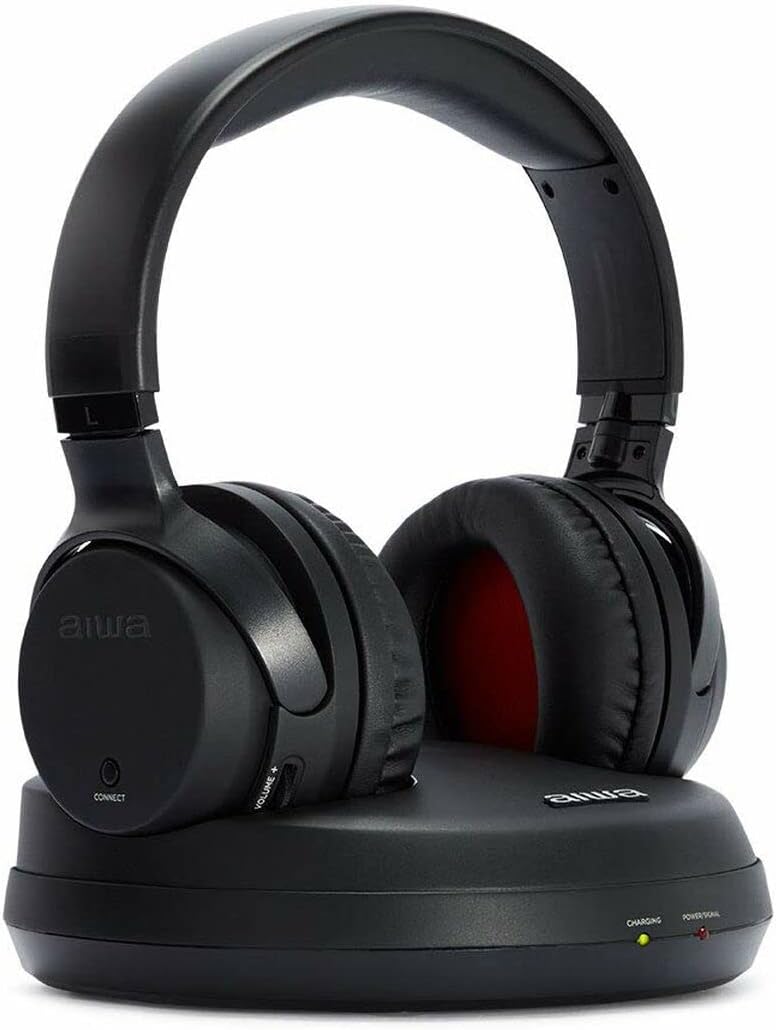
Image: The Aiwa WHF-880 wireless RF headphones resting on their black transmitter base station. The headphones are black with red ear cup interiors. The base station has indicator lights for charging and power.
Setup Instructions
Charging the Headphones:
Insert the provided rechargeable Lithium Ion batteries into the headphone battery compartment. Place the headphones onto the transmitter base station. Connect the AC/DC power adapter to the base station and plug it into a power outlet. The "CHARGING" indicator light on the base station will illuminate. A full charge may take approximately 5 days for initial use, or less for subsequent charges.
Connecting the Transmitter Base Station:
Identify the audio output port on your audio source device (e.g., TV, Blu-ray player, Hi-Fi system). This is typically a 3.5mm headphone jack or RCA audio output ports (red and white).
- For 3.5mm Jack: Use the provided RCA Jack to 3.5mm Audio Cable. Connect the 3.5mm end to your audio source's headphone jack and the RCA ends to the corresponding input ports on the transmitter base station.
- For RCA Audio Output: Use the provided RCA Jack to 3.5mm Audio Cable. Connect the RCA ends to your audio source's RCA output ports and the 3.5mm end to the corresponding input port on the transmitter base station.
- For 6.3mm Jack: If your audio source has a 6.3mm headphone jack, use the 6.3mm Jack Adapter with the 3.5mm audio cable.
Pairing the Headphones:
Once the base station is connected and powered, turn on the headphones using the power button (if applicable, or they may power on automatically when removed from the base). Press the "CONNECT" button on the headphones (if present) to establish a connection with the base station. The "POWER/SIGNAL" light on the base station will indicate a successful connection.
Operating Instructions
Power On/Off:
To power on the headphones, press and hold the power button located on one of the earcups. To power off, press and hold the same button until the indicator light turns off.
Volume Control:
Adjust the listening volume using the "VOLUME +" and "VOLUME -" controls typically found on the earcup. For optimal sound quality and to minimize potential background noise, it is recommended to set the audio source volume to a high level and then adjust the headphone volume to your preferred listening level.
Wireless Range:
The headphones operate using RF (Radio Frequency) technology, providing a wireless range of up to 100 meters (approximately 328 feet) in open areas. Obstacles such as walls and other electronic devices may reduce the effective range.
Battery Life:
A fully charged battery provides approximately 10 hours of continuous playback. When the battery level is low, an indicator light or audible signal may alert you. Place the headphones back on the base station to recharge.
Active Noise Cancellation:
The headphones feature Active Noise Cancellation (ANC) to reduce ambient noise. Refer to the specific button or switch on the headphones for activating and deactivating this feature.
Maintenance and Care
Cleaning:
Wipe the headphones and base station with a soft, dry cloth. Do not use abrasive cleaners, solvents, or strong chemicals. Ensure no liquid enters the openings.
Storage:
When not in use for extended periods, store the headphones on the charging base or in a cool, dry place away from direct sunlight and extreme temperatures. Remove batteries if storing for very long durations.
Battery Care:
To prolong battery life, avoid fully discharging the batteries frequently. Recharge them regularly. If the headphones will not be used for a long time, charge them fully before storage and recharge every few months.
Water Resistance:
The headphones are rated as water resistant. This means they can withstand light splashes or sweat, but they are not designed for submersion in water. Avoid exposing them to heavy rain or direct water streams.
Troubleshooting
| Problem | Possible Cause | Solution |
|---|---|---|
| No sound from headphones. | Headphones not powered on or not charged. Transmitter not connected or powered. Audio source volume too low. Incorrect audio input selected on source. Headphones not paired with transmitter. | Ensure headphones are charged and powered on. Verify transmitter is connected to power and audio source, and its power indicator is on. Increase volume on both audio source and headphones. Check audio output settings on your TV/device. Press the "CONNECT" button on the headphones to re-establish connection. |
| Sound is distorted or has static. | Out of range. Interference from other RF devices. Low battery on headphones. Audio source volume too high, causing clipping. | Move closer to the transmitter base station. Relocate the transmitter away from other electronic devices (e.g., Wi-Fi routers, cordless phones). Recharge the headphone batteries. Reduce the audio source volume and increase headphone volume. |
| Headphones not charging. | Headphones not correctly placed on base. Power adapter not connected or faulty. Batteries not inserted correctly or faulty. | Ensure headphones are seated firmly on the charging contacts of the base station. Check power adapter connection to base and wall outlet. Try a different outlet. Verify battery insertion polarity. Replace batteries if old or damaged. |
| Only one ear works. | Loose connection. Damaged cable or headphone unit. Balance setting on audio source. | Check all cable connections. Inspect headphone cable for damage. If issue persists, contact support. Check audio balance settings on your connected device. |
Specifications
| Feature | Detail |
|---|---|
| Model Name | WHF-880 |
| Connectivity Technology | Wireless RF (Radio Frequency) |
| Wireless Range | Up to 100 meters (approx. 328 feet) |
| Headphone Type | Over-Ear, Headband |
| Noise Control | Active Noise Cancellation |
| Frequency Range | 40Hz - 18KHz |
| Battery Type | Lithium Ion (Rechargeable) |
| Battery Life | Approx. 10 hours (on a single charge) |
| Charging Time | Approx. 5 days (initial charge, may vary) |
| Power Source | AC/DC Adapter |
| Compatible Devices | All analog and digital audio devices (TV, Blu-ray, CD, DVD, Hi-Fi, Amplifiers, DAB, etc.) |
| Connector Type | 3.5mm Jack (with 6.3mm adapter) |
| Material | Faux Leather, Aluminium |
| Water Resistance Level | Water Resistant (splashes/sweat) |
| Product Dimensions (approx.) | 60 x 60 x 85 cm (likely package dimensions) |
| Item Weight (approx.) | 1.17 kg (likely package weight) |
Warranty and Support
For warranty information and technical support, please refer to the official Aiwa website or contact their customer service department. Keep your purchase receipt as proof of purchase for any warranty claims.
Legal Disclaimer: Please note that product specifications can change without prior notice. Always refer to the manufacturer's official website for the most current specifications and information.