1. Introduction
This manual provides comprehensive instructions for the installation, operation, and maintenance of your Camslead 9-inch Digital Monitor 1080P HD Rear View Camera System. This system is designed for heavy-duty applications, offering a reliable solution for monitoring your vehicle's surroundings with high-definition video recording capabilities.
Please read this manual thoroughly before installation and operation to ensure proper use and to maximize the lifespan of your product.
2. Product Components
The Camslead 9-inch Digital Monitor 1080P HD Rear View Camera System includes the following components:
- 9-inch Monitor with Built-in DVR (1 pc)
- 1080P Side Cameras (4 pcs)
- 4PIN 15m Extension Cables (4 pcs)
- L-Bracket (1 pc)
- Power Cable (1 pc)
- Sunshade (1 pc)
- Remote Control (1 pc)
- Operation Manual (1 pc) - This document
- Sponge Mat (4 pcs)


2.1. Monitor Features
- High Definition Digital Color LCD wide screen video monitor.
- Resolution: 1024(H) x 600(V).
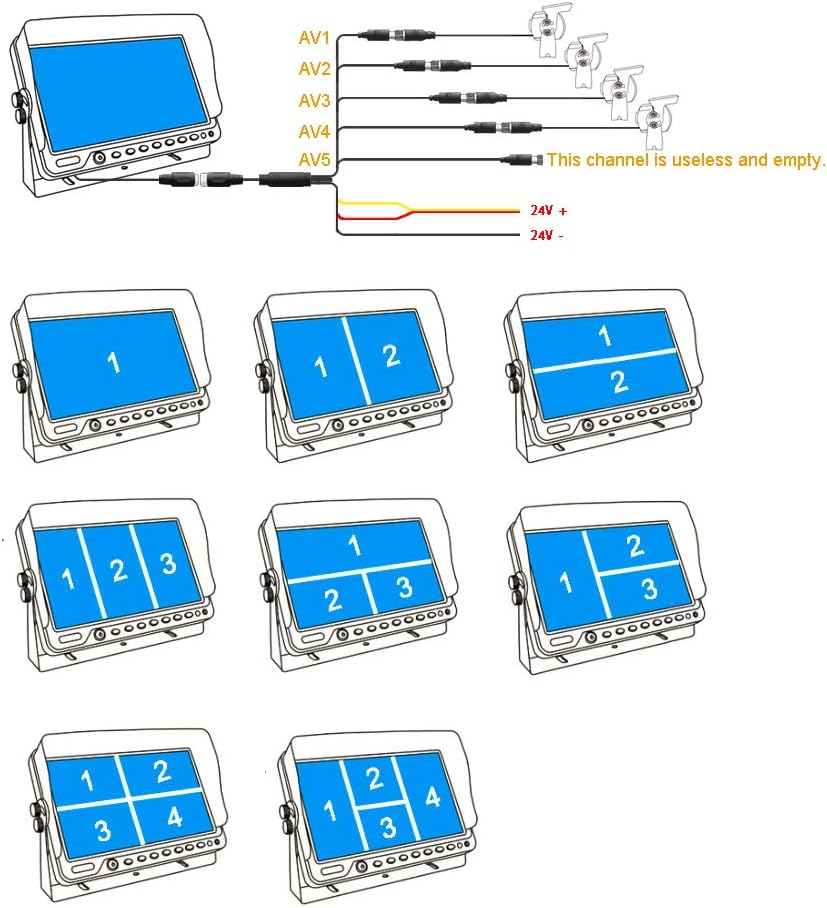
- Built-in quad / split screen functionality, capable of displaying up to four camera views simultaneously.
- Eight multi-screen combination display modes, configurable as default boot screen.
- Built-in DVR for 1080P video recording.
- Supports up to 256GB SD card for video storage (SD card not included).
- Loop recording with auto overwrite function.
- On-monitor video playback.
- Parking lines assistance feature, adjustable via display settings.


2.2. Camera Features
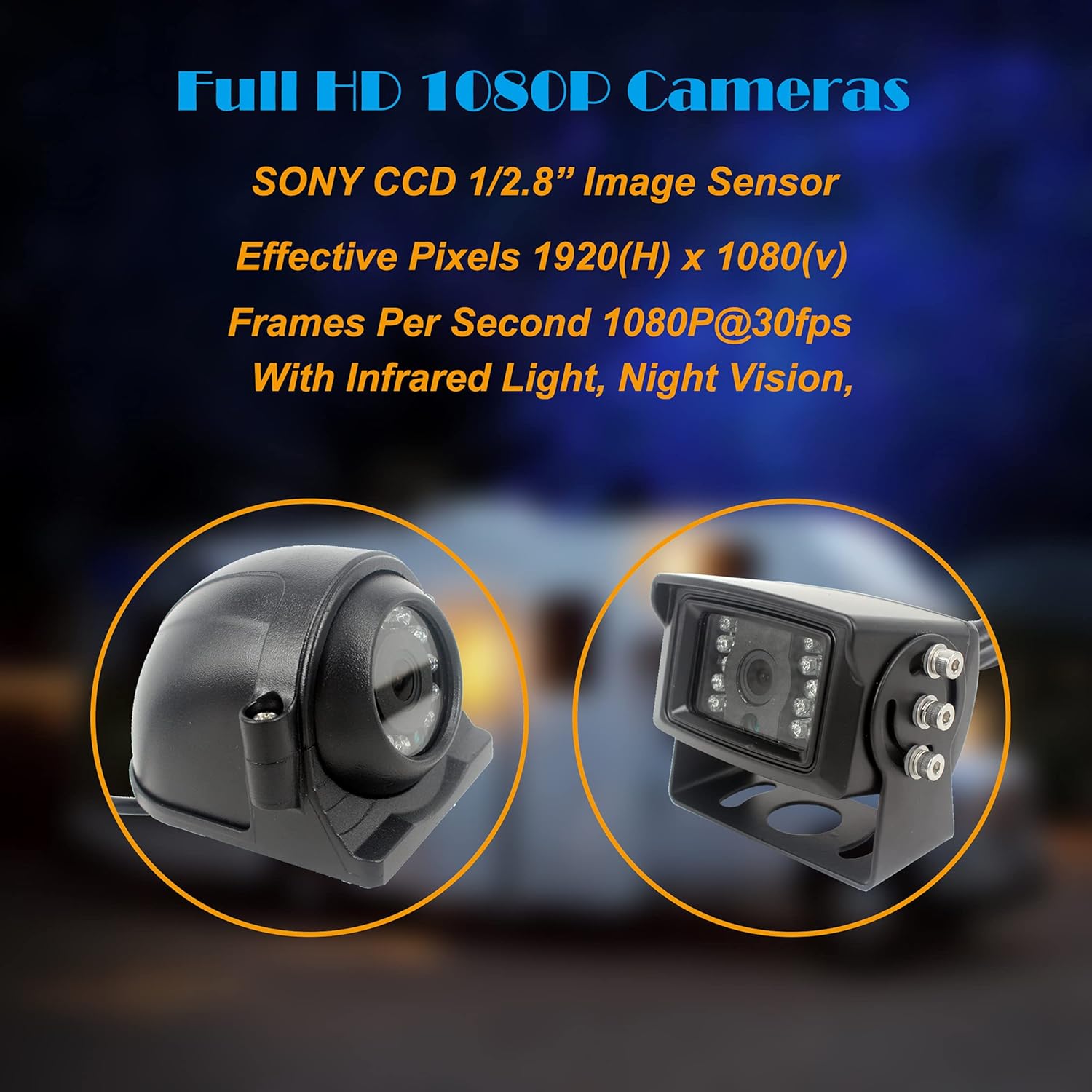
- 1080P 1/2.8" Image Sensor (SONY CCD).
- Effective Pixels: 1920(H) x 1080(V).
- Frame Rate: 1080P@30fps.
- Sturdy metal shell construction.
- Waterproof rating: IP69.
- Operating temperature: -20℃ to 70℃.
- IR Night Vision: Rear-view camera built-in 18 IR LEDs, side camera built-in 12 IR LEDs.
- Night vision distance up to 12 meters (39 feet).
- 120° viewing angle with all-glass, high-pixel lens.
- Infrared light sensor for automatic activation based on ambient light.
- Mounting bracket allows 360° rotation for installation.


3. Installation and Setup
Proper installation is crucial for the optimal performance of your camera system. Follow these steps carefully.
3.1. Wiring Connections
The system operates on a wide voltage range of 12V-36V DC, suitable for most medium to large vehicles.
- Connect the Red wire and Yellow wire to the vehicle's ACC (Accessory) power source.
- Connect the Black wire to a metal ground point on the vehicle chassis.
- Connect the 4-pin plugs from the cameras to the corresponding AV1/AV2/AV3/AV4 inputs on the monitor. Use the provided 15m extension cables as needed.
- Trigger Wires: The trigger wires (Green for V5, White for V4, Gray for V3, Purple for V2) are optional. If connected to a specific trigger (e.g., reverse light), the monitor will automatically display the corresponding camera in full screen when activated.
- Parking Monitoring: For 24-hour parking monitoring, please connect the yellow wire to Battery+ and the red wire to ACC+.
- Video Output: The monitor has a video output (V5) that can be connected to another monitor if desired.

3.2. Camera Mounting
Mount the cameras securely in desired locations, ensuring a clear field of view. The robust metal shell and IP69 waterproof rating allow for external mounting. The mounting bracket allows for 360° rotation to adjust the camera's viewing angle.
4. Operating Instructions
4.1. Monitor Operation
- Power On/Off: Press the power button on the monitor or remote control.
- Channel Switching: Use the AV button on the monitor or remote to cycle through camera views (AV1, AV2, AV3, AV4) or split-screen modes.
- Menu Navigation: Use the MENU button to access settings. Use the '+' and '-' buttons to navigate and adjust values.
- Split Screen Modes: The monitor supports single full view, split dual view, split triple view, and quad four view. You can select from 8 multi-screen combination display modes.
- Parking Lines: Enable or disable parking lines assistance through the monitor's settings menu.
4.2. DVR Recording
The monitor has a built-in DVR for recording video footage.
- SD Card Insertion: Insert an SD card (up to 256GB, Class 10 recommended, not included) into the designated slot on the monitor.
- Automatic Recording: The system will automatically begin recording when powered on, utilizing loop recording to overwrite the oldest files when the SD card is full.
- Video Playback: Recorded videos can be played back directly on the monitor or by removing the SD card and viewing on a computer.
4.3. 24-Hour Parking Monitoring
If the yellow wire is connected to Battery+ and the red wire to ACC+, the system can monitor your vehicle's surroundings even when parked. This feature requires continuous power supply to the yellow wire.
5. Maintenance
- Cleaning: Regularly clean the camera lenses and monitor screen with a soft, damp cloth. Avoid abrasive cleaners.
- Cable Inspection: Periodically check all cables and connections for wear, damage, or loose fittings. Secure any loose connections.
- SD Card Management: Format the SD card periodically (e.g., monthly) to maintain optimal recording performance and prevent data corruption. Back up important footage before formatting.
- Environmental Protection: While cameras are IP69 waterproof, ensure the monitor is protected from direct exposure to water and extreme temperatures.
6. Troubleshooting
| Problem | Possible Cause | Solution |
|---|---|---|
| No image on monitor. |
|
|
| Image flickering or distorted. |
|
|
| DVR not recording. |
|
|
| Night vision not working. |
|
|
7. Specifications
| Feature | Detail |
|---|---|
| Model Number | CL9D105BHD |
| Monitor Screen Size | 9 Inches |
| Monitor Display Technology | LCD |
| Monitor Resolution | 1024(H) x 600(V) |
| Video Capture Resolution | 1080p |
| Camera Image Sensor | 1/2.8" 1080P (SONY CCD) |
| Camera Effective Pixels | 1920(H) x 1080(V) |
| Camera Frame Rate | 1080P@30fps |
| Camera Waterproof Rating | IP69 |
| Operating Temperature | -20℃ to 70℃ (-4°F to 158°F) |
| Power Input | 12V-36V DC |
| SD Card Support | Max 256GB (Class 10 recommended) |
| Product Dimensions | 14 x 9 x 8 inches |
| Item Weight | 11.44 pounds |
8. Warranty and Support
For warranty information and technical support, please contact Camslead customer service. Refer to the contact details provided on the product packaging or the official Camslead website.
Manufacturer: Guangzhou Zhiren Electronic Co., Ltd
Date First Available: April 11, 2020