
Introduction
This manual provides essential information for the safe and efficient operation of your Denver HBO-6620 Hoverboard. Please read it thoroughly before first use and retain it for future reference. Proper understanding and adherence to these instructions will ensure a safe and enjoyable experience with your hoverboard.

Figure 1: The Denver HBO-6620 Hoverboard in white, shown from an angled perspective, highlighting its sleek design and 6.5-inch wheels.
Safety Information
Your safety is paramount. Always follow these guidelines to prevent injury or damage to the hoverboard.
- Always wear appropriate safety gear, including a helmet, knee pads, and elbow pads.
- Operate the hoverboard in safe, open areas, away from traffic, pedestrians, and obstacles.
- Do not ride on wet, icy, or uneven surfaces.
- Avoid steep inclines or declines.
- Maintain a safe speed and be prepared to stop. The maximum speed is 12 km/h, but adjust based on conditions.
- Ensure the hoverboard is fully charged before use.
- Do not exceed the maximum weight capacity of 90 kg.
- Children should only operate the hoverboard under adult supervision.
- The hoverboard is certified UL, indicating it meets specific safety standards.
Setup
1. Unboxing
Carefully remove all components from the packaging. Verify that all parts are present: the Denver HBO-6620 Hoverboard, charger, and this user manual.
2. Initial Charging
Before first use, fully charge the hoverboard's integrated 4000 mAh rechargeable battery. This typically takes approximately 2-3 hours. The charging port is located on the side of the hoverboard.
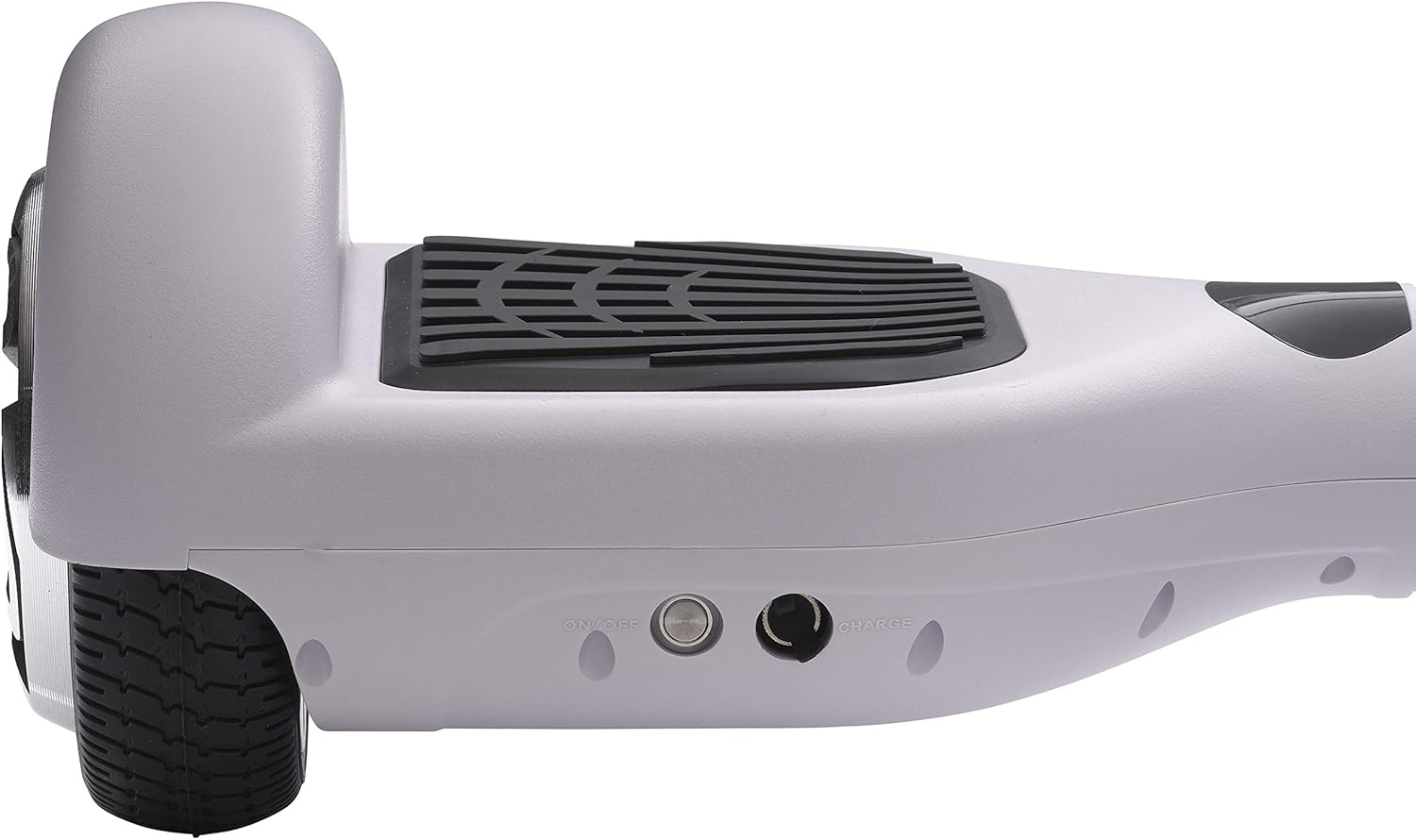
Figure 2: Close-up view of the hoverboard's side, showing the 'ON/OFF' power button and the 'CHARGE' port for connecting the power adapter.
3. Powering On and Self-Balancing
Press the power button to turn on the hoverboard. It will automatically engage its self-balancing system. Ensure the hoverboard is on a flat surface during power-on for proper calibration.

Figure 3: Central section of the hoverboard showing the battery indicator (green) and the status indicator (red), which illuminate to provide operational feedback.
Operating Instructions
1. Mounting and Dismounting
- Mounting: Place one foot firmly on a footpad. Once the hoverboard stabilizes, quickly step on with your other foot. Maintain a relaxed posture.
- Dismounting: Step off backward, one foot at a time, ensuring the hoverboard remains stable.
2. Riding
- Forward/Backward: Lean slightly forward to move forward, and slightly backward to move backward.
- Turning: To turn left, press your right foot forward slightly. To turn right, press your left foot forward slightly.
- Stopping: Return to an upright, neutral position to slow down and stop.
The hoverboard is equipped with two 250W motors, allowing for a maximum speed of 12 km/h. The actual speed and range (up to 10 km per charge) may vary based on rider weight, terrain, temperature, and riding style.

Figure 4: Frontal view of the Denver HBO-6620 Hoverboard, showcasing its symmetrical design and the integrated blue LED lights.
Maintenance
1. Cleaning
Wipe the hoverboard with a damp cloth. Do not use harsh chemicals or abrasive cleaners. Avoid direct water spray or submersion.
2. Battery Care
- Charge the battery regularly, even if not in use, to maintain its lifespan.
- Do not overcharge or completely drain the battery.
- Store the hoverboard in a cool, dry place when not in use.
3. Wheel and Body Inspection
Periodically inspect the solid rubber wheels for wear and tear. Check the ABS hard shell for any cracks or damage. Ensure all components are securely fastened.
Troubleshooting
| Problem | Possible Cause | Solution |
|---|---|---|
| Hoverboard does not turn on. | Low battery or power button issue. | Charge the hoverboard fully. Ensure the power button is pressed firmly. |
| Hoverboard is not balancing correctly. | Improper calibration or uneven surface. | Turn off the hoverboard, place it on a flat surface, and turn it back on to recalibrate. |
| Reduced speed or range. | Low battery, heavy load, or challenging terrain. | Ensure the battery is fully charged. Reduce load or ride on smoother surfaces. |
| Unusual noises during operation. | Loose components or internal issue. | Discontinue use immediately. Contact customer support for assistance. |
If you encounter issues not listed here or if the suggested solutions do not resolve the problem, please contact Denver customer support.
Specifications
| Feature | Detail |
|---|---|
| Model Number | HBO-6620 |
| Brand | Denver |
| Motor Power | 2 x 250W |
| Max Speed | Up to 12 km/h |
| Battery Type | Lithium-ion (1 included) |
| Battery Capacity | 4000 mAh |
| Charging Time | Approx. 2-3 hours |
| Range per Charge | Up to 10 km |
| Wheel Size | 6.5 inches |
| Wheel Material | Solid Rubber |
| Body Material | ABS Hard Shell |
| Max Load Capacity | 90 kg |
| Product Dimensions (L x W x H) | 60 x 18.8 x 17.8 cm |
| Item Weight | 8.4 kg |
| Safety Certification | UL Certified |
| Recommended Age Range | Child (under adult supervision) |
| Recommended Use | Outdoor |
Warranty and Support
For warranty information, please refer to the documentation provided at the time of purchase or visit the official Denver website. If you require technical support, spare parts, or have any questions regarding your Denver HBO-6620 Hoverboard, please contact Denver customer service through their official channels.
Manufacturer: Denver


