
1. Introduction and Overview
The Logitech K380 Multi-Device Wireless Bluetooth Keyboard is a compact, minimalist keyboard designed for seamless multitasking across multiple devices. Its slim profile and lightweight design make it highly portable, ideal for use at home, in the office, or on the go. The keyboard features an Apple-specific layout, ensuring full compatibility and intuitive use with macOS, iOS, and iPadOS devices. Enjoy comfortable and quiet typing with its scooped, low-profile scissor keys, providing a fluid and familiar laptop-like typing experience.

Figure 1.1: Logitech K380 Multi-Device Wireless Bluetooth Keyboard in Off-white.
2. What's in the Box
Upon unboxing your Logitech K380 keyboard, you should find the following items:
- Logitech K380 Multi-Device Wireless Bluetooth Keyboard
- 2 x AAA Alkaline Batteries (pre-installed)
- Quick Start Guide / User Documentation

Figure 2.1: Contents of the Logitech K380 retail packaging.
3. Setup
3.1. Battery Installation
The Logitech K380 keyboard comes with two AAA alkaline batteries pre-installed. To access the battery compartment, slide open the cover on the underside of the keyboard. Ensure the batteries are correctly oriented according to the polarity markings (+/-). Close the cover securely.

Figure 3.1: The Logitech K380 offers up to 24 months of battery life.
3.2. Powering On and Bluetooth Pairing
To power on the keyboard, locate the ON/OFF switch on the left side of the keyboard and slide it to the ON position. A small LED indicator will light up briefly.
The K380 can pair with up to three Bluetooth-enabled devices. Follow these steps to pair your keyboard:
- Turn on the keyboard using the ON/OFF switch.
- Press and hold one of the Easy-Switch keys (F1, F2, or F3) for three seconds until the LED light above the key starts blinking rapidly. This indicates the keyboard is in pairing mode.
- On your device (Mac, iPad, iPhone, etc.), go to Bluetooth settings and select "Logitech K380" from the list of available devices.
- Follow the on-screen prompts to complete the pairing process. You may be asked to type a code on the K380 keyboard and press Enter.
- Once successfully paired, the LED light on the Easy-Switch key will glow solid for a few seconds and then turn off.

Figure 3.2: Easily pair and switch between up to three devices.
4. Operating Instructions
4.1. Switching Between Devices
After pairing your keyboard with multiple devices, you can effortlessly switch between them by simply pressing the corresponding Easy-Switch key (F1, F2, or F3). The keyboard will automatically connect to the selected device.
4.2. Typing Experience
The Logitech K380 is designed for comfortable and quiet typing. Its round, scooped keys provide a satisfying tactile response while minimizing typing noise, making it suitable for various environments.

Figure 4.1: Experience comfortable and quiet typing with the K380.
4.3. Media and Shortcut Keys
The keyboard features dedicated media and shortcut keys along the top row (F4-F12) for quick access to functions like volume control, media playback, and more. These keys are optimized for macOS, iOS, and iPadOS environments.

Figure 4.2: US layout with convenient media keys.
5. Maintenance
To ensure the longevity and optimal performance of your Logitech K380 keyboard, regular maintenance is recommended:
- Cleaning: Use a soft, lint-free cloth slightly dampened with water or a mild cleaning solution to wipe down the keys and surface. Avoid excessive moisture.
- Dust Removal: Use compressed air to clear any dust or debris that may accumulate between the keys.
- Battery Replacement: When the battery indicator light (located near the ON/OFF switch) turns red, it's time to replace the batteries. Slide open the battery compartment cover on the underside of the keyboard and replace the two AAA batteries.
6. Troubleshooting
6.1. Connection Issues
- Keyboard Not Connecting: Ensure the keyboard is powered on and within range (up to 10 meters or 33 feet). Check your device's Bluetooth settings to confirm Bluetooth is enabled.
- Re-pairing: If connection is lost, try re-pairing the keyboard by putting it into pairing mode (hold F1/F2/F3 for 3 seconds) and re-selecting it on your device.
- Interference: Move the keyboard closer to your device and away from other wireless devices that might cause interference.
6.2. Typing Problems
- Keys Not Responding: Check battery levels. Replace batteries if low.
- Incorrect Characters: Ensure the correct keyboard layout is selected on your operating system.
7. Specifications
| Feature | Detail |
|---|---|
| Brand | Logitech |
| Model Number | K380 |
| Connectivity Technology | Bluetooth |
| Compatible Devices | Mac, iPad, iPhone, Bluetooth wireless devices with external keyboard support |
| Power Source | 2 x AAA Batteries |
| Battery Life | Up to 24 months (typical usage) |
| Dimensions (L x W x H) | 10.9 x 4.9 x 0.6 inches |
| Item Weight | 14.1 ounces |
| Color | Off-white |
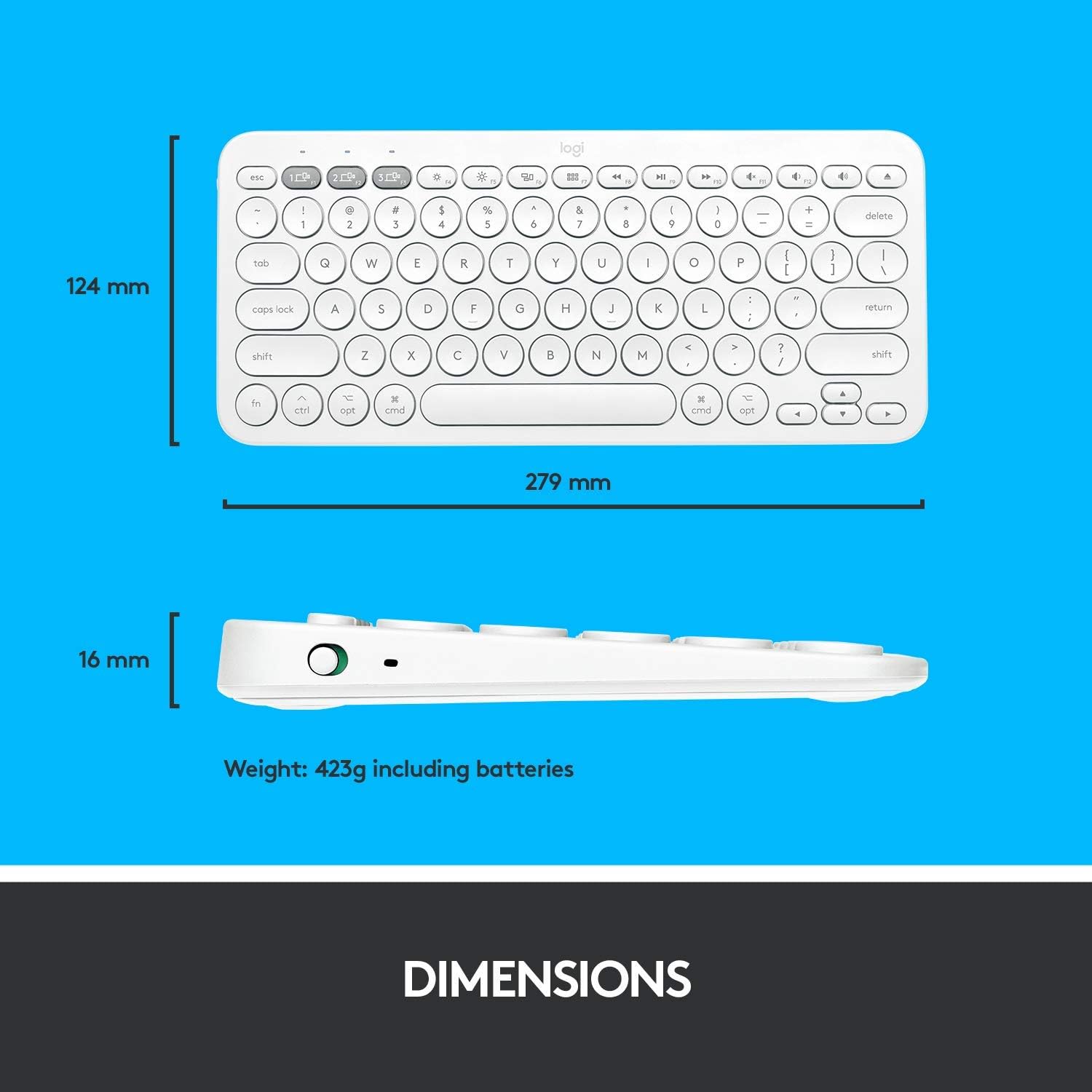
Figure 7.1: Physical dimensions and weight of the Logitech K380 keyboard.
8. Warranty and Support
For warranty information and technical support, please refer to the official Logitech website or contact Logitech customer service directly. Keep your purchase receipt as proof of purchase.
- Online Support: Visit www.logitech.com/support/k380 for FAQs, troubleshooting guides, and software downloads.
- Contact Support: Find regional contact information on the Logitech support website.


