
Introduction
This manual provides comprehensive instructions for the safe and efficient installation, operation, and maintenance of your Adrian Steel MD534 Bin, Cabinet & Drawer Module. Please read this manual thoroughly before beginning any procedures to ensure proper use and to prevent damage or injury. Keep this manual for future reference.
Safety Information
- Read all instructions: Familiarize yourself with all steps before assembly or operation.
- Use appropriate tools: Ensure you have the correct tools for installation and maintenance.
- Secure installation: The module must be securely mounted to prevent tipping or movement, especially in a vehicle.
- Weight limits: Do not exceed the weight capacity of drawers, bins, or shelves. Overloading can cause damage or instability.
- Personal Protective Equipment (PPE): Wear appropriate safety gear, such as gloves and eye protection, during installation.
- Children and pets: Keep children and pets away from the module during installation and operation.
Product Overview
The Adrian Steel MD534 is a versatile storage module designed for organizing tools, parts, and supplies. It features a combination of bins, cabinets, and drawers to accommodate various storage needs. The unit is constructed for durability and efficient space utilization.
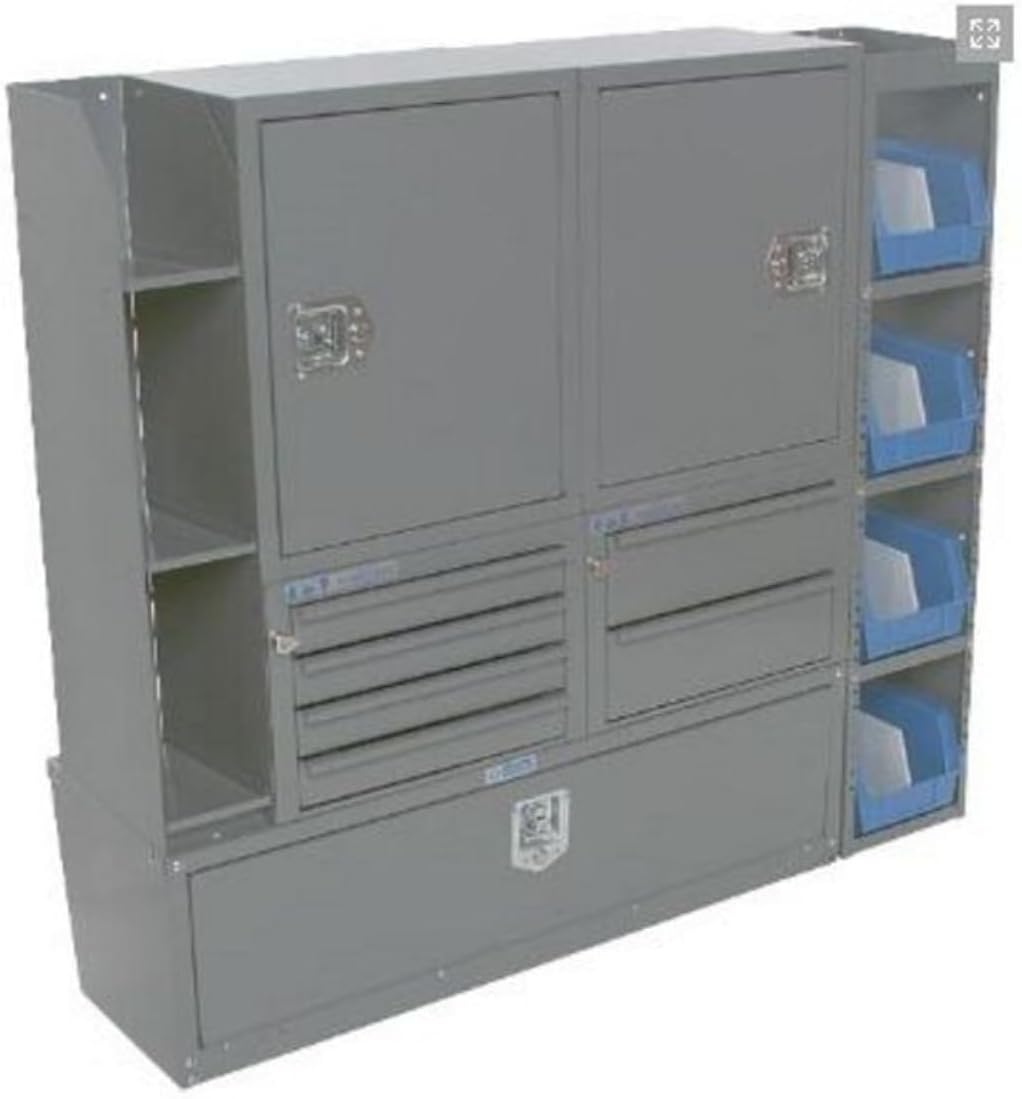
Figure 1: Adrian Steel MD534 Bin, Cabinet & Drawer Module. This image displays the complete module, featuring two upper cabinets with latches, multiple small drawers below the left cabinet, two larger drawers below the right cabinet, open shelving on the far left, a large lower storage compartment, and a series of blue plastic bins on the far right.
Components:
- Cabinets: Enclosed storage areas with doors for secure item containment.
- Drawers: Multiple sizes for organized storage of smaller items and tools.
- Bins: Open-top containers, typically removable, for quick access to parts.
- Shelving: Open compartments for accessible storage.
- Base Compartment: A large, lower storage area.
Setup and Installation
The MD534 module is designed for freestanding installation with a floor mount. Proper installation is crucial for stability and safety.
Required Tools (Not Included):
- Drill
- Wrenches/Sockets
- Measuring Tape
- Marking Tool (e.g., pencil)
- Safety Glasses
- Gloves
Installation Steps:
- Unpack and Inspect: Carefully remove all components from the packaging. Inspect for any shipping damage. Report any damage to the carrier immediately.
- Choose Location: Select a stable, level surface for installation. For vehicle installations, ensure the location does not obstruct vehicle operation or safety features.
- Position Module: Place the MD534 module in its desired location. Ensure there is adequate clearance for opening cabinet doors and pulling out drawers.
- Mark Mounting Points: Using the pre-drilled holes in the module's base, mark the corresponding drilling locations on the floor.
- Drill Pilot Holes: Drill pilot holes at the marked locations. Ensure not to drill into any critical vehicle components (e.g., fuel lines, electrical wiring).
- Secure Module: Use appropriate fasteners (bolts, washers, nuts - not included) to securely attach the module to the floor. Tighten all fasteners firmly.
- Verify Stability: After securing, gently push and pull on the module to ensure it is stable and does not wobble.
- Install Bins and Drawers: Insert the blue plastic bins into their designated slots and ensure all drawers slide smoothly.
Operating Instructions
The MD534 module is designed for straightforward use. Follow these guidelines for optimal performance and longevity.
- Cabinets: To open, disengage the latch mechanism and pull the door open. To close, push the door shut until the latch engages securely.
- Drawers: Pull the drawer handle to open. Push the drawer firmly to close. Avoid slamming drawers to prevent damage to the slides.
- Bins: The blue plastic bins are designed for easy removal and reinsertion. Simply lift them out to access contents or transport them.
- Weight Distribution: Distribute weight evenly within the module. Place heavier items in lower compartments or drawers to maintain stability.
- Secure Contents: When the module is in a moving vehicle, ensure all cabinet doors are latched and drawers are fully closed to prevent contents from shifting or falling out during transit.
Maintenance
Regular maintenance will ensure the longevity and proper functioning of your Adrian Steel MD534 module.
- Cleaning: Wipe down exterior surfaces with a damp cloth and mild detergent as needed. Avoid abrasive cleaners that could damage the painted finish.
- Drawer Slides: Periodically check drawer slides for smooth operation. If they become stiff, clean any debris and apply a small amount of silicone lubricant.
- Fasteners: Regularly inspect all mounting fasteners to ensure they remain tight. Retighten if any looseness is detected.
- Latches: Check cabinet door latches for proper engagement. Clean any dirt or debris that might hinder their function.
- Damage Inspection: Periodically inspect the module for any signs of wear, damage, or corrosion. Address any issues promptly to prevent further deterioration.
Troubleshooting
| Problem | Possible Cause | Solution |
|---|---|---|
| Drawer sticks or is hard to open/close. | Debris in drawer slides; drawer overloaded; bent slide. | Clean slides and apply lubricant; reduce load; inspect slides for damage and replace if necessary. |
| Cabinet door does not latch securely. | Latch mechanism obstructed or misaligned; debris. | Clear any obstructions; adjust latch mechanism if possible; clean latch area. |
| Module feels unstable or wobbles. | Mounting fasteners are loose; uneven installation surface. | Retighten all mounting fasteners; ensure the installation surface is level. |
| Bins do not fit properly. | Incorrect bin size; debris in bin slot. | Ensure correct bins are used; clear any debris from the bin slots. |
Specifications
| Feature | Detail |
|---|---|
| Model Number | MD534 |
| Brand | Adrian Steel |
| Dimensions (W x H x D) | 52w x 46.5h x 14d inches |
| Color | Grey |
| Material | Multiple Products (typically steel) |
| Item Weight | 173.2 pounds |
| Mounting Type | Floor Mount |
| Installation Type | Freestanding |
| Finish Type | Painted |
| UPC | 643934594681 |
Warranty and Support
For specific warranty information regarding your Adrian Steel MD534 module, please refer to the documentation provided at the time of purchase or contact Adrian Steel directly. Adrian Steel products are known for their durability and quality.
For technical support, replacement parts, or further assistance, please contact Adrian Steel customer service through their official website or the contact information provided with your purchase.
Manufacturer: Adrian Steel
Website: www.adriansteel.com (Note: This is a general link and may not be the exact support page.)