
1. Important Safety Instructions
Read and understand all safety instructions before operating the generator. Failure to follow these instructions can result in serious injury or death.
- Carbon Monoxide Hazard: Generators produce carbon monoxide, an odorless, colorless, poisonous gas. Operate the generator outdoors in a well-ventilated area, far from windows, doors, and vents. Never operate indoors or in partially enclosed spaces.
- Electrical Shock Hazard: Do not operate the generator in wet conditions. Ensure all electrical connections are dry and properly grounded. Use only approved extension cords that are rated for outdoor use and the generator's power output.
- Fire Hazard: Gasoline is highly flammable. Refuel in a well-ventilated area with the engine off and cool. Do not smoke or allow open flames near the generator or fuel. Store gasoline in an approved container in a safe location.
- Hot Surfaces: The generator engine and muffler become very hot during operation and remain hot for a period after shutdown. Avoid contact with hot surfaces to prevent burns.
- Children and Pets: Keep children and pets away from the generator, especially during operation.
2. Components Overview
Familiarize yourself with the main components of your Husky HKG3000 portable gasoline generator.
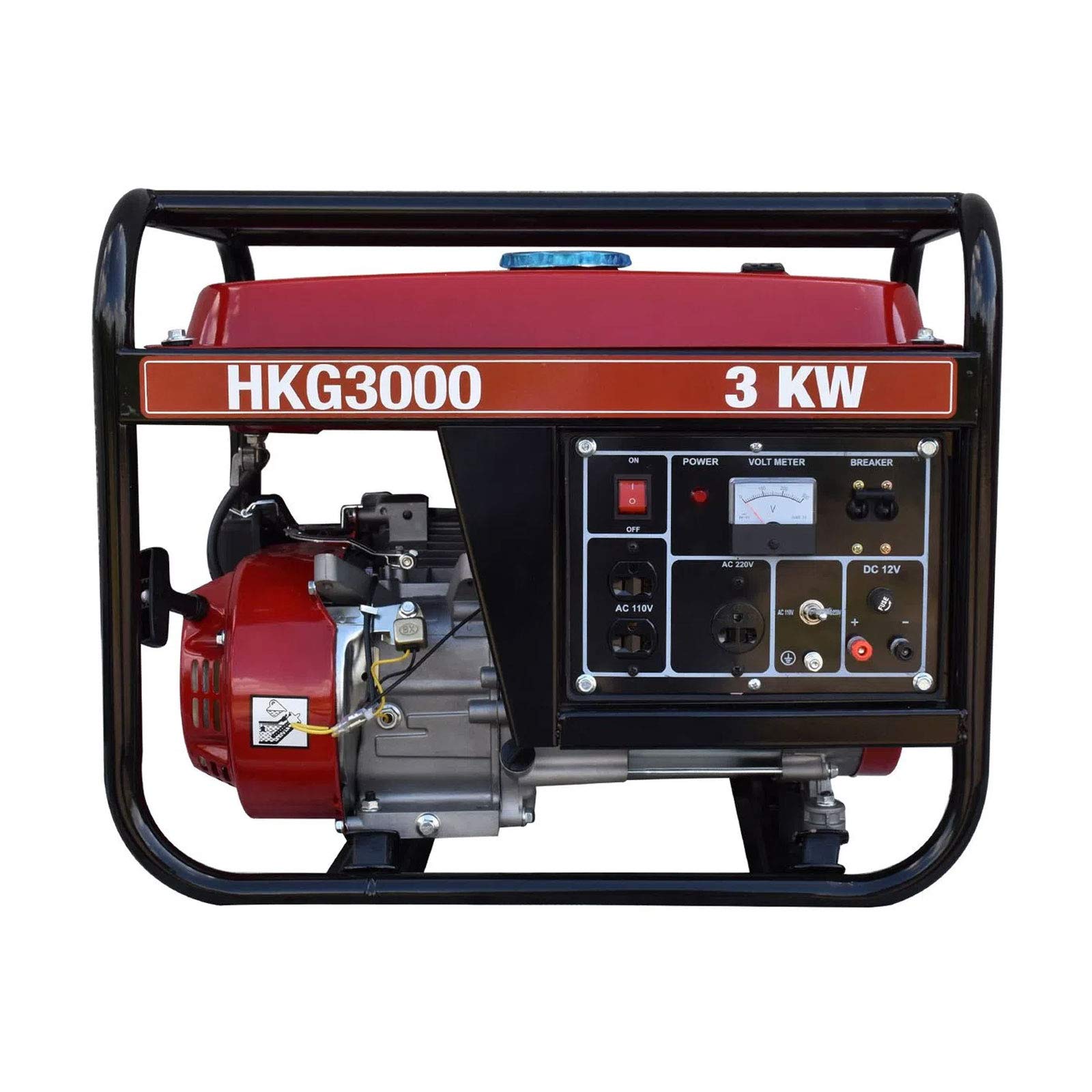
Figure 2.1: Overall view of the Husky HKG3000 Portable Gasoline Generator, showcasing its robust frame and control panel.

Figure 2.2: Front view of the Husky HKG3000 Portable Gasoline Generator, highlighting the control panel with power outlets, voltmeter, and circuit breakers.

Figure 2.3: Side view of the Husky HKG3000 Portable Gasoline Generator, showing the 4-stroke engine, air filter housing, and fuel valve.

Figure 2.4: Included accessories for the Husky HKG3000 Portable Gasoline Generator, featuring the user manual, power plugs, and a spark plug wrench.
Key Components:
- Fuel Tank: Stores gasoline.
- Fuel Cap: Seals the fuel tank.
- Fuel Valve: Controls fuel flow to the engine.
- Choke Lever: Used for starting a cold engine.
- Recoil Starter: Manual pull-cord for starting the engine.
- Engine Switch: Turns the engine ignition ON/OFF.
- Air Filter: Protects the engine from dust and debris.
- Oil Fill Cap/Dipstick: For adding and checking engine oil.
- AC Outlets (110V/220V): For connecting electrical devices.
- DC 12V Outlet: For charging 12V batteries.
- Voltmeter: Displays output voltage.
- Circuit Breakers: Protect the generator and connected devices from overload.
- Muffler: Reduces engine noise and directs exhaust gases.
3. Setup
Before first use, perform the following setup steps:
3.1 Unpacking
- Carefully remove the generator from its packaging.
- Inspect for any shipping damage. Contact your dealer if damage is found.
- Ensure all included accessories (power plugs, spark plug wrench, manual) are present.
3.2 Adding Engine Oil
The generator is shipped without engine oil. Operating without oil will cause severe engine damage.
- Place the generator on a level surface.
- Unscrew the oil fill cap/dipstick.
- Slowly add the recommended engine oil (e.g., SAE 10W-30) to the crankcase until it reaches the upper mark on the dipstick. Do not overfill.
- Replace the oil fill cap/dipstick securely.
3.3 Adding Fuel
Use only fresh, unleaded gasoline with an octane rating of 87 or higher.
- Ensure the generator engine is off and cool.
- Open the fuel cap.
- Carefully pour gasoline into the fuel tank, avoiding spills. Do not fill above the red indicator or the bottom of the filler neck.
- Securely close the fuel cap. Wipe up any spilled fuel immediately.
3.4 Grounding the Generator
Proper grounding is essential to prevent electrical shock.
- Connect a heavy-gauge copper wire from the generator's grounding terminal to an approved ground source, such as a ground rod driven into the earth.
- Consult a qualified electrician for local grounding requirements.
4. Operating Instructions
4.1 Pre-Start Checks
- Check engine oil level.
- Check fuel level.
- Ensure all electrical loads are disconnected from the generator.
- Verify the generator is on a level surface and in a well-ventilated outdoor area.
4.2 Starting the Engine (Manual Start)
- Turn the fuel valve to the ON position.
- Move the choke lever to the CLOSED (start) position if the engine is cold. If the engine is warm, set the choke to the OPEN position.
- Turn the engine switch to the ON position.
- Firmly grasp the recoil starter handle and pull it slowly until resistance is felt, then pull quickly and smoothly.
- Once the engine starts, slowly move the choke lever to the OPEN (run) position.
- Allow the engine to warm up for a few minutes before connecting electrical loads.
4.3 Connecting Electrical Loads
- Ensure the generator is running smoothly.
- Plug in your electrical devices one at a time, starting with the highest wattage device.
- Do not exceed the generator's rated wattage (2.8 kW nominal, 3 kW maximum). Overloading will trip the circuit breakers.
4.4 Stopping the Engine
- Disconnect all electrical loads from the generator.
- Turn the engine switch to the OFF position.
- Turn the fuel valve to the OFF position.
5. Maintenance
Regular maintenance ensures optimal performance and extends the life of your generator. Always perform maintenance with the engine off and cool.
5.1 Engine Oil Change
- Change the engine oil after the first 20 hours of operation, then every 50-100 hours or annually.
- Drain old oil while the engine is warm. Refill with recommended oil type and quantity.
5.2 Air Filter Cleaning
- Inspect the air filter every 50 hours or more frequently in dusty conditions.
- Clean the foam element with warm, soapy water, rinse, and allow to dry completely. Lightly oil the foam element before reinstallation.
5.3 Spark Plug Inspection
- Inspect the spark plug every 100 hours or annually.
- Clean carbon deposits and adjust the gap if necessary. Replace if electrodes are worn or insulation is cracked.
5.4 Fuel System Maintenance
- If storing the generator for more than 30 days, drain the fuel tank and carburetor, or use a fuel stabilizer.
- Regularly check fuel lines for cracks or leaks.
5.5 Storage
- Clean the exterior of the generator.
- Store in a clean, dry, well-ventilated area, away from direct sunlight and extreme temperatures.
- Cover the generator to protect it from dust.
6. Troubleshooting
This section provides solutions to common operational issues.
6.1 Engine Will Not Start
- No Fuel: Check fuel level and add fresh gasoline if needed.
- Fuel Valve OFF: Turn fuel valve to ON.
- Engine Switch OFF: Turn engine switch to ON.
- Improper Choke Position: Adjust choke lever as per starting instructions (Section 4.2).
- Low Oil Level: Check oil level and add oil if necessary. The generator may have a low-oil shutdown feature.
- Fouled Spark Plug: Inspect and clean or replace the spark plug.
6.2 No Power Output
- Circuit Breaker Tripped: Reset the AC or DC circuit breaker on the control panel. Reduce load if it trips again.
- Overload: Disconnect some electrical devices. Do not exceed the generator's rated capacity.
- Faulty Connection: Check all power cords and connections.
6.3 Engine Runs Poorly
- Stale Fuel: Drain old fuel and refill with fresh gasoline.
- Clogged Air Filter: Clean or replace the air filter.
- Fouled Spark Plug: Inspect and clean or replace the spark plug.
7. Specifications
| Specification | Value |
|---|---|
| Brand | Husky |
| Model | HKG3000 |
| Engine Type | 4-Stroke |
| Engine Horsepower | 7.5 hp |
| Fuel Type | Gasoline |
| Starting System | Manual (Recoil) |
| Maximum Power Output | 3 kW (3000 Watts) |
| Rated Power Output | 2.8 kW (2800 Watts) |
| Frequency | 60 Hz |
| Voltage | 110V / 220V |
| Recommended Use | Commercial |
| Item Weight | 70 Kilograms |
| Portability | Portable |
8. Warranty and Support
This Husky generator is covered by a manufacturer's warranty. Please refer to the warranty card included with your product for specific terms and conditions.
For technical assistance, parts, or warranty claims, please contact Husky customer support through their official website or the contact information provided in your product documentation.
Always provide your model number (HKG3000) and serial number when contacting support to ensure efficient service.