
THE G-LAB COMBO-TUNGSTEN/IT
THE G-LAB Combo TUNGSTEN Wireless Gaming Keyboard and Mouse User Manual
Model: COMBO-TUNGSTEN/IT
Introduction
Welcome to the user manual for your THE G-LAB Combo TUNGSTEN Wireless Gaming Keyboard and Mouse. This combo provides a high-performance, ergonomic, and customizable gaming experience with its advanced wireless technology, precise tracking, and vibrant RGB backlighting. Please read this manual carefully to ensure proper setup, operation, and maintenance of your new gaming peripherals.
Package Contents
- THE G-LAB Combo TUNGSTEN Wireless Gaming Keyboard
- THE G-LAB Combo TUNGSTEN Wireless Gaming Mouse
- 2.4 GHz USB Nano Receiver
- USB Charging Cable
- User Manual (this document)
Setup
Initial Connection
- Locate the 2.4 GHz USB Nano Receiver. It is typically stored in a compartment on the underside of the mouse for safekeeping.

Image: The underside of the THE G-LAB Combo TUNGSTEN mouse, indicating the storage location for the USB Nano Receiver.
- Plug the USB Nano Receiver into an available USB port on your PC or gaming console (PS4, PS5, Xbox One, Xbox Series X/S).

Image: A user connecting the 2.4 GHz USB Nano Receiver to a laptop, illustrating the simple plug-and-play connection for the combo.
- Ensure both the keyboard and mouse are powered on. The devices should automatically connect to the receiver. No additional drivers or software are required for basic functionality.

Image: The THE G-LAB Combo TUNGSTEN keyboard and mouse set, showcasing the complete wireless setup with the USB receiver.
Charging the Devices
The keyboard and mouse have built-in rechargeable batteries. Use the provided USB charging cable to charge them when the battery is low.
- Connect the USB charging cable to the charging port on the keyboard/mouse and to a USB power source (e.g., PC USB port, USB wall adapter).
- A full charge takes approximately 3 hours.
- The keyboard offers up to 30 hours of autonomy with lighting on, and up to 180 hours with lighting off.

Image: The THE G-LAB Combo TUNGSTEN keyboard and mouse on a desk, with an overlay indicating +30 hours of autonomy with lighting ON and +180 hours with lighting OFF.
Operating Instructions
Keyboard Functions
- Anti-Ghosting: The keyboard supports 26-key anti-ghosting to ensure all key presses are registered accurately during intense gaming sessions.
- Multimedia Hotkeys: Utilize the 12 multimedia hotkeys for quick access to volume control, media playback, and other functions. These are typically accessed using the FN key in combination with the F1-F12 keys.
- RGB Backlighting Control:
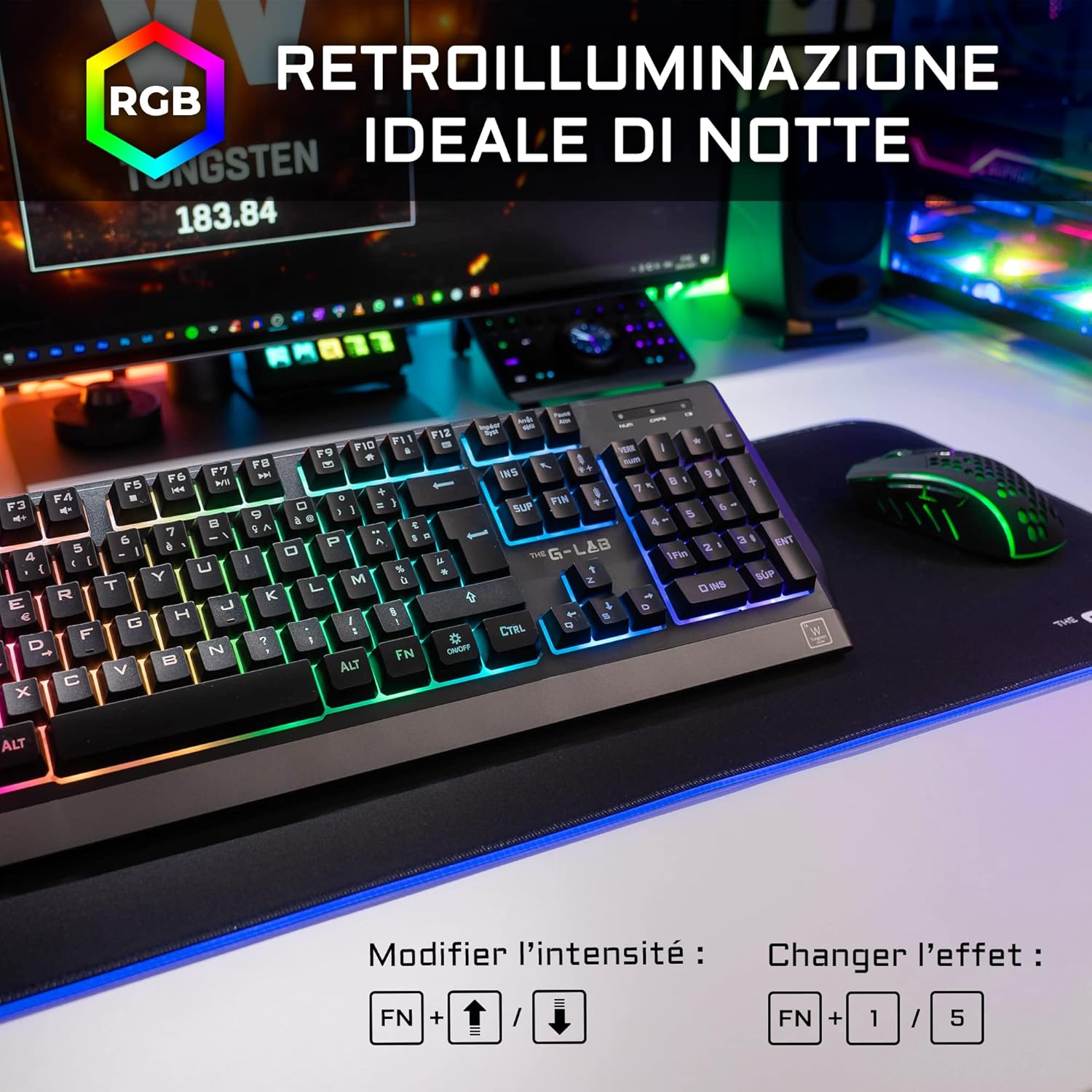
Image: The THE G-LAB Combo TUNGSTEN keyboard displaying its vibrant RGB backlighting, with text overlays showing controls for brightness (FN + Up/Down arrows) and LED effects (FN + 1-5).
- Brightness Adjustment: Press FN + ↑ (Up Arrow) to increase brightness, FN + ↓ (Down Arrow) to decrease brightness or turn off lighting.
- LED Effects: Choose from 5 different LED effects by pressing FN + 1 through FN + 5.
- Color Selection: The keyboard offers 7 different colors. Specific key combinations for color cycling might be available, refer to the quick start guide if included.
Mouse Functions
- DPI Adjustment: The mouse features an ultra-precise optical sensor with adjustable sensitivity up to 2400 DPI.

Image: A close-up of the THE G-LAB Combo TUNGSTEN mouse, pointing out the DPI button for sensitivity adjustment (800-1200-1600-2400 DPI) and the silicone grip for enhanced comfort.
Press the DPI button (usually located behind the scroll wheel) to cycle through 4 sensitivity levels: 800, 1200, 1600, and 2400 DPI.
- Programmable Buttons: The mouse has 7 buttons that can be assigned to various functions. Customization typically requires software, which is not mentioned as included or downloadable. For basic use, buttons function as standard mouse buttons.
- RGB Lighting: The mouse features an intense and dynamic RGB lighting effect. This lighting is typically automatic and not user-configurable in the same way as the keyboard.
Maintenance
- Cleaning: Use a soft, dry cloth to clean the keyboard and mouse. For stubborn dirt, a slightly damp cloth can be used, but ensure no liquid enters the devices. Do not use harsh chemicals or abrasive cleaners.
- Storage: Store the devices in a cool, dry place away from direct sunlight and extreme temperatures.
- Battery Care: To prolong battery life, avoid fully discharging the devices frequently. Charge them regularly, especially if they will not be used for an extended period.
Troubleshooting
| Problem | Possible Cause | Solution |
|---|---|---|
| Keyboard/Mouse not responding |
|
|
| Lag or delayed response |
|
|
| RGB lighting not working |
|
|
Specifications
| Feature | Detail |
|---|---|
| Model Number | COMBO-TUNGSTEN/IT |
| Connectivity | 2.4 GHz Wireless (USB Receiver) |
| Keyboard Type | Wireless Gaming Keyboard |
| Mouse Type | Wireless Gaming Mouse |
| Keyboard Anti-Ghosting | 26 Keys |
| Mouse DPI | 800 / 1200 / 1600 / 2400 DPI (Adjustable) |
| Keyboard Backlighting | RGB (5 effects, 7 colors) |
| Mouse Buttons | 7 (Programmable) |
| Battery Life (Keyboard) | 30 hours (lighting ON), 180 hours (lighting OFF) |
| Charging Time | Approx. 3 hours |
| Wireless Range | Up to 10 meters |
| Compatibility | PC, PS4, PS5, Xbox One, Xbox Series X/S (Windows, macOS, Linux) |
| Keyboard Weight | 630g |
| Mouse Weight | 100g |
Warranty and Support
THE G-LAB products are designed and tested for quality. The Combo TUNGSTEN comes with a 2-year warranty. If you encounter any issues or have questions, please contact THE G-LAB customer service. For returns, Amazon allows returns within 30 days of purchase for a full refund.
For further assistance, please visit the official THE G-LAB store on Amazon or contact their customer support directly. Customer service aims to respond within 24 hours.
Online Support: THE G-LAB Amazon Store
Ask a question about this manual
Ask about setup, troubleshooting, compatibility, parts, safety, or missing instructions. Manuals+ will review the question and use this page’s manual context to help answer it.