
DETECK DT600
DETECK DT600 Bank Grade Money Counter Machine User Manual
Model: DT600 Spark (Serial Number Reading)
1. Product Overview
The DETECK DT600 is a bank-grade money counter machine designed for accurate, reliable, and secure counting of mixed denomination currencies. It features advanced counterfeit detection and various counting and sorting modes to streamline cash handling operations.
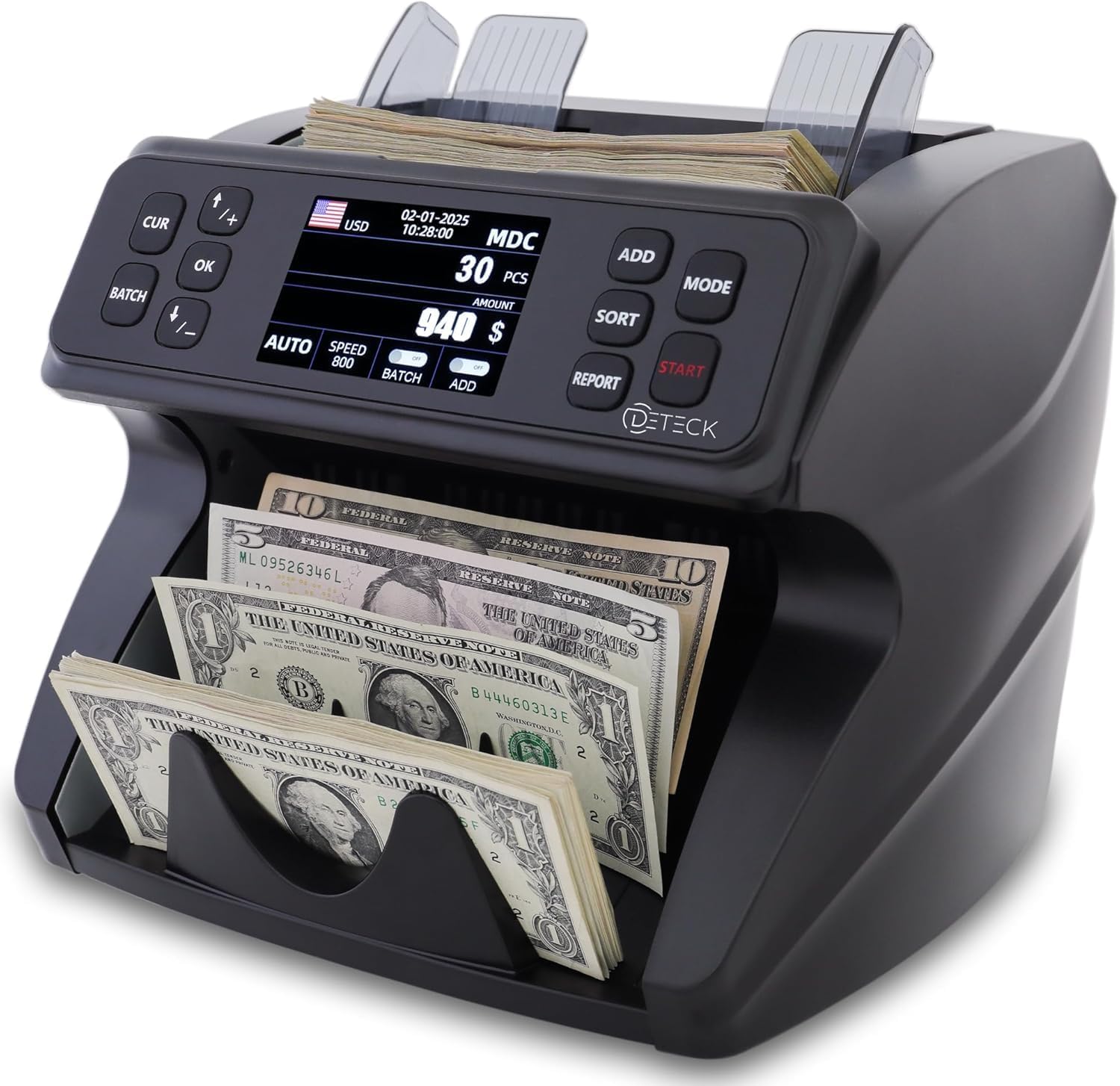
Figure 1: DETECK DT600 Bank Grade Money Counter Machine.
2. Package Contents
Upon unpacking your DETECK DT600, please verify that all components are present:
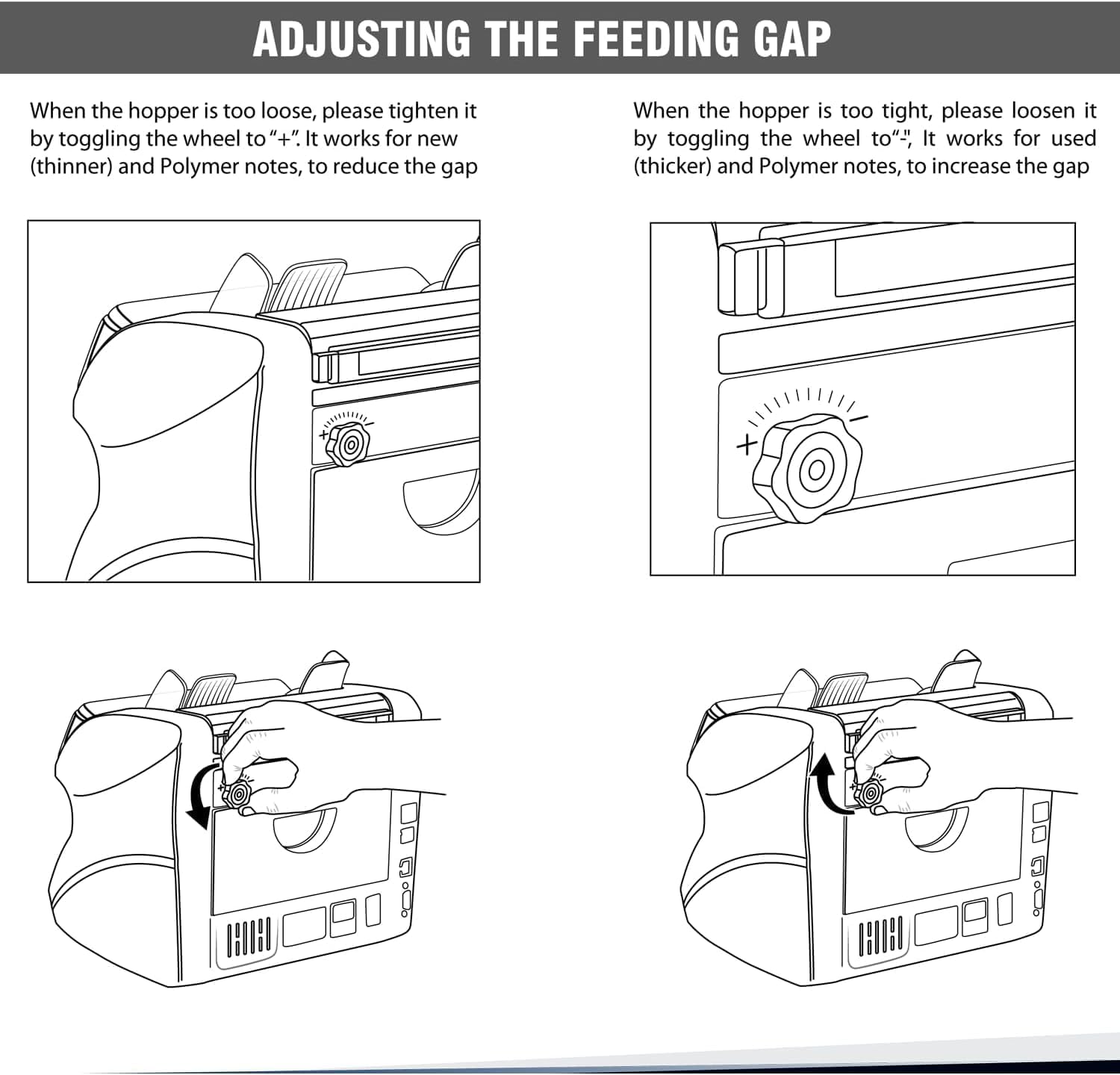
Figure 2: The complete bundle of the DETECK DT600.
- DETECK DT600 Money Counter Machine
- User Manual
- Power Cord (1.5m long)
- Maintenance Kit:
- Microfiber Cloth
- Fuses (x2)
- Cleaning Brush
- USB Flash Drive
- Dust / Waterproof Cover
3. Setup Instructions
3.1 Initial Power Connection
Before connecting the power, ensure the machine's power switch is in the OFF position. Connect the provided power cord to the machine and then to a suitable power outlet.
3.2 Adjusting the Feeding Gap
Proper adjustment of the feeding gap is crucial for smooth operation and to prevent bill jams. The feeding gap thickness wheel is located on the side of the machine.

Figure 3: Illustration of the feeding gap adjustment wheel.
- If the hopper is too loose (notes feed too easily or multiple notes feed), tighten the wheel by toggling it towards the "+" sign. This is suitable for new or thinner notes.
- If the hopper is too tight (notes jam or do not feed), loosen the wheel by toggling it towards the "-" sign. This is suitable for used or thicker notes.
- It is advised to adjust the wheel to the middle position for initial setup.
- Perform trial and error attempts to find the optimal adjustment for your specific banknotes before making a final adjustment.
For a visual guide on adjusting the feeding gap and preparing money for counting, please refer to the instructional video below:
Video 1: How to Ensure a Trouble-Free Operation with the DETECK DT600. This video demonstrates proper feeding gap adjustment and preparing banknotes for counting.
4. Operating Instructions
4.1 Preparing Banknotes for Counting
To ensure accurate and jam-free counting, prepare your banknotes by straightening them and removing any foreign objects like paper clips or rubber bands. Place a neat stack of notes on the hopper. Ensure the counting guide is 2mm to 3mm longer than the notes.
4.2 Counting and Sorting Modes
The DETECK DT600 offers various modes for efficient money handling:

Figure 4: Overview of operation and counting/sorting modes.
- MDC (Mixed Denomination Count): Counts mixed denominations and provides a total value.
- SDC (Single Denomination Count): Counts only the first denomination of a mixed stack. Other denominations must be manually removed.
- CNT (Count Total Number of Bills): Counts the total quantity of bills without valuing them.
- MIX (Multi-Currency Count): Supports counting multiple currencies (e.g., USD, CAD, MXN, EUR, GBP) under MDC mode.
- SORT by Denomination: Sorts bills by denomination (manual process).
- FACE: Sorts bills by face orientation (manual process).
- ORIENTATION: Sorts bills by direction (manual process).
- ADD: Keeps a running total of counted bills across multiple batches.
- BATCH: Counts and sorts bills into preset quantities.
4.3 Advanced Counterfeit Detection
The DT600 is equipped with multiple detection methods to ensure the authenticity of banknotes:

Figure 5: Advanced Counterfeit Protection features.
- UV (Ultraviolet): Detects security threads and features visible under UV light.
- MG (Magnetic): Checks for magnetic ink properties.
- IR (Infrared): Verifies infrared security features.
- MT (Metallic Thread): Detects metallic security threads.
- 2CIS (Contact Image Sensor): Dual CIS sensors for comprehensive image scanning and analysis.
- Serial Number Recognition: Records and displays serial numbers of counted bills.
4.4 On-Screen Reporting
The large 3.5" TFT display provides detailed on-screen reports, including grand total, bill quantity, and value by denomination. This allows for easy reconciliation and record-keeping. The machine can also connect to a printer (sold separately) for physical reports.

Figure 6: On-screen report displaying counting results.
5. Maintenance
Regular maintenance ensures the longevity and optimal performance of your DETECK DT600.
5.1 Cleaning
Use the provided cleaning brush and microfiber cloth to regularly clean dust and debris from the machine's sensors and bill pathways. Ensure the machine is turned off and unplugged before cleaning.
- Gently brush away any dust or paper residue from the hopper, stacker, and internal components.
- Wipe the exterior with the microfiber cloth. Avoid using harsh chemicals or abrasive materials.
5.2 General Care
- Keep the machine in a clean, dry environment, away from direct sunlight and extreme temperatures.
- Use the dust/waterproof cover when the machine is not in use to protect it from environmental elements.
- Avoid placing heavy objects on top of the machine.
6. Troubleshooting
This section addresses common issues you might encounter with your DETECK DT600.
6.1 Bill Jams or Improper Feeding
- Cause: Incorrect feeding gap adjustment, worn or crumpled notes, foreign objects in the bill path.
- Solution:
- Turn off and unplug the machine.
- Carefully remove any jammed bills.
- Adjust the feeding gap thickness wheel as described in Section 3.2.
- Ensure banknotes are neatly stacked and free of foreign objects before placing them in the hopper.
6.2 Inaccurate Counts or Counterfeit Alerts
- Cause: Dirty sensors, worn notes, or notes with significant damage.
- Solution:
- Clean the machine's sensors and bill pathways thoroughly (refer to Section 5.1).
- Ensure notes are not excessively worn, torn, or folded.
- Verify the counterfeit detection settings are appropriate for the currency being counted.
6.3 Machine Not Powering On
- Cause: Power cord not properly connected, power outlet issue, or blown fuse.
- Solution:
- Check that the power cord is securely connected to both the machine and the power outlet.
- Test the power outlet with another device to ensure it is functional.
- Inspect the fuses (located near the power input) and replace if necessary using the spare fuses provided in the maintenance kit.
7. Specifications
| Feature | Specification |
|---|---|
| Brand | DETECK |
| Model Number | DT600 Spark (Serial Number Reading) |
| Item Weight | 11.5 pounds |
| Product Dimensions | 10 x 9.5 x 9 inches |
| Color | Black/Black |
| Manufacturer Part Number | BILLCOUNTER600C |
| Date First Available | October 26, 2020 |
| Counting Speed | Up to 1200 notes per minute |
| Hopper Capacity | 500 notes |
| Stacker Capacity | 200 notes |
| Counterfeit Detection | 2CIS/UV/IR/MG/MT, Serial Number Recognition |

Figure 7: DETECK DT600 product dimensions.
8. Warranty and Support
DETECK is a US-based company committed to quality. The DETECK DT600 comes with a 1-year manufacturer warranty.
For any inquiries, technical assistance, or warranty claims, please contact our dedicated US-based support team. Contact information can typically be found on the official DETECK website or the product packaging.
9. Additional Resources
For a more detailed guide and further information, you can download the official User Guide in PDF format:
Ask a question about this manual
Ask about setup, troubleshooting, compatibility, parts, safety, or missing instructions. Manuals+ will review the question and use this page’s manual context to help answer it.