1. Introduction
Thank you for purchasing the Kimiso KM-2003 Bluetooth Speaker. This manual provides essential information for the safe and efficient use of your device. Please read these instructions carefully before operating the speaker and retain them for future reference.
2. Safety Information
- Do not expose the speaker to extreme temperatures, direct sunlight, or high humidity.
- Keep the speaker away from water and liquids. This product is not waterproof.
- Do not attempt to disassemble, repair, or modify the speaker yourself. Contact qualified service personnel for assistance.
- Use only the specified charging voltage (5V USB) to prevent damage.
- Keep out of reach of children.
- Avoid prolonged listening at high volumes to prevent hearing damage.
3. Package Contents
Please check the package for the following items:
- Kimiso KM-2003 Bluetooth Speaker
- USB Charging Cable
- User Manual (this document)
4. Product Overview
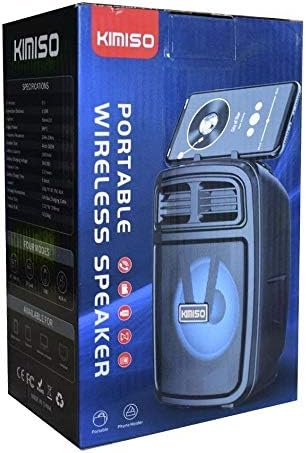
Image 1: The Kimiso KM-2003 Bluetooth Speaker shown in its retail packaging. The speaker features a dark casing with a visible speaker cone and LED lighting, along with a slot for holding a mobile phone on top.
The Kimiso KM-2003 is a portable wireless speaker designed for versatile audio playback. It features Bluetooth connectivity, support for USB and TF card playback, an AUX input, and integrated LED lights. The speaker is equipped with a handle for easy portability and includes a karaoke function.
5. Setup
5.1 Charging the Speaker
- Connect the provided USB charging cable to the speaker's charging port.
- Connect the other end of the USB cable to a 5V USB power source (e.g., a wall adapter, computer USB port).
- The charging indicator light will illuminate, typically red, to show that the speaker is charging.
- Once fully charged, the indicator light may change color or turn off. A full charge provides approximately 4 hours of playback time.
5.2 Power On/Off
- To power on the speaker, press and hold the Power button (location varies, typically on the control panel) for a few seconds until you hear an audible prompt or see the LED lights activate.
- To power off the speaker, press and hold the Power button again until the speaker powers down.
5.3 Bluetooth Pairing
- Ensure the speaker is powered on and in Bluetooth pairing mode. The LED indicator will usually flash, indicating it's ready to pair.
- On your mobile device (smartphone, tablet, laptop), enable Bluetooth and search for available devices.
- Select "KM-2003" from the list of found devices.
- Once successfully paired, the speaker will emit a confirmation sound, and the Bluetooth indicator light will typically stop flashing and remain solid.
- The effective Bluetooth connection range is approximately 10 meters (33 feet).
5.4 Other Connection Modes
The KM-2003 speaker supports multiple playback options:
- USB Playback: Insert a USB flash drive containing MP3 audio files into the USB port. The speaker will automatically switch to USB mode and begin playback.
- TF Card Playback: Insert a TF (MicroSD) card containing MP3 audio files into the TF card slot. The speaker will automatically switch to TF card mode and begin playback.
- AUX Input: Connect an external audio device (e.g., MP3 player, computer) to the speaker's AUX port using a 3.5mm audio cable. The speaker will switch to AUX mode, and audio will be played from the connected device.
6. Operating Instructions
6.1 Basic Controls
The speaker features integrated control buttons, typically located on the top or front panel:
- Power Button: Press and hold to turn on/off. Short press to switch modes (Bluetooth, USB, TF, AUX).
- Play/Pause Button: Short press to play or pause audio.
- Volume Up (+): Short press to increase volume. Press and hold for next track.
- Volume Down (-): Short press to decrease volume. Press and hold for previous track.
- LED Light Button: Short press to cycle through LED light modes or turn them off.
6.2 Music Playback
After connecting via Bluetooth, USB, TF card, or AUX, use the speaker's control buttons or your connected device to manage music playback (play, pause, skip tracks, adjust volume).
6.3 Karaoke Function
The KM-2003 speaker includes a karaoke function. If a microphone input is available (not explicitly listed as included, but function is present), connect a compatible microphone to the designated port. Adjust microphone volume separately if controls are provided.
6.4 LED Lights
The speaker features integrated LED lights that enhance the listening experience. Use the dedicated LED light button to change light patterns or turn the lights on/off according to your preference.
7. Maintenance
- Cleaning: Use a soft, dry cloth to clean the speaker's exterior. Do not use abrasive cleaners, solvents, or harsh chemicals.
- Storage: When not in use for extended periods, store the speaker in a cool, dry place, away from direct sunlight and extreme temperatures.
- Battery Care: To prolong battery life, avoid fully discharging the battery frequently. Charge the speaker regularly, even if not in use.
8. Troubleshooting
| Problem | Possible Solution |
|---|---|
| Speaker does not turn on. | Ensure the battery is charged. Connect the speaker to a power source and try again. |
| Cannot pair via Bluetooth. | Ensure the speaker is in Bluetooth pairing mode. Turn off and on Bluetooth on your device. Move closer to the speaker (within 10m). Forget the device on your phone and try pairing again. |
| No sound. | Check the volume level on both the speaker and your connected device. Ensure the correct input mode (Bluetooth, USB, TF, AUX) is selected. |
| Distorted sound. | Reduce the volume. Ensure the audio source is not distorted. Move your device closer to the speaker to improve Bluetooth signal. |
9. Specifications
| Feature | Specification |
|---|---|
| Model | KM-2003 |
| Bluetooth Version | Not specified (Wireless) |
| Bluetooth Range | Up to 10 meters (33 feet) |
| Audio Channel | Stereo 2.0 |
| Output Power | 20 Watts |
| Frequency Response | 20Hz-20KHz |
| Speaker Size | 4 inches |
| Battery Capacity | 1200mAh |
| Charging Input | 5V (USB) |
| Average Battery Life | Up to 4 hours |
| Supported Modes | USB, TF Card, AUX, Bluetooth |
| Hands-free Mode | Yes |
| Wi-Fi | No |
| Outdoor Use | Yes (Portable) |
| Rechargeable Battery | Yes |
| Radio Function | No |
| LED Lights | Yes |
| Karaoke Function | Yes |
| Handle Included | Yes |
| Remote Control | No |
| Waterproof | No |
| Product Dimensions | 40 x 25 x 35 cm |
| Product Weight | 1 Kilogram |
| Compatible Devices | Notebook, Smartphone, Tablet |
10. Warranty and Support
Kimiso products are designed for reliability and performance. For warranty information or technical support, please refer to the contact details provided at your point of purchase or visit the official Kimiso website. Please retain your proof of purchase for warranty claims.


