
1. Introduction
The AGM Global Vision Rattler TC35-384 is a thermal imaging clip-on system designed to transform your daytime optics into a high-performance thermal device. This unit is suitable for various applications including patrolling, hunting, and observation in challenging conditions such as darkness, fog, smoke, dust, rain, and snow. It features a high-sensitivity thermal detector and an OLED display for clear image presentation.
Key Features:
- 17µm Uncooled Microbolometer: High-sensitivity thermal detector for clear imaging.
- 384×288 Resolution & 1024x768 OLED Display: Provides sharp, detailed thermal images.
- 1235m Detection Range: Long-range detection capability.
- 16GB Built-in Storage & Wi-Fi: On-board video recording, image capture, and live streaming via mobile application.
- Up to 4.5 Hours Battery Life: Powered by two CR123A batteries, with external USB power support.
- IP67 Protection: Waterproof and shockproof design for harsh environments.
2. Safety Information
Please read and understand all safety instructions before operating the device. Failure to follow these instructions may result in injury or damage to the device.
- Do not disassemble or modify the device. Unauthorized modifications can void the warranty and pose safety risks.
- Handle batteries with care. Use only specified CR123A batteries. Do not mix old and new batteries, or different types of batteries. Dispose of used batteries according to local regulations.
- Avoid direct exposure of the lens to strong light sources, such as the sun, as this may damage the thermal sensor.
- Keep the device away from extreme temperatures, humidity, and corrosive substances.
- This product contains chemicals known to the State of California to cause cancer and birth defects or other reproductive harm. Wash hands after handling.
3. Package Contents
Verify that all items are present and in good condition upon unpacking.
- AGM Global Vision Rattler TC35-384 Thermal Clip-On Riflescope
- USB Cable
- Lens Cloth
- User Manual
4. Device Overview
Familiarize yourself with the main components of your Rattler TC35-384.
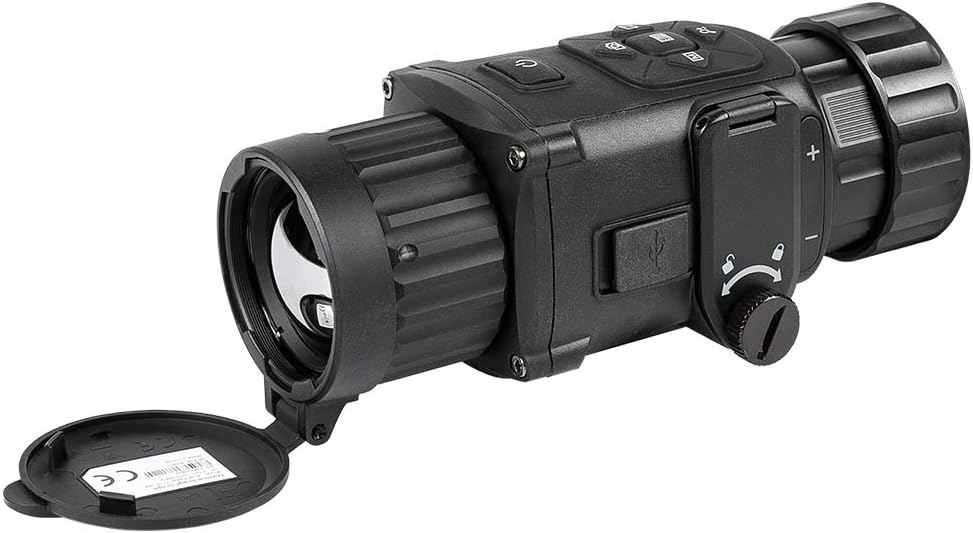
Figure 4.1: Front-side view of the Rattler TC35-384 thermal clip-on device, showing the objective lens and control buttons.

Figure 4.2: Side view of the Rattler TC35-384, highlighting the battery compartment and USB port.

Figure 4.3: The thermal clip-on device with its rear attachment, ready for mounting onto a riflescope.
5. Setup
5.1 Battery Installation
- Locate the battery compartment on the side of the device.
- Open the battery compartment cover.
- Insert two CR123A batteries, ensuring correct polarity (+/-).
- Close the battery compartment cover securely.
5.2 Mounting the Device
The Rattler TC35-384 is designed to attach to your existing daytime riflescope. It utilizes a Weaver Mount system.
- Ensure your riflescope is securely mounted and zeroed.
- Attach the appropriate adapter (not included in standard package) to the objective lens of your daytime riflescope.
- Slide the Rattler TC35-384 onto the adapter, ensuring a firm and stable connection.
- Secure the device using the locking mechanism on the adapter.

Figure 5.1: The Rattler TC35-384 thermal clip-on device mounted on a traditional riflescope, attached to a rifle.
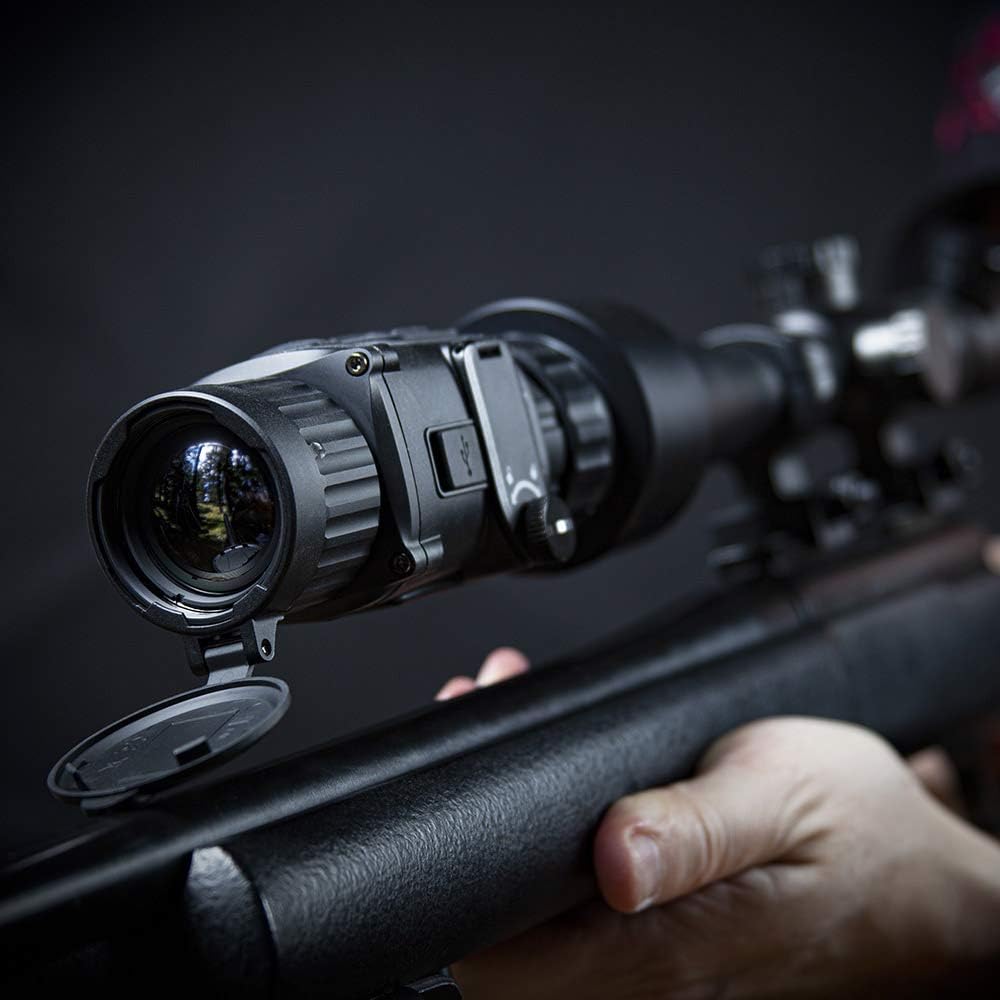
Figure 5.2: A detailed view of the thermal clip-on device securely attached to the front of a riflescope.
5.3 Powering On/Off
- To Power On: Press and hold the power button until the AGM logo appears on the display.
- To Power Off: Press and hold the power button until the shutdown prompt appears, then confirm.
6. Operating Instructions
6.1 Basic Operation
- Focus Adjustment: Rotate the objective lens focus ring to achieve a clear image.
- Brightness Adjustment: Use the designated buttons (often +/-) to adjust display brightness.

Figure 6.1: A user operating the thermal clip-on device, demonstrating its use in conjunction with a riflescope.
6.2 Menu Navigation
The device features an intuitive menu system. Use the control buttons to navigate through options and adjust settings.
- Press the Menu button to enter the main menu.
- Use the navigation buttons (up/down or arrow keys) to scroll through menu items.
- Press the Select/OK button to confirm a selection or enter a sub-menu.
- Press the Menu button again to exit the current menu level.
6.3 Display Modes and Palettes
The Rattler TC35-384 offers various display modes and color palettes to optimize viewing for different environments and preferences.
- Color Palettes: Switch between options like White Hot, Black Hot, Red Hot, Fusion, etc., to highlight thermal signatures differently.
- Scene Modes: Select modes optimized for specific conditions (e.g., Jungle, Recognition, City) to enhance image clarity.

Figure 6.2: Example of a thermal image captured by the device, showing a wild boar in a field.
6.4 Video Recording and Image Capture
The device has 16GB of built-in storage for recording videos and capturing still images.
- To Record Video: Press the Record button (usually indicated by a camera icon) to start/stop video recording.
- To Capture Image: Press the Capture button (usually indicated by a photo icon) to take a still image.
- Files are saved to the internal storage and can be accessed by connecting the device to a computer via USB.
6.5 Wi-Fi Connectivity
Connect the device to a mobile application for live video streaming and remote control.
- Download the official AGM Global Vision app from your mobile device's app store.
- Enable Wi-Fi on the Rattler TC35-384 through the device menu.
- Connect your mobile device to the Rattler's Wi-Fi network (SSID and password typically displayed on the device screen).
- Open the app to view live feed, control settings, and manage recordings.
6.6 Stadiametric Rangefinder
Use the built-in stadiametric rangefinder to estimate distances to objects of known height.
- Access the rangefinder function from the main menu.
- Select the target type (e.g., deer, human) or manually input the object's height.
- Align the top and bottom markers with the target to get a distance estimate.
7. Maintenance
7.1 Cleaning
- Lens Cleaning: Use the provided lens cloth or a soft, lint-free cloth specifically designed for optics. Gently wipe the lens surface. For stubborn dirt, use a small amount of lens cleaning solution.
- Device Body: Wipe the device body with a soft, damp cloth. Do not use abrasive cleaners, solvents, or harsh chemicals.
7.2 Storage
- Store the device in a cool, dry place, away from direct sunlight and extreme temperatures.
- If storing for an extended period, remove the batteries to prevent leakage.
- Keep the lens caps on to protect the optics from dust and scratches.
7.3 Battery Care
- Always use fresh, high-quality CR123A batteries.
- Replace batteries when the low battery indicator appears to ensure consistent performance.
- For extended use, consider connecting an external power bank via the USB interface.
8. Troubleshooting
This section addresses common issues you might encounter with your Rattler TC35-384.
| Problem | Possible Cause | Solution |
|---|---|---|
| Device does not power on | Dead or incorrectly inserted batteries | Replace batteries with fresh ones, ensuring correct polarity. |
| Image is blurry | Focus not adjusted; dirty lens | Rotate the objective lens focus ring. Clean the lens with the provided cloth. |
| Short battery life | Old batteries; cold temperatures; continuous use of Wi-Fi/recording | Use fresh, high-quality batteries. In cold conditions, keep batteries warm before use. Minimize continuous Wi-Fi/recording or use external power. |
| Hazy image or static in low temperatures | Battery performance degradation in cold | Ensure batteries are fully charged. If issue persists, remove and reinsert batteries. Consider using the device in warmer conditions or with an external power source. |
| Wi-Fi connection issues | Wi-Fi not enabled; incorrect password; app issues | Ensure Wi-Fi is enabled on the device. Verify the Wi-Fi password. Restart both the device and your mobile app. |
If you encounter problems not listed here or if solutions do not resolve the issue, please contact AGM Global Vision customer support.
9. Specifications
Detailed technical specifications for the AGM Global Vision Rattler TC35-384.
| Feature | Specification |
|---|---|
| Detector Type | 17µm Uncooled Microbolometer |
| Resolution | 384×288 |
| Display | 1024×768 OLED |
| Detection Range | Up to 1235 meters |
| Battery Type | 2x CR123A (3V) |
| Battery Life | Up to 4.5 hours continuous operation |
| Internal Storage | 16GB |
| Connectivity | Wi-Fi, USB |
| Protection Level | IP67 (Waterproof and Shockproof) |
| Material | Polycarbonate |
| Item Weight | 6.34 Ounces (approx. 0.18 kg) |
| Item Dimensions (LxWxH) | 3.5 x 2.4 x 2.4 inches (approx. 8.9 x 6.1 x 6.1 cm) |
| Mounting Type | Weaver Mount |
| Model Year | 2021 |
10. Warranty and Support
10.1 Warranty Information
The AGM Global Vision Rattler TC35-384 comes with a 5-year manufacturer's warranty. This warranty covers defects in materials and workmanship under normal use. Please retain your proof of purchase for warranty claims. The warranty does not cover damage caused by misuse, unauthorized modifications, accidents, or improper maintenance.
10.2 Customer Support
For technical assistance, warranty claims, or any questions regarding your device, please contact AGM Global Vision customer support through their official website or the contact information provided with your product packaging.
When contacting support, please have your product model (TC35-384) and serial number ready.


