
Sennheiser IE 100 PRO
Sennheiser IE 100 PRO Dynamic In-Ear Monitoring Headphones User Manual
Model: IE 100 PRO
Introduction
The Sennheiser IE 100 PRO in-ear monitoring headphones are designed for demanding live performances, offering a precise acoustic overview. Featuring a newly developed dynamic driver, these headphones deliver a warm, powerful, and detailed sound. They ensure distortion-free audio even in loud environments. Ideal for musicians and DJs, the IE 100 PRO provides exceptional sound quality and high wearing comfort for live sessions, production, or daily use.
What's in the Box
Your Sennheiser IE 100 PRO package includes the following items:
- IE 100 Pro CLEAR In-Ear Monitors
- Detachable Cable
- Protective Case
- Cleaning Tool
- Foam and Silicone Ear Adapters (various sizes)
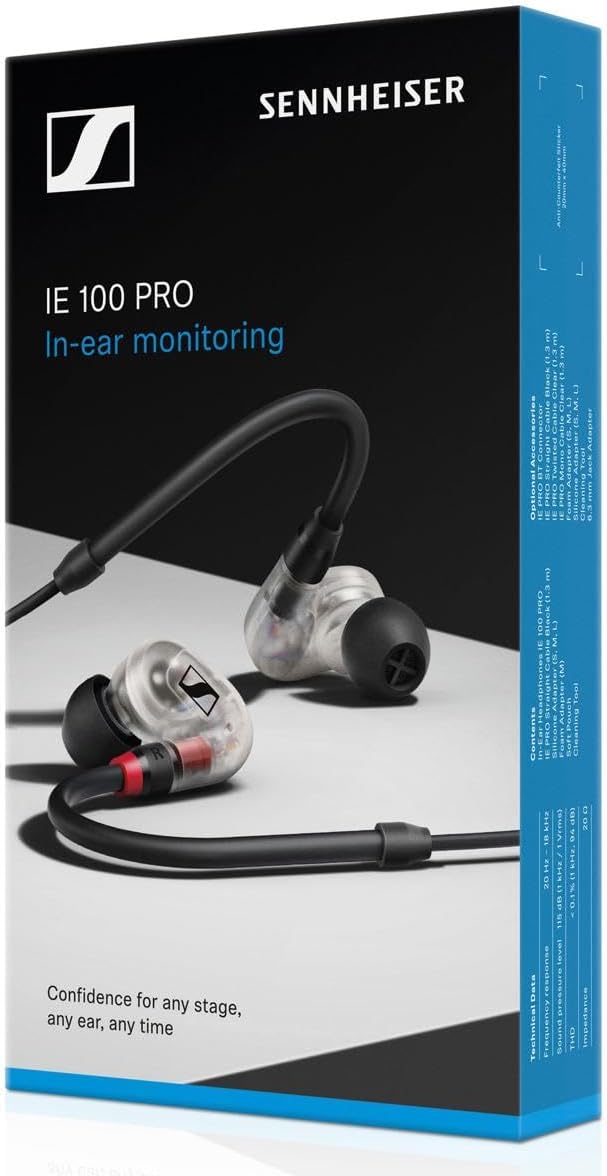
Figure 1: Contents of the Sennheiser IE 100 PRO package.
Product Overview
The IE 100 PRO features an innovative, dynamic 10-mm broadband transducer for powerful, precise monitoring. Its dynamic driver system minimizes acoustic stress factors, ensuring homogeneous, distortion-free audio reproduction. The slim and ergonomic single-driver design provides a secure and comfortable fit, complemented by excellent sound shielding from optimized earpieces and flexible silicone/foam tips. The stage-proof cable includes an internal cable duct for enhanced durability.

Figure 2: Sennheiser IE 100 PRO in-ear monitors.
Video 1: Official product overview highlighting key features and design of the Sennheiser IE 100 PRO in-ear monitors.
Setup
1. Selecting the Right Ear Tips
Proper ear tip selection is crucial for optimal sound quality and comfort. The package includes various sizes of silicone and foam ear adapters. Experiment with different sizes to find the pair that fits most snugly and comfortably in your ear canals. A good seal ensures excellent sound isolation and proper audio reproduction.
2. Attaching the Cable
The IE 100 PRO features a detachable cable for convenience and durability. To attach, align the connector on the cable with the port on the earbud and push gently until it clicks into place. Ensure a secure connection for both earbuds.

Figure 3: Detachable cable connection point on the earbud.
3. Wearing the In-Ear Monitors
Place the earbuds into your ear canals, ensuring the cable loops over the top of your ears for a secure and comfortable fit. Adjust the cable behind your head or under your chin as preferred. The ergonomic design is intended to provide stability during movement.

Figure 4: Correct wearing of the IE 100 PRO in-ear monitors.
Operating Instructions
The Sennheiser IE 100 PRO are passive in-ear monitors designed for direct connection to an audio source. They do not feature active noise cancellation or built-in media controls on the cable itself, relying on the connected device for volume and playback management.
1. Connecting to an Audio Source
Connect the 3.5 mm jack of the IE 100 PRO cable to the headphone output of your audio device (e.g., monitoring system, audio interface, smartphone, laptop). Ensure the connection is firm.
2. Volume Adjustment
Adjust the listening volume directly on your connected audio source. Start with a low volume and gradually increase it to a comfortable level to prevent hearing damage.
Maintenance
Regular maintenance helps prolong the life and maintain the performance of your IE 100 PRO in-ear monitors.
- Cleaning Ear Tips: Remove the silicone or foam ear tips from the earbuds. Clean them gently with a soft, damp cloth. For foam tips, follow the manufacturer's specific cleaning instructions. Ensure they are completely dry before reattaching.
- Cleaning Earbuds: Use the provided cleaning tool to carefully remove any earwax or debris from the earbud nozzles. Pay attention to the internal foam filters within the nozzle and ear tips; ensure they are correctly oriented after cleaning.
- Cable Care: The stage-proof cable is designed for durability. Avoid sharp bends or excessive pulling. If the cable becomes dirty, wipe it with a dry, soft cloth.
- Storage: When not in use, store your IE 100 PRO in the provided protective case to prevent damage from dust, dirt, and physical impact.
Troubleshooting
If you encounter issues with your Sennheiser IE 100 PRO, try the following troubleshooting steps:
| Problem | Possible Cause | Solution |
|---|---|---|
| Poor sound quality or lack of bass | Incorrect ear tip size or improper fit in the ear canal. | Experiment with different ear tip sizes to achieve a snug fit and good seal. Ensure the earbuds are worn correctly. |
| No sound from one or both earbuds | Loose cable connection or faulty audio source. | Check that the detachable cable is securely connected to both earbuds and the audio source. Test with a different audio source or cable if possible. |
| Distorted sound | Audio source volume too high or earbud nozzles are blocked. | Reduce the volume on your audio source. Clean the earbud nozzles and ear tips using the provided cleaning tool. |
Specifications
| Feature | Specification |
|---|---|
| Brand | Sennheiser |
| Model Name | IE 100 Pro |
| Color | Clear |
| Ear Placement | In Ear |
| Form Factor | Universal In Ear |
| Impedance | 20 Ohms |
| Frequency Range | 20Hz - 18,000Hz |
| Sensitivity | 115 dB |
| Noise Control | Sound Isolation |
| Audio Driver Type | Dynamic Driver |
| Cable Features | Detachable |
| Headphone Jack | 3.5 mm Jack |
| Item Weight | 160 Grams |
| Water Resistance Level | Water Resistant |
Warranty and Support
Warranty Information
The Sennheiser IE 100 PRO comes with a 2-year manufacturer's warranty. Please retain your proof of purchase for warranty claims.
Customer Support
For further assistance, technical support, or warranty inquiries, please visit the official Sennheiser website or contact their customer service department. You can find detailed contact information and FAQs on their support pages.