
1. Introduction
Thank you for choosing the Vandlion 64GB USB Voice Recorder. This compact and versatile digital audio recorder is designed for ease of use, offering high-quality audio capture and extensive storage capacity. This manual provides detailed instructions to help you set up, operate, and maintain your device for optimal performance.
2. Safety Information
- Do not expose the device to extreme temperatures, direct sunlight, or high humidity.
- Avoid dropping or subjecting the device to strong impacts.
- Keep the device away from water and other liquids.
- Do not attempt to disassemble or repair the device yourself. Refer to qualified service personnel.
- Use only the provided charging cables and adapters.
3. Package Contents
Please check the package contents to ensure all items are present:
- Vandlion 64GB USB Voice Recorder
- Micro-USB Adapter
- Type-C Adapter
- Earphone
- User Manual (this document)
4. Product Overview

Front view of the Vandlion 64GB USB Voice Recorder, showing its sleek black design and the 'Rec = Save' switch.

The voice recorder held between two fingers, illustrating its compact and lightweight design for easy portability. Dimensions are approximately 1x1x2.37 inches and weight is 1.7 oz.
4.1. Components
- Recording Switch: Used to start and stop recording.
- USB Connector: For charging and connecting to a computer.
- Microphone: Built-in for audio capture.
- Indicator Light: Shows device status (charging, recording, etc.).
- Earphone Jack (3.5mm): For audio playback using the included earphone.
5. Setup
5.1. Charging the Device
Before first use, fully charge the voice recorder. Connect the device to a USB power source (e.g., computer USB port, USB wall adapter) using the integrated USB connector. The indicator light will show charging status. A full charge takes approximately 2 hours and provides up to 20 hours of recording time.

An internal view of the voice recorder's battery, illustrating its long-lasting power capacity for extended recording sessions.
5.2. Connecting to a Computer
The voice recorder features a USB 2.0 interface. To connect to a computer (Windows 2000 and higher), simply plug the device directly into a USB port. For devices with Micro-USB or Type-C ports, use the included adapters. Once connected, the device will appear as a removable disk, allowing you to manage recorded files.
6. Operating Instructions
6.1. Recording Audio

A finger sliding the 'Rec = Save' switch to the 'Rec' position, demonstrating the simple one-key recording operation.
The device features a simple one-key recording function:
- To start recording, slide the recording switch to the "on" position. The device will begin recording automatically after approximately 5 seconds.
- To stop recording and save the file, slide the switch back to the "off" position. The recording file will be saved with a date and time stamp.
The device utilizes Japanese third-generation AGC intelligent noise reduction technology to minimize ambient noise during recording, ensuring clear audio quality.
6.2. Playback

The voice recorder connected to a laptop via USB, with an earphone plugged into its 3.5mm jack, illustrating options for audio playback.
You can play back recorded files in two ways:
- Via Earphone: Plug the included 3.5mm earphone into the earphone jack on the device. Use the playback controls on the earphone cable (if available) or the device's built-in controls (long press play button to switch folders and play files) to navigate and listen to recordings.
- Via Computer: Connect the device to your computer. Access the recorded files (MP3/WMA/WAV format) from the removable disk and play them using your computer's media player.
6.3. File Management

An illustration of the 64GB high-speed storage capacity, indicating the ability to store up to 750 hours of audio files.
With 64GB of internal memory, the device can store up to 750 hours of recording files. To manage your files:
- Connect the recorder to your computer.
- Open the removable disk drive that appears.
- You can copy, move, delete, or rename files and folders as you would with any other storage device.
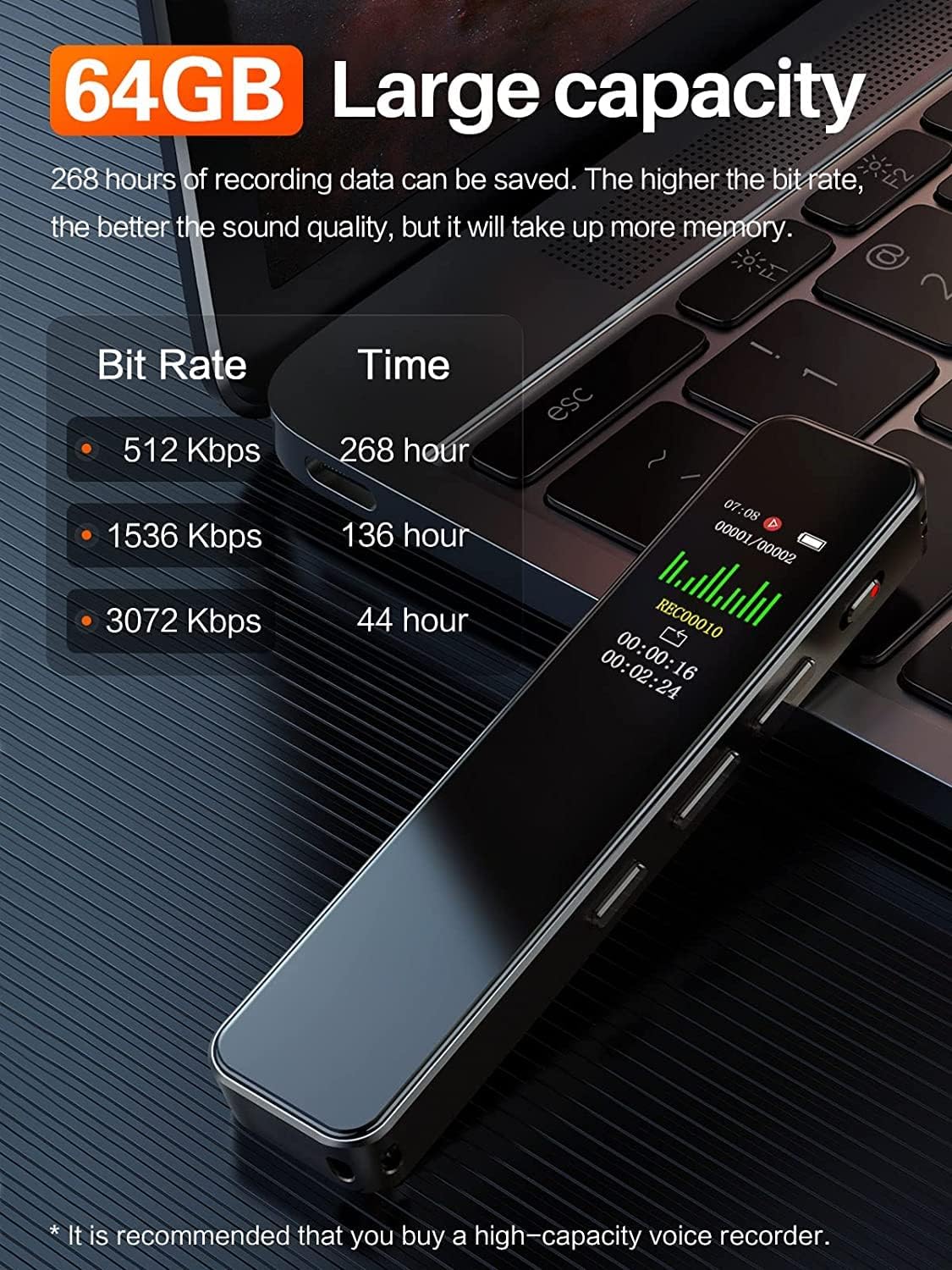
A visual representation of the 64GB large capacity, showing how different bit rates affect recording time: 512 Kbps for 268 hours, 1536 Kbps for 136 hours, and 3072 Kbps for 44 hours.
7. Maintenance
- Cleaning: Use a soft, dry cloth to clean the device. Do not use liquid cleaners or aerosols.
- Storage: Store the device in a cool, dry place away from direct sunlight and extreme temperatures.
- Battery Care: To prolong battery life, avoid fully discharging the battery frequently. Charge the device regularly, even if not in use for extended periods.
- Data Backup: Regularly back up important recordings to your computer to prevent data loss.
8. Troubleshooting
| Problem | Possible Cause | Solution |
|---|---|---|
| Device does not turn on. | Battery is depleted. | Charge the device for at least 2 hours. |
| Cannot record. | Memory full. | Delete old files to free up space. |
| Poor recording quality. | Microphone obstructed; too far from sound source; high ambient noise. | Ensure microphone is clear; move closer to sound source; record in a quieter environment. |
| Device not recognized by computer. | Loose connection; incompatible USB port; driver issue. | Ensure secure connection; try a different USB port; restart computer. |
| Cannot hear playback through earphone. | Earphone not fully inserted; earphone faulty. | Ensure earphone is fully inserted; try a different earphone. |
9. Specifications
| Color | Black |
| Memory Capacity | 64GB |
| Weight | 15g (0.53 oz) |
| Dimensions (L*W*H) | 64 x 19 x 10 mm (2.5 x 0.74 x 0.39 inches) |
| Battery / Voltage | 180mAh / 3.7V |
| Supported File Formats | MP3 / WMA / WAV |
| Record Quality (Adjustable) | 32Kbps to 384Kbps |
| Material | Engineering plastic, strong anti-drop resistance |
| Chip | Latest X8 Professional Voice Recorder Japanese Chip, HD recording |
| Connector | USB (Micro-USB and Type-C adapters included) |
| Compatible With | Windows 2000 and Higher & all Android Phones |
| Battery Life (Recording) | Up to 20 Hours |
| Max Recording Capacity | 750 Hours (with 64GB capacity) |
10. Warranty and Support
Vandlion, established in 1996, is committed to providing high-quality voice recorders. All products undergo strict quality inspections before shipment.
If you encounter any product-related issues within one year of purchase, please contact Vandlion customer support. We offer free replacement or refund for eligible issues.
For further assistance or inquiries, please refer to the contact information provided with your purchase or visit the official Vandlion website.