
1. Introduction
The CREATIVE XP GlassCondor IR Monocular PRO is an advanced infrared night vision monocular designed for clear viewing in 100% darkness. It features a no-glow infrared illuminator, a 1.54-inch TFT viewing screen, 5x optical magnification, and 8x digital zoom, allowing users to observe objects up to 1640 feet away. This device is ideal for wildlife observation, hunting, surveillance, and other outdoor activities where low-light or no-light conditions are present. It also supports photo and video recording directly to a 32GB SD card, with a phone and computer card reader included for easy media transfer.
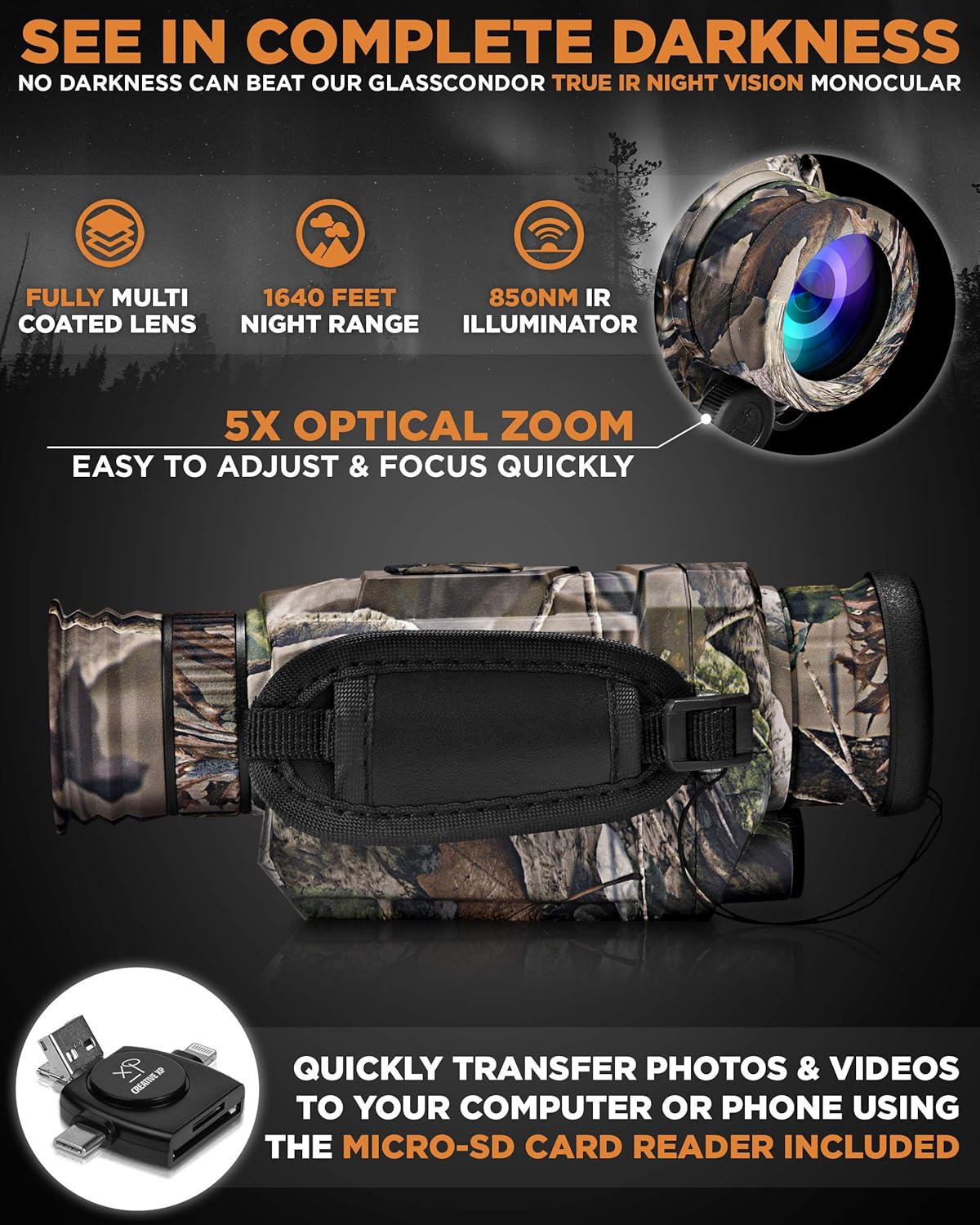
Figure 1: CREATIVE XP GlassCondor Monocular with key features.

Figure 2: Visual comparison of day and night viewing capabilities.
2. What's Included
Your CREATIVE XP GlassCondor IR Monocular PRO package includes the following items:
- CREATIVE XP GlassCondor IR Monocular PRO
- Carrying Pouch
- Neck Strap
- 32GB Micro SD Card
- Phone & Computer Card Reader
- USB Charging Cable
- Charging Brick
- Microfiber Cleaning Cloth
- User Manual

Figure 3: Contents of the GlassCondor IR Monocular PRO package.
3. Setup
3.1 Battery Installation
- Locate the battery compartment on the front of the monocular.
- Unscrew the cap of the battery compartment.
- Remove any protective paper or film from the included CR16340 3.7V 700mAh rechargeable battery.
- Insert the battery into the compartment, ensuring correct polarity.
- Securely screw the cap back onto the compartment.
3.2 Charging
The monocular comes with a rechargeable battery. To charge it:
- Connect the micro USB cable to the charging port on the monocular (located under a rubber flap).
- Connect the other end of the USB cable to the provided charging brick or any standard USB power source.
- Allow the battery to fully charge before first use.
3.3 SD Card Insertion
The monocular requires a micro SD card (32GB included) to save photos and videos.
- Locate the SD card slot, typically under a rubber flap near the USB port.
- Insert the micro SD card into the slot until it clicks into place.
4. Operating Instructions
4.1 Power On/Off
- To power on, press and hold the main power button (usually the central button on top) for a few seconds.
- To power off, press and hold the main power button again until the device shuts down.
4.2 Mode Selection
The monocular offers different modes for capturing and viewing media:
- Press the Mode button (typically on the right side of the top panel) to cycle through Photo, Video, and Playback modes.
4.3 Zoom and IR Adjustment
Use the '+' and '-' buttons on the top panel to control zoom and infrared levels:
- In Photo or Video mode, press '+' to zoom in (up to 8x digital zoom) and '-' to zoom out.
- These buttons also adjust the intensity of the infrared illuminator (up to 9 levels).
4.4 Focus Adjustment
Achieve a clear image by adjusting the focus:
- Rotate the objective lens (front lens) to adjust the main focus.
- Rotate the diopter (eyepiece) to fine-tune the focus to your individual eyesight.
4.5 Daytime and Nighttime Use
- Daytime: Keep the IR filter cap on the objective lens to prevent overexposure and protect the IR illuminator.
- Nighttime: Remove the IR filter cap for optimal infrared performance.
4.6 Recording and Transferring Media
- In Photo mode, press the main button to take a picture.
- In Video mode, press the main button to start recording, and press it again to stop.
- To transfer photos and videos, use the included USB cable to connect the monocular to a computer, or remove the SD card and use the provided card reader.
Video 1: Demonstration of the GlassCondor IR Monocular PRO's features, unboxing, and night footage capabilities. This video shows the device in action, including its ability to record in various light conditions and the clarity of its infrared vision. It also highlights the compact design and included accessories.
5. Maintenance
- Cleaning: Use the provided microfiber cloth to gently clean the lenses. Avoid abrasive materials or harsh chemicals.
- Battery Care: Ensure the rechargeable battery is fully charged before extended use. Store the device with a partially charged battery if not used for long periods.
- Storage: Store the monocular in its protective pouch in a cool, dry place away from direct sunlight and extreme temperatures.
6. Troubleshooting
If you encounter issues with your GlassCondor IR Monocular PRO, consider the following:
- No Power: Ensure the battery is correctly installed and fully charged. Check the USB cable and charging brick if charging.
- Blurry Image: Adjust both the objective lens and the diopter for optimal focus. Ensure the IR filter cap is removed for night vision.
- Recording Issues: Verify that the 32GB micro SD card is properly inserted and has sufficient free space.
- For further assistance, refer to the detailed user manual included in your package or contact customer support.
7. Specifications
| Feature | Specification |
|---|---|
| Product Dimensions | 7.01 x 2.83 x 3.07 inches |
| Item Weight | 1.37 pounds |
| Model Number | GlassCondor |
| Objective Lens Diameter | 35 Millimeters |
| Eye Piece Lens Description | Digital TFT Screen (1.54 inch) |
| Focal Length Description | 175 millimeters |
| Optical Magnification | 5x |
| Digital Zoom | 8x |
| Night Vision Range | Up to 1640 feet |
| IR Illuminator | No-glow Infrared |
| Power Source | Battery Powered (Rechargeable CR16340 3.7V 700mAh) |
| Compatible Devices | Camera |
| Lens Coating Description | Fully multi coated |
8. Warranty & Support
CREATIVE XP offers a warranty for products manufactured on or after April 2017. They are committed to customer satisfaction and aim to answer all questions or suggestions within 24 hours.
Contact Information:
- Website: www.creative-xp.com
- Email: support@creative-xp.com
- Phone Number: +1 646-600-8243
- Address: 2511 W Winton Ave 3c, Hayward, CA 94545
9. Safety Information
WARNING: Never look directly at the sun with your monocular, as it may cause serious damage to your eyes. Always keep the IR filter cap on during daytime use to protect the device and your eyes.