
1. Introduction and Overview
Thank you for choosing the Basetech ZD-30B Soldering Iron Kit. This kit is designed for various soldering tasks, offering a complete solution for direct soldering applications. It features a robust construction and an ergonomic design for precise work. Please read this manual thoroughly before use to ensure safe and optimal operation.
Key Features:
- Complete kit for direct soldering.
- Robust construction for durability.
- Ergonomic soldering iron design for precise work.
2. Safety Instructions
Always observe the following safety precautions to prevent injury or damage to the product.
General Safety:
- This device operates on 230V AC. Ensure your power outlet matches this voltage.
- Do not use the soldering iron in damp or wet conditions.
- Keep the soldering iron away from flammable materials.
- Always unplug the soldering iron when not in use or before cleaning.
- Do not touch the heating element or tip of the soldering iron when it is hot. Severe burns can occur.
- Ensure adequate ventilation in your workspace to disperse soldering fumes. Soldering fumes can be harmful if inhaled.
- Wear appropriate personal protective equipment, including safety glasses, to protect against splashes of molten solder.
- Keep out of reach of children.
3. Package Contents
Verify that all items listed below are present in your kit:
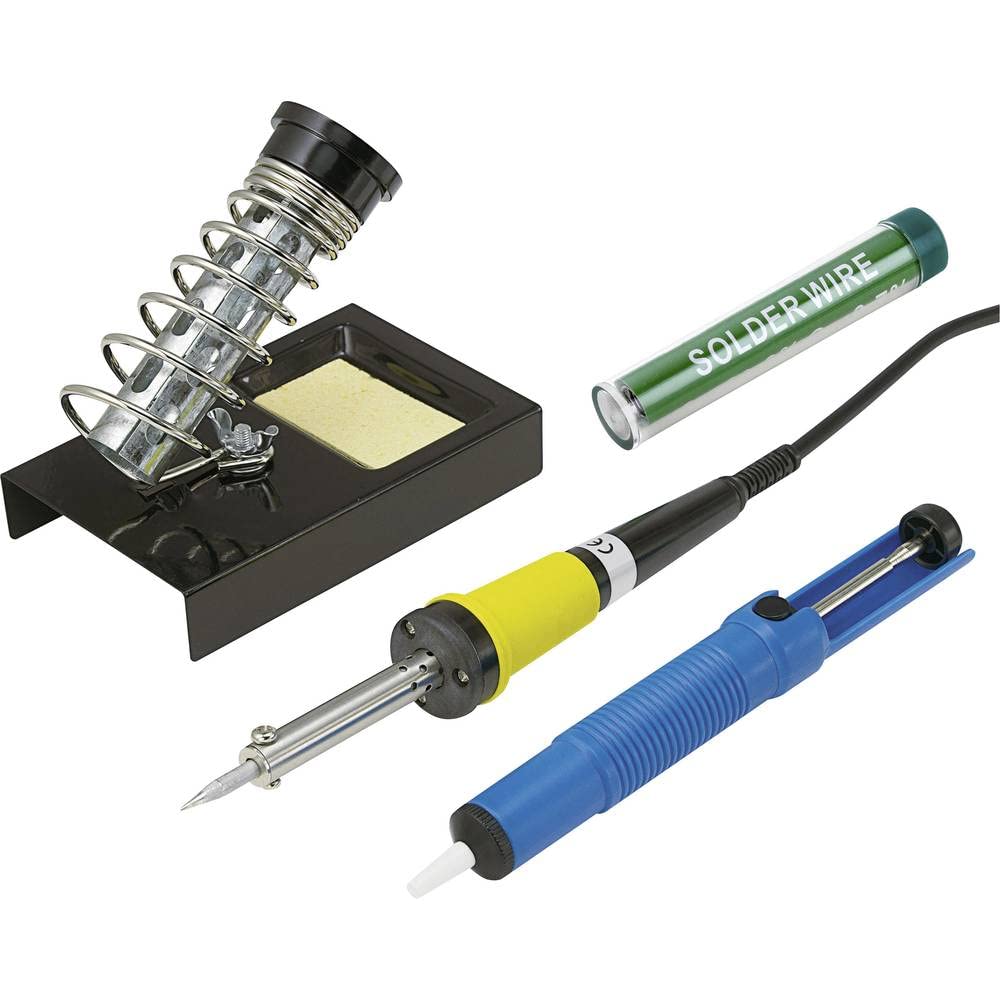
- Basetech ZD-30B Soldering Iron (230V, 30W)
- Soldering Iron Stand with Sponge
- Solder Wire
- Desoldering Pump


4. Setup
Follow these steps to set up your soldering station:
- Prepare Your Workspace: Choose a well-ventilated area. Place a heat-resistant mat or surface protector on your workbench. Ensure good lighting.
- Assemble the Soldering Iron Stand: Place the soldering iron stand on a stable, flat surface. If the sponge is dry, dampen it slightly with water (do not soak) and place it in the designated tray on the stand.
- Position the Soldering Iron: Place the soldering iron securely in its stand. Ensure the tip is not touching any surfaces when resting.
- Connect to Power: Plug the soldering iron into a suitable 230V AC power outlet. The iron will begin to heat up.
5. Operating Instructions
This section provides basic instructions for using the soldering iron and desoldering pump.
5.1. Tinning the Soldering Iron Tip
Before first use, or after cleaning, the tip must be 'tinned' to ensure efficient heat transfer and prevent oxidation.
- Allow the soldering iron to heat up completely.
- Apply a small amount of solder wire directly to the hot tip until it is coated with a thin, shiny layer of solder.
- Wipe any excess solder on the damp sponge. The tip should now have a thin, silvery coating.
5.2. Basic Soldering Technique
For joining two components or wires:
- Ensure the components to be soldered are clean and free of oxidation.
- Heat both components simultaneously by placing the hot soldering iron tip against them.
- Once the components are hot enough, apply solder wire to the junction, not directly to the iron tip. The heat from the components should melt the solder, allowing it to flow smoothly and create a strong joint.
- Remove the solder wire, then remove the soldering iron. Allow the joint to cool naturally without disturbing it.
5.3. Using the Desoldering Pump
The desoldering pump is used to remove unwanted solder.
- Push down the plunger of the desoldering pump until it locks.
- Heat the solder joint you wish to remove with the soldering iron until the solder melts.
- Quickly remove the soldering iron and place the nozzle of the desoldering pump over the molten solder.
- Press the release button on the pump to create suction, drawing the molten solder into the pump.
- Repeat if necessary until most of the solder is removed.
- To clear the pump, push the plunger down again.
6. Maintenance
Proper maintenance ensures the longevity and performance of your soldering iron.
6.1. Cleaning the Soldering Tip
Regularly wipe the soldering tip on the damp sponge provided in the stand to remove excess solder and flux residue. This helps prevent oxidation and ensures efficient heat transfer.
6.2. Replacing the Soldering Tip
Over time, soldering tips can wear out or become damaged. To replace the tip:
- Ensure the soldering iron is unplugged and completely cool.
- Carefully unscrew the retaining nut or collar that holds the tip in place.
- Remove the old tip and insert a new, compatible Basetech tip.
- Securely fasten the retaining nut or collar.
- After replacement, tin the new tip as described in Section 5.1.
6.3. Storage
When not in use, ensure the soldering iron is unplugged and fully cooled before storing it in a dry, safe place, away from children.
7. Troubleshooting
If you encounter issues with your soldering iron, refer to the following common problems and solutions:
| Problem | Possible Cause | Solution |
|---|---|---|
| Soldering iron not heating up. | Not plugged in; faulty power outlet; internal fault. | Check power connection; try a different outlet; if still not working, discontinue use and contact support. |
| Solder not melting or poor joints. | Tip is oxidized or dirty; insufficient heat transfer; components not hot enough. | Clean and re-tin the tip (Section 5.1); ensure proper contact with components. |
| Excessive smoke/fumes. | Too much flux; poor ventilation. | Use less solder/flux; ensure adequate ventilation in your workspace. |
| Desoldering pump not effective. | Nozzle not sealing; solder not fully molten; pump clogged. | Ensure tight seal over molten solder; ensure solder is fully liquid; clear any clogs from the pump nozzle. |
8. Specifications
| Specification | Value |
|---|---|
| Manufacturer | Basetech |
| Model Number | BT-2280536 |
| Product Dimensions (L x W x H) | 24.7 x 4 x 29 cm; 580 grams |
| Power Type | Corded Electric |
| Power | 30 Watts |
| Style | Pencil |
| Special Feature | Ergonomic Handle |
| Usage | Home Use |
| Upper Rated Temperature | 400 Degrees Celsius |
| Burner Type | Electric |
9. Warranty and Support
This Basetech ZD-30B Soldering Iron Kit comes with a 1-year warranty on spare parts availability from the date of purchase. For warranty claims or technical support, please refer to the retailer or manufacturer's contact information provided at the point of purchase.
Please retain your proof of purchase for any warranty claims.