
1. Introduction
Thank you for choosing the XTRARM TiTon 120 cm TV Wall Mount. This manual provides essential information for the safe and proper installation, operation, and maintenance of your new TV wall mount. Please read this manual thoroughly before installation and keep it for future reference.

The XTRARM TiTon TV wall mount seamlessly integrates into a modern living space, providing flexible viewing angles.
2. Safety Information
WARNING: Failure to read and follow all instructions may result in personal injury, property damage, or voiding of warranty. The manufacturer is not liable for damage or injury caused by incorrect mounting or use.
- Ensure the mounting surface can safely support the combined weight of the mount and the TV.
- Do not exceed the maximum weight capacity of 40 kg (88 lbs).
- Verify VESA compatibility with your TV before installation.
- Use appropriate tools and safety equipment during installation.
- Keep children and pets away during installation.
- Consult a qualified professional if you are unsure about the installation process or wall type.
3. Package Contents
Carefully unpack the box and ensure all parts are present and undamaged. If any parts are missing or damaged, do not attempt to install. Contact customer support for assistance.
- XTRARM TiTon TV Wall Mount Assembly
- Standard Mounting Hardware Kit (screws, anchors, washers, spacers)
- Installation Manual

Image showing the complete XTRARM TiTon wall mount assembly and the included standard mounting hardware kit.
4. Setup and Installation
This section outlines the general steps for installing your XTRARM TiTon TV wall mount. Specific wall types may require different anchors or fasteners not included in the standard kit. Always ensure the wall structure can support the load.
4.1 Wall Plate Installation
- Choose a suitable location on your wall, ensuring it is free from electrical wires or plumbing.
- Position the wall plate at the desired height and mark the drilling points. Use a level to ensure it is perfectly horizontal.
- Drill pilot holes according to the marked points and insert the appropriate wall anchors.
- Secure the wall plate to the wall using the provided screws. Ensure it is firmly attached.

Illustration of the wall plate installation and the TV bracket attachment process.
4.2 TV Bracket Attachment
- Identify the VESA mounting holes on the back of your TV.
- Attach the TV brackets to the back of your TV using the appropriate screws and spacers from the hardware kit. Ensure the brackets are securely fastened and aligned.
4.3 Mounting the TV to the Wall Plate
- With assistance, carefully lift the TV and align the TV brackets with the arms of the wall mount.
- Hook the TV brackets onto the wall mount arms.
- Secure the TV to the mount using the locking mechanisms or screws as indicated in the detailed diagram. This step can be challenging for large TVs and may require precise alignment.
5. Operating Instructions
The XTRARM TiTon mount offers extensive flexibility for optimal viewing from various positions in your room.
5.1 Articulation and Extension
The mount features a robust articulated arm that allows the TV to extend up to 120 cm from the wall. Gently pull or push the TV to adjust the distance from the wall.

The mount extends up to 120 cm, providing significant flexibility for viewing angles.
5.2 Swivel and Rotation
The mount allows for smooth swivel (left/right) and rotation (horizontal leveling) adjustments. This enables you to achieve the perfect viewing angle from almost anywhere in the room.
5.3 Tilt Adjustment
Adjust the vertical tilt of your TV to reduce glare and optimize viewing comfort. The mount supports a tilt range of -5° to +15°.
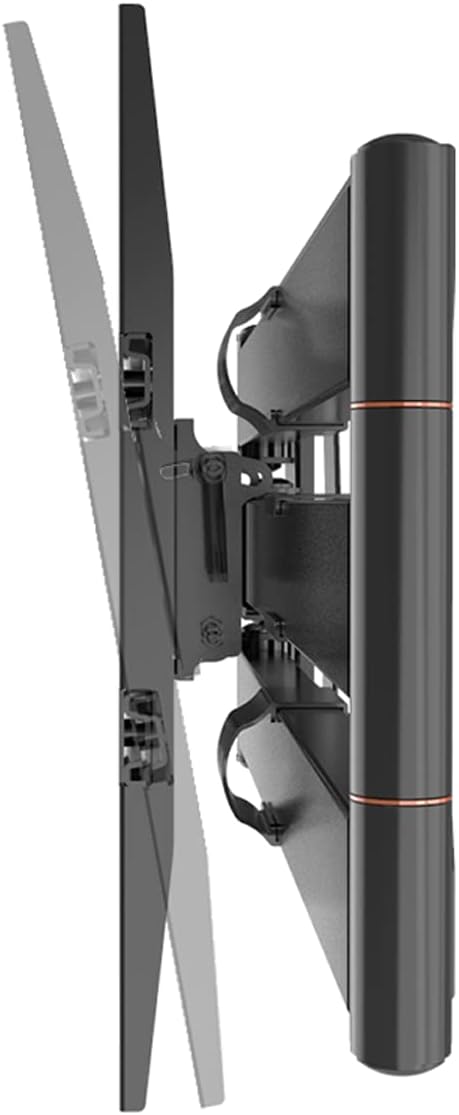
The mount allows for vertical tilt adjustment to optimize viewing and reduce glare.
6. Maintenance
Regular maintenance ensures the longevity and safe operation of your TV wall mount.
- Cleaning: Wipe the mount with a soft, dry cloth. Do not use abrasive cleaners or solvents.
- Inspection: Periodically check all screws and connections to ensure they are tight and secure. Over time, vibrations or adjustments may loosen fasteners.
- Movement: If the arm movement becomes stiff, a small amount of silicone-based lubricant can be applied to the pivot points, avoiding contact with electrical components.
7. Troubleshooting
If you encounter issues with your XTRARM TiTon TV wall mount, refer to the following common problems and solutions:
| Problem | Possible Cause | Solution |
|---|---|---|
| TV is not level | Wall plate not level during installation; TV not properly adjusted on mount. | Re-check wall plate level and adjust if necessary. Use the mount's rotation feature to fine-tune TV level. |
| Mount feels unstable | Screws are loose; wall not strong enough; weight capacity exceeded. | Tighten all screws. Verify wall strength and ensure TV weight is within limits. Consult a professional if unsure. |
| Difficulty moving the arm | Friction in joints; dust accumulation. | Clean joints. Apply a small amount of silicone-based lubricant if needed. |
| TV cannot be securely attached | Incorrect VESA screws/spacers; TV brackets not aligned. | Ensure correct VESA screws are used. Re-align TV brackets with the mount's arms. |
If the problem persists, please contact XTRARM customer support.
8. Specifications
Detailed technical specifications for the XTRARM TiTon 120 cm TV Wall Mount.
| Feature | Specification |
|---|---|
| Model Number | XTR-LA2070 |
| Product Dimensions | 120 x 48 x 42 cm |
| Product Weight | 10.65 Kilograms |
| Material | Metal |
| Mounting Type | Wall Mount |
| Movement Type | Articulating, Swivel, Tilt, Rotate |
| Maximum Compatible TV Size | 75 Inches |
| Minimum Compatible TV Size | 42 Inches |
| Maximum Weight Capacity | 40 kg |
| VESA Compatibility | 100x100, 100x200, 200x100, 200x200, 200x300, 300x200, 300x300, 400x200, 400x300, 400x400 |
| Maximum Tilt Angle | 15 Degrees |
| Arm Length | Up to 120 cm |
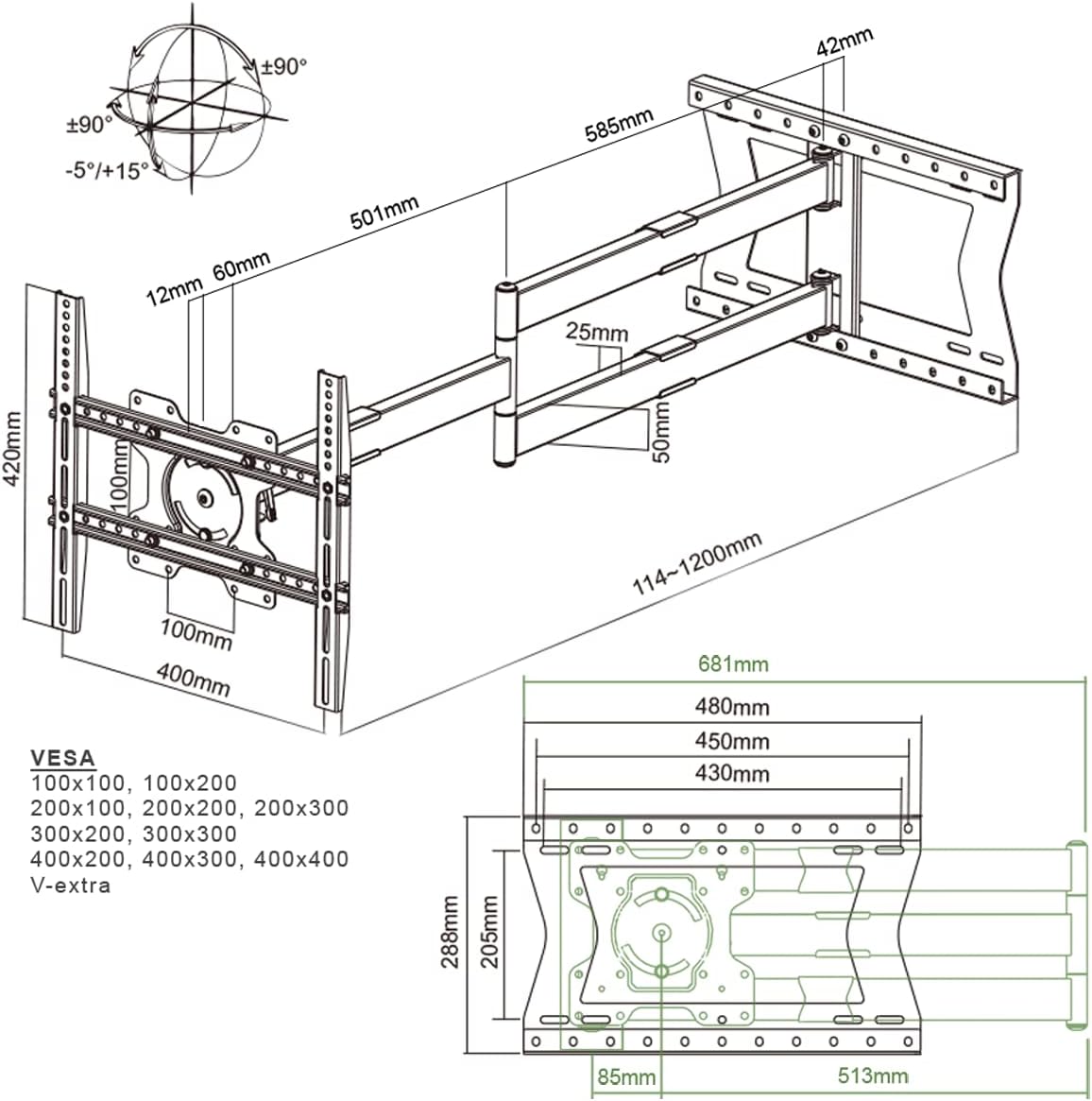
Detailed dimensions and VESA compatibility for the XTRARM TiTon wall mount.
9. Warranty and Support
The XTRARM TiTon TV Wall Mount comes with a 5-year warranty on the product. Additionally, spare parts are available for a period of 2 years within the EU.
For technical support, warranty claims, or inquiries about spare parts, please contact XTRARM customer service through their official channels or the retailer where you purchased the product.


