
1. Introduction
The TFA Dostmann Material Moisture Meter 30.5506.01 is designed for quick and easy measurement of moisture content in wood and various building materials. This robust device is suitable for on-site inspections, new construction projects, or general home use. It features a clear display for moisture readings and an integrated temperature display. Proper moisture measurement is crucial, especially for firewood, as high moisture content (over 20%) reduces calorific value and can lead to increased smoke, tar, and soot formation.
2. Safety Information
- Read this instruction manual thoroughly before using the device.
- Keep the device out of reach of children.
- The measuring electrodes are sharp. Handle with care to avoid injury.
- Do not use the device for purposes other than those described in this manual.
- Do not expose the device to extreme temperatures, vibrations, or shocks.
- Do not immerse the device in water or other liquids.
- Only use the specified battery type (4 x 1.5 V AAA).
3. Package Contents
Please check that all items are present and undamaged:
- TFA Dostmann Material Moisture Meter 30.5506.01
- Protective Cap
- Instruction Manual
4. Product Overview
The material moisture meter features a compact design with a clear digital display and intuitive controls. The measuring electrodes are located at the top, protected by a removable cap.
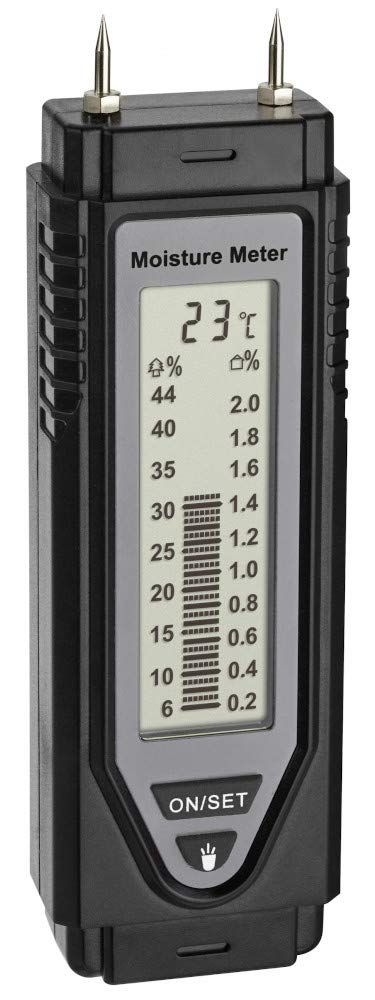
Figure 1: Front view of the TFA Dostmann Material Moisture Meter, showing the display and 'ON/SET' button.
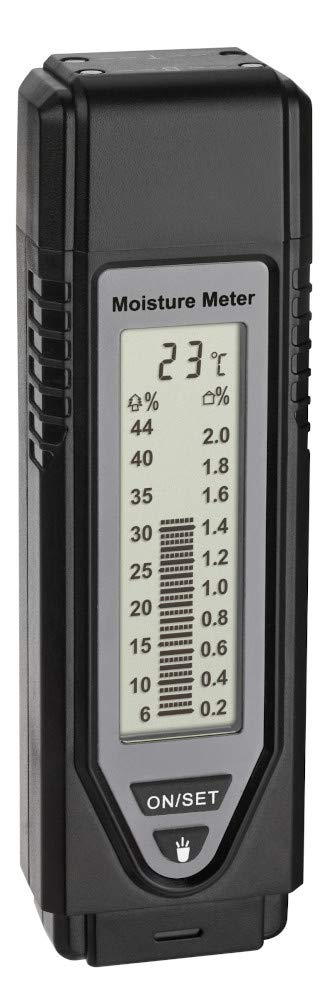
Figure 2: Close-up of the meter's display, showing temperature, moisture percentage for wood (left scale), and building materials (right scale).
- Display: Shows moisture readings (bar graph and percentage) and temperature.
- ON/SET Button: Powers the device on and cycles through settings.
- LED Light Button: Activates a small LED light for illumination.
- Measuring Electrodes: Two pins at the top for inserting into the material.
- Protective Cap: Covers the electrodes when not in use and includes test fields.
5. Setup
5.1 Battery Installation
- Locate the battery compartment on the back of the device.
- Using a small Phillips head screwdriver, carefully open the battery compartment cover.
- Insert four (4) 1.5 V AAA batteries, ensuring correct polarity (+/-). Batteries are not included.
- Replace the battery compartment cover and secure it with the screw.
5.2 Initial Function Test
Before first use, or if you suspect inaccurate readings, perform a function test:
- Ensure the protective cap is securely placed over the measuring electrodes.
- Press the 'ON/SET' button to turn on the device.
- The protective cap has two integrated test fields. Press the electrodes firmly onto these test fields.
- The display should show specific reference values (e.g., 19% for wood and all bars for building materials) indicating correct functionality. Refer to the markings on the protective cap for exact test values.
6. Operating Instructions
6.1 General Measurement Procedure
- Remove the protective cap from the measuring electrodes. The cap can be stored on the bottom end of the device during measurement to prevent loss.
- Press the 'ON/SET' button to power on the device.
- Firmly insert both measuring electrodes into the material you wish to measure. Ensure the electrodes penetrate sufficiently for an accurate reading.
- Read the moisture percentage from the display. The device shows a bar graph and a numerical value.
- After measurement, remove the electrodes from the material. The display will clear.
- Replace the protective cap over the electrodes when finished.

Figure 3: The moisture meter being used to measure moisture content in a piece of wood.
6.2 Wood Moisture Measurement
The left scale on the display (marked with '%') is used for wood moisture readings. The measuring range for wood is 6% to 44%.
6.3 Building Material Moisture Measurement
The right scale on the display (marked with 'c/%') is used for building material moisture readings. This applies to soft building materials such as plaster, mortar, and concrete. The measuring range for building materials is 0.2% to 2.0%.
6.4 Temperature Display
The device also displays the ambient temperature in Celsius (°C) or Fahrenheit (°F). The temperature measuring range is 0°C to +40°C (32°F to 104°F).
6.5 LED Light Function
Press the dedicated LED light button to activate a small flashlight. This light is intended for general illumination and does not specifically illuminate the measurement area.
6.6 Automatic Shut-off
To conserve battery life, the device features an automatic shut-off function after a period of inactivity.
7. Understanding Readings
Interpreting the moisture readings is essential for effective use of the meter. The following guidelines provide common thresholds:
7.1 Wood Moisture Interpretation
| Moisture Content | Interpretation |
|---|---|
| Below 14% | Dry (Ideal for firewood, construction) |
| 14% - 20% | Normal (Acceptable for many applications) |
| Above 20% | Moist (Not suitable for burning, potential for mold in construction) |
7.2 Building Material Moisture Interpretation (Concrete, Mortar, Plaster)
| Moisture Content | Interpretation |
|---|---|
| Below 0.4% | Dry |
| 0.4% - 1.1% | Normal |
| Above 1.1% | Moist (Indicates potential issues like water damage or insufficient drying time) |
8. Maintenance
- Cleaning: Wipe the device with a soft, dry cloth. Do not use abrasive cleaners or solvents.
- Storage: Always replace the protective cap over the electrodes when the device is not in use to prevent damage and ensure safety. Store the device in a dry, dust-free environment at room temperature.
- Battery Replacement: If the display becomes dim or the device does not power on, replace all four AAA batteries. Remove batteries if the device will not be used for an extended period to prevent leakage.
9. Troubleshooting
- Device does not turn on: Check if batteries are inserted correctly and have sufficient charge. Replace batteries if necessary.
- Inaccurate readings: Ensure the electrodes are fully and firmly inserted into the material. Perform the initial function test (Section 5.2) to verify device calibration. Ensure the material surface is clean and free of debris.
- Display is dim or flickering: Replace batteries.
- Electrodes are damaged: Do not use the device with damaged electrodes. Contact customer support for assistance.
10. Specifications
- Model: 30.5506.01
- Measuring Range (Wood Moisture): 6% to 44%
- Measuring Range (Building Material Moisture): 0.2% to 2.0%
- Measuring Range (Temperature): 0°C to +40°C (32°F to 104°F)
- Power Supply: 4 x 1.5 V AAA batteries (not included)
- Material: Plastic
- Dimensions: Approximately 44 x 34 x 144 mm (L x W x H)
- Weight: Approximately 103 g (without batteries)
- Color: Black
11. Warranty and Support
The EU Spare Part Availability Duration for this product is 1 year. For warranty claims, technical support, or inquiries regarding spare parts, please contact your retailer or the manufacturer, TFA Dostmann, directly. Please have your proof of purchase and the product model number (30.5506.01) available when contacting support.

