Introduction
This manual provides essential information for the safe operation, assembly, maintenance, and troubleshooting of your new Costzon 12V Kids' Electric Ride on Tractor with Detachable Trailer. Please read this manual thoroughly before initial use and retain it for future reference. This product is designed to provide an engaging and interactive experience for children aged 3 years and up.

Image: The Costzon Ride on Tractor in pink, featuring a front engine design, large wheels, and a detachable rear trailer.
Safety Information
WARNING: Adult supervision is required at all times. This product is intended for children aged 3 years and up, with a maximum weight capacity of 66 lbs (30 kg). Ensure all safety belts are securely fastened before operation.
- Always operate the vehicle in a safe environment, away from traffic, steep inclines, swimming pools, or other hazards.
- Ensure the child wears appropriate safety gear, such as a helmet, if local regulations require it.
- Do not allow children to stand on the vehicle or trailer while in motion.
- The trailer is designed for transporting toys and light items, not people.
- This product meets CPSIA and ASTM certifications for safety.
What's in the Box
Upon unpacking, please verify that all components listed below are present and undamaged:
- 1 x Kids Ride On Tractor
- 1 x Remote Control
- 1 x Charger
- 1 x Instruction Manual (this document)
Setup and Assembly
Refer to the detailed assembly instructions provided in the separate assembly guide for step-by-step procedures. Key steps include:
- Initial Battery Charge: Before first use, fully charge the 12V 7AH rechargeable battery for 8-12 hours. The charger connects to the designated charging port on the vehicle.
- Wheel Installation: Securely attach all wheels as per the assembly guide.
- Steering Wheel and Seat Assembly: Install the steering wheel and seat, ensuring they are firmly in place.
- Trailer Attachment: The trailer can be easily attached and detached using the provided bolt mechanism.

Image: Close-up view illustrating the simple bolt mechanism for attaching and detaching the trailer from the tractor.
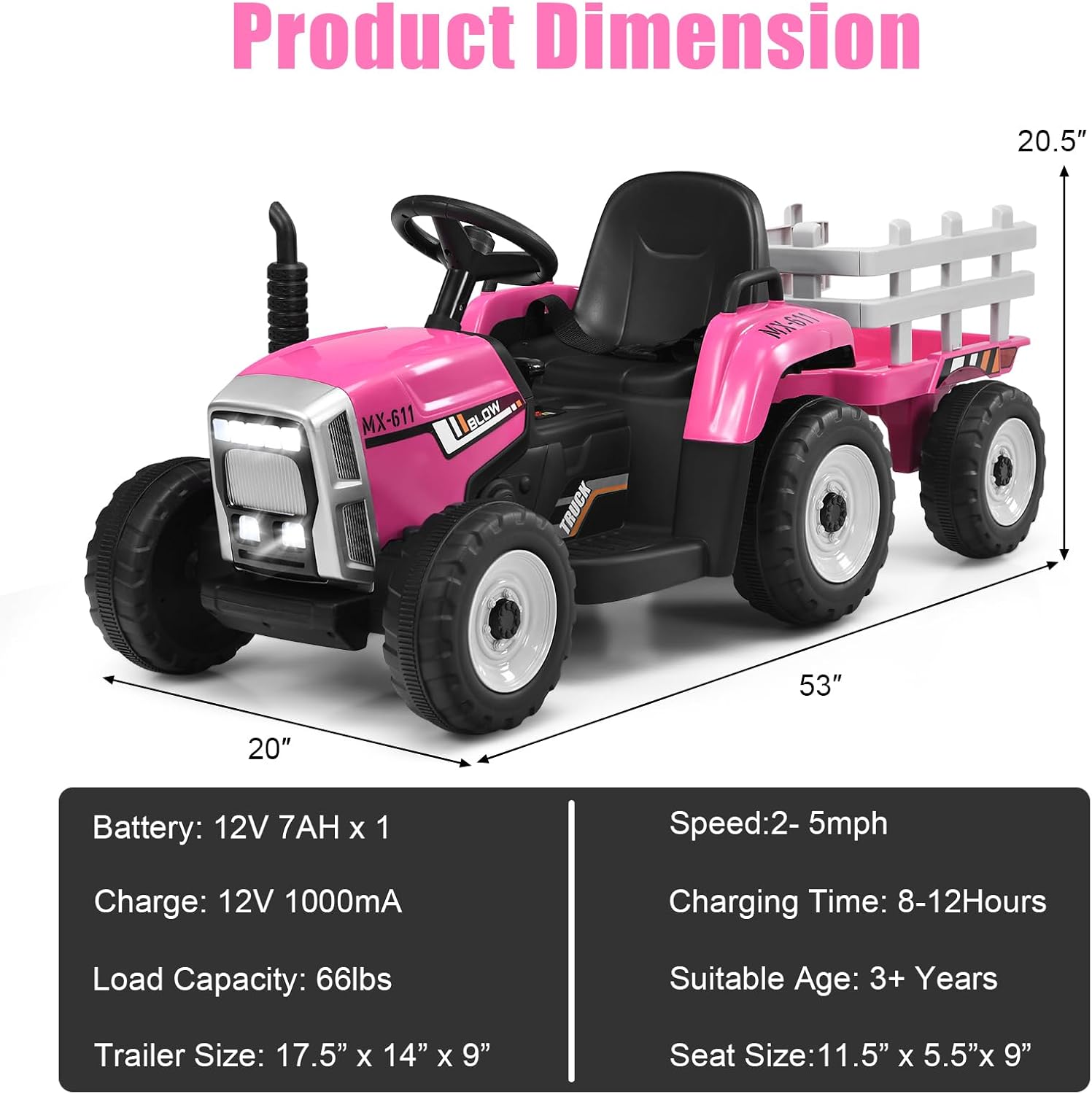
Image: Diagram showing the overall dimensions of the tractor with trailer (53 inches long, 20 inches wide, 20.5 inches high) and key specifications like battery, speed, and load capacity.
Operating Instructions
Your Costzon Ride on Tractor offers two primary control modes:
1. Manual Control (Child Operated)
- Start Button: Press the one-button start to power on the tractor.
- Foot Pedal: Press the foot pedal on the right to accelerate. Release to brake.
- Steering Wheel: Turn the steering wheel to control direction. The horn can be activated via a button on the steering wheel.
- Gear Shift Handle: Use the gear shift handle to select forward (high/low speed) or reverse.
- Lights Switch: Activate the 7 LED headlights using the dedicated switch.
- Soft-Start Technology: The vehicle is equipped with soft-start technology to prevent sudden acceleration or braking, ensuring a smooth and safe ride.
2. Parental Remote Control
The included 2.4G remote control allows parents to override child control for safety and guidance. Ensure AAA 1.5V batteries (not provided) are installed in the remote.
- Forward/Backward: Use the corresponding buttons to move the tractor forward or backward.
- Left/Right: Steer the tractor left or right.
- Speed: Adjust the speed setting (low, medium, high) using the speed button.
- Stop: Press the stop button to immediately halt the vehicle.
Audio Features
- USB Port: Insert a USB drive to play pre-loaded music.
- Bluetooth Connectivity: Connect your smartphone wirelessly to play audio through the tractor's speakers.
- Volume Control: Adjust the volume using the dedicated buttons on the control panel.

Image: Detailed view of the tractor's control panel, highlighting the USB slot, Bluetooth controls, one-button start, gear shift, and lights switch.

Image: Diagram of the parental remote control, showing buttons for forward, backward, stop, speed, left, right, and an indicator light.
Maintenance
- Battery Care:
- Recharge the battery after each use, even if only for a short period, to prolong its lifespan.
- Do not overcharge the battery; disconnect the charger once charging is complete.
- If storing the vehicle for an extended period, charge the battery fully every 30 days.
- Cleaning: Wipe the vehicle with a soft, damp cloth. Avoid using abrasive cleaners or solvents that could damage the plastic or paint.
- Storage: Store the tractor in a dry, cool place, away from direct sunlight and moisture.
- Wheel Inspection: Periodically check the wear-resistant and anti-slip wheels for debris or damage, especially after use on various surfaces like wood floors, asphalt, cement, or brick roads.

Image: Close-up of the tractor's wheels, demonstrating their wear-resistant and anti-slip properties suitable for various terrains.
Troubleshooting
If you encounter issues with your Costzon Ride on Tractor, please refer to the following common solutions:
| Problem | Possible Cause | Solution |
|---|---|---|
| Vehicle does not move. | Low battery; Loose battery connection; Overload; Motor issue. | Charge battery fully; Check battery terminals; Reduce load; Contact customer support. |
| Vehicle moves slowly. | Low battery; Overload; Operating on soft/uneven terrain. | Charge battery fully; Reduce load; Operate on firmer surfaces. |
| Remote control not working. | Remote batteries dead or incorrectly installed; Remote not paired. | Replace remote batteries; Ensure correct polarity; Refer to remote pairing instructions in the assembly guide. |
| No sound from audio features. | Volume too low; Incorrect input selected; Device not connected. | Increase volume; Cycle through input modes (USB/Bluetooth); Ensure Bluetooth device is paired or USB is properly inserted. |
Specifications
| Feature | Detail |
|---|---|
| Brand | Costzon |
| Model Number | XMX611 |
| Material | PP + Iron |
| Product Dimensions (L x W x H) | 53 x 20 x 20.5 inches |
| Item Weight | 29 pounds |
| Battery | 12V 7AH |
| Charger | 12V 1000mA |
| Speed | 2-5 mph |
| Charging Time | 8-12 Hours |
| Load Capacity | 66 lbs |
| Manufacturer Recommended Age | 3 years and up |
| Trailer Size (L x W x H) | 17.5" x 14" x 9" |
Warranty and Support
For warranty information, technical support, or replacement parts, please contact Costzon customer service. Refer to the contact details provided on the product packaging or the official Costzon website.
Please retain your purchase receipt for warranty claims.


