1. Introduction
Thank you for purchasing the Esperanza 2.1 USB Cancan EP153 Speaker System. This manual provides essential information for the safe and efficient use of your new speakers. Please read it thoroughly before use and retain it for future reference.
The Esperanza EP153 is a compact 2.1 speaker system designed to enhance your audio experience, particularly for computers and laptops. It features a subwoofer for rich bass and two satellite speakers for clear stereo sound, all powered conveniently via USB.
2. Safety Instructions
- Do not expose the speakers to water, moisture, or extreme temperatures.
- Avoid placing the speakers near heat sources or in direct sunlight.
- Do not attempt to open or repair the unit yourself. Refer all servicing to qualified personnel.
- Ensure proper ventilation around the speakers to prevent overheating.
- Keep out of reach of children.
- Use only the provided cables or compatible replacements.
- Disconnect the USB power cable during lightning storms or when unused for long periods.
3. Package Contents
Please check the package for the following items:
- 1 x Esperanza Subwoofer Unit
- 2 x Esperanza Satellite Speakers
- 1 x USB Power Cable (integrated or separate)
- 1 x 3.5mm Audio Input Cable (integrated or separate)
- 1 x User Manual (this document)
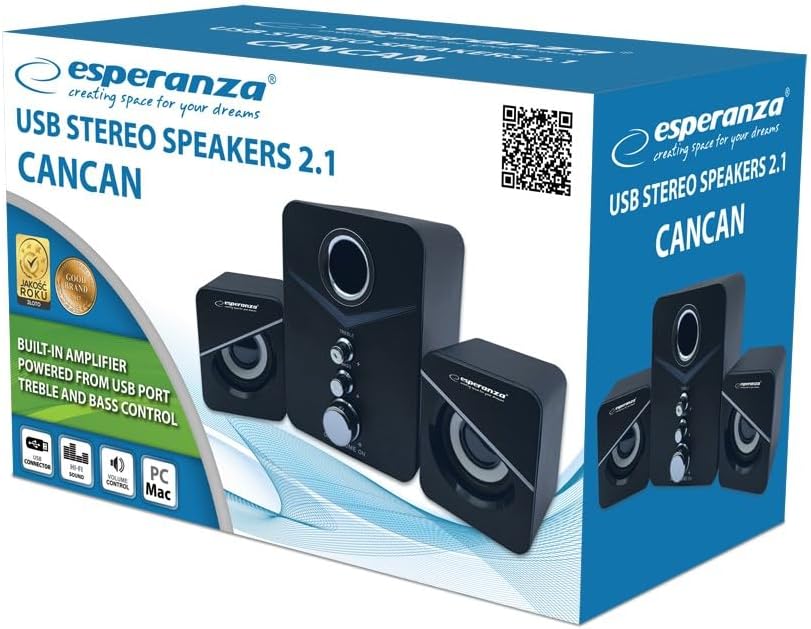
Image: Retail box of the Esperanza 2.1 USB Cancan EP153 speaker system, showing the subwoofer and two satellite speakers.
4. Product Overview
The Esperanza EP153 speaker system consists of a central subwoofer unit and two compact satellite speakers. The subwoofer houses the main controls and connections.

Image: Front view of the Esperanza EP153 subwoofer, featuring illuminated blue accents, a large volume knob, and smaller knobs for bass and treble control.
Subwoofer Controls and Ports:
- Volume Knob: Adjusts the overall sound level.
- Bass Knob: Adjusts the low-frequency output.
- Treble Knob: Adjusts the high-frequency output.
- USB Power Cable: Connects to a USB port for power.
- 3.5mm Audio Input Cable: Connects to your audio source (e.g., computer, laptop, smartphone).
- Satellite Speaker Outputs: Ports for connecting the two satellite speakers.

Image: Rear view of the Esperanza EP153 subwoofer and satellite speakers, showing the various cable connections including the USB power cable and 3.5mm audio input.
5. Setup
Follow these steps to set up your Esperanza EP153 speaker system:
- Placement: Place the subwoofer on a stable surface, preferably on the floor or a desk, ensuring adequate ventilation. Position the two satellite speakers on either side of your monitor or listening area for optimal stereo separation.
- Connect Satellite Speakers: Connect the cables from the two satellite speakers to the corresponding output ports on the back of the subwoofer unit. Ensure a secure connection.
- Connect Audio Source: Plug the 3.5mm audio input cable from the subwoofer into the headphone jack or audio output port of your computer, laptop, or other audio device.
- Connect Power: Plug the USB power cable from the subwoofer into an available USB port on your computer, a USB wall adapter (not included), or a powered USB hub. The speakers will power on automatically or can be turned on using the volume knob if it has an integrated power switch.
- Initial Volume Adjustment: Turn the main volume knob on the subwoofer to its minimum position before playing audio to avoid sudden loud sounds.
6. Operating Instructions
- Power On/Off: The speakers are powered on when the USB cable is connected and the volume knob is turned from the 'OFF' position (if applicable). Turn the volume knob fully counter-clockwise to turn off the speakers.
- Adjusting Volume: Rotate the large volume knob on the front of the subwoofer clockwise to increase volume and counter-clockwise to decrease it.
- Adjusting Bass: Use the 'BASS' knob to increase or decrease the low-frequency output according to your preference.
- Adjusting Treble: Use the 'TREBLE' knob to increase or decrease the high-frequency output for clearer sound.
- Playing Audio: Start playing audio from your connected device. Adjust the volume on both your device and the speaker system for the desired listening level.
7. Maintenance
- Cleaning: Use a soft, dry cloth to clean the speaker surfaces. Do not use liquid cleaners or abrasive materials.
- Storage: When not in use for extended periods, disconnect the power and store the speakers in a cool, dry place.
- Cable Care: Avoid bending or crimping the cables excessively.
8. Troubleshooting
| Problem | Possible Cause | Solution |
|---|---|---|
| No sound |
|
|
| Distorted sound |
|
|
| Only one satellite speaker works |
|
|
9. Specifications
- Model: EP153
- Speaker Type: 2.1 Stereo Speaker System (Subwoofer + 2 Satellites)
- Connectivity: USB (Power), 3.5mm Auxiliary (Audio Input)
- Power Output: 6 Watts RMS (1000 Watts PMPO peak power)
- Control Method: Tactile (Knobs for Volume, Bass, Treble)
- Power Source: USB (5V DC)
- Recommended Use: Computer, PC, Laptop
- Weight: Approximately 2 Kilograms
- Mounting Type: Table Mounting
- Product Number: 5901299945155
10. Warranty and Support
Esperanza products are designed for reliability and performance. For warranty information, please refer to the warranty card included with your purchase or contact your local retailer.
For further product information or support, please visit the official Esperanza website or contact their customer service department.
You can find more product details at: Esperanza Product Information


