
ZEITHALTER SNC3002
ZEITHALTER Digital Alarm Clock User Manual
Model: SNC3002 | Brand: ZEITHALTER
1. Introduction
Thank you for choosing the ZEITHALTER Digital Alarm Clock. This clock features a large, easy-to-read LED display, a convenient swivel base, adjustable alarm sound levels, and customizable display brightness. Designed for ease of use, it is ideal for bedrooms, living rooms, and offices. This manual provides detailed instructions to help you set up and operate your new alarm clock.

Figure 1: ZEITHALTER Digital Alarm Clock
2. Package Contents
- ZEITHALTER Digital Alarm Clock (Model SNC3002)
- AC Power Adapter (integrated cord)
- User Manual
3. Important Safety Information
- Do not expose the unit to extreme temperatures, direct sunlight, dust, or humidity.
- Ensure the power cord is securely plugged into a standard US 120V outlet. Do not use with 240V.
- Keep the device away from water or other liquids.
- Do not attempt to disassemble or modify the clock. Refer all servicing to qualified personnel.
- Use only the specified AAA batteries for backup. Do not mix old and new batteries or different types of batteries.
4. Setup
4.1 Power Connection
The ZEITHALTER Digital Alarm Clock is primarily powered by AC electricity. Plug the integrated power cord into a standard 120V AC wall outlet. The display will illuminate, and the clock will be ready for initial setup.
4.2 Battery Backup Installation
For power outage protection, install two (2) AAA batteries (not included) into the battery compartment located on the bottom of the clock. The battery backup retains time and alarm settings during a power interruption and allows the alarm to sound. The display will not be illuminated during battery backup mode.

Figure 2: Battery backup ensures settings are retained during power outages.
5. Operating Instructions
The clock features clearly labeled buttons on the back for easy operation. Refer to Figure 3 for button identification.
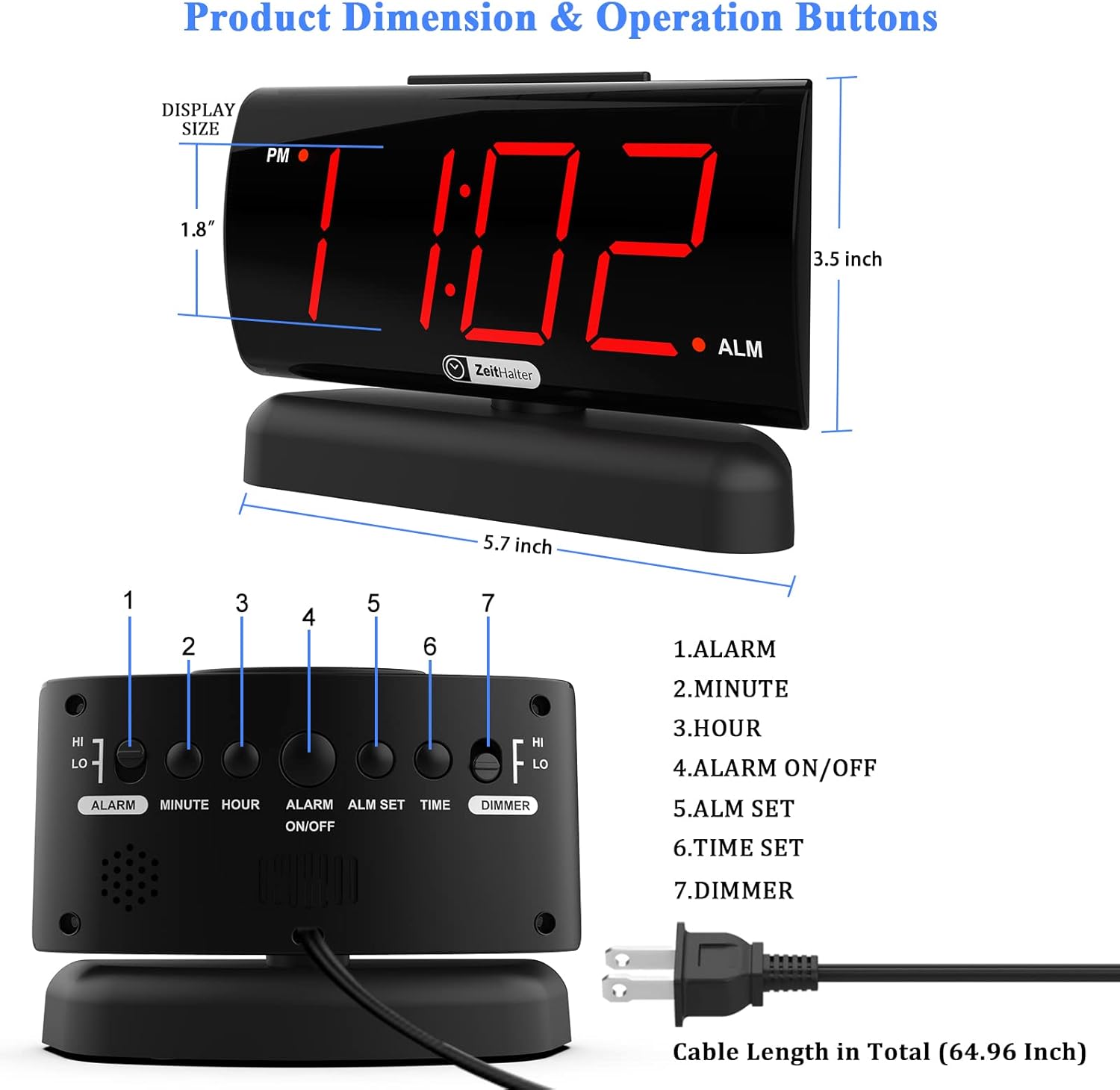
Figure 3: Product Dimensions & Operation Buttons
5.1 Setting the Time
- Press and hold the TIME SET button until the hour digits begin to flash.
- Press the HOUR button to adjust the hour. Pay attention to the PM indicator.
- Press the MINUTE button to adjust the minute.
- Press TIME SET again to confirm and exit time setting mode.
5.2 Setting the Alarm
- Press and hold the ALM SET button until the alarm hour digits begin to flash.
- Press the HOUR button to adjust the alarm hour.
- Press the MINUTE button to adjust the alarm minute.
- Press ALM SET again to confirm and exit alarm setting mode.
- To activate or deactivate the alarm, press the ALARM ON/OFF button. An alarm indicator (usually a small dot or icon) will appear on the display when the alarm is active.
5.3 Snooze Function
When the alarm sounds, press the large SNOOZE button located on the top of the clock. This will temporarily silence the alarm for 9 minutes. The alarm will sound again after the snooze period. To turn off the alarm completely, press the ALARM ON/OFF button on the back.

Figure 4: Large Snooze Button for easy access.
5.4 Adjusting Display Brightness
The clock offers two levels of display brightness (High and Low). To adjust, slide the DIMMER switch on the back of the clock to your preferred setting. The low setting is ideal for nighttime use to avoid disturbing sleep.

Figure 5: Two Display Brightness Levels.
5.5 Adjusting Alarm Volume
The alarm sound has two volume levels: High and Low. To adjust, slide the ALARM HI/LO switch on the back of the clock to your desired volume. This allows for a comfortable wake-up experience, whether you are a light or heavy sleeper.

Figure 6: Adjustable Alarm Volume.
5.6 90° Swivel Base
The clock is equipped with a 90° swivel base, allowing you to easily adjust the viewing angle for optimal readability from various positions in your room. Simply rotate the clock on its base to achieve the desired angle.

Figure 7: 90° Swivel Base for easy viewing.
5.7 Features in Action (Video)
Video 1: This video demonstrates various features of the ZEITHALTER Digital Alarm Clock, including AC power supply, setting the time, snooze mode, 2-level brightness dimmer, 90° swivel base, and battery installation. It provides a visual guide to the clock's functionality.
6. Maintenance
- Cleaning: To clean the clock, wipe the surface with a soft, dry cloth. Do not use abrasive cleaners or solvents, as they may damage the finish.
- Battery Replacement: Replace the AAA backup batteries annually or if you notice settings are not retained during power outages.
- Storage: If storing the clock for an extended period, remove the backup batteries to prevent leakage.
7. Troubleshooting
| Problem | Possible Cause | Solution |
|---|---|---|
| Display is blank. | No AC power; Dimmer set to 0% light. | Ensure the power cord is securely plugged in. Check the dimmer switch on the back and set it to HI or LO. |
| Alarm does not sound. | Alarm is not activated; Alarm time is incorrect; Volume is too low. | Press the ALARM ON/OFF button to activate the alarm (check for indicator). Verify the alarm time is set correctly. Adjust the ALARM HI/LO switch. |
| Time/settings lost after power outage. | Backup batteries are dead or not installed. | Install two new AAA batteries in the battery compartment. |
| Clock display is too dim/bright. | Dimmer setting is not preferred. | Adjust the DIMMER switch on the back of the clock. |
8. Specifications
| Feature | Detail |
|---|---|
| Model Number | SNC3002 |
| Display Type | 1.8'' Large Red LED Digital Display |
| Power Source | AC 120V Corded Electric |
| Battery Backup | 2 x AAA Batteries (not included) |
| Snooze Duration | 9 Minutes |
| Brightness Levels | 2 (High, Low) |
| Alarm Volume Levels | 2 (High, Low) |
| Dimensions (W x H) | 6.14" x 4.09" (156mm x 104mm) |
| Weight | 10.7 ounces |
| Material | Plastic, Acrylonitrile Butadiene Styrene |
| Special Features | 90° Swivel Base, Easy-to-Use Buttons |
9. Warranty and Support
ZEITHALTER provides a 24-month warranty for this product from the date of purchase, covering manufacturing defects. We also offer lifetime support to ensure your satisfaction.
For technical assistance, troubleshooting, or warranty claims, please contact our customer support team:
- Email: support@zeithalter.com
- Website: www.zeithalter.com
Please have your model number (SNC3002) and purchase information ready when contacting support.
Ask a question about this manual
Ask about setup, troubleshooting, compatibility, parts, safety, or missing instructions. Manuals+ will review the question and use this page’s manual context to help answer it.