
Acvoce Keypad for Learn Button & Dip Switch
Acvoce Universal Garage Door Opener Keypad Instruction Manual
Model: Keypad for Learn Button & Dip Switch
1. Introduction
This manual provides detailed instructions for the installation, programming, and operation of your Acvoce Universal Garage Door Opener Keypad. This keypad offers convenient keyless access to your garage, compatible with a wide range of garage door opener brands and technologies.
The keypad features a durable, weather-resistant flip-up cover and a backlit keypad for easy visibility in various lighting conditions. It is designed to control up to three different garage door openers.
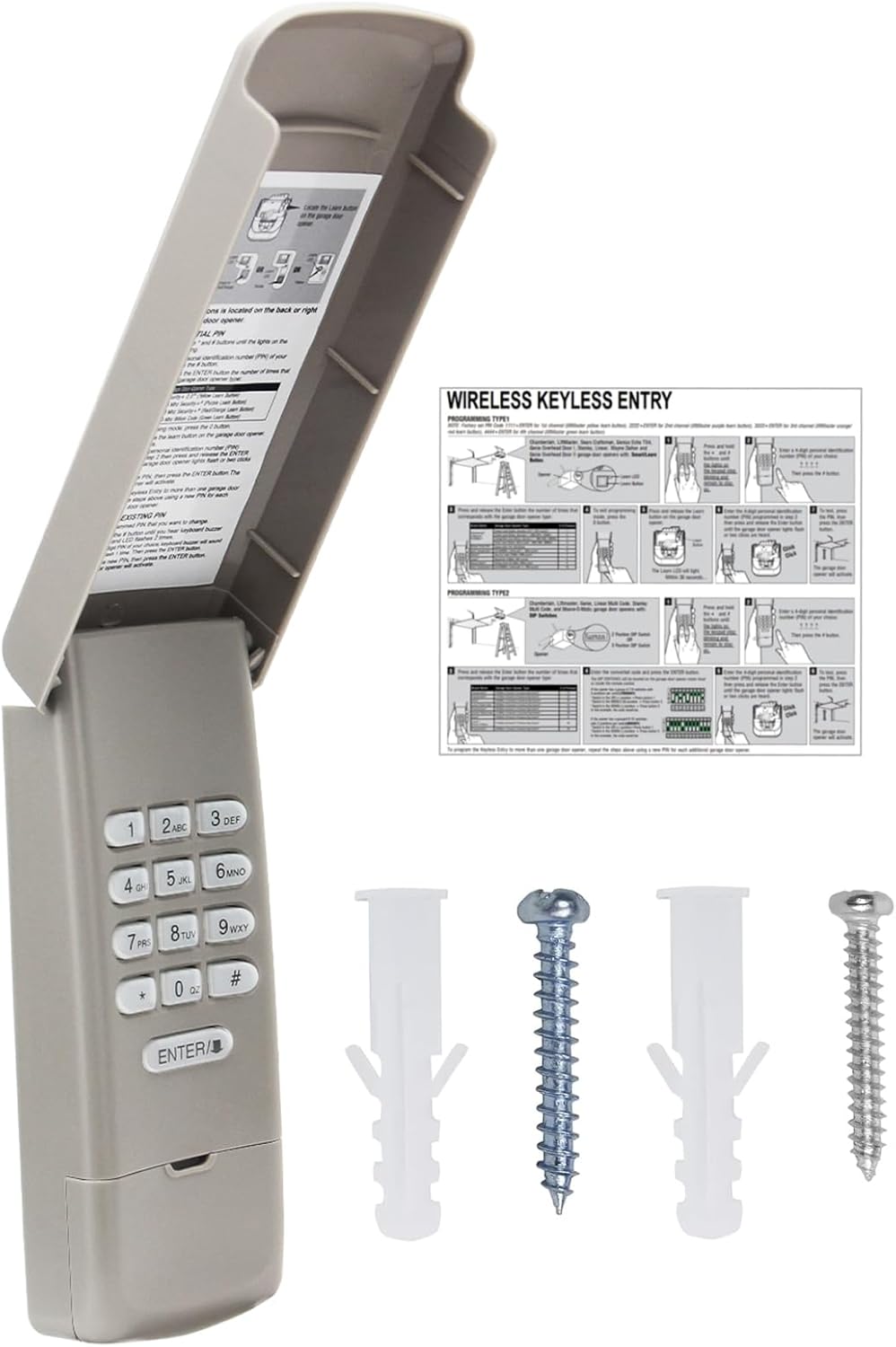
This image displays the Acvoce universal garage door opener keypad, its flip-up cover open to reveal the numeric buttons. Alongside it are the detailed programming instructions and the mounting screws and anchors provided for installation.
2. Compatibility
The Acvoce Universal Garage Door Opener Keypad is designed for broad compatibility. Please verify your garage door opener's brand, year of manufacture, and the color of its learn button or dip switch configuration to ensure compatibility.
2.1 Compatible Brands and Systems
- Chamberlain, Liftmaster, Craftsman: Green, Orange/Red, Purple, Yellow Learn Buttons, and 7, 8, 9, 10, 12 Code Dip Switches.
- Genie, Overhead Door: Intellicode (1995-Current), and 9 Code Dip Switches.
- Linear: MegaCode (1997-Current), and 10 Code Dip Switches.
- Stanley: Multi-Code, and 10 Code Dip Switches.
- Other Compatible Brands: Legacy, BlueMAX, Python, Raynor, Access Master, Wayne Dalton.
2.2 Incompatible Systems
- Sears Craftsman Series 100, 200.57933
- Overhead Door models 456, 551, 556, and 1000A
- Overhead Door openers equipped with dip switches.

A detailed table outlining the compatibility of the Acvoce keypad with various garage door opener brands, including Chamberlain, Liftmaster, Genie, Linear, and Stanley. It specifies compatible learn button colors (Red/Orange, Purple, Green, Yellow) and dip switch configurations with their corresponding frequencies and years.

This image provides a partial list of specific compatible models for LiftMaster, Chamberlain, Craftsman, Genie, Overhead Door, Linear, Wayne Dalton, and various Code/Dip Switch systems. Users should refer to this list to confirm their opener's compatibility.
3. Package Contents
Upon opening your package, please ensure all the following items are present:
- Acvoce Universal Garage Door Opener Keypad
- Mounting Screws
- 9V Battery (pre-installed in keypad)
- Instruction Manual (this document)
4. Setup and Installation
4.1 Battery Installation
The keypad comes with a 9V battery pre-installed. If you need to replace it, open the battery compartment located at the bottom rear of the keypad, insert a new 9V battery, and close the cover securely.
4.2 Mounting the Keypad
The keypad is designed for easy surface mounting next to your garage door. Choose a location that is easily accessible but out of reach of small children.
- Open the keypad's flip-up cover.
- Locate the mounting hole on the back of the keypad.
- Using the provided screw, secure the keypad to a sturdy surface (e.g., door frame, wall). Ensure it is mounted at a comfortable height.

A visual guide demonstrating the easy installation process of the Acvoce keypad. It shows how to mount the keypad using a single screw and how to insert the 9V battery into its compartment.
5. Programming Instructions
Before programming, ensure your garage door is closed. The keypad can be programmed for both Learn Button and Dip Switch type garage door openers.
5.1 Programming for Learn Button Openers
- On the keypad, press and hold the * (star) and # (pound) buttons simultaneously until the keypad backlight flashes. Release both buttons.
- Enter your desired 4-digit Personal Identification Number (PIN).
- Press the # button. The backlight will flash once.
- Locate the LEARN button on your garage door opener motor head. Press and release this button. The LED indicator on the opener will light up, signaling it is ready to learn a new code.
- Within 30 seconds of pressing the opener's LEARN button, return to the keypad and enter your 4-digit PIN again.
- Press the ENTER button. The garage door opener should activate (e.g., lights flash, motor hums).
- Press the ENTER button again. The garage door opener should activate a second time.
- Test your new PIN by entering it and pressing ENTER. The garage door should open or close.
5.2 Programming for Dip Switch Openers
- On the keypad, press and hold the * (star) and # (pound) buttons simultaneously until the keypad backlight flashes. Release both buttons.
- Enter your desired 4-digit Personal Identification Number (PIN).
- Press the # button. The backlight will flash once.
- Locate the dip switches on your garage door opener. Open the battery compartment or a dedicated panel on the keypad to access its dip switches.
- Carefully match the position of the dip switches on the keypad to precisely replicate the settings on your garage door opener.
- Press the ENTER button. The garage door opener should activate.
- Press the ENTER button again. The garage door opener should activate a second time.
- Test your new PIN by entering it and pressing ENTER. The garage door should open or close.
5.3 Changing an Existing PIN
- Press and hold the * (star) and # (pound) buttons simultaneously until the keypad backlight flashes. Release both buttons.
- Enter your existing 4-digit PIN.
- Press the # button. The backlight will flash once.
- Enter your new 4-digit PIN.
- Press the # button. The backlight will flash once.
- Test the new PIN by entering it and pressing ENTER.
6. Operating the Keypad
6.1 Opening and Closing the Garage Door
To open or close your garage door, simply enter your 4-digit PIN and press the ENTER button. The keypad will beep with each button press, confirming input.
6.2 One-Button Close Feature
For security and to conserve battery life, the one-button close feature operates as follows:
- After opening the garage door using your PIN, you can press the ENTER button within 15 seconds to close the garage door without re-entering the PIN.
- If more than 15 seconds have passed since the door was opened, you must re-enter your 4-digit PIN and then press ENTER to close the garage door.

An image illustrating the convenience of keyless garage access, showing a person approaching a garage door with the Acvoce keypad mounted on the wall, allowing entry without a traditional remote or key.

A close-up view of the Acvoce keypad, emphasizing its convenient design features: a weatherproof flip-up protective cover and a backlit keypad for easy visibility and operation in low-light conditions.
7. Maintenance
7.1 Battery Replacement
The keypad is powered by a 9V battery. If the keypad's backlight becomes dim or the range decreases, it is time to replace the battery. To replace the battery:
- Open the flip-up cover of the keypad.
- Locate the battery compartment at the bottom rear of the keypad.
- Remove the old 9V battery.
- Insert a new 9V Zinc Carbon battery, ensuring correct polarity.
- Close the battery compartment cover securely.
8. Troubleshooting
If you encounter issues with your Acvoce Universal Garage Door Opener Keypad, please refer to the following common solutions:
- Keypad Not Pairing:
- First, reset the keypad to factory settings according to the instructions provided in the package.
- Verify compatibility: Ensure your garage door opener's brand, learn button color, or dip switch type is listed as compatible.
- Try programming with a different learn button color: Sometimes, the color of the learn button on your opener may be faded or misidentified.
- Opener's memory full: Your garage door opener's memory might be full. Erase the opener's memory (refer to your garage motor unit's operation manual) and then attempt to program the keypad again.
- Ensure the garage door is closed: Some openers require the garage door to be in the closed position before programming can be completed successfully.
- "ENTER" Key Issues During Programming:
- If the ENTER button seems unresponsive or requires multiple presses during programming, try pressing and releasing it a few times, or press and hold it until you hear two clicks or see the light flash.
- Short Range or Intermittent Operation:
- Replace the 9V battery with a fresh one. A weak battery is a common cause of reduced range and unreliable operation.

An image presenting a troubleshooting guide for common issues with the Acvoce keypad, including tips for programming, range problems, and battery replacement.
9. Specifications
| Feature | Specification |
|---|---|
| Manufacturer | Acvoce |
| Item Weight | 6.4 ounces |
| Package Dimensions | 6.93 x 2.83 x 1.57 inches |
| Batteries Required | 1 x 9V battery (included) |
| Battery Cell Type | Zinc Carbon |
| Color | Garage Door Keypad (Flip Cover Type) |
| Style | Keypad for Learn Button & Dip Switch |
| Item Package Quantity | 1 |
10. Warranty and Customer Support
10.1 Warranty Information
Acvoce products are backed by an industry-leading 1-Year warranty from the date of purchase. This warranty covers defects in materials and workmanship under normal use.
10.2 Customer Support
If you have any questions, require assistance with installation or programming, or experience any issues with your Acvoce Universal Garage Door Opener Keypad, please do not hesitate to contact our customer service team. You can reach us through the "Ask a question" link on our store front page.
Ask a question about this manual
Ask about setup, troubleshooting, compatibility, parts, safety, or missing instructions. Manuals+ will review the question and use this page’s manual context to help answer it.