
1. Introduction
The X-DRAGON 140W Foldable Solar Panel Charger is designed to provide portable power for various electronic devices and portable power stations. Featuring high-efficiency polycrystalline solar cells, this charger is ideal for outdoor activities, emergencies, and off-grid power needs. Its foldable design and adjustable kickstand ensure ease of use and optimal sunlight exposure.
2. Package Contents
Please verify that all items are present in your package:
- X-DRAGON 140W Foldable Solar Charger
- DC to Anderson Cable
- DC 5.5x2.5mm to 5.5x2.1mm Cable
- 5 Laptop Connectors
- Instruction Manual (this document)

Image: The X-DRAGON 140W Foldable Solar Panel shown with its various included cables and laptop connectors, illustrating the complete package contents.
3. Product Features
The X-DRAGON 140W Foldable Solar Panel Charger incorporates several features for efficient and safe power generation:
- High Efficiency: Utilizes US-made polycrystalline solar cells with up to 20% conversion efficiency.
- Multiple Output Methods: Includes MC-4 (20A max), Dual USB (5V/2.4A per port with iSolar Technology), and 18V DC (18V/6.6A) outputs.
- Adjustable Kickstand: Integrated kickstand allows for optimal angling towards the sun, potentially increasing sunlight absorption by up to 25%.
- Portability: Foldable design with a portable handle for easy transport and storage.
- Safety Protections: Built-in Over Power Protection, Surge Protection, and Short Circuit Protection.

Image: A collage highlighting key features of the X-DRAGON solar panel, such as the MC4 output, ergonomic handle, adjustable kickstand, and the high-efficiency polycrystalline solar cells.
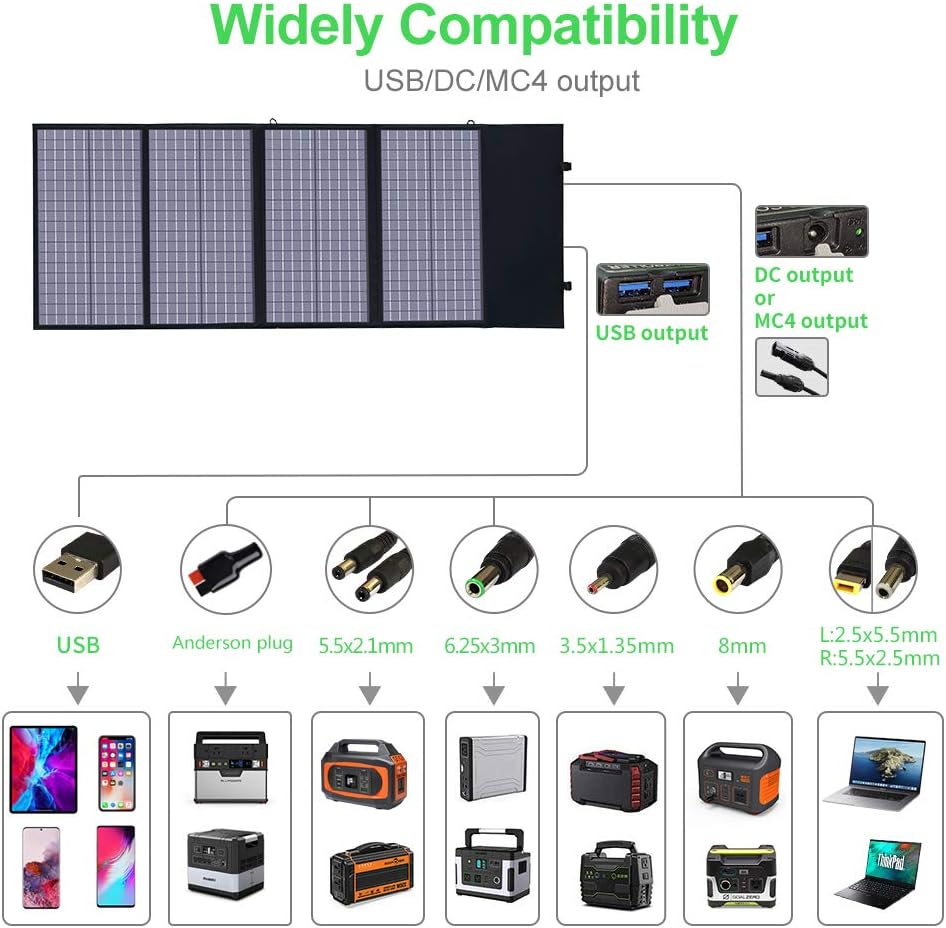
Image: Close-up view of the solar controller, showing the MC4 port and icons indicating over power, surge, and short circuit protection features.
4. Setup Guide
4.1 Unfolding and Positioning
- Unfold the solar panel completely on a flat surface.
- Locate the integrated kickstand on the back of the panel.
- Adjust the kickstand to angle the solar panel directly towards the sun. This maximizes sunlight exposure and charging efficiency.
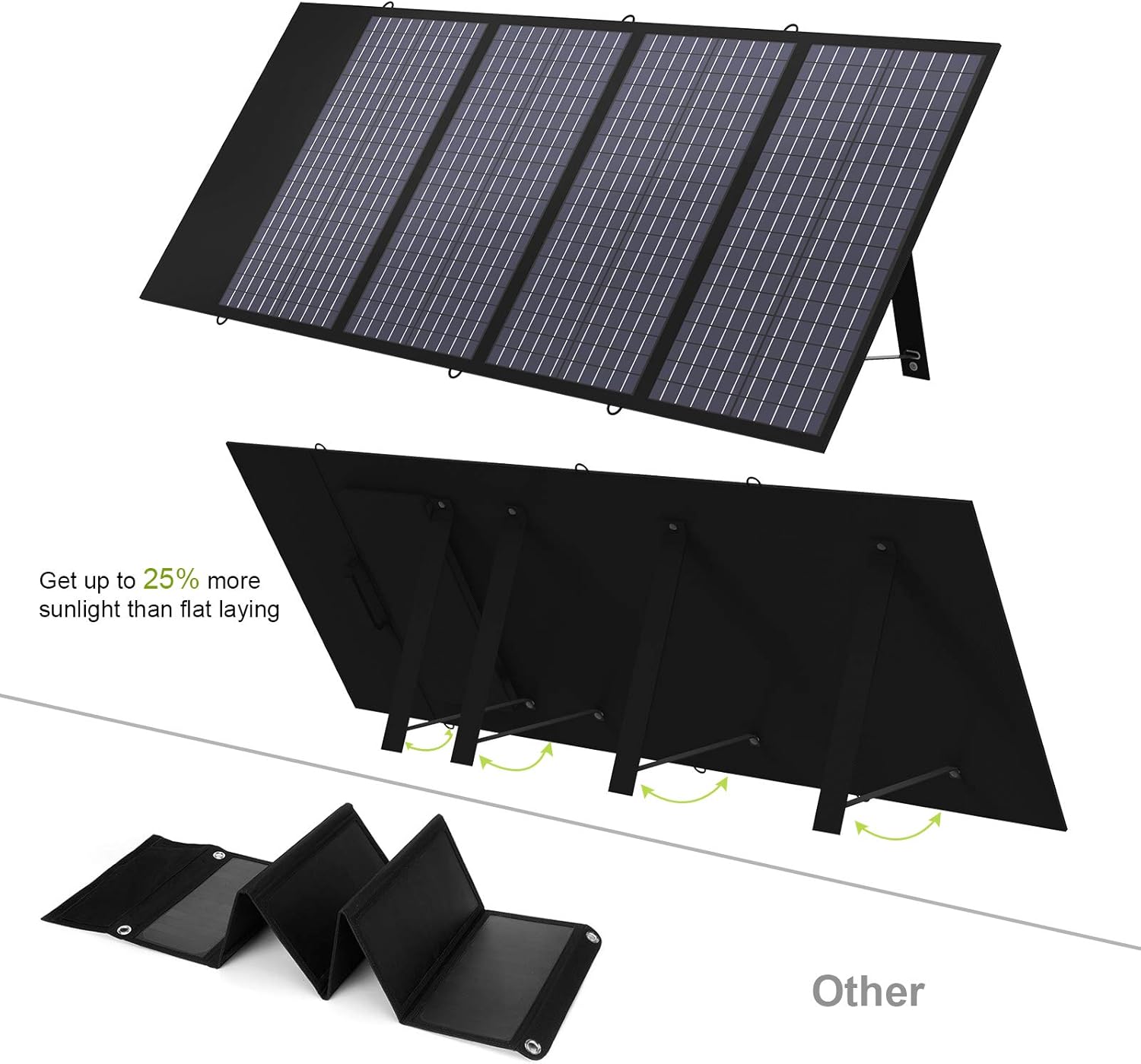
Image: The X-DRAGON solar panel displayed with its adjustable kickstand extended, demonstrating how to position it for optimal sun exposure.
4.2 Initial Connection
Before connecting devices, ensure the solar panel is positioned in direct sunlight. Connect your device or power station to the appropriate output port on the solar controller.
5. Operating Instructions
5.1 Charging Devices
The X-DRAGON 140W solar panel offers multiple output options:
- USB Ports (5V): Use the dual USB ports to charge 5V USB-powered gadgets such as smartphones, tablets, and external battery packs. The iSolar Technology automatically adjusts current and voltage for the fastest possible charge.
- DC Output (18V): Connect 18V laptops, 12V car batteries (requires a charge controller for battery protection), and compatible portable generators using the provided DC cables and laptop connectors.
- MC-4 Output: Designed for charging X-DRAGON Portable Power Stations and other compatible devices that accept MC-4 input. The MC-4 output can deliver up to 20A.

Image: The X-DRAGON solar panel connected and simultaneously charging a laptop, a tablet, and a smartphone, demonstrating its multi-device charging capability.
5.2 Optimal Performance
For best charging results, ensure the solar panel is placed in direct sunlight without any obstructions. Cloudy weather will significantly reduce power output. Periodically adjust the panel's angle to follow the sun's movement throughout the day.
6. Connecting Multiple Solar Panels
The X-DRAGON 140W solar panel supports connecting multiple units to increase power output. Ensure the total wattage of all connected solar panels does not exceed 280W.
6.1 Series Connection
In a series connection, the voltage of the panels adds up. Connect the positive (+) terminal of one panel to the negative (-) terminal of the next. A maximum of 5 panels can be chained in series.
6.2 Parallel Connection
In a parallel connection, the current of the panels adds up. Connect positive (+) terminals together and negative (-) terminals together. A maximum of 2 panels can be chained in parallel.
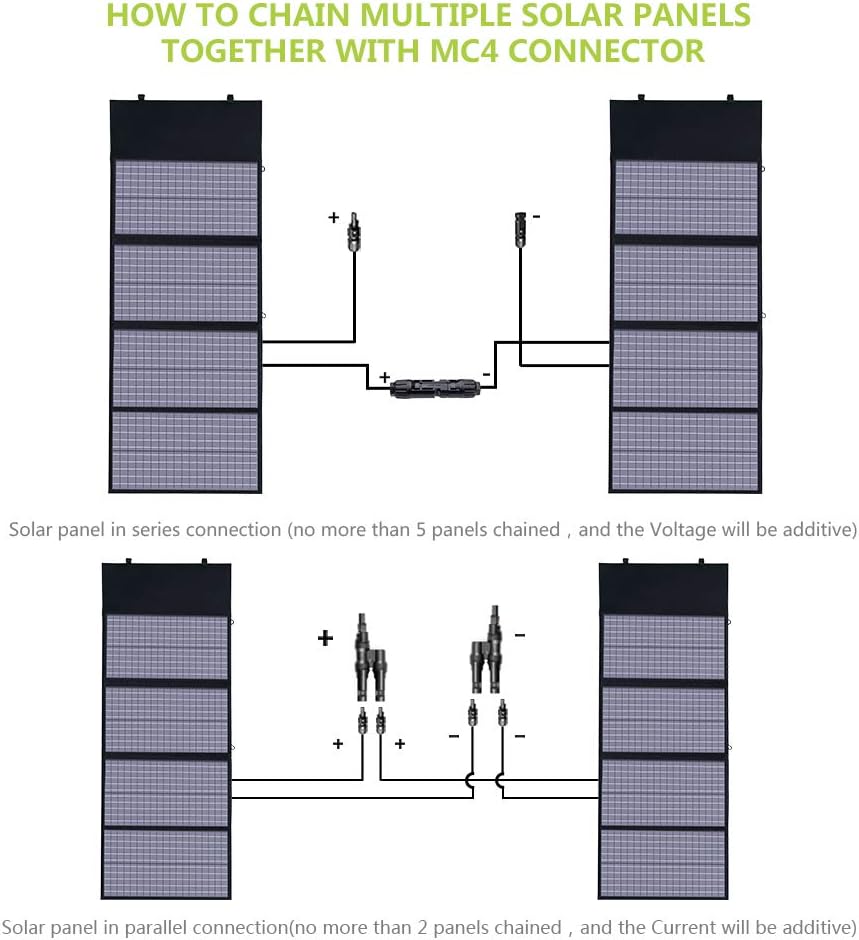
Image: A diagram illustrating the correct wiring for connecting multiple X-DRAGON solar panels in both series and parallel configurations using MC4 connectors.
7. Compatibility
The X-DRAGON 140W solar panel is designed for broad compatibility:
- Portable Power Stations: Compatible with most major brands including ECOFLOW (via MC-4), Jackery (via DC Adapter), and ALLPOWER (via Anderson Adapter).
- Laptops: Charges 18V laptops and other devices requiring 18V DC input, using the provided laptop connectors.
- USB Devices: Charges 5V USB devices such as smartphones, tablets, and power banks.
- 12V Car Batteries: Can charge 12V car batteries when used with an appropriate charge controller (sold separately) to prevent overcharging.

Image: A detailed compatibility chart illustrating the various USB, DC, and MC4 output options and the range of devices they can charge, including smartphones, tablets, portable power stations, and laptops.
8. Maintenance and Care
- Cleaning: Regularly wipe the solar panels with a soft, damp cloth to remove dust, dirt, or debris that may reduce efficiency. Do not use harsh chemicals or abrasive materials.
- Weather Protection: While the panel has some water resistance, avoid prolonged exposure to heavy rain or submersion in water. Store in a dry place when not in use.
- Storage: Fold the panel and store it in a cool, dry environment away from direct sunlight when not in use for extended periods.
- Handling: Handle the panel with care to avoid physical damage to the solar cells or frame.
9. Troubleshooting
- Low Power Output:
- Ensure the panel is in direct, unobstructed sunlight.
- Adjust the panel's angle using the kickstand to face the sun directly.
- Clean the panel surface to remove any dirt or dust.
- Cloudy or overcast conditions will naturally reduce output.
- Device Not Charging:
- Verify that the device is compatible with the solar panel's output voltage and current.
- Check all cable connections to ensure they are secure and correctly inserted.
- Ensure sufficient sunlight is reaching the panel.
- If charging a 12V car battery, confirm a charge controller is properly connected.
- Panel Overheating:
- While solar panels operate in heat, extreme temperatures can affect performance. Ensure adequate airflow around the panel.
10. Technical Specifications

Image: A table comparing the technical specifications of the X-DRAGON 140W solar panel with other similar products, highlighting its peak power, cell efficiency, and output methods.
| Specification | Value |
|---|---|
| Brand | X-DRAGON |
| Model Number | XD-SP-002-BLA |
| Material | Polycrystalline Silicon |
| Product Dimensions (Unfolded) | 62.2"L x 22.05"W x 0.2"H |
| Item Weight | 9.92 pounds (4500 Grams) |
| Efficiency | Up to 20% |
| Maximum Power | 140 Watts |
| Maximum Voltage (USB) | 5 Volts |
| Output Voltage (DC) | 18 Volts |
| AC Adapter Current (MC-4) | 25 Amps (Max MC-4 output 20A) |
| Power Source | Solar-Powered |
| Temperature Range | -4°F to 140°F (-20°C to 60°C) |
| Certifications | CE, FCC |
11. Warranty and Customer Support
The X-DRAGON 140W Foldable Solar Panel Charger comes with an 18-month warranty from the date of purchase. This warranty covers manufacturing defects and issues arising from normal use.
For technical assistance, warranty claims, or any questions regarding your product, please contact X-DRAGON customer service. Refer to the contact information provided on the product packaging or the official X-DRAGON website for the most up-to-date support details.
Please have your model number (XD-SP-002-BLA) and proof of purchase ready when contacting support.