
1. Product Overview
The Binefia RQ676 is a versatile 4-in-1 electric grooming kit designed for men. It includes a rotary shaver, a hair clipper, a nose and ear trimmer, and a facial cleansing brush. This device features a 4D floating contour-following system, IPX7 waterproofing for wet and dry use, and a smart LED display for battery status and reminders.

Image 1.1: The Binefia RQ676 4-in-1 Electric Shaver kit, showcasing the main unit with rotary shaver head, hair clipper, nose trimmer, and facial cleansing brush attachments.
Package Contents:
- Rotary Shaver Head
- Hair Clipper Head
- Nose & Ear Trimmer Head
- Facial Cleansing Brush Head
- 4 Attachment Guide Combs (3mm, 6mm, 9mm, 12mm)
- USB Charger
- USB Cable
- Cleaning Brush
- User Manual (this document)
2. Safety Information
Please read all safety instructions carefully before using the device to ensure safe operation and prevent injury or damage.
- Keep the device away from children.
- Do not disassemble, repair, or modify the device yourself. Contact customer support if service is required.
- Use only the provided USB cable and charger.
- Do not immerse the charger or USB cable in water.
- Ensure the charging port is dry before connecting the USB cable.
- If the device is damaged, discontinue use immediately.
- Avoid using the device on irritated or broken skin.
- For hygiene reasons, do not share the device with others.
3. Setup and Charging
3.1 Initial Charge
Before first use, fully charge the shaver. The device features a 1400mAh Li-ion battery.
- Ensure the shaver is turned off.
- Connect the USB cable to the shaver's charging port.
- Connect the other end of the USB cable to the provided USB charger, a computer, car charger, or power bank.
- The LED display will show the battery percentage increasing during charging.
- A full charge takes approximately 1.5 hours and provides up to 120 minutes of running time, or approximately 50 days of typical use.

Image 3.1: The Binefia electric shaver being charged via USB, illustrating the charging process and battery specifications.
3.2 Attaching/Detaching Heads
To change attachments, gently pull the current head upwards to remove it. Align the desired head with the main unit and push it down until it clicks into place.
4. Operating Instructions
The Binefia RQ676 supports both wet and dry shaving and grooming.
4.1 Power On/Off and Travel Lock
- Power On/Off: Press the power button once to turn the device on or off.
- Travel Lock: To activate the travel lock, press and hold the power button for 3 seconds. The lock icon will appear on the LED display. To deactivate, press and hold the power button for 3 seconds again.

Image 4.1: The smart LED screen displaying battery percentage, a cleaning reminder icon, a smart travel lock icon, and a charging reminder icon.
4.2 Using the Rotary Shaver
The 4D floating rotary shaver head adapts to facial contours for a close shave.
- Dry Shave: For a quick shave, ensure your face is clean and dry. Move the shaver in small, circular motions against the direction of hair growth.
- Wet Shave: For extra skin protection, apply shaving gel or foam to your face. Move the shaver in small, circular motions. Rinse the shaver head under running water during and after use.
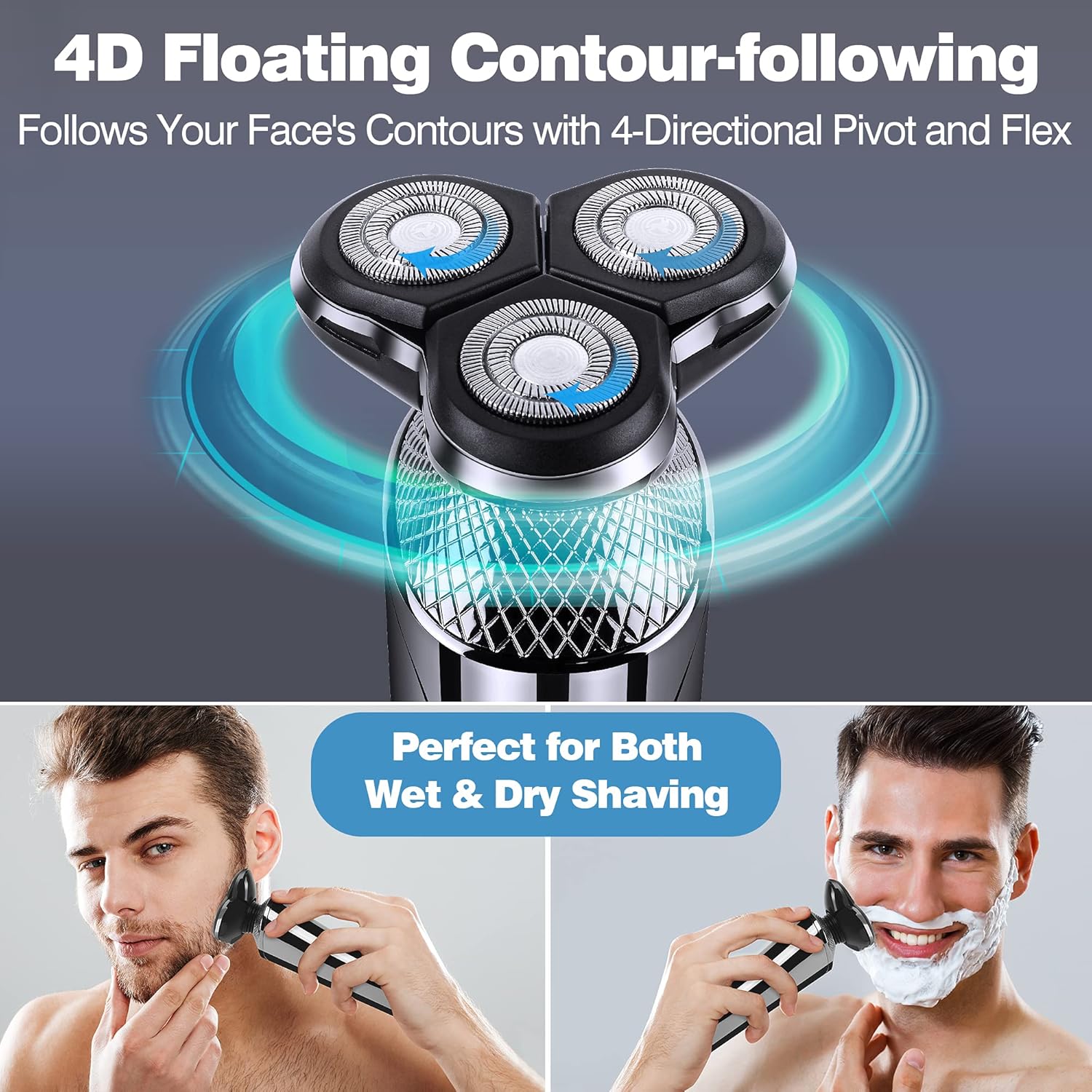
Image 4.2: Illustration of the 4D floating contour-following shaver head and examples of both wet and dry shaving techniques.
4.3 Using the Hair Clipper
Attach the hair clipper head for trimming beards, sideburns, or hair.
- Select one of the four guide combs (3mm, 6mm, 9mm, 12mm) and attach it to the clipper head for desired hair length.
- Turn on the device and move the clipper against the direction of hair growth.
- For precise edging, remove the guide comb and use the clipper blade directly.

Image 4.3: A man using the hair clipper attachment, with an inset showing the four available guide comb sizes (3mm, 6mm, 9mm, 12mm).
4.4 Using the Nose & Ear Trimmer
Attach the nose and ear trimmer head for removing unwanted hair.
- Gently insert the trimmer tip into your nostril or ear canal.
- Move the trimmer in a circular motion to cut hairs. Do not insert too deeply.
4.5 Using the Facial Cleansing Brush
Attach the facial cleansing brush head for deep skin cleaning.
- Wet your face and apply your preferred facial cleanser to the brush head or your skin.
- Turn on the device and gently move the brush in circular motions across your face.
- Rinse your face and the brush head thoroughly after use.
5. Maintenance and Cleaning
Regular cleaning ensures optimal performance and extends the lifespan of your device.
5.1 Cleaning the Shaver Heads
The Binefia RQ676 is IPX7 waterproof, allowing for easy cleaning under running water.
- After each use, turn off the device.
- Detach the used head (rotary shaver, clipper, trimmer, or brush).
- Rinse the head thoroughly under running tap water. For the rotary shaver, you can open the shaver head tops for a more thorough clean of the blades.
- Use the small cleaning brush provided to remove any stubborn hair or debris from the blades and internal components.
- Shake off excess water and allow the head to air dry completely before reattaching or storing.
- The main body of the shaver can also be rinsed under running water, but ensure the charging port is closed and dry before charging.

Image 5.1: The Binefia electric shaver demonstrating its IPX7 waterproof feature, being safely cleaned under running water. An inset shows the rotary shaver head opened for detailed cleaning.
5.2 Storage
Store the device and its attachments in a dry, cool place, away from direct sunlight and out of reach of children.
6. Troubleshooting
| Problem | Possible Cause | Solution |
|---|---|---|
| Device does not turn on. | Low battery or travel lock activated. | Charge the device. Deactivate travel lock by pressing and holding the power button for 3 seconds. |
| Shaver performance is poor. | Blades are dirty or dull. | Clean the shaver head thoroughly. If performance does not improve, consider replacing the shaver head (contact customer support for availability). |
| Device not charging. | USB cable or charger issue, or charging port is wet. | Ensure the USB cable is securely connected and the charger is working. Verify the charging port is dry. Try a different USB power source. |
| Attachments are difficult to change. | Incorrect alignment or excessive force. | Ensure proper alignment before pushing or pulling. Apply gentle, firm pressure. Avoid excessive force to prevent damage. |
7. Specifications
| Feature | Detail |
|---|---|
| Model | RQ676 |
| Power Source | 1400mAh Li-ion Battery Powered |
| Charging Time | Approx. 1.5 hours |
| Running Time | Approx. 120 minutes |
| Waterproof Rating | IPX7 (100% Waterproof) |
| Blade Material | Stainless Steel |
| Display | Smart LED Display (Battery Percentage, Charge Indicator, Cleaning Indicator, Safe Lock Indicator) |
| Included Heads | Rotary Shaver, Hair Clipper, Nose Hair Trimmer, Facial Cleansing Brush |
| Package Dimensions | 20.4 x 15.2 x 6.4 cm |
| Weight | 583 g |
8. Warranty and Support
For warranty information or technical support, please refer to the contact details provided with your purchase or visit the official Binefia website. Keep your proof of purchase for warranty claims.