1. Introduction
Thank you for choosing the INJORA T6DC 2.4GHz 6-channel RC Transmitter and Receiver system. This system is designed to provide reliable and responsive control for various RC models, including 1/8 and 1/10 scale RC cars, boats, tanks, and crawlers like the TRX4 and SCX10. This manual provides detailed instructions for setup, operation, and maintenance to ensure optimal performance and longevity of your device. Please read this manual thoroughly before using the product.
2. Safety Information
- Always operate your RC model in a safe and open area, away from people, pets, and obstacles.
- Ensure all batteries are correctly installed and charged before operation.
- Never operate your RC model near water unless it is specifically designed for aquatic use.
- Keep the transmitter and receiver away from extreme temperatures, moisture, and direct sunlight.
- Do not attempt to modify or disassemble the components, as this may void the warranty and cause damage.
- Always turn on the transmitter before turning on the receiver, and turn off the receiver before turning off the transmitter.
3. Package Contents
Verify that all items listed below are included in your package:
- 1x INJORA T6DC 2.4GHz 6CH Transmitter
- 1x INJORA T6DC Receiver
- 1x Instruction Manual

Figure 1: Contents of the INJORA T6DC package, including the transmitter, receiver, and manual.
4. Product Overview
4.1 Transmitter Layout
The INJORA T6DC transmitter features an ergonomic design for comfortable handling and precise control. Key components include:
- Steering Wheel: Controls the left and right steering of your RC model.
- Throttle Trigger: Controls forward and reverse movement, as well as braking.
- CH3 Button: A three-position switch for controlling auxiliary functions (e.g., lights, winches).
- CH4 Button: A two-position switch for controlling auxiliary functions.
- CH5/CH6 Buttons: Additional buttons for controlling auxiliary functions.
- Trim Adjustments: Dials located under a flip cover for fine-tuning steering and throttle neutral positions.
- USB Connection: (Only for 5V) Used for charging rechargeable batteries if installed.

Figure 2: Detailed view of the INJORA T6DC transmitter controls, including steering, throttle, and trim adjustments.

Figure 3: Diagram showing the mixed mode control capability of the transmitter, useful for dual motor setups.
4.2 Receiver Layout
The INJORA T6DC receiver is a compact unit designed to receive signals from the transmitter and control your RC model's components. It features multiple channels for connecting servos, ESCs, and other accessories.
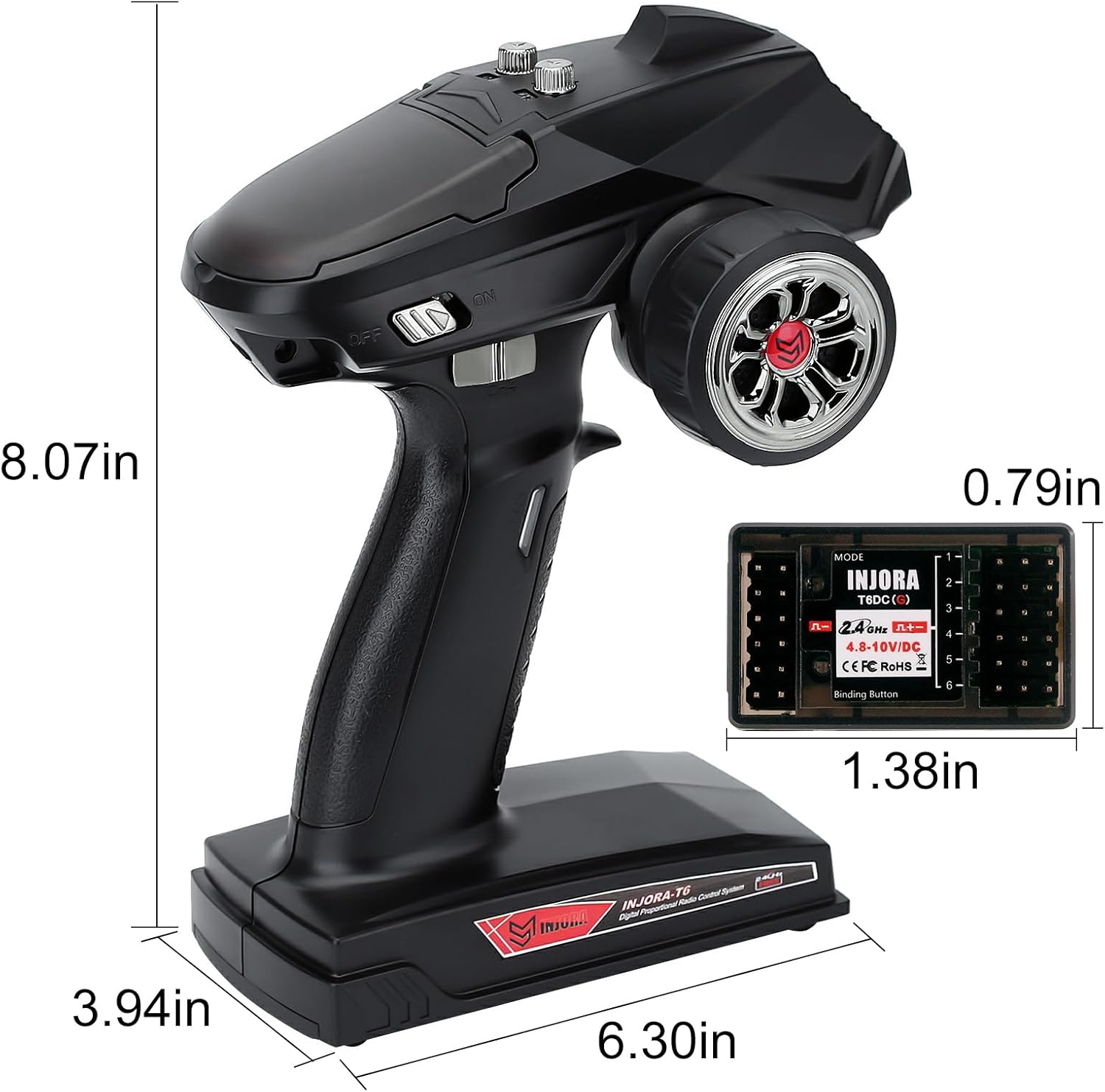
Figure 4: The INJORA T6DC receiver module, shown with approximate dimensions for installation planning.

Figure 5: Close-up of the receiver ports, indicating connections for various channels and power.
5. Setup
5.1 Battery Installation (Transmitter)
The INJORA T6DC transmitter requires 4 AA batteries for operation. Follow these steps to install them:
- Locate the battery compartment cover on the bottom of the transmitter.
- Slide the cover open.
- Insert 4 AA batteries, ensuring correct polarity (+/-).
- Close the battery compartment cover securely.

Figure 6: The battery compartment of the transmitter, designed for four AA batteries.
Video 1: An official video demonstrating the unboxing and initial setup, including battery installation, for the INJORA RC Transmitter.
5.2 Receiver Connection
Connect the receiver to your RC model's components as follows:
- Connect the steering servo to the CH1 port.
- Connect the Electronic Speed Controller (ESC) to the CH2 port.
- Connect auxiliary components (e.g., lights, winches) to CH3, CH4, CH5, or CH6 as needed.
- Ensure all connections are secure and correctly oriented.
5.3 Binding Procedure
To establish communication between the transmitter and receiver, follow these binding steps:
- Ensure both the transmitter and receiver are powered off.
- Press and hold the binding button on the receiver.
- While holding the binding button, power on the receiver. The receiver's LED should start flashing rapidly.
- Release the binding button.
- Power on the transmitter.
- The receiver's LED should turn solid, indicating a successful binding.
- If binding fails, repeat the steps.
6. Operating Instructions
6.1 Basic Control
- Steering: Rotate the steering wheel clockwise to turn right, and counter-clockwise to turn left.
- Throttle: Pull the throttle trigger towards you for forward movement. Push the trigger away from you for braking or reverse.
6.2 Channel Functions
- CH1 (Steering): Primary steering control.
- CH2 (Throttle): Primary throttle control.
- CH3: A 3-position switch for auxiliary functions.
- CH4: A 2-position switch for auxiliary functions.
- CH5 & CH6: Additional channels for advanced auxiliary functions.
6.3 Trim Adjustments
The trim dials allow for fine adjustments to the neutral position of steering and throttle. Access these dials by flipping open the cover on the top of the transmitter.
- Steering Trim (ST.TRIM): Adjusts the center point of the steering. If your model pulls to one side when the steering wheel is centered, use this trim to correct it.
- Throttle Trim (TH.TRIM): Adjusts the neutral point of the throttle. If your model moves slightly forward or backward when the throttle trigger is at rest, use this trim to stop it.
6.4 Throttle Speed Limit Adjustment
The transmitter includes a throttle speed limit adjustment feature, ideal for beginners or for operating in confined spaces. This allows you to set a maximum throttle output.
6.5 Brake and Failsafe
The system features a brake function and a failsafe mechanism. The failsafe function is designed to prevent runaway models by setting a predetermined throttle position (usually neutral or brake) if the signal is lost.
6.6 Mixed Control
The INJORA T6DC supports mixed control of channels 1 and 2, allowing for advanced setups such as dual motor control or 4-wheel steering. Each of the 3 channels can be set independently for mixed control.
7. Maintenance
- Cleaning: Use a soft, dry cloth to clean the transmitter and receiver. Avoid using solvents or harsh chemicals.
- Storage: Store the system in a cool, dry place away from direct sunlight and moisture. Remove batteries from the transmitter if storing for extended periods.
- Battery Care: If using rechargeable batteries, follow the manufacturer's charging guidelines. Do not overcharge or deep discharge batteries.
8. Troubleshooting
- No Power: Check battery installation and ensure batteries are charged. Verify the ON/OFF switch is in the 'ON' position.
- No Response from Model: Ensure the transmitter and receiver are properly bound. Check all connections between the receiver, ESC, and servos. Verify the model's battery is charged.
- Erratic Control: Re-bind the transmitter and receiver. Check for interference from other 2.4GHz devices. Ensure the receiver antenna is not damaged or obstructed.
- Steering/Throttle Not Centered: Adjust the respective trim dials on the transmitter.
9. Specifications
| Feature | Specification |
|---|---|
| Manufacturer | INJORA |
| Item Model Number | INT-T6 |
| Package Dimensions | 13.98 x 9.45 x 4.68 inches |
| Item Weight | 6.4 ounces |
| Batteries Required | 4 AA batteries |
| Transmitter Voltage Range | 4.8V to 12V (supports 1s to 3s) |
| Receiver Voltage Range | 3.3V to 10V |
| Channels | 6CH |
| Frequency | 2.4GHz FHSS 67 channels |
| Response Time | Within 3ms |
| Control Distance | 400m to 500m |
10. Warranty and Support
INJORA products are manufactured to high-quality standards. For specific warranty details and customer support, please refer to the information provided at the point of purchase or contact INJORA customer service directly. Keep your purchase receipt as proof of purchase.