
U`King ZQ05031
U`King Party Lights RGB Stage Lighting User Manual
Model: ZQ05031
1. Product Overview
The U`King Party Lights RGB Stage Lighting is a versatile laser light system designed to create dynamic visual effects for various events and venues. It features multiple operating modes, a wide range of patterns, and robust construction for extended use.
Key Features:
- Amazing Visual Effect: 20W RGB DMX laser light with 160 patterns and thousands of multiple color beams.
- 3D Animation: High-speed optical scanner for animated graphics, beam shows, and graphics show patterns. Movement, rotation, zoom (+/-), drawing, and speed are adjustable.
- Professional Control: Supports 6CH / 34 Channels DMX control for advanced lighting effects.
- High Quality and Safety: Built-in cooling fan for prolonged brightness and a laser scanner service life of 5000 to 10000 hours.
- Versatile Application: Suitable for party atmosphere, bar, club, KTV, family gathering, birthday, wedding, live show, and church events.


2. Setup
2.1 Unpacking and Inspection
Carefully remove the laser light unit and all accessories from the packaging. Inspect the unit for any signs of damage during transit. Ensure all components listed in the 'What's in the Box' section are present.
2.2 Placement
Place the laser light on a stable, flat surface or mount it securely using the included bracket. Ensure the projection area is clear of obstructions. For optimal visual effects, a smoke or haze environment is highly recommended, as dynamic beams and scanning effects are not fully visible without it.
2.3 Power Connection
Connect the provided power cable to the unit's power input port and then to a suitable power outlet (AC100-240V, 50/60Hz).
2.4 DMX Connection (Optional)
If using DMX control, connect your DMX console to the unit's DMX IN port using a standard DMX cable. For multiple units, daisy-chain them by connecting the DMX OUT of the first unit to the DMX IN of the next.
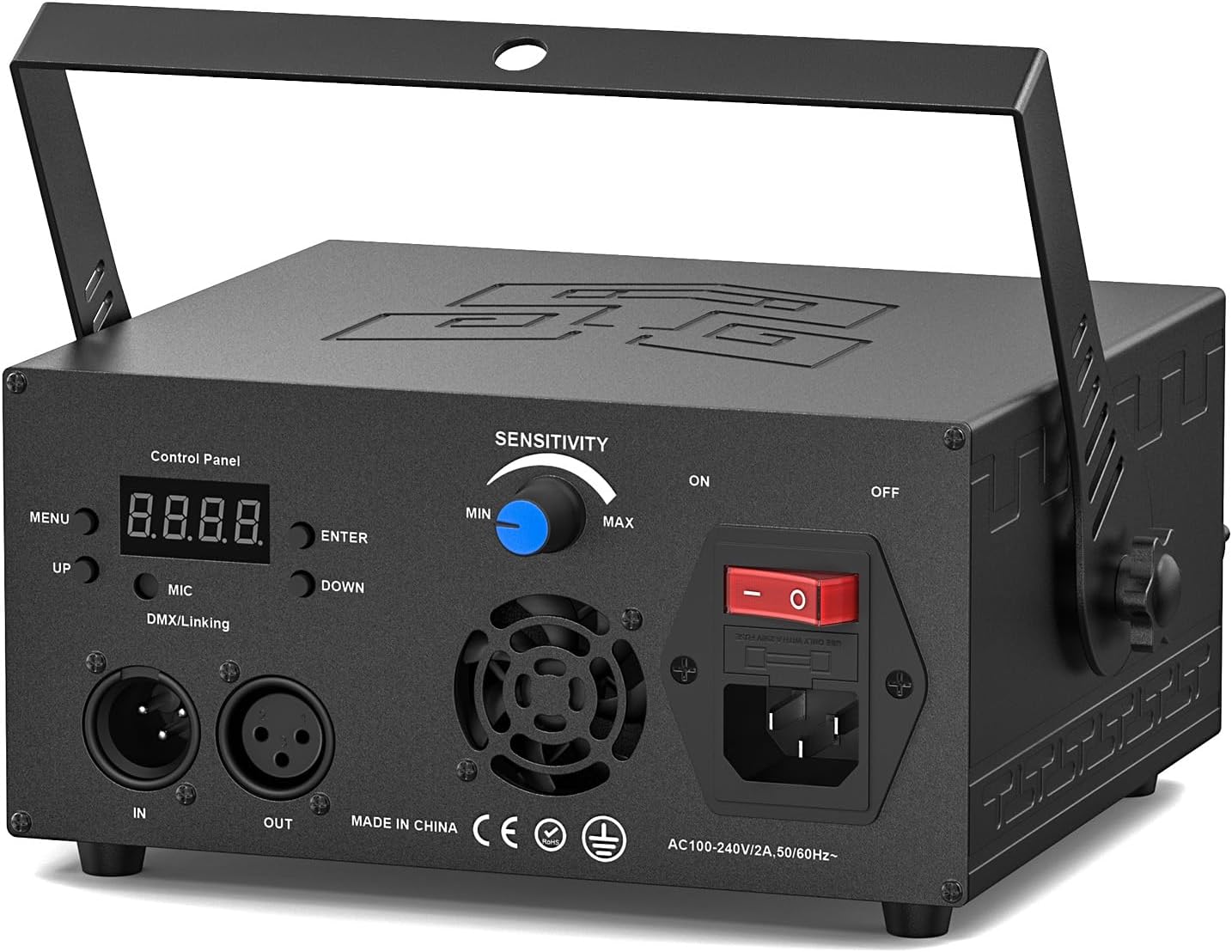

3. Operating Modes
The U`King Party Light offers several operating modes to suit different needs and environments. Use the control panel on the rear of the unit or the included remote control to switch between modes and adjust settings.
3.1 Sound Activated Mode
In Sound Activated mode, the laser light reacts to the rhythm of music or ambient sound. The sensitivity can be adjusted using the 'SENSITIVITY' knob on the rear panel.

3.2 AUTO Mode
The AUTO mode cycles through various pre-programmed patterns and effects automatically, providing a continuous light show without external input.

3.3 DMX Control Mode
For professional control, connect the unit to a DMX console. The unit supports 6-channel and 34-channel DMX modes, allowing for precise control over patterns, colors, movement, rotation, zoom, and speed.

3.4 Master/Slave Mode
Connect multiple units using DMX cables to synchronize their operation. Set one unit as the Master and the others as Slaves to create a coordinated light show across all connected devices.

3.5 Remote Control Functions
The included remote control provides convenient access to various functions, including power ON/OFF, mode selection (DMX 34CH, Sound Activated, DMX 6CH, Auto Laser Show), beam/animation selection, RGB color adjustment, and animation rotation/flip position.

3.6 Official Product Videos
Below are official product videos from the seller demonstrating the U`King Party Lights in action. These videos provide visual examples of the various patterns and modes.
Video 1: Demonstration of U`King 3D Patterns Laser Light for Parties, showcasing various animated effects.
Video 2: Another demonstration of U`King 3D Patterns Laser Light for Parties, highlighting different pattern sequences.
Video 3: A third video showcasing U`King 3D Patterns Laser Light for Parties, focusing on dynamic light movements.
4. Maintenance
4.1 Cleaning
Regularly clean the exterior of the unit with a soft, dry cloth. Ensure the laser aperture is free from dust and debris to maintain optimal projection quality. Do not use harsh chemicals or abrasive materials.
4.2 Cooling System
The unit features a built-in cooling fan to maintain brightness and extend the lifespan of the laser scanner. Ensure the fan vents are not obstructed during operation to allow for proper airflow.
4.3 Storage
When not in use, store the laser light in a cool, dry place, away from direct sunlight and extreme temperatures. Keep it in its original packaging or a protective case to prevent damage.
5. Troubleshooting
If you encounter issues with your U`King Party Light, refer to the following common troubleshooting steps:
- No Power: Ensure the power cable is securely connected to both the unit and the power outlet. Check if the power switch on the unit is in the 'ON' position.
- No Laser Output: Verify that the unit is powered on and not in standby mode. Ensure the laser aperture is not blocked.
- Patterns Not Visible / Weak: The best visual effects are achieved in a smoke or haze environment. Without smoke, only some dots will be visible, and dynamic beams and scanning effects will not be prominent.
- Remote Control Not Responding: Check the battery in the remote control. Ensure there are no obstructions between the remote and the unit's IR receiver.
- DMX Control Issues: Verify DMX cable connections. Ensure the DMX address on the unit matches your console settings. Check the DMX signal from your console.
For further assistance, please contact U`King customer support.
6. Specifications
| Feature | Specification |
|---|---|
| Model Number | ZQ05031 |
| Color | 1 Black |
| Material | Aluminum |
| Light Source Wattage | 20 Watts |
| Brightness | 12230 Lux |
| Voltage | 240 Volts (AC) |
| Product Dimensions | 9.4"L x 5.9"W x 9.8"H |
| Item Weight | 4.1 Pounds |
| DMX Channels | 6CH / 34 Channels |
| Laser Scanner Lifespan | 5000 to 10000 hours |
7. Warranty and Support
7.1 Warranty Information
For detailed warranty information, please refer to the documentation provided with your purchase or contact U`King directly. Optional protection plans may be available for purchase separately.
7.2 User Manual (PDF)
A comprehensive user manual in PDF format is available for download. You can access it via the following link: U`King Party Lights User Manual PDF
7.3 Customer Support
If you require technical assistance or have questions not covered in this manual, please contact U`King customer support through their official channels or the retailer where the product was purchased.
Ask a question about this manual
Ask about setup, troubleshooting, compatibility, parts, safety, or missing instructions. Manuals+ will review the question and use this page’s manual context to help answer it.