
1. Important Safety Instructions
Always observe basic safety precautions to reduce the risk of fire, electric shock, and personal injury when operating power tools. Read all instructions carefully before use.
- Work Area Safety: Keep your work area clean and well-lit. Cluttered or dark areas invite accidents. Do not operate power tools in explosive atmospheres, such as in the presence of flammable liquids, gases, or dust.
- Electrical Safety: Power tool plugs must match the outlet. Never modify the plug in any way. Avoid body contact with earthed or grounded surfaces such as pipes, radiators, ranges, and refrigerators.
- Personal Safety: Always wear eye protection. Use hearing protection when operating for extended periods. Dress properly; do not wear loose clothing or jewelry. Keep hair, clothing, and gloves away from moving parts.
- Tool Use and Care: Do not force the power tool. Use the correct power tool for your application. Disconnect the plug from the power source before making any adjustments, changing accessories, or storing power tools.
- Maintenance: Maintain power tools. Check for misalignment or binding of moving parts, breakage of parts, and any other condition that may affect the power tool’s operation. If damaged, have the power tool repaired before use.
2. Product Overview and Components
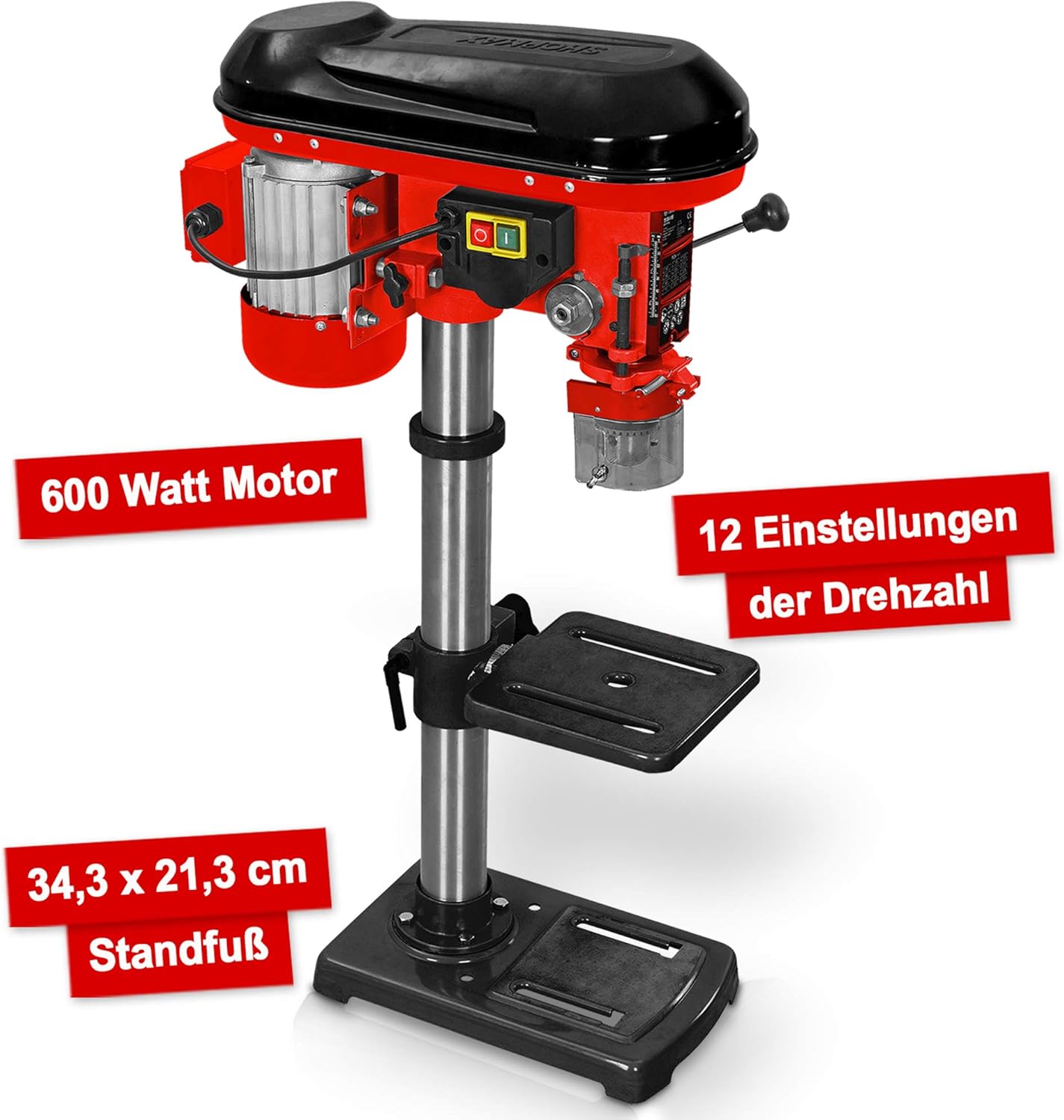
The Hecht Professional Pillar Drill is designed for precise drilling operations. Familiarize yourself with its main components for safe and effective use.

- Motor Housing: Contains the 600W motor and belt drive system.
- Head Assembly: Includes the chuck, spindle, and depth stop.
- Column: The main support structure for the head assembly and drilling table.
- Drilling Table: Adjustable in height and angle for versatile drilling.
- Base Plate: Provides stability and features mounting slots for securing to a workbench.
- Chuck: Holds the drill bits securely (3-16 mm capacity).
- Speed Adjustment Lever: Used to change the drilling speed.
- Feed Handles: Used to lower the chuck and drill bit into the workpiece.
- On/Off Switch: Power control for the drill.
- Chip Protection Guard: Transparent guard for safety during operation.
3. Setup and Assembly
Follow these steps to assemble and set up your pillar drill before initial use.
- Unpacking: Carefully remove all components from the packaging. Check for any damage or missing parts.
- Base Plate Installation: Place the base plate on a stable, level workbench. Secure it using appropriate bolts through the elongated slots on the base.
- Column Assembly: Mount the column securely onto the base plate according to the provided hardware.
- Drilling Table Attachment: Slide the drilling table assembly onto the column. Adjust its height and secure it with the locking handle.
- Head Assembly Mounting: Carefully place the head assembly onto the top of the column and secure it.
- Chuck Installation: Insert the chuck onto the spindle taper. Use a rubber mallet to gently tap it into place, ensuring a firm fit.
- Chip Guard: Attach the transparent chip protection guard around the chuck area.

4. Operating Instructions
Understand how to properly operate your pillar drill for optimal performance and safety.
4.1 Selecting Drill Bits
Choose the appropriate drill bit for the material and desired hole size. The chuck accommodates bits from 3 mm to 16 mm. Ensure the drill bit is sharp and free from damage.
4.2 Installing Drill Bits
- Ensure the drill is unplugged.
- Open the chuck jaws using the chuck key.
- Insert the drill bit into the chuck, ensuring it is centered and seated firmly.
- Tighten the chuck jaws securely with the chuck key. Remove the chuck key immediately after tightening.
4.3 Adjusting Speed
The drill features 12 speed settings, adjustable via a belt drive system. Select the speed appropriate for your material and drill bit size. Lower speeds are generally for larger bits and harder materials, while higher speeds are for smaller bits and softer materials.


4.4 Adjusting Drilling Table
The drilling table can be adjusted in height and tilted up to +/- 45 degrees. Loosen the locking handle, position the table as required, and then securely tighten the handle.

4.5 Setting Drilling Depth
Use the depth stop mechanism to set the desired drilling depth. This ensures consistent hole depths for repetitive tasks.
4.6 Drilling Procedure
- Secure the workpiece firmly to the drilling table using clamps or a vise. Never hold the workpiece by hand.
- Adjust the table height and angle, and set the drilling depth.
- Select the appropriate speed.
- Turn on the drill using the On/Off switch.
- Slowly lower the drill bit into the workpiece using the feed handles, applying steady, even pressure.
- Once the desired depth is reached, retract the drill bit from the workpiece.
- Turn off the drill.
5. Maintenance
Regular maintenance ensures the longevity and safe operation of your pillar drill.
- Cleaning: After each use, clean the drill of dust and chips. Use a brush or compressed air. Do not use solvents that may damage plastic parts.
- Lubrication: Periodically lubricate moving parts such as the column, spindle, and depth stop mechanism with light machine oil.
- Belt Tension: Check the tension of the drive belt regularly. Adjust if necessary to prevent slippage and ensure proper power transmission. Refer to the belt diagram inside the motor housing cover.
- Chuck Maintenance: Keep the chuck jaws clean and free of debris. If the chuck becomes stiff, clean and lightly lubricate it.
- Electrical Cord: Inspect the power cord for any damage. Replace if frayed or cut.
6. Troubleshooting
This section addresses common issues you might encounter with your pillar drill.
| Problem | Possible Cause | Solution |
|---|---|---|
| Drill does not start | No power supply; Faulty switch; Motor issue | Check power connection and circuit breaker; Inspect switch for damage; Consult qualified service personnel. |
| Excessive vibration | Loose mounting; Unbalanced drill bit; Worn bearings | Tighten mounting bolts; Replace or re-center drill bit; Consult service personnel for bearing replacement. |
| Drill bit slips in chuck | Chuck not tightened sufficiently; Oily chuck jaws; Damaged chuck jaws | Tighten chuck firmly with key; Clean chuck jaws; Replace chuck if damaged. |
| Motor overheats | Overloading; Insufficient ventilation; Prolonged use | Reduce load; Ensure clear ventilation; Allow motor to cool down. |
| Inaccurate drilling | Loose workpiece; Worn drill bit; Misaligned table | Secure workpiece firmly; Replace drill bit; Check and adjust table alignment. |
7. Specifications
Technical data for the Hecht Professional Pillar Drill.
| Feature | Specification |
|---|---|
| Manufacturer | Hecht |
| Item Model Number | Standbohrmaschine Hecht |
| Power Source | Corded Electric |
| Voltage | 230 Volts |
| Max Power | 600 Watt |
| Max Rotational Speed | 2700 RPM |
| Number of Speeds | 12 |
| Max Chuck Size | 16 mm |
| Material | Metal |
| Color | Red Pillar Drill |
| Package Dimensions | 71 x 45 x 27 cm |
| Weight | 23 kilograms (approx.) |
| Usage Environment | Indoor |
| Reference Number | 8595614925655 |
8. Warranty and Support
For warranty information, please refer to the documentation provided with your purchase or contact the retailer. For technical support or spare parts inquiries, please contact Hecht customer service or your authorized dealer.
Please have your model number (Standbohrmaschine Hecht) and reference number (8595614925655) available when contacting support.

