
1. Introduction
The ProTuning KOMPLEMENT Divider for Pull-Out Tray (Model IK.804.675.65) is designed to enhance the organization of your pull-out storage solutions. This divider helps categorize and store small items such as scarves, belts, ties, jewelry, and other accessories, making them easy to find and access. Its design features larger compartments at the back and smaller ones at the front to optimize reach and visibility.
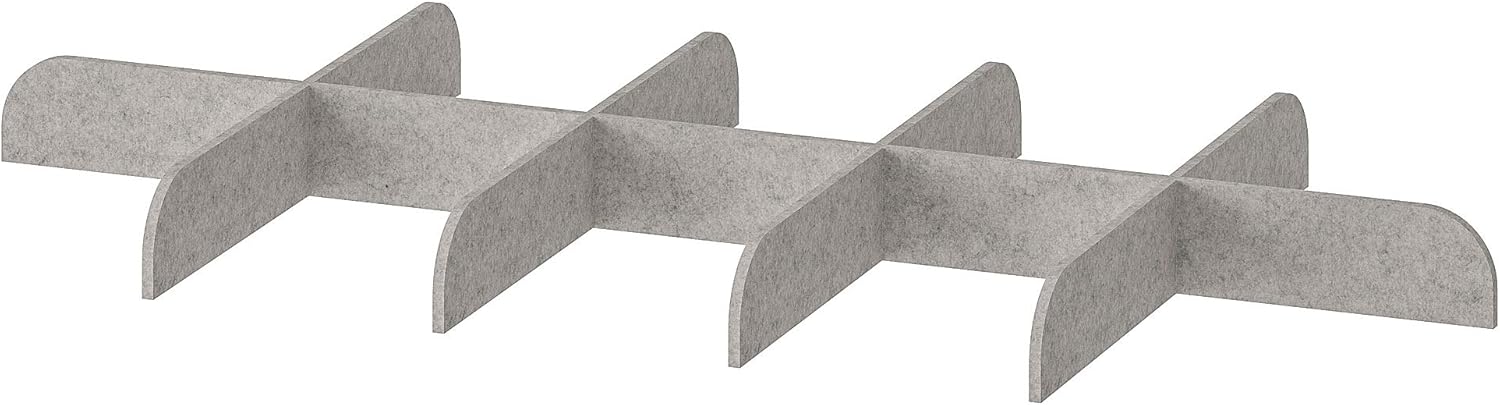
Figure 1: The ProTuning KOMPLEMENT Divider in light grey, designed for organizing small items within a pull-out tray.
2. Setup
The KOMPLEMENT Divider is intended for use with compatible pull-out trays. No assembly is required for the divider itself; simply place it into your existing pull-out tray.
- Prepare the Pull-Out Tray: Ensure your pull-out tray is clean and empty before placing the divider.
- Position the Divider: Carefully place the KOMPLEMENT Divider into the pull-out tray. The divider is designed to fit snugly within the tray's dimensions (65x30x4.5 cm).
- Orientation: For optimal access, position the divider so that the larger compartments are towards the back of the tray and the smaller compartments are towards the front.

Figure 2: The KOMPLEMENT Divider correctly placed within a pull-out tray, ready for organization.
3. Operating (Usage)
Once installed, the KOMPLEMENT Divider provides structured compartments for various small items. Utilize the different compartment sizes to organize your belongings efficiently.
- Small Compartments (Front): Ideal for frequently accessed items or smaller accessories like rings, earrings, watches, or small pins.
- Larger Compartments (Back): Suitable for items such as scarves, belts, ties, larger jewelry pieces, or other small garments.
- Categorization: Group similar items together to maintain order and simplify retrieval. For example, dedicate one compartment to ties, another to belts, and so on.

Figure 3: A close-up view of the KOMPLEMENT Divider's compartments, demonstrating how various accessories can be neatly organized.
4. Maintenance
To ensure the longevity and cleanliness of your KOMPLEMENT Divider, follow these simple maintenance guidelines:
- Cleaning: Wipe clean with a damp cloth. A mild detergent can be used if necessary.
- Drying: Ensure the divider is completely dry before placing items back into the compartments.
- Avoid Harsh Chemicals: Do not use abrasive cleaners or strong chemical solvents, as these may damage the material.
5. Troubleshooting
If you encounter any issues with your KOMPLEMENT Divider, consider the following common solutions:
| Problem | Possible Cause | Solution |
|---|---|---|
| Divider does not fit in the tray. | Incorrect tray size or divider orientation. | Verify the dimensions of your pull-out tray against the divider's specifications (65x30x4.5 cm). Ensure the divider is oriented correctly. |
| Items are not staying organized. | Overfilling compartments or improper item placement. | Avoid overfilling. Utilize the different compartment sizes for appropriate items. Re-evaluate your organization strategy. |
6. Specifications
| Attribute | Detail |
|---|---|
| Model Number | IK.804.675.65 |
| Dimensions (L x W x H) | 65 x 30 x 4.5 cm (approximately) |
| Color | Light Grey |
| Material | (Material not specified in product data, assuming a felt-like or fabric material based on image) |
| Item Weight | 1.1 pounds (approx. 0.5 kg) |
| Brand | ProTuning |
| Manufacturer | ProTuning |
7. Warranty and Support
For specific warranty information regarding your ProTuning KOMPLEMENT Divider, please refer to the documentation provided at the time of purchase or contact the retailer directly. General support inquiries can be directed to the manufacturer, ProTuning.
Manufacturer Contact: Please visit the official ProTuning website or refer to your purchase receipt for contact details.