
Introduction
Thank you for purchasing the HEKEE RGB LED Flood Light. This remote-controlled, color-changing 50W LED floodlight is designed for versatile lighting applications, both indoors and outdoors. It offers a wide range of colors, dynamic modes, and convenient timing functions to enhance any environment. Please read this manual thoroughly before installation and operation to ensure safe and optimal performance.
Package Contents
- RGB LED Flood Light (2 units)
- Remote Control (2 units)
- User Manual
Features
- 50W RGB LED Illumination: Provides powerful and vibrant color lighting.
- Remote Control Operation: Easy adjustment of colors, modes, and brightness.
- DIY Strobe Mode: Customize strobe effects with 1 to 12 colors and adjustable speed.
- Multiple Mood Modes: Includes Smooth, Relaxation, and Romantic modes for various occasions.
- 12 Common Colors: Pre-set color options for quick selection.
- 24-Hour Timer Function: Schedule automatic on/off times daily.
- Synchronization Technology: Ensures consistent color changes across multiple floodlights.
- IP66 Waterproof Rating: Suitable for outdoor use in various weather conditions.
- Memory Function: Remembers the last used color or mode.
- Durable Design: Features an extra-long mounting bracket and 6.5 feet long power cord for easy installation.
Specifications
| Brand | HEKEE |
| Model Number | BLFL-LFCA |
| Wattage | 50 Watts |
| Voltage | 120 Volts |
| Brightness | 10000 Lumen |
| Light Source Type | LED |
| Control Method | Remote Control (Infrared) |
| Water Resistance Level | IP66 Waterproof |
| Material | Aluminum, Glass |
| Product Dimensions | 6"L x 4.5"W x 1.5"H |
| Item Weight | 2.51 pounds |
Safety Instructions
- Always disconnect power before installation or maintenance.
- Ensure the power source matches the specified voltage (120 Volts).
- Do not look directly into the LED light when it is on, as it can cause eye strain.
- Keep the floodlight away from flammable materials.
- Ensure proper grounding to prevent electrical shock.
- Do not attempt to disassemble or modify the floodlight. Contact qualified personnel for repairs.
- While IP66 waterproof, avoid submerging the unit in water.
Setup and Installation
- Unpack: Carefully remove the floodlight and accessories from the packaging.
- Mounting: The floodlight comes with an extra-long mounting bracket. This bracket allows for multi-angle adjustment (360 degrees) and can be used for floor mounting or secured to a surface using appropriate fasteners (not included).
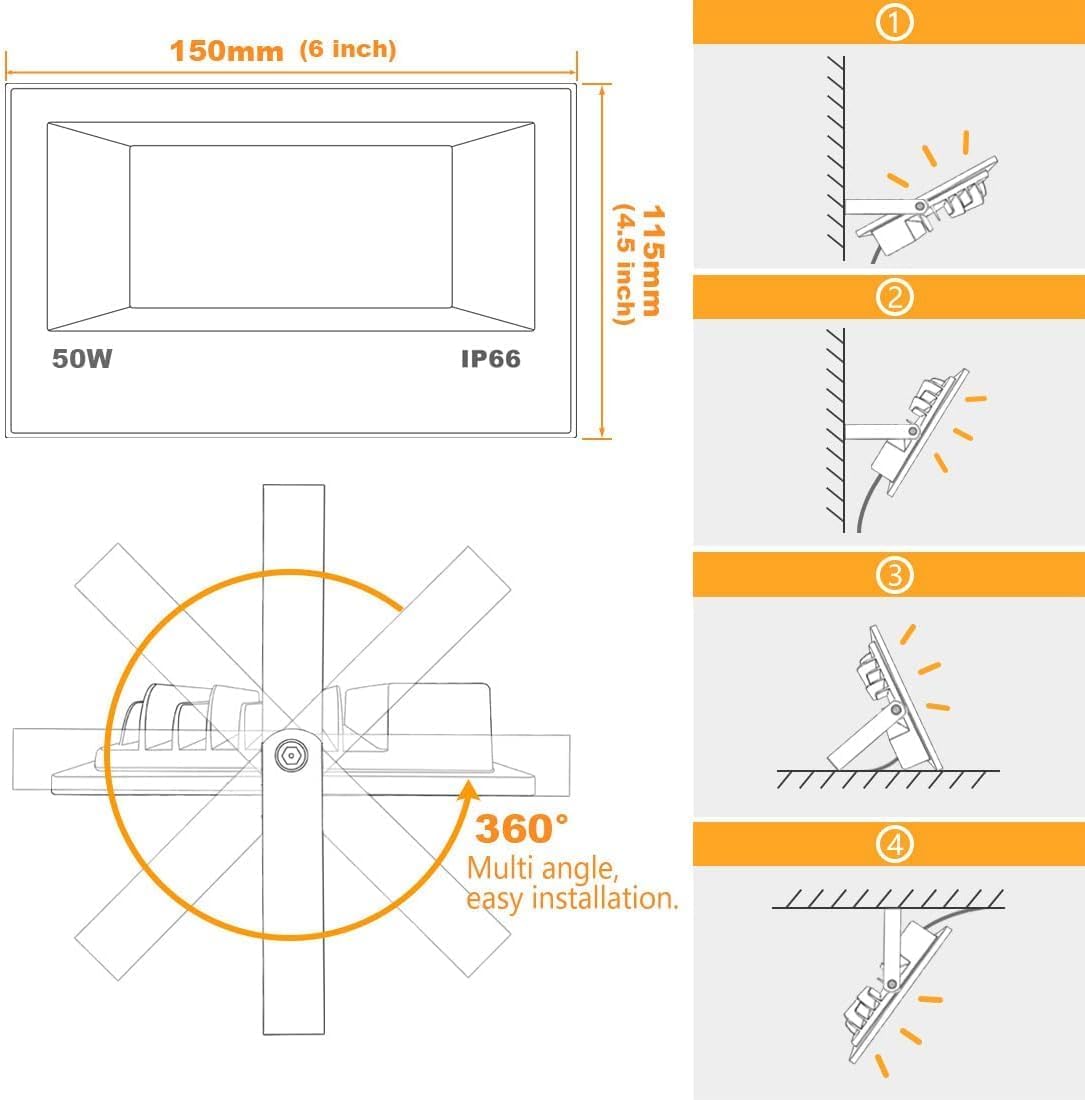
This image illustrates the dimensions of the floodlight (6 inches by 4.5 inches by 1.5 inches) and provides visual examples of how the adjustable bracket allows for floor mounting, wall mounting, or ceiling mounting, offering multi-angle, easy installation.
- Placement: Position the floodlight in your desired location. The 6.5 feet long power cord provides flexibility for placement. For outdoor use, ensure the power connection is protected from direct water exposure, even with the IP66 rating.

This image highlights the IP66 waterproof rating of the floodlight, showing water droplets on its surface, indicating its suitability for outdoor environments.
- Power Connection: Plug the floodlight into a standard 120V AC power outlet.
Operating Instructions
Remote Control Functions
The floodlight is operated using the included infrared remote control. Ensure the remote is pointed towards the floodlight for optimal response.

This image displays the remote control, detailing buttons for Relaxation Mode, Romantic Mode, DIY-FLASH, Smooth, Timer (24H), Dim down/speed down, Dim up/speed up, RGB color buttons, and individual color selection buttons.
- On/Off: Press the 'On' or 'Off' button to power the light on or off.
- Color Selection: Choose from 12 commonly used colors by pressing the corresponding color buttons (Red, Green, Blue, Orange, Light Green, Light Blue, Purple, Yellow, Sky Blue, Pink, Light Yellow, RGB White).
- Brightness Adjustment: Use the 'Dim up' and 'Dim down' buttons to adjust the light intensity.
- DIY Strobe Mode: Press 'DIY-FLASH' to activate. You can customize the strobe effect with at least 1 color, up to 12 colors, and adjust the strobe speed using the dimming buttons.
- Mood Modes: Select 'Smooth', 'Relaxation', or 'Romantic' for pre-programmed color-changing sequences.
- Timing Function: Press the '24H' button to activate the 24-hour timer. The light will automatically turn on and off at the set times daily. This feature uses the latest timing chip for convenience.

This image demonstrates the timing function, showing two floodlights set to different automatic on/off schedules (e.g., PM19:00 turn on / AM07:00 turn off and PM17:00 turn on / AM06:00 turn off), highlighting the convenience of scheduled lighting.
- Synchronization: When using multiple floodlights, the synchronization technology ensures that the rhythm of color changes in Smooth, Relaxation, and Romantic modes remains consistent across all connected units.
- Memory Function: The LED floodlight will remember the last color or mode used even after being turned off.
Application Examples
The versatile color options and modes make these floodlights ideal for various settings:
- Outdoor Landscape Lighting: Illuminate gardens, yards, fences, and patios with vibrant colors.

This image showcases the floodlights illuminating a house and trees in different colors, demonstrating the 12 colors and multi-color changing modes for landscape lighting.
- Stage and Event Lighting: Create dynamic lighting effects for parties, weddings, or stage backdrops.

This image depicts a vibrant party or concert setting, highlighting the DIY Customized Strobe Mode where users can set their favorite colors to strobe, such as orange and green for Halloween, or red and green for Christmas.
- Holiday Decorations: Easily switch colors for Halloween (orange/green), Christmas (red/green), or other festive occasions.
Maintenance
- Cleaning: Wipe the floodlight's surface with a soft, damp cloth. Do not use abrasive cleaners or solvents.
- Inspection: Periodically check the power cord and connections for any signs of damage. If damage is found, discontinue use and contact customer support.
- Storage: If storing the floodlight for an extended period, ensure it is clean and dry. Store in a cool, dry place away from direct sunlight.
Troubleshooting
- Light not turning on:
Check power connection: Ensure the floodlight is securely plugged into a working outlet.
Remote battery: Replace the remote control battery if the light does not respond to remote commands. - Remote not working:
Line of sight: Ensure there are no obstructions between the remote and the floodlight's sensor.
Distance: Operate the remote within its effective range. - Inconsistent color changes (multiple units):
Synchronization: Ensure all units are within range and properly synchronized. If issues persist, try resetting and re-synchronizing. - Flickering:
Power supply: Ensure a stable power supply. Fluctuations can cause flickering.
If you encounter issues not listed here or if troubleshooting steps do not resolve the problem, please contact HEKEE customer support.
Warranty and Support
This HEKEE RGB LED Flood Light comes with a Limited Warranty. For specific warranty terms and conditions, please refer to the warranty card included in your package or contact HEKEE customer support directly.
For technical assistance, product inquiries, or warranty claims, please contact:
HEKEE Customer Support
Contact information (e.g., email, phone, website) can typically be found on the product packaging or the manufacturer's official website.