
1. Introduction
Thank you for choosing the XPRIT Folding Electric Bike. This manual provides essential information for the safe assembly, operation, and maintenance of your new electric bicycle. Please read it thoroughly before your first ride to ensure optimal performance and safety.
Key Features:
- UL2271 Certified Battery: Equipped with a 36V/10Ah battery for reliable power.
- Powerful Motor: Features a 250W Brushless Motor, capable of reaching 15.5 mph.
- Extended Range: Offers a maximum range of 27.9 miles with pedal assist.
- Enhanced Safety: Includes Dual Disc Braking System, High-Beam LED Headlight, and Illuminated Warning Tail Light.
- Portable Design: Lightweight Aluminum Alloy Frame allows for easy folding and transport.
- High Load Capacity: Supports riders up to 264 lbs.
2. Setup and Assembly
Your XPRIT Folding Electric Bike comes mostly pre-assembled. Follow these steps to complete the setup and prepare for your first ride.
Assembly Video Guide:
Official assembly guide for the XPRIT 14'' Folding Electric Bike. This video demonstrates the unboxing, unfolding, and attachment of various components.
2.1 Unboxing and Initial Inspection
Carefully open the packaging and remove the bicycle body, seat post, accessories box, and any protective materials. Inspect all components for any signs of damage during transit.

Image: The XPRIT Folding Electric Bike in its unfolded state, ready for assembly.
2.2 Unfolding the Frame
Unfold the main frame of the bike. Ensure the folding clasps (silver and black) are securely locked into place to prevent accidental folding during use. The bike's dimensions when unfolded are approximately 38 inches in length and 30 inches in height.

Image: Side view of the XPRIT Folding Electric Bike, highlighting its approximate unfolded dimensions.
2.3 Handlebar Adjustment
Raise the folded handlebar into the upright position. Secure the handlebar by closing the lever firmly. Adjust the height of the handlebar to a comfortable riding position, then close the lever to lock it in place.

Image: Detail of the handlebar, showing the LCD display, throttle, and key ignition.
2.4 Seat Post Installation
Insert the seat post into the frame. Adjust the seat height to ensure your feet can comfortably touch the ground when stopped. Once the desired height is set, close the quick-release lever to secure the seat post firmly.
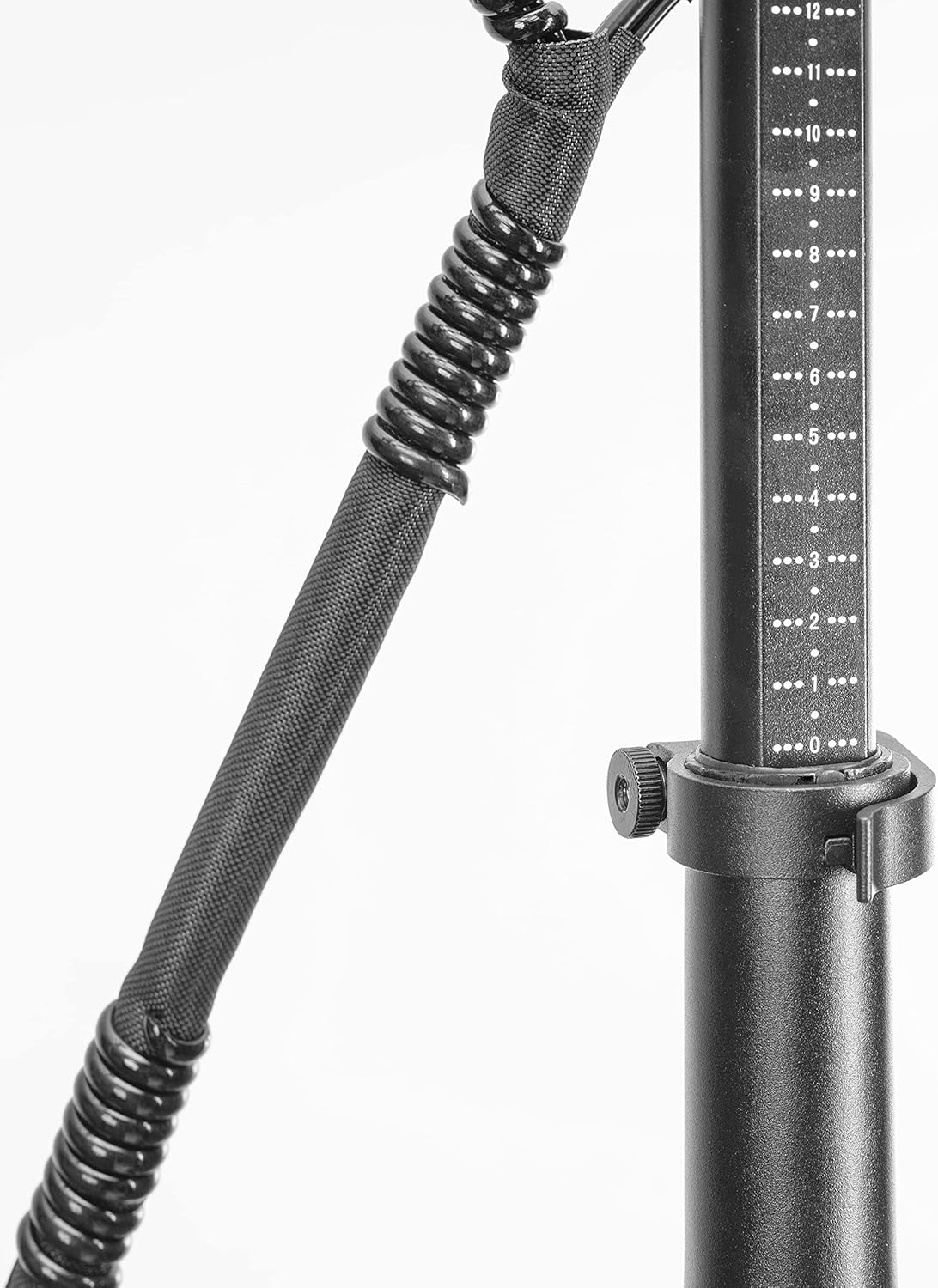
Image: The seat post with its adjustment mechanism, allowing for personalized height settings.
2.5 Pedal Attachment
Attach the pedals to the crank arms. Note that pedals are typically marked 'L' for left and 'R' for right. Ensure they are threaded correctly and tightened securely with the provided wrench.
2.6 Headlight and Reflectors
Attach the high-beam LED headlight to the front of the bike using the provided screws and nuts. Secure the orange reflectors to the front and rear of the bike for increased visibility.

Image: The high-beam LED headlight mounted on the front of the bike.
2.7 Battery Connection
Ensure the battery is securely seated in its compartment and connect the power cord. The battery is located under the seat and integrated into the frame design.

Image: The battery housing and rear rack assembly.
3. Operating Instructions
3.1 Powering On/Off
To power on the bike, insert the key into the ignition on the handlebar and turn it to the 'ON' position. The LCD display will illuminate. To power off, turn the key to 'OFF' and remove it.
3.2 Riding Modes: Full Throttle & Pedal Assist
- Full Throttle: Engage the throttle on the handlebar to accelerate without pedaling.
- Pedal Assist: The motor provides assistance as you pedal, making riding easier, especially on inclines or for longer distances.
3.3 Braking System
The bike is equipped with a Dual Disc Braking System for effective stopping power. Apply both front and rear brakes simultaneously for balanced and safe deceleration. Regularly check brake pads and cables for wear.
3.4 Folding for Storage and Transport
To fold the bike, release the frame and handlebar folding clasps. Carefully fold the bike in half and collapse the handlebar stem. The folded dimensions are approximately 21 inches in length and 16 inches in height, making it compact for storage or transport in vehicles.

Image: The XPRIT Folding Electric Bike in its compact folded configuration, showing its reduced dimensions.
4. Maintenance
4.1 Battery Care and Charging
Charge the 36V/10Ah battery using the provided charger. Ensure the charger is connected to a standard power outlet and then to the bike's charging port. The battery level indicator on the LCD panel will show the current charge status. Avoid completely draining the battery and store it in a cool, dry place when not in use.
4.2 Tire Maintenance
Regularly check the tire pressure of your 14-inch wheels. Maintain the recommended PSI (pounds per square inch) as indicated on the tire sidewall to ensure safe riding and optimal battery efficiency. Inspect tires for any punctures or excessive wear.
4.3 Brake Inspection
Periodically inspect the dual disc brakes for proper function. Check brake levers for responsiveness and ensure brake pads are not excessively worn. Adjust or replace components as necessary to maintain effective braking.
4.4 General Cleaning
Clean your electric bike regularly with a damp cloth. Avoid using high-pressure water jets directly on electrical components. Lubricate the chain periodically to ensure smooth operation.
5. Troubleshooting
- Bike Not Powering On: Ensure the key is fully inserted and turned to the 'ON' position. Check the battery connection and verify the battery has sufficient charge.
- Motor Not Engaging: Confirm the battery is charged and properly connected. Check if the throttle or pedal assist sensor is obstructed or damaged.
- Brakes Squealing or Ineffective: Inspect brake pads for wear and contamination. Ensure brake cables are properly tensioned. Consult a professional if issues persist.
- Reduced Range: Check tire pressure. Ensure the battery is fully charged before each ride. Riding conditions (hills, wind, rider weight) can affect range.
6. Specifications
| Specification | Value |
|---|---|
| Bike Type | Folding Bike, Electric Bike |
| Brand | XPRIT |
| Model Number | TDT1401Z |
| Wheel Size | 14 Inches |
| Frame Material | Aluminum |
| Suspension Type | Rear, Front, Dual |
| Brake Style | Disc |
| Item Weight | 44 Pounds |
| Load Capacity | Up to 264 lbs |
| Battery | UL2271 Certified 36V/10Ah |
| Motor | 250W Brushless Motor |
| Max Speed | 15.5 mph |
| Max Range (Pedal Assist) | 27.9 miles |
7. Warranty and Support
For warranty information, product support, or to purchase replacement parts, please contact XPRIT customer service. Keep your purchase receipt as proof of purchase for any warranty claims.
For further assistance, please visit the official XPRIT website or contact their customer support channels.