
1. Product Overview
The Leayjeen Kids Camera Protective Case is designed to provide robust protection for children's digital cameras. Crafted from durable EVA material, this hard case safeguards your child's precious device from drops, dust, and minor impacts. Its compact and lightweight design makes it ideal for travel and everyday use, ensuring the camera remains safe and secure. The case features a smooth-pulling zipper and an organized interior to accommodate the camera and its essential accessories.

Image 1.1: The Leayjeen Kids Camera Protective Case in pink. The case is shown open, revealing a pink children's digital camera securely placed inside, along with a white charging cable and other small accessories in a mesh pocket. A closed view of the case is also displayed, highlighting its compact design and rainbow stripe accent.
2. Features and Design
2.1 Protective Qualities
- Durable EVA Material: Constructed from high-quality EVA, the case offers excellent shock absorption, protecting the camera from accidental drops and impacts.
- Dust and Water Resistance: The semi-waterproof design helps protect the camera from dust and light splashes, making it suitable for various environments.
- Smooth Zipper Closure: Equipped with a high-quality zipper that operates smoothly, ensuring easy access while securely enclosing the camera.

Image 2.1: This image highlights the protective qualities of the case. It shows an illustration of the case with a cracked ground effect, symbolizing drop protection. Another section depicts water droplets on the case, indicating its semi-waterproof nature. A third section shows a hand wiping the case with a cloth, demonstrating its easy-to-clean surface.
2.2 Internal Organization
- Soft Velvet Lining: The interior is lined with soft velvet material, providing a gentle, scratch-resistant surface that cradles the camera and prevents damage.
- Elastic Mesh Pocket: A dedicated elastic mesh pocket is integrated into the lid, perfect for storing small accessories such as charging cables, memory cards, or small headphones.
- Elastic Strap: An internal elastic strap helps secure the camera in place, preventing movement during transport.

Image 2.2: Detailed views of the interior of the Leayjeen case. One panel shows the elastic mesh pocket designed to hold small accessories like cables. Another panel focuses on the soft velvet lining, which provides a gentle, scratch-resistant surface for the camera.
3. Compatibility and Usage
This protective case is designed to be compatible with most standard mini digital cameras for children. Its internal dimensions are optimized to provide a snug fit for various models, ensuring maximum protection.

Image 3.1: A collage illustrating the compatibility of the Leayjeen protective case with different models of children's cameras. It shows several types of mini digital cameras, including those with animal designs, fitting snugly into the case, emphasizing its adaptable design.
3.1 How to Use
- Open the Case: Unzip the case completely using the smooth-pulling zipper.
- Insert Camera: Gently place your child's digital camera into the main compartment. Ensure it sits securely within the soft velvet lining.
- Secure with Strap: If your camera model allows, use the internal elastic strap to further secure the camera in place.
- Store Accessories: Utilize the elastic mesh pocket in the lid to store small accessories such as charging cables, USB drives, or extra memory cards.
- Close the Case: Zip the case closed firmly to ensure the camera and accessories are fully protected.
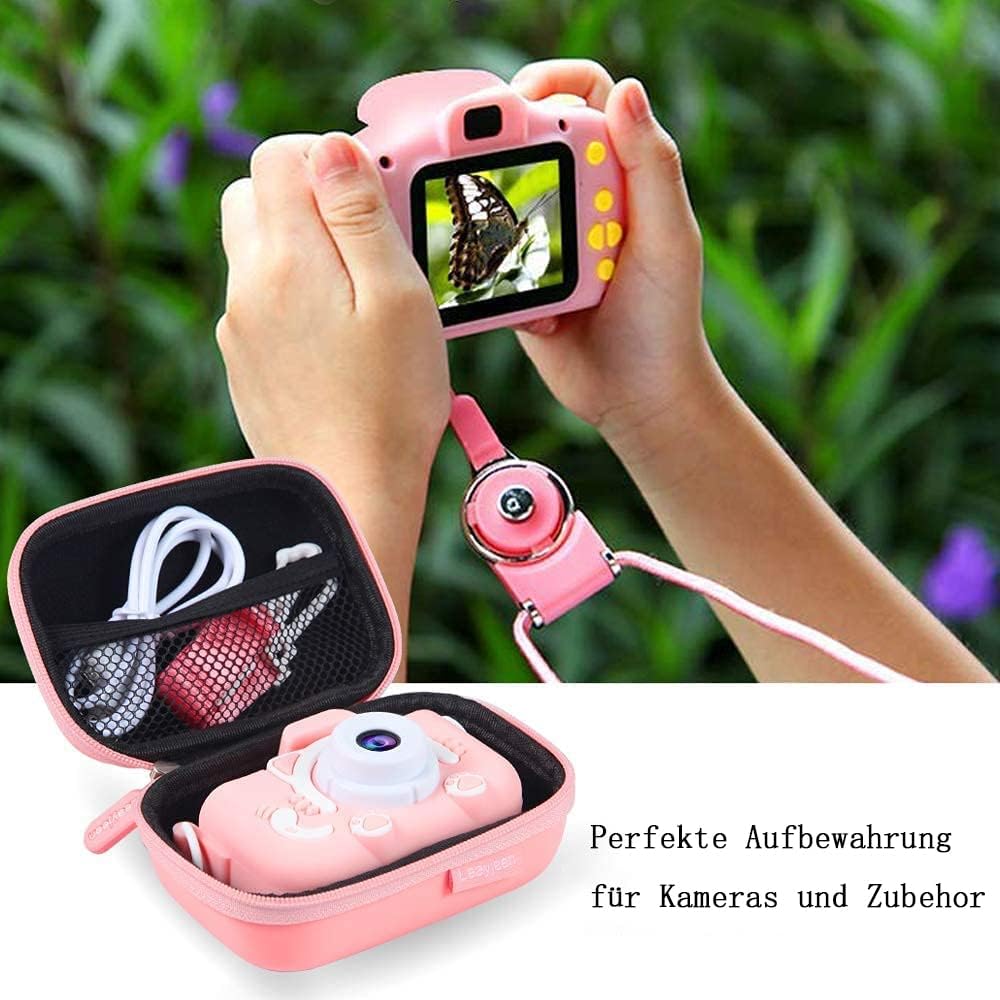
Image 3.2: This image shows the Leayjeen case open with a camera and accessories neatly stored inside, and a child happily holding a kids' camera. It visually represents the case as an ideal storage solution that keeps the camera safe while not in use, and ready for a child's adventures.
4. Specifications

Image 4.1: This diagram provides precise measurements for the Leayjeen Kids Camera Protective Case. It details the external dimensions of the case (5.1 inches length, 3.3 inches width, 2.2 inches height) and the dimensions of a typical compatible kids camera (3.3 inches length, 2.5 inches height, 2 inches width), helping users confirm fit.
| Feature | Detail |
|---|---|
| Brand | Leayjeen |
| Model Number | YDL-BT-F-12-29-001 |
| Product Dimensions (External) | 13 cm (L) x 8.5 cm (W) x 5.5 cm (H) |
| Product Dimensions (Internal) | 11 cm (L) x 7.5 cm (W) x 5.5 cm (H) |
| Weight | 60 grams |
| Material | EVA (Ethylene-vinyl acetate) and Synthetic Lining |
| Color | Red (also available in other colors) |
| Closure Type | Zipper |
| Case Type | Hard Case |
| Number of Compartments | 1 (main compartment) + 1 (mesh pocket) |
| Strap Type | Internal Elastic Strap |
5. Care and Maintenance
To ensure the longevity and effectiveness of your Leayjeen Kids Camera Protective Case, follow these simple care instructions:
- Cleaning: Wipe the exterior of the case with a soft, damp cloth. For tougher spots, a mild soap solution can be used, then wipe clean with a dry cloth. Avoid harsh chemicals or abrasive cleaners.
- Drying: If the case gets wet, allow it to air dry completely before closing or storing any electronic devices inside.
- Storage: Store the case in a cool, dry place away from direct sunlight and extreme temperatures when not in use.
- Zipper Care: Periodically check the zipper for any debris and clean if necessary to ensure smooth operation.
6. Troubleshooting
This product is a protective case and does not contain electronic components, therefore, typical troubleshooting steps for electronic devices do not apply.
- Case does not close properly: Ensure no items are obstructing the zipper path. Check if the camera or accessories are placed correctly and not overfilling the case.
- Camera does not fit: Verify the dimensions of your camera against the internal dimensions provided in the specifications section (Section 4). This case is designed for mini digital cameras for children.
- Stains or dirt: Refer to the "Care and Maintenance" section (Section 5) for cleaning instructions.
7. Warranty and Support
For information regarding product warranty, returns, or customer support, please refer to the documentation included with your purchase or contact the seller directly through the platform where the product was acquired. Leayjeen is committed to customer satisfaction.
For further assistance, you may also visit the official Leayjeen brand page or contact their customer service.