
1. Introduction
Thank you for choosing the BASETBL Gaming Office Chair, model UKCHAF010B. This manual provides essential information for the safe assembly, operation, and maintenance of your new chair. Please read these instructions carefully before assembly and retain them for future reference.
2. Safety Information
- Ensure all parts are present and undamaged before assembly. Do not use if any parts are missing or damaged.
- Assemble the chair on a soft, clean surface to prevent scratches.
- Do not overtighten screws during assembly.
- Keep children and pets away during assembly.
- The maximum weight capacity for this chair is 150 kg (330 lbs). Do not exceed this limit.
- Use the chair only for its intended purpose.
- Regularly check all bolts and screws for tightness and re-tighten as necessary.
3. Package Contents
Please verify that all components are included in your package:
- Backrest
- Seat Cushion
- Armrests (2)
- Base (5-star)
- Casters (5)
- Gas Lift Cylinder
- Mechanism Plate
- Screw Kit and Tools
- Instruction Manual
4. Assembly Instructions
Follow these steps to assemble your BASETBL Gaming Office Chair. It is recommended to have two people for easier assembly.
- Attach Casters to Base: Insert each of the five casters into the holes at the end of the chair base arms until they click securely into place.
- Insert Gas Lift: Place the gas lift cylinder into the center hole of the assembled base.
- Attach Mechanism Plate: Secure the mechanism plate to the underside of the seat cushion using the provided screws. Ensure the front of the mechanism faces the front of the seat.
- Attach Armrests: Align the armrests with the pre-drilled holes on the sides of the seat cushion and the backrest. Secure them using the appropriate screws. Ensure the armrests are oriented correctly (left and right).
- Connect Backrest to Seat: With the armrests attached, connect the backrest to the seat cushion. The armrests often serve as the connection points. Secure all screws firmly.
- Place Assembled Top onto Gas Lift: Carefully place the assembled seat and backrest onto the gas lift cylinder, ensuring the center hole of the mechanism plate aligns with the top of the gas lift. Press down firmly to secure.

Image 1: Main view of the BASETBL Gaming Office Chair, showcasing its ergonomic design and black finish.

Image 2: The BASETBL Gaming Office Chair positioned in a typical office environment, demonstrating its suitability for various settings.
5. Operating Instructions
Your BASETBL Gaming Office Chair features several adjustable components for personalized comfort.
5.1. Height Adjustment
To adjust the seat height, pull the lever located under the right side of the seat upwards. While pulling the lever, stand up to raise the seat or remain seated to lower it. Release the lever to lock the height.
5.2. Tilt and Lock Function
The chair features a rocking function and a tilt lock. Push the same lever (used for height adjustment) inwards to lock the backrest in an upright position. Pull the lever outwards to enable the rocking function, allowing the backrest to tilt between 90° and 120°.

Image 3: Illustration of the ergonomic design, showing the tilt range (90° to 120°) and controls for height adjustment and tilt lock. The tension control knob is also visible.
5.3. Tilt Tension Control
Adjust the resistance of the rocking function by turning the round knob located under the front-center of the seat. Turn clockwise to increase tension (stiffer rock) and counter-clockwise to decrease tension (looser rock).
5.4. Flip-up Armrests
The armrests can be flipped up to allow the chair to be pushed closer to a desk or for easier movement. Simply lift the armrests upwards until they lock into the vertical position. To lower, gently pull them down.
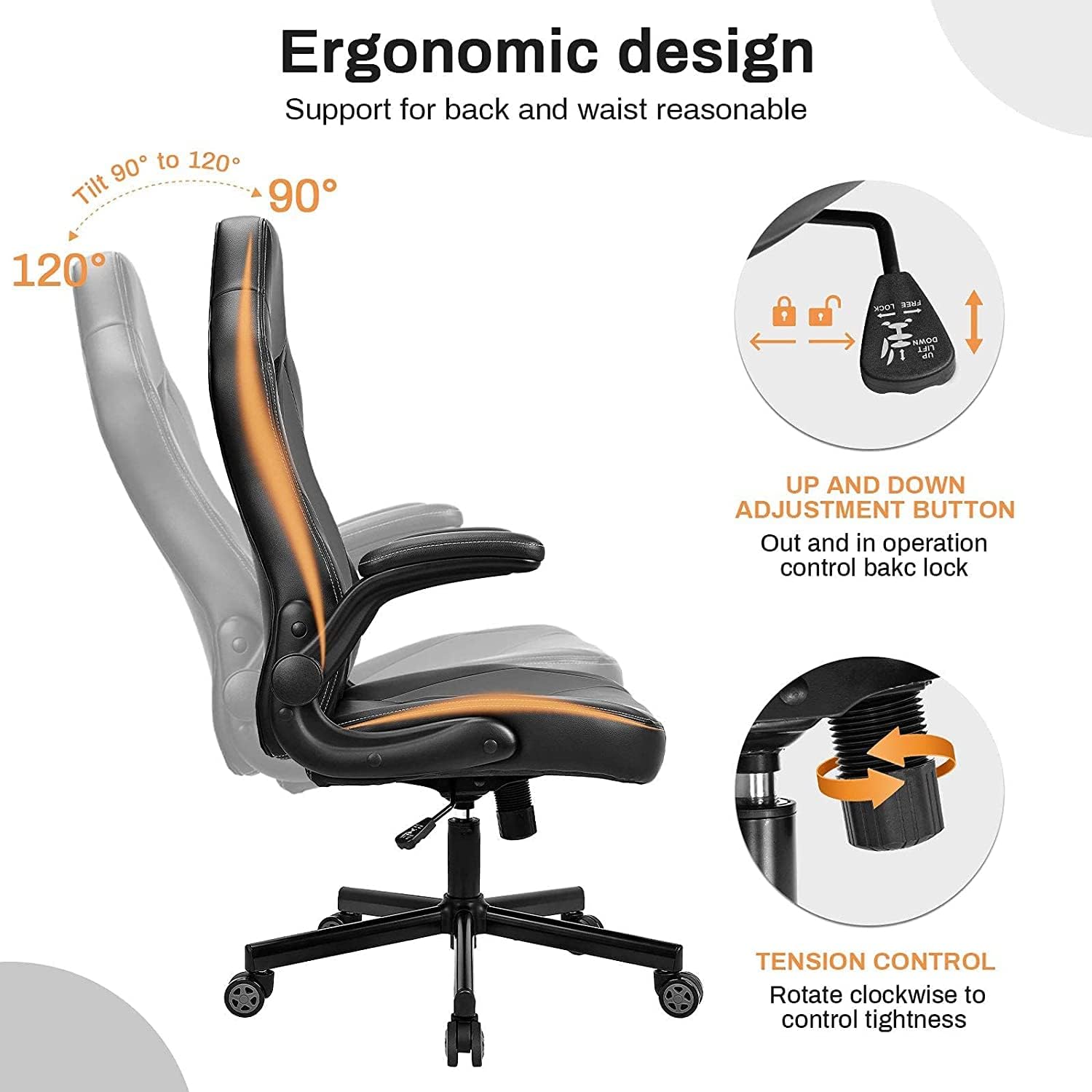
Image 4: The BASETBL chair demonstrating its flip-up armrests, allowing for flexible positioning and space-saving.
6. Maintenance
6.1. Cleaning
- Wipe the PU leather surface with a soft, damp cloth. Avoid abrasive cleaners or harsh chemicals.
- For spills, blot immediately with a clean, dry cloth.
- Vacuum fabric areas (if applicable) with a soft brush attachment.
6.2. General Care
- Periodically check all screws and bolts and tighten them to ensure stability and safety.
- Avoid exposing the chair to direct sunlight or extreme temperatures, which can damage the material.
- Ensure casters are clean and free of debris for smooth movement.

Image 5: Detail showing the durable PU leather surface and high-density sponge padding, designed for comfort and longevity.
7. Troubleshooting
| Problem | Possible Cause | Solution |
|---|---|---|
| Chair is wobbly/unstable | Loose screws; uneven assembly | Check and tighten all screws. Ensure the base is on a flat surface. |
| Gas lift not adjusting height | Lever not engaged; gas lift faulty | Ensure the height adjustment lever is fully pulled up. If problem persists, contact support. |
| Backrest not tilting or locking | Tilt lock engaged; tension too high | Pull the tilt lever outwards to enable rocking. Adjust the tilt tension knob counter-clockwise. |
| Casters not rolling smoothly | Debris in casters; casters damaged | Clean any hair or debris from the caster wheels. Replace damaged casters if necessary. |
8. Specifications
| Brand | BASETBL |
| Model Number | UKCHAF010B |
| Color | Black |
| Dimensions (L x W x H) | 78 x 74 x 126.5 cm (30.7 x 29.1 x 49.8 inches) |
| Item Weight | 18.42 kg (40.6 lbs) |
| Material | PU Leather, High-density Sponge, Alloy Steel Frame |
| Maximum Load Capacity | 150 kg (330 lbs) |
| Special Features | Ergonomic Design, Adjustable Height, Flip-up Armrests, Rocking Function (90°-120°), Headrest, Lumbar Support, Silent Casters |
| Certifications | TÜV, SGS |
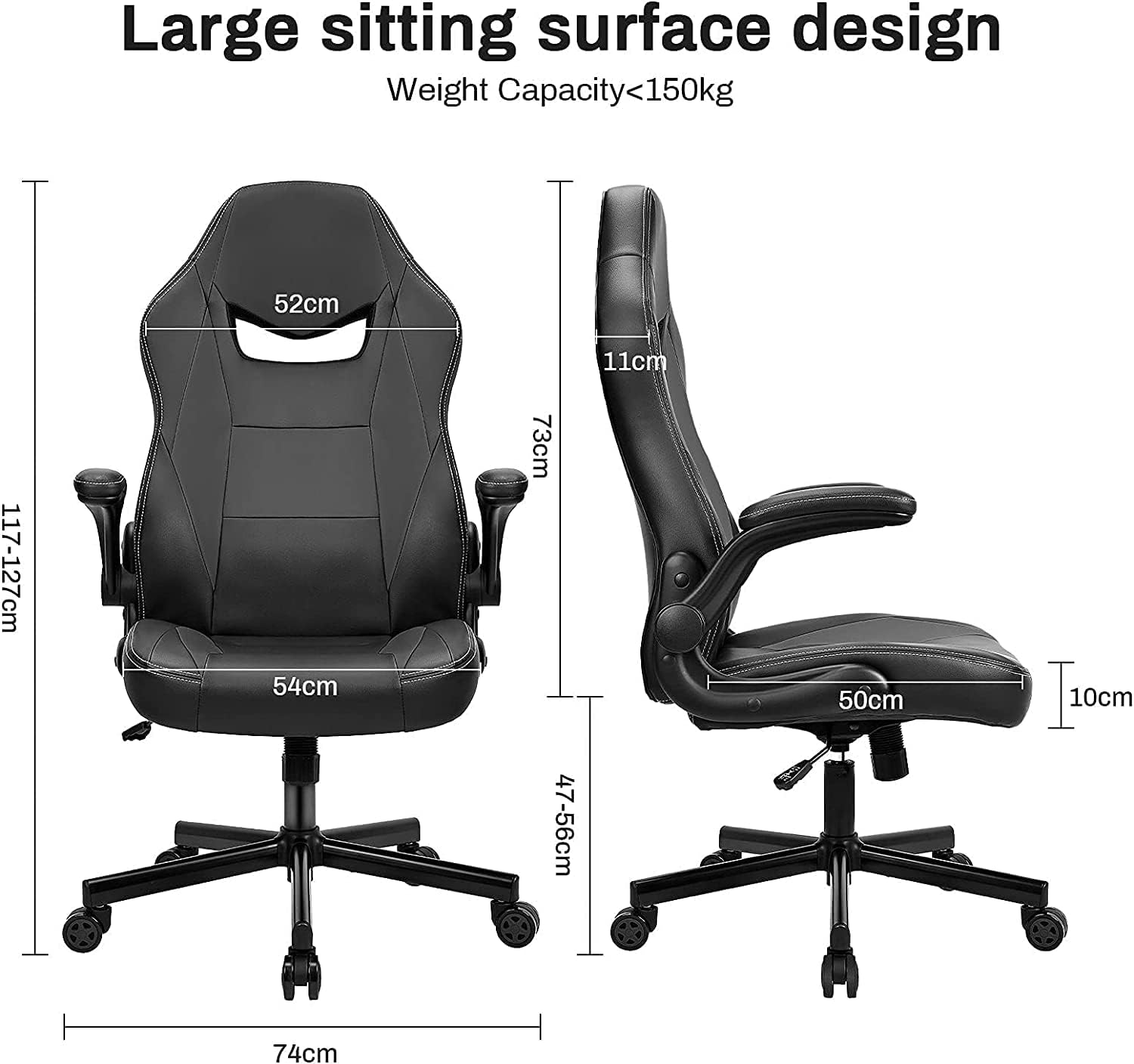
Image 6: Front and side view with detailed dimensions of the chair, including seat width, backrest height, and overall height range.

Image 7: Comparison illustrating the larger sitting surface and backrest height of the BASETBL chair, suitable for users between 150cm and 190cm.

Image 8: Visual comparison highlighting the BASETBL chair's 74cm diameter metal iron base with a 150kg load capacity, compared to smaller plastic bases.
9. Warranty and Support
BASETBL is committed to providing high-quality products and customer satisfaction. For any questions regarding assembly, operation, or if you encounter any issues with your chair, please contact BASETBL customer support.
Please refer to your purchase documentation for specific warranty terms and contact details. Keep your proof of purchase for warranty claims.