
1. Important Safety Instructions
Please read these instructions carefully before installing and using the appliance. Keep this manual for future reference.
- Ensure the appliance is installed by a qualified person in accordance with local regulations.
- Do not operate the hob if the glass ceramic surface is cracked or broken. Disconnect from power immediately.
- Avoid placing metallic objects such as knives, forks, spoons, and lids on the hob surface as they can get hot.
- Supervise children to ensure they do not play with the appliance. The hob features a child lock to prevent accidental changes to cooking settings.
- Do not clean the hob with a steam cleaner.
- Always switch off the cooking zones after use.
- The hob is equipped with overheating protection. If the temperature becomes too high, it will automatically switch off.
- A residual heat indicator will show if a cooking zone is still hot after being switched off.
2. Product Overview
The Klarstein Virtuosa Glass Ceramic Hob is a self-sufficient cooking appliance designed for integration into your kitchen unit. It features four cooking zones with a total power output of 6500 Watts.

Figure 2.1: Top view of the Klarstein Virtuosa Glass Ceramic Hob, showing the four cooking zones and the integrated touch control panel at the bottom.
Key Features:
- Four Cooking Zones: Includes one large zone, two small zones, and one flexible Vario hob.
- High Power Output: Total of 6500 W for rapid heating.
- Vario Hob: Automatically recognizes cookware size and adjusts power (800W, 1600W, or 2300W).
- Touch Control Panel: Integrated digital display for setting power levels and timer.
- Safety Features: Overheating protection, residual heat indicator, and child lock.
- Easy-Care Surface: Smooth glass-ceramic surface for simple cleaning.

Figure 2.2: Illustration of the power distribution across the four cooking zones, including the Vario hob's flexible wattage.
3. Setup and Installation
The Klarstein Virtuosa hob is designed for drop-in installation into a kitchen countertop. Ensure the installation area meets the required dimensions and ventilation standards.
3.1 Unpacking
- Carefully remove the hob from its packaging.
- Check for any damage during transit. If damaged, do not install and contact your supplier.
- Verify that all included components are present: the electric ceramic hob and mounting material.
3.2 Dimensions and Cut-out
Refer to the diagram below for the precise dimensions of the hob and the required cut-out size for your countertop.
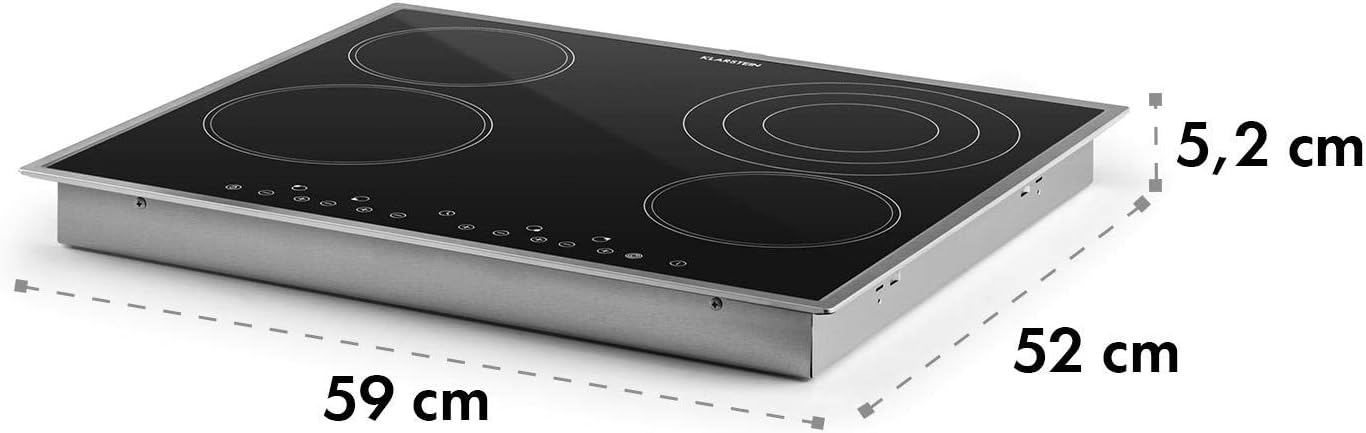
Figure 3.1: Physical dimensions of the hob, indicating a width of 59 cm, depth of 52 cm, and height of 5.2 cm.
3.3 Electrical Connection
- The electrical connection must be performed by a qualified electrician.
- Ensure the power supply matches the hob's requirements (2.3E+2 Volts, 6500 Watts).
- The appliance must be properly earthed.
4. Operating Instructions
The Klarstein Virtuosa hob is controlled via its intuitive touch control panel.

Figure 4.1: The touch control panel allows for seamless operation without physical buttons.
4.1 Switching On/Off
- To switch on, press the power symbol on the control panel.
- To switch off, press the power symbol again.
4.2 Adjusting Power Levels
- Select the desired cooking zone by touching its corresponding control.
- Use the '+' and '-' symbols to adjust the power level from 1 to 9.
4.3 Using the Vario Hob (Pot Recognition)
The Vario hob automatically detects the size of your cookware and adjusts its power output accordingly (800W, 1600W, or 2300W).

Figure 4.2: The flexible Vario hob automatically recognizes the size of the pot placed on it, optimizing heating efficiency.
4.4 Timer Function
The integrated kitchen timer can be set for up to 99 minutes, providing automatic switch-off for the selected cooking zone.

Figure 4.3: The hob's timer function enhances convenience and precision in cooking.
4.5 Child Lock
Activate the child lock to prevent accidental operation or changes to settings, ensuring safety in households with children.

Figure 4.4: The integrated child lock provides peace of mind during cooking activities.
5. Maintenance and Cleaning
The glass-ceramic surface of the Klarstein Virtuosa hob is designed for easy cleaning and maintenance.
- Always ensure the hob is cool before cleaning.
- Wipe the surface with a damp cloth and a mild detergent after each use.
- For stubborn stains, use a specialized ceramic hob cleaner.
- Avoid abrasive cleaners, scouring pads, or harsh chemicals that could scratch the surface.
- Do not use steam cleaners.
6. Troubleshooting
If you encounter issues with your Klarstein Virtuosa hob, refer to the following common problems and solutions. If the problem persists, contact customer support.
| Problem | Possible Cause | Solution |
|---|---|---|
| Hob does not switch on. | No power supply; Child lock activated. | Check power connection; Deactivate child lock. |
| Cooking zone not heating. | Incorrect cookware; Overheating protection activated. | Ensure cookware is suitable for ceramic hobs; Allow hob to cool down. |
| Display shows an error code. | Internal fault. | Switch off the hob, wait a few minutes, then switch back on. If error persists, contact service. |
7. Specifications
Detailed technical specifications for the Klarstein Virtuosa Glass Ceramic Hob.
| Feature | Detail |
|---|---|
| Brand | KLARSTEIN |
| Model Number | CP4-Virtuosa-4BKS |
| Installation Type | Drop-In |
| Color | Black |
| Material Type | Stainless Steel Glass Ceramics |
| Heating Elements | 4 |
| Burner Type | Induction |
| Total Wattage | 6500 watts |
| Voltage | 2.3E+2 Volts |
| Product Dimensions (L x W x H) | 20.47 x 23.23 x 2.05 inches (approx. 52 x 59 x 5.2 cm) |
| Item Weight | 17.82 pounds |
| Special Features | Safety Lock, Timer, Residual Heat Indicator, Overheating Protection |
| Included Components | Electric ceramic hob, mounting material |
Note: While the specification lists "Burner type: Induction", the product is consistently described as a "Glass Ceramic Hob" in the title and features, referring to its surface material.
8. Warranty and Customer Support
For warranty information or technical support, please refer to the documentation provided with your purchase or visit the official KLARSTEIN website. Ensure you have your model number (CP4-Virtuosa-4BKS) and purchase details ready when contacting support.
You can also visit the KLARSTEIN Store on Amazon for more product information.