
Introduction
This manual provides instructions for the setup, operation, and maintenance of your PULUZ 10x10 inch Photo Light Box. This portable mini lightbox is designed to provide optimal lighting conditions for photographing small items, featuring integrated LED lighting and multiple background options.
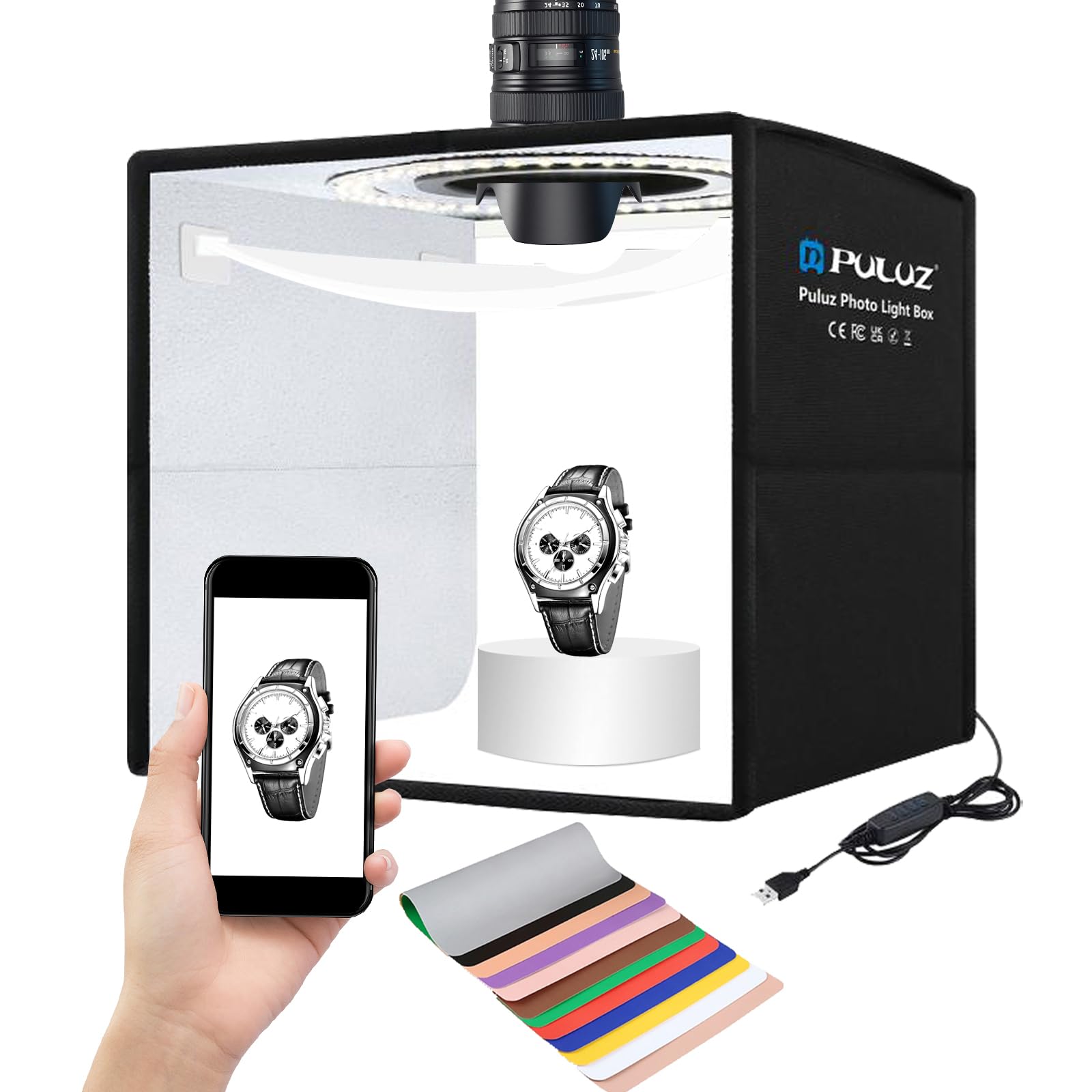
Figure 1: PULUZ 10x10 inch Photo Light Box, assembled and ready for use.
Setup
The PULUZ Photo Light Box features a unique folding design for quick and easy assembly.
- Unfold the Studio: Gently expand the light box from its folded state.
- Fix the Support Plate: Put down the internal support plate to stabilize the studio structure.
- Insert Background Cloth: Slide your desired background paper into the elastic band located inside the box.
- Connect Power: Plug the USB cable into a compatible USB power source (e.g., mobile power bank, USB charger, computer host, laptop).

Figure 2: Visual guide for the quick assembly process of the photo light box.

Figure 3: The light box supports USB power, compatible with various devices.
Operating Instructions
LED Lighting Control
The light box features 104PCS high-display LED lamp beads with a CRI (Color Rendering Index) of ≥95 and a color temperature of 5500 Kelvin. The lighting is 1%~100% dimmable, allowing for precise control over brightness.
- Use the inline controller on the USB cable to adjust brightness and power the unit on/off.
- The light box is designed with multiple light sources to minimize shadows and reflections, ensuring even illumination.

Figure 4: The inline controller allows for easy adjustment of light brightness from 1% to 100%.

Figure 5: The stepless dimming function provides smooth and precise light intensity adjustments.
Background Options
The light box includes 6 sheets of double-sided background paper, offering 12 different colors (black, white, grey, gold, yellow, orange, red, pink, blue, purple, green, brown). These backdrops are waterproof and anti-wrinkle for consistent results.

Figure 6: The included 12-color backdrops are waterproof and easy to clean, allowing for diverse shooting scenarios.

Figure 7: Examples of different background colors that can be used with the light box.
Multi-angle Shooting
The light box supports multi-angle shooting, allowing you to capture photos from various perspectives.
- Top Opening: A circular opening on the top allows for overhead or bird's-eye view shots.
- Front Opening: The main front opening provides a frontal shooting angle.

Figure 8: The light box offers both overlook and frontal shooting capabilities.

Figure 9: Demonstrates how to use the light box for various product photography angles.
Using the Diffuser
A diffuser is included to help reduce high exposure and reflections, especially when photographing highly reflective products.
- Attach the diffuser using the Velcro straps inside the light box, positioning it between the light source and the product.

Figure 10: The diffuser helps soften light and reduce glare on reflective items.

Figure 11: The soft cloth effect is beneficial for products with high reflectivity, such as jewelry or ceramics.
Product Video Overview
Video 1: An official product video from PULUZ demonstrating the features and usage of the 25cm Folding Portable Photo Lighting Studio.
Maintenance
- The included backdrops are waterproof and easy to clean. Wipe them with a damp cloth as needed.
- The light box is constructed from fabric, not plastic, which helps prevent melting. While the LED lights do not get excessively hot, it is recommended to allow the unit to cool for a few minutes after prolonged use before folding and storing.
Troubleshooting
- No Power: Ensure the USB cable is securely connected to both the light box and a functional USB power source. Verify the power source is active.
- Uneven Lighting/Reflections: Adjust the brightness using the inline controller. Utilize the included diffuser to soften light and reduce reflections on shiny objects. Experiment with different background colors to optimize the visual effect.
Specifications
| Brand | PULUZ |
| Model Number | YDF629 |
| Product Dimensions | 10"D x 10"W x 10"H (25cm x 25cm x 25cm) |
| Material | Nylon |
| Light Source | 104PCS LED Light Emitting Diodes |
| Color Temperature | 5500 Kelvin |
| Color Rendering Index (CRI) | ≥95 |
| Dimmable Range | 1% - 100% |
| Voltage | 5 Volts |
| Wattage | 10 watts |
| Hardware Interface | USB |
| Included Backdrops | 6 double-sided sheets (12 colors) |
| Water Resistance Level | Waterproof (for backdrops) |
What's in the Box
- Photo Box x 1
- Soft case x 1
- Background paper x 6
- Color packing box x 1

Figure 12: The complete package contents of the PULUZ Photo Light Box.
Warranty
This product comes with a 2 Year Manufacturer Warranty.
Support
For further assistance or inquiries, please refer to the PULUZ Store on Amazon or the official product page where you purchased the item.


