
1. Introduction
This manual provides essential information for the safe and effective use of your EXALIUM Premium 4.8V 1.7Ah NiMh rechargeable battery. This battery is specifically designed for compatibility with Surtec I@n, Surtec Residencia, Paradox PXMW625BAT, and Magellan MG-6250 alarm systems, serving as a reliable backup power source.
Please read this manual thoroughly before installation and operation to ensure optimal performance and longevity of the battery.
2. Safety Information
- Do not short-circuit the battery terminals.
- Do not expose the battery to extreme temperatures (above 60°C or below -20°C).
- Do not disassemble, puncture, or modify the battery.
- Keep the battery away from water and moisture.
- Dispose of used batteries according to local regulations. Do not incinerate.
- Use only chargers specified for NiMh batteries.
- Keep out of reach of children.
3. Setup and Installation
Before installing the new battery, ensure your alarm system is powered off and disconnected from the main power supply. Refer to your alarm system's specific manual for detailed battery compartment access instructions.
- Locate the battery compartment on your alarm system (e.g., Surtec I@n, Surtec Residencia, Paradox PXMW625BAT, Magellan MG-6250).
- Carefully remove the old battery, noting the polarity (+/-) of the connectors.
- Connect the new EXALIUM Premium 4.8V 1.7Ah NiMh battery, ensuring correct polarity. The connectors are typically designed to fit only one way.
- Place the battery securely within the compartment.
- Close the battery compartment cover.
- Reconnect your alarm system to the main power supply and power it on. Allow the system to fully charge the new battery.
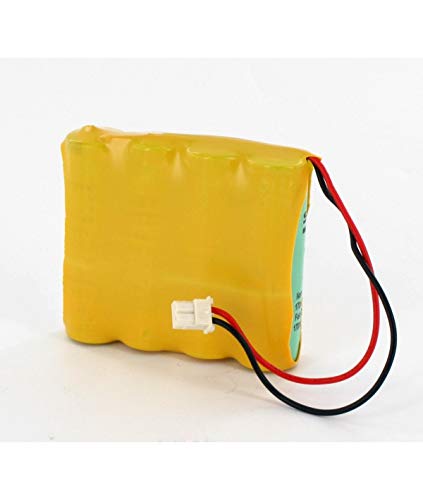
Image 1: EXALIUM Premium 4.8V 1.7Ah NiMh Battery. This image shows the battery pack with its connector, ready for installation into a compatible alarm system.
4. Operating and Charging
Once installed, the battery will be charged by your alarm system's internal charging circuit. It serves as a backup power source in case of a main power outage.
- Initial Charge: After installation, allow the battery to charge for at least 24 hours with the alarm system connected to main power.
- Normal Operation: The battery will automatically provide power to the alarm system during power failures.
- Battery Status: Your alarm system typically has indicators (LEDs or display messages) to show battery status. Consult your alarm system's manual for details.
5. Maintenance
- Regular Checks: Periodically check your alarm system's battery status indicator.
- Cleaning: Keep the battery and its compartment clean and free from dust. Use a dry, soft cloth.
- Replacement: NiMh batteries have a finite lifespan. If your alarm system frequently reports low battery or fails to hold a charge, it may be time to replace the battery. The typical lifespan for alarm system batteries is 3-5 years, depending on usage and environmental conditions.
- Storage: If storing the battery for an extended period, ensure it is partially charged (around 50%) and stored in a cool, dry place. Recharge every 3-6 months to prevent deep discharge.
6. Troubleshooting
| Problem | Possible Cause | Solution |
|---|---|---|
| Alarm system reports "Low Battery" or "Battery Fault" | Battery not fully charged, battery nearing end of life, or faulty connection. | Ensure the alarm system is connected to main power for at least 24 hours. Check battery connections for proper seating. If the issue persists, the battery may need replacement. |
| Alarm system does not power on during outage | Battery not installed correctly, battery completely discharged, or battery is faulty. | Verify correct battery installation and polarity. Ensure the battery has had sufficient time to charge. If the problem continues, replace the battery. |
| Battery feels hot during charging | Normal during charging, but excessive heat can indicate a problem. | Slight warmth is normal. If the battery becomes excessively hot to the touch, disconnect it immediately and contact a qualified technician or the alarm system manufacturer. |
7. Specifications
- Brand: EXALIUM Premium
- Battery Type: NiMh (Nickel-Metal Hydride)
- Voltage: 4.8 Volts
- Capacity: 1.7 Ah (Ampere-hours)
- Reusability: Rechargeable
- Dimensions: 58 x 52 cm (Note: This dimension may refer to packaging or a specific component, as it is unusually large for a battery of this type.)
- Compatibility: Surtec I@n, Surtec Residencia, Paradox PXMW625BAT, Magellan MG-6250 alarm systems.
8. Warranty and Support
Specific warranty information for this EXALIUM Premium battery is typically provided at the point of purchase or with the product packaging. Please retain your proof of purchase for warranty claims.
For technical support or further assistance, please contact your retailer or the EXALIUM Premium customer service department.