
EXALIUM Premium makita-M001
Internal 7.2V Battery for Makita M001, M003 Drill User Manual
Model: makita-M001 | Brand: EXALIUM Premium
1. Product Overview
This manual provides comprehensive instructions for the EXALIUM Premium internal 7.2V 2100mAh NiMH battery, specifically designed for use with Makita M001 and M003 drills. This high-quality rechargeable battery features solder terminals for a secure and reliable connection within your power tool.
Key Features:
- NiMH Chemistry: Reliable and robust battery technology.
- 7.2 Volts: Optimal voltage for compatible Makita drills.
- 2100 mAh Capacity: Provides extended runtime for your tools.
- Direct Compatibility: Designed for Makita M001 and M003 drill models.
- Rechargeable: For long-term, cost-effective use.
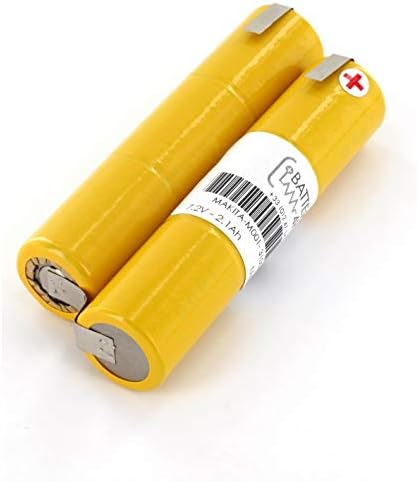
Figure 1: General view of the EXALIUM Premium 7.2V NiMH battery cells.
2. Safety Information
Please read and understand all safety warnings and instructions before installing or using this battery. Failure to follow these instructions may result in electric shock, fire, and/or serious injury.
- Charging: Only use chargers specifically designed for NiMH batteries with the correct voltage and current ratings. Do not use chargers designed for other battery chemistries (e.g., Li-ion, NiCd).
- Handling: Do not short-circuit the battery terminals. Avoid dropping, puncturing, or disassembling the battery. Do not expose the battery to water or extreme temperatures (above 60°C / 140°F or below -20°C / -4°F).
- Storage: Store the battery in a cool, dry place away from direct sunlight and flammable materials.
- Disposal: Do not dispose of batteries in household waste or by incineration. Always dispose of batteries according to local regulations, preferably at a certified recycling facility.
- Repair: Battery replacement involves soldering and should only be performed by qualified personnel. Improper installation can lead to damage or injury.
3. Installation
This internal battery requires disassembly of the Makita drill and soldering for proper installation. It is highly recommended that this procedure be performed by a qualified technician or an individual with experience in electronics repair and soldering.
Required Tools:
- Screwdriver set (appropriate for Makita drill casing)
- Soldering iron and solder
- Desoldering pump or braid
- Heat shrink tubing or electrical tape (for insulation)
- Multimeter (optional, for testing connections)
Installation Steps:
- Safety First: Ensure the drill is completely disconnected from any power source and that any existing battery pack (if external) is removed.
- Disassemble Drill Casing: Carefully open the drill casing by removing all screws. Note the position of all internal components and wires. Refer to your specific Makita drill's service manual for detailed disassembly instructions.
- Locate Old Battery: Identify the existing internal battery pack. It will be connected via soldered terminals to the drill's internal circuitry.
- Desolder Old Battery: Using a soldering iron and desoldering tool, carefully desolder the connections of the old battery pack. Pay attention to the polarity (+ and -).
- Prepare New Battery: The EXALIUM Premium battery comes with solder terminals. Ensure they are clean and ready for soldering.
- Solder New Battery: Carefully solder the new EXALIUM Premium battery into place, ensuring correct polarity. Use heat shrink tubing or electrical tape to insulate any exposed connections.
- Test Connections: (Optional but recommended) Use a multimeter to verify continuity and correct voltage output from the newly installed battery before reassembling.
- Reassemble Drill: Carefully reassemble the drill casing, ensuring all wires are properly routed and not pinched. Secure all screws.

Figure 2: Illustrative diagram of a drill's internal components, showing the typical location of the internal battery (item 17).

Figure 3: The EXALIUM Premium internal battery pack with solder terminals.
4. Operation
Once installed, the EXALIUM Premium internal battery operates seamlessly with your Makita M001 or M003 drill. Proper charging practices are essential for maximizing battery life and performance.
Charging:
- Use only the original Makita charger or a compatible NiMH charger designed for 7.2V battery packs.
- Follow the instructions provided with your charger for proper charging procedures.
- Avoid overcharging, as this can reduce battery life. Most modern NiMH chargers have automatic shut-off features.
- Charge the battery in a well-ventilated area, away from flammable materials.
Discharging:
- Use the drill as normal until the battery power diminishes.
- For optimal battery life, it is generally recommended to fully discharge NiMH batteries before recharging them, though partial discharges are also acceptable.
5. Maintenance and Storage
Proper maintenance and storage will extend the lifespan of your EXALIUM Premium battery.
- Cleaning: Keep the battery and its terminals clean and free from dust and debris. Use a dry cloth for cleaning.
- Temperature: Avoid exposing the battery to extreme temperatures. Do not leave the drill in direct sunlight or in very cold environments for extended periods.
- Long-Term Storage: If storing the drill with the battery for an extended period (more than 3 months), it is recommended to store the battery at approximately 50% charge in a cool, dry place. Recharge it every 3-6 months to prevent deep discharge.
- Avoid Impact: Protect the drill from severe impacts, which can damage the internal battery cells.
6. Troubleshooting
If you encounter issues with your EXALIUM Premium battery, refer to the following common troubleshooting steps:
| Problem | Possible Cause | Solution |
|---|---|---|
| Battery not charging | Incorrect charger; faulty charger; poor connection; battery too hot/cold; battery reached end of life. | Ensure charger is compatible and functional. Check all connections. Allow battery to reach room temperature. If issues persist, battery may need replacement. |
| Short operating time | Battery not fully charged; battery degradation; heavy usage. | Ensure full charge cycles. Battery capacity naturally decreases over time. Consider if usage demands exceed battery capacity. |
| Battery/Drill overheating | Overuse; short circuit; faulty components. | Stop use immediately. Allow to cool down. Check for any visible damage or loose connections. If overheating persists, seek professional repair. |
7. Specifications
Detailed technical specifications for the EXALIUM Premium internal battery:
| Attribute | Value |
|---|---|
| Brand | EXALIUM Premium |
| Battery Type | NiMH |
| Voltage | 7.2 Volts |
| Capacity | 2100 Milliampere-hour (mAh) |
| Recommended Use | Perceuse (Drill) |
| Reusability | Rechargeable |
| Dimensions (L x W x H) | 110 x 45 centimeters (as provided) |
| Manufacturer | EXALIUM Premium |
| Model Reference | makita-M001 |
8. Warranty and Support
For warranty information or technical support regarding your EXALIUM Premium internal battery, please contact the seller or manufacturer directly. Keep your proof of purchase for any warranty claims.
For further assistance or inquiries, please refer to the contact information provided by your retailer or on the EXALIUM Premium official website.
Ask a question about this manual
Ask about setup, troubleshooting, compatibility, parts, safety, or missing instructions. Manuals+ will review the question and use this page’s manual context to help answer it.