
Introduction
This manual provides detailed instructions for the safe and efficient operation of your Mondial Connect Mega Sound CM-12 Amplified Speaker. Please read this manual thoroughly before using the product and retain it for future reference.
Important Safety Instructions
To ensure safe operation and prevent damage, please observe the following precautions:
- Power Supply: Connect the speaker only to a power source within the specified voltage range (Bivolt). Ensure the power cord is not damaged or pinched.
- Ventilation: Do not block any ventilation openings. Maintain adequate space around the speaker for proper airflow.
- Water and Moisture: Do not expose the speaker to rain, moisture, or any liquids. Do not place objects filled with liquids, such as vases, on the speaker.
- Heat Sources: Keep the speaker away from heat sources such as radiators, heat registers, stoves, or other apparatus (including amplifiers) that produce heat.
- Cleaning: Unplug the speaker from the power outlet before cleaning. Use a dry cloth for cleaning. Do not use liquid cleaners or aerosol cleaners.
- Servicing: Do not attempt to service this product yourself. Refer all servicing to qualified service personnel. Servicing is required when the apparatus has been damaged in any way, such as power-supply cord or plug is damaged, liquid has been spilled or objects have fallen into the apparatus, the apparatus has been exposed to rain or moisture, does not operate normally, or has been dropped.
- Placement: Place the speaker on a stable, flat surface to prevent it from falling.
- Children: Keep out of reach of children.
Package Contents
Verify that all items listed below are included in your package:
- 1 x Mondial Connect Mega Sound CM-12 Amplified Speaker
- 1 x Remote Control
- 1 x Power Cable
- 1 x P2/P2 Cable
- 1 x Instruction Manual
Product Overview
The Mondial Connect Mega Sound CM-12 is an amplified speaker designed for powerful audio output. It features multiple connectivity options and integrated lighting effects.

Figure 1: Front view of the Mondial Connect Mega Sound CM-12 Amplified Speaker.
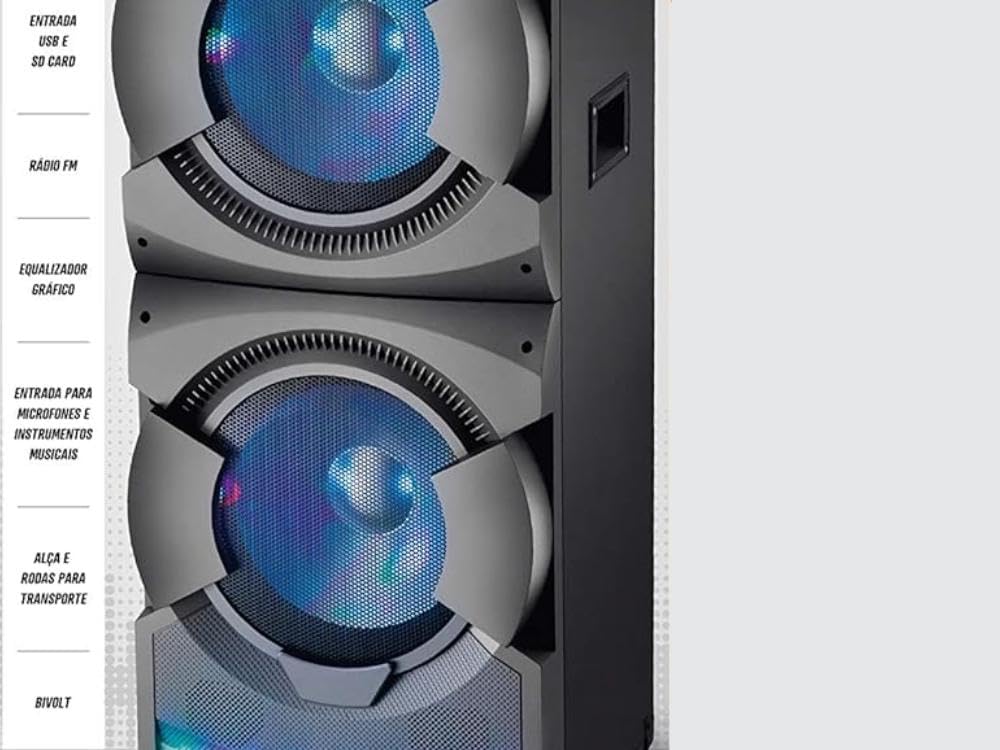
Figure 2: Side view illustrating key features and connection ports.
Control Panel and Ports
Familiarize yourself with the various controls and connection ports on your speaker:
- Power Button: Turns the speaker on or off.
- Volume Control: Adjusts the overall sound volume.
- USB Input: For connecting USB flash drives.
- SD Card Slot: For inserting SD memory cards.
- AUX Input (P2/P2): For connecting external audio devices via cable.
- Microphone Input: For connecting a microphone.
- Guitar Input: For connecting a guitar or other musical instrument.
- FM Radio Antenna: For receiving FM radio signals.
- Graphic Equalizer: Controls for adjusting bass, treble, and other audio frequencies.
- Flash Light Button: Activates or deactivates the integrated lighting effects.
- Display: Digital display showing current mode, track information, or radio frequency.
- Transport Handle and Wheels: For easy portability.
Setup
- Unpacking: Carefully remove the speaker and all accessories from the packaging.
- Placement: Place the speaker on a stable, flat surface. Ensure there is adequate space around the unit for ventilation.
- Power Connection: Connect the power cable to the speaker's power input and then to a suitable electrical outlet. The speaker supports Bivolt (127V/220V) operation.
- Initial Power On: Press the Power button to turn on the speaker. The display should illuminate.
Operating Instructions
Power On/Off
Press the Power button located on the control panel to turn the speaker on or off.
Volume Adjustment
Rotate the Volume knob clockwise to increase the volume and counter-clockwise to decrease it. Volume can also be adjusted via the remote control.
Bluetooth Connection
- Turn on the speaker.
- Press the Mode button (if available, otherwise it should automatically be in Bluetooth mode or cycle through modes) until "Bluetooth" or "BT" appears on the display.
- Activate Bluetooth on your mobile device (smartphone, tablet, etc.).
- Search for available devices and select "Mondial CM-12" (or similar name) from the list.
- Once paired, you will hear a confirmation sound, and you can now play audio from your device through the speaker.
USB/SD Card Playback
- Insert a USB flash drive into the USB port or an SD card into the SD Card Slot.
- The speaker should automatically switch to USB or SD mode and begin playing audio files. If not, press the Mode button to select the correct input.
- Use the Play/Pause, Next Track, and Previous Track buttons on the control panel or remote control to manage playback.
FM Radio
- Press the Mode button until "FM" appears on the display.
- Press the Play/Pause button to initiate an automatic scan for available radio stations. The speaker will save detected stations.
- Use the Next Track and Previous Track buttons to navigate between saved stations.
Microphone and Guitar Input
- Connect your microphone to the MIC Input and/or your guitar to the GUITAR Input.
- Adjust the individual volume levels for the microphone and guitar using their respective controls on the speaker (if available) or the main volume control.
Flash Light Function
Press the Flash Light button to activate or deactivate the integrated colorful lighting effects. These lights will pulse with the music.
Graphic Equalizer
Use the Graphic Equalizer controls to fine-tune the audio output. Adjust bass, treble, and other frequency bands to suit your preference and the audio content.
Maintenance
Proper maintenance ensures the longevity and optimal performance of your speaker.
- Cleaning: Always unplug the speaker before cleaning. Use a soft, dry cloth to wipe the exterior surfaces. Do not use abrasive cleaners, waxes, or solvents.
- Storage: When not in use for extended periods, store the speaker in a cool, dry place, away from direct sunlight and extreme temperatures.
- Ventilation: Ensure the ventilation grilles are free from dust and debris.
Troubleshooting
If you encounter any issues with your Mondial Connect Mega Sound CM-12 speaker, refer to the following common problems and solutions:
| Problem | Possible Cause | Solution |
|---|---|---|
| No power | Power cable not connected; Power outlet not working; Speaker is off. | Ensure the power cable is securely connected. Test the outlet with another device. Press the Power button. |
| No sound | Volume too low; Incorrect input mode selected; Audio source issue. | Increase the volume. Press the Mode button to select the correct input (Bluetooth, USB, SD, AUX). Check the audio source device. |
| Bluetooth not connecting | Speaker not in Bluetooth mode; Device too far; Device already connected to another speaker. | Ensure the speaker is in Bluetooth mode. Move your device closer to the speaker. Disconnect from other Bluetooth devices. |
| USB/SD card not playing | Incorrect file format; Corrupted files; Card/drive not inserted correctly. | Ensure audio files are in a compatible format (e.g., MP3). Reinsert the USB drive or SD card. Try a different drive/card. |
Specifications
Key technical specifications for the Mondial Connect Mega Sound CM-12 Amplified Speaker:
- Brand: MONDIAL
- Model Name: Connect Mega Sound
- Model Number: CM-12
- Speaker Type: Amplified Speaker with Tweeter and 12-inch Woofers
- Special Features: USB Port, Bluetooth, FM Radio, Graphic Equalizer, Flash Light
- Compatible Devices: Notebook, Smartphone, Tablet
- Color: Black
- Product Dimensions: 45.3 cm (Depth) x 42 cm (Width) x 116 cm (Height)
- Waterproof: No
- Control Method: Remote
- Wireless Communication Technology: Bluetooth
- Power Source: Electric Cord (Bivolt)
- Amplification Type: Active
- Output Power: 1500 Watts RMS
- Connectivity Technology: Auxiliary, Bluetooth, USB
- Audio Output Mode: Stereo
- Mounting Type: Floor Mount
- Weight: 29.3 Kilograms
- Certification: ANATEL: 02535-16-03211

Figure 3: Speaker dimensions.
Warranty Information
This product comes with a manufacturer's warranty. Please refer to the details below:
- Manufacturer Warranty: 12 Months
- Warranty Type: Limited
For warranty claims or service, please retain your proof of purchase and contact customer support.
Customer Support
For technical assistance, service, or any questions regarding your Mondial Connect Mega Sound CM-12 speaker, please contact Mondial Customer Support:
- Phone: 0800 55 0393
- Email: sac@emondial.com.br
Please have your product model number (CM-12) and purchase information ready when contacting support.