
1. Product Overview
The Klighten 24W LED Wall Light (Model GW007-6000K) is a versatile lighting solution designed for both indoor and outdoor use. It features a rotatable LED panel, an integrated motion detector, and an IP65 waterproof rating, making it suitable for various environments such as balconies, gardens, patios, and hallways. The light provides a cool white illumination (5700K-6000K) with a brightness of 1500 lumens.

Figure 1: Klighten 24W LED Wall Light with Motion Detector
2. Safety Information
Please read all instructions carefully before installation and use. Retain this manual for future reference.
- Electrical Safety: Installation should only be performed by a qualified electrician or competent person in accordance with local electrical codes and regulations. Always disconnect power at the circuit breaker before installation or maintenance.
- Mounting: Ensure the mounting surface is structurally sound and can support the weight of the fixture.
- Water Protection: While the fixture is IP65 rated for water and dust resistance, ensure all connections are properly sealed during installation to maintain this rating.
- Handling: Do not look directly into the LED light source when illuminated, as it may cause eye strain.
3. Package Contents
Verify that all components are present before beginning installation:
- 1 x Klighten 24W LED Wall Light Unit
- 1 x Mounting Hardware Kit (screws, wall plugs)
- 1 x Hex Key (Allen key)
- 1 x Instruction Manual

Figure 2: Included Components
4. Installation Instructions
Follow these steps for proper installation:
- Prepare the Mounting Surface: Choose a suitable location for the wall light. Ensure the power supply is turned off at the main circuit breaker.
- Mark Drilling Points: Use the lamp bracket as a template to mark the two drilling points on the wall.
- Drill Holes: Drill two holes at the marked points. Insert the provided wall plugs into the drilled holes.
- Secure the Bracket: Fix the lamp bracket to the wall using the provided screws.
- Wire Connections: Connect the household electrical wires to the appropriate terminals on the lamp. Typically, Brown (Live/L), Blue (Neutral/N), and Yellow/Green (Ground) wires. Ensure secure connections.
- Attach the Wall Light: Align the wall light unit with the mounted bracket and secure it with the remaining screws.
- Restore Power: Once installation is complete and all connections are secure, restore power at the circuit breaker.
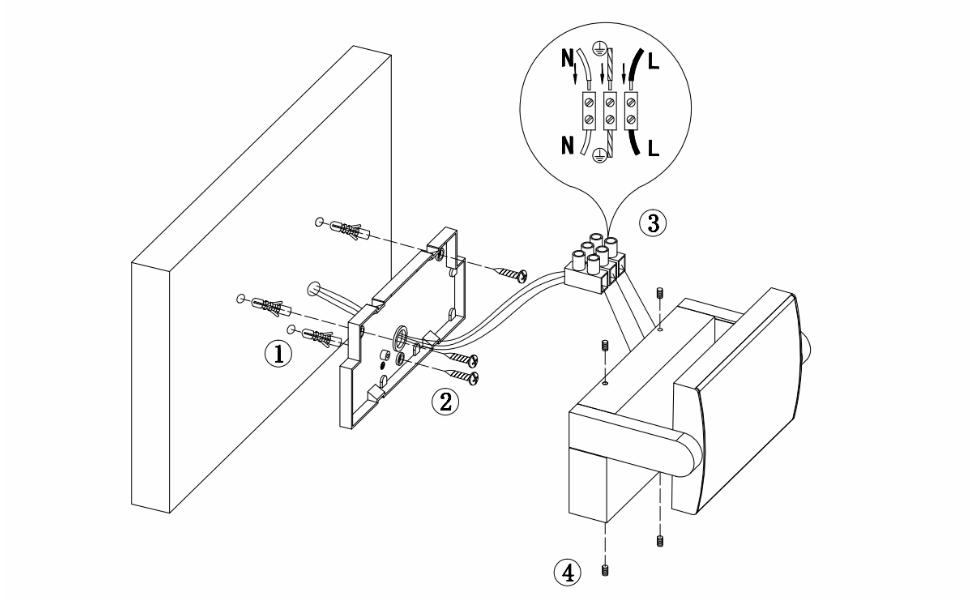
Figure 3: Installation Diagram
Adjusting the LED Panel
The LED panel can be rotated up to 350 degrees vertically. Loosen the adjustment screws (if present, typically on the side joints) with the provided hex key, adjust the panel to your desired lighting angle, and then tighten the screws to secure it.

Figure 4: Rotatable LED Panel
5. Operating Instructions
Motion Sensor Functionality
The wall light is equipped with a motion sensor that automatically turns the light on when motion is detected within its range (approximately 3 to 8 meters, with a 120-degree detection angle). The detection distance may be shortened if the lamp is mounted too low.

Figure 5: Motion Sensor Settings and Operation
Adjusting Sensor Settings
The sensor has adjustable settings for time and light sensitivity. These controls are typically located on the sensor unit itself, often under a small cover.
- Time Setting (TIME): Adjusts how long the light stays on after motion is detected. You can set this from approximately 30 seconds to 3 minutes.
- Light-Sensitive Setting (LUX): Determines the ambient light level at which the sensor becomes active.
- LUX+: The lamp will operate only at night or in dim conditions.
- LUX-: The lamp will operate both day and night.
Continuous Lighting Mode
To activate continuous lighting mode, switch the light off and on twice quickly within two seconds (OFF-ON-OFF-ON). The light will then remain on continuously. After approximately 5 hours, the light will automatically revert to sensor mode. To return to sensor mode manually, switch the light off and on again (OFF-ON).
Disabling the Motion Detector Function (Advanced)
Warning: This procedure involves modifying the internal wiring and should only be performed by a qualified professional. Improper modification can lead to electric shock or damage to the product.
If you wish to permanently disable the motion detector function, you can cut the three wires connecting the sensor adjustment unit to the LED driver. Refer to the internal wiring diagram (Figure 5) for guidance. This action will cause the light to function as a standard wall light, controlled by an external switch.
6. Maintenance
To ensure optimal performance and longevity of your Klighten LED Wall Light, follow these maintenance guidelines:
- Cleaning: Regularly clean the exterior of the fixture with a soft, damp cloth. Do not use abrasive cleaners or solvents, as they may damage the finish or the PC lampshade.
- Inspection: Periodically inspect the fixture for any signs of damage, loose connections, or wear. If any issues are found, disconnect power and consult a qualified electrician.
- Seals: For outdoor installations, ensure that the waterproof seals remain intact and free from damage to maintain the IP65 rating.
7. Troubleshooting
If you encounter issues with your Klighten LED Wall Light, refer to the following common problems and solutions:
| Problem | Possible Cause | Solution |
|---|---|---|
| Light does not turn on. | No power supply; faulty wiring; sensor set to 'night only' during daytime; sensor malfunction. | Check circuit breaker and wiring connections. Adjust LUX setting. Test sensor by covering it or waiting for night. If problem persists, consult a professional. |
| Light stays on continuously. | Continuous lighting mode activated; constant motion in detection zone; sensor malfunction. | Toggle power (OFF-ON) to exit continuous mode. Ensure no objects are constantly moving in the detection area. Adjust TIME setting. If problem persists, consult a professional. |
| Motion sensor range is too short or inconsistent. | Mounting height too low; obstructions; extreme temperatures. | Ensure optimal mounting height (refer to specifications). Clear any obstructions. Sensor performance can be affected by extreme weather. |
| Light flickers. | Unstable power supply; loose wiring connection; faulty LED driver. | Check power supply stability. Inspect and secure all wiring connections. If flickering continues, the LED driver may need replacement by a qualified technician. |
8. Specifications
| Feature | Detail |
|---|---|
| Brand | Klighten |
| Model Number | GW007-6000K |
| Dimensions (L x W x H) | 21 x 10 x 16 cm (8.27 x 3.94 x 6.3 inches) |
| Weight | 1.4 Kilograms |
| Power | 24 Watts |
| Luminous Flux | 1500 lm |
| Color Temperature | 5700K-6000K (Cool White) |
| Color Rendering Index (CRI) | 80.00 |
| Material | Aluminum (Housing), Polycarbonate (Lampshade) |
| IP Rating | IP65 (Waterproof and Dustproof) |
| Voltage | 220 Volts |
| Switch Style | Motion Detector |
| Installation Type | Wall Mount |
| Special Features | Rotatable LED Panel, Motion Sensor, Waterproof |

Figure 6: Product Dimensions and Features

Figure 7: EU Energy Label (Class G)
For more details, visit the official EU EPREL database: https://eprel.ec.europa.eu/qr/2268506
9. Warranty and Support
Klighten products are manufactured to high-quality standards. For warranty information, technical support, or any inquiries regarding your product, please contact the seller or Klighten customer service directly. Please have your model number (GW007-6000K) and purchase details ready when contacting support.