
Introduction
Thank you for purchasing the Better Homes & Gardens 40-inch Tower Fan. This manual provides important information for the proper assembly, operation, maintenance, and troubleshooting of your fan. Please read this manual thoroughly before use and retain it for future reference.
This tower fan is designed to provide efficient air circulation with features such as multiple speed settings, oscillation, a timer, and convenient remote control operation. Its portable design makes it suitable for various indoor environments.
Important Safety Instructions
When using electrical appliances, basic precautions should always be followed to reduce the risk of fire, electric shock, and injury to persons, including the following:
- Read all instructions before using this fan.
- Use this fan only as described in this manual. Other uses not recommended may cause fire, electric shock, or injury to persons.
- To reduce the risk of fire or electric shock, do not expose this fan to water or rain.
- This fan is intended for indoor use only. Do not use outdoors.
- Do not operate any fan with a damaged cord or plug. Discard fan or return to an authorized service facility for examination and/or repair.
- Do not run cord under carpeting. Do not cover cord with throw rugs, runners, or similar coverings. Do not route cord under furniture or appliances. Arrange cord away from traffic area and where it will not be tripped over.
- To disconnect the fan, turn controls to OFF, then remove plug from outlet.
- Do not insert or allow foreign objects to enter any ventilation or exhaust opening as this may cause an electric shock or fire, or damage the fan.
- Do not block air intakes or exhaust in any manner. Do not use on soft surfaces, like a bed, where openings may become blocked.
- A fan has hot and arcing or sparking parts inside. Do not use it in areas where gasoline, paint, or flammable liquids are used or stored.
- Always unplug the fan when not in use, when moving from place to place, and before cleaning.
- Do not operate the fan in the presence of explosive and/or flammable fumes.
- Do not place the fan or any parts near an open flame, cooking or other heating appliance.
- Do not operate the fan with a wet hand.
Package Contents
Carefully unpack your tower fan and check that all items are included:
- Tower Fan Unit
- Base (two halves)
- Remote Control
- Fasteners (screws) for base assembly
- Instruction Manual (this document)
Assembly and Setup
Your tower fan requires minimal assembly before use. Follow these steps:
- Assemble the Base: Take the two halves of the base and align them. They are designed to fit together snugly.
- Attach the Base to the Fan: Carefully place the main fan unit onto the assembled base, ensuring the alignment posts on the fan unit fit into the corresponding holes on the base. The power cord should pass through the designated channel in the base.
- Secure the Base: Using the provided screws, secure the base to the fan unit from the underside. Ensure the base is firmly attached and stable.
- Position the Fan: Place the fan on a firm, level surface. Ensure there is adequate space around the fan for proper air circulation and oscillation.
- Connect Power: Plug the power cord into a standard 120V AC electrical outlet.
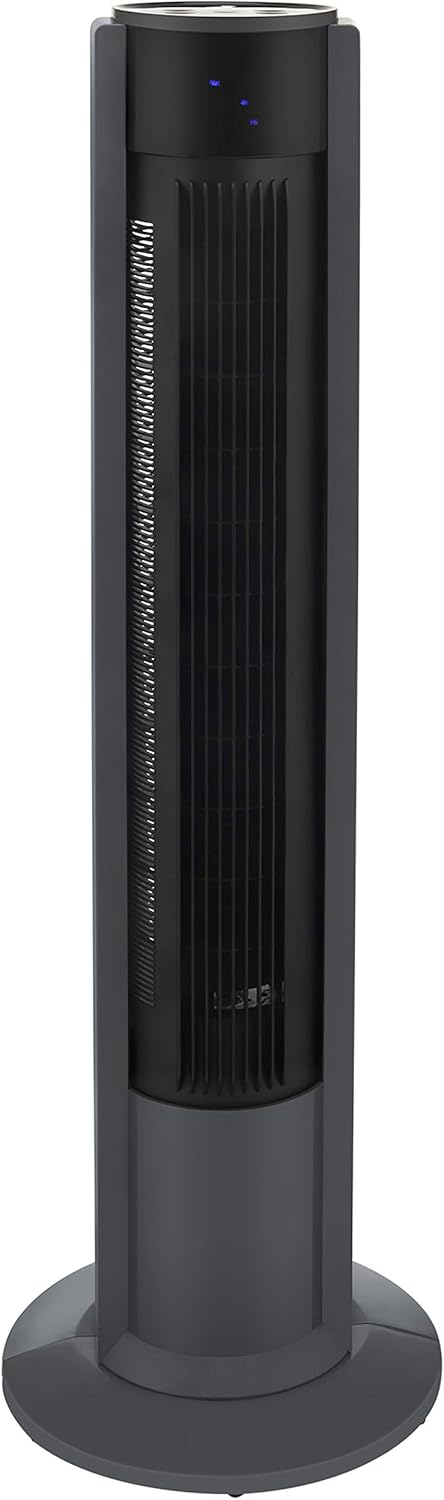
Image: The fully assembled Better Homes & Gardens 40-inch Tower Fan, ready for use.
Operating Instructions
Your tower fan can be operated using the control panel on top of the unit or the included remote control.
Control Panel

Image: Close-up view of the fan's top control panel, showing the power button and indicator lights.
The control panel features several buttons and indicator lights:
- Power Button (U): Press to turn the fan ON or OFF.
- Speed Button: Cycles through fan speeds (Low, Medium, High).
- Mode Button: Selects different fan modes (Normal, Natural, Sleep).
- OSC (Oscillation) Button: Activates or deactivates the oscillation function.
- Timer Button: Sets the operating timer.
Remote Control

Image: The remote control resting on the fan's top panel, showing its buttons.
The remote control provides convenient access to all fan functions from a distance. Ensure the remote has a working battery (typically a CR2025 coin cell battery). The remote control can be magnetically stored on top of the fan unit.
- Power Button: Turns the fan ON or OFF.
- Speed Buttons (+/-): Adjusts the fan speed.
- Mode Button: Cycles through fan modes (Normal, Natural, Sleep).
- OSC Button: Activates or deactivates the oscillation function.
- Timer Button: Sets the operating timer.
Fan Functions
- Power ON/OFF: Press the Power button on the control panel or remote to turn the fan on or off.
- Speed Settings: Press the Speed button to cycle through 3 fan speeds: Low, Medium, and High. The corresponding indicator light will illuminate.
- Oscillation: Press the OSC button to start or stop the fan's oscillation. The fan will rotate from side to side to distribute air over a wider area. The product features 3 types of oscillation for varied air distribution.
- Modes: Press the Mode button to select from different airflow patterns:
- Normal Mode: Provides a constant airflow at the selected speed.
- Natural Mode: Simulates a natural breeze by varying the fan speed intermittently.
- Sleep Mode: Operates at a lower, quieter speed, often with a gradual decrease in speed over time, ideal for nighttime use.
- Timer: Press the Timer button to set the fan to automatically turn off after a specified period. Each press typically adds an hour to the timer, up to a maximum setting (e.g., 1-12 hours). The indicator lights will show the selected timer duration.
Maintenance and Cleaning
Regular cleaning helps maintain the fan's performance and extends its lifespan. Always unplug the fan before cleaning.
- Exterior Cleaning: Use a soft, damp cloth to wipe the exterior surfaces of the fan. Do not use abrasive cleaners or solvents, as they may damage the finish.
- Air Intake/Outlet Grilles: Use a vacuum cleaner with a brush attachment to remove dust and debris from the air intake and outlet grilles. Do not attempt to open the fan housing to clean internal components.
- Remote Control: Wipe the remote control with a soft, dry cloth. Replace the battery when necessary (CR2025 type).
Do not immerse the fan in water or allow water to drip into the motor housing.
Storage
When not in use for extended periods, store the fan in a cool, dry place. It is recommended to store the fan in its original packaging to protect it from dust and damage. Ensure the power cord is neatly wrapped and secured.
Troubleshooting
If you experience issues with your fan, refer to the following common problems and solutions:
| Problem | Possible Cause | Solution |
|---|---|---|
| Fan does not turn on. | No power supply. Power button not pressed. | Ensure the power cord is securely plugged into a working outlet. Press the Power button on the control panel or remote. |
| Fan operates but no air comes out. | Air intake/outlet blocked. | Check for obstructions around the air intake and outlet grilles. Clean any dust or debris. |
| Remote control not working. | Battery depleted. Obstruction between remote and fan. | Replace the remote control battery (CR2025). Ensure there is a clear line of sight between the remote and the fan's receiver. |
| Fan makes unusual noise. | Dust accumulation. Fan not on a level surface. | Clean the fan grilles to remove dust. Place the fan on a stable, level surface. |
| Oscillation not working. | Oscillation function not activated. | Press the OSC button on the control panel or remote. |
Specifications
| Feature | Specification |
|---|---|
| Brand | Better Homes & Gardens |
| Model Name | FZ10-19M |
| Product Identifier | BHS2803696710BR |
| Height | 40 inches (105.4 cm) |
| Dimensions (D x W x H) | 30.5 cm x 30.5 cm x 105.4 cm (approx. 12 in x 12 in x 41.5 in) |
| Power Source | AC Adapter |
| Voltage | 120 Volts |
| Number of Speeds | 3 |
| Special Features | Oscillating, Portable, Remote Control, Timer |
| Control Method | Remote Control, Push Button |
| Usage Environment | Indoor |
| Components Included | Remote Control |
| UPC | 737278692568 |
| ASIN | B08R6LMRVD |
Warranty and Support
For warranty information or customer support, please refer to the documentation included with your purchase or contact the retailer where the product was acquired. Keep your purchase receipt as proof of purchase for any warranty claims.