
1. Introduction and Overview
The GYS FIREMAN 9-13 TRUE COLOR optoelectronic welding helmet is designed to provide essential protection for the welder's face and eyes. It safeguards against harmful UV and infrared radiation, as well as welding projections. This fully automatic mask transitions from a clear state to a dark shade in a fraction of a second upon arc ignition, ensuring continuous protection. Equipped with a comfortable headband, it allows for hands-free operation during various welding tasks.
Key features include:
- 2 Light Sensors: For reliable arc detection.
- TIG Welding Compatibility: Suitable for TIG welding applications above 2 Amperes.
- Active Filter: Offers shade ranges from 5-9 and 9-13.
- Low Intensity Range: A dedicated 4-9 shade range for low amperage welding.
- 7 Dark Shades: Adjustable shades from 5 to 13 to suit various welding and cutting operations.
- TRUE COLOR Technology: Provides a clearer, more natural view of the welding area.
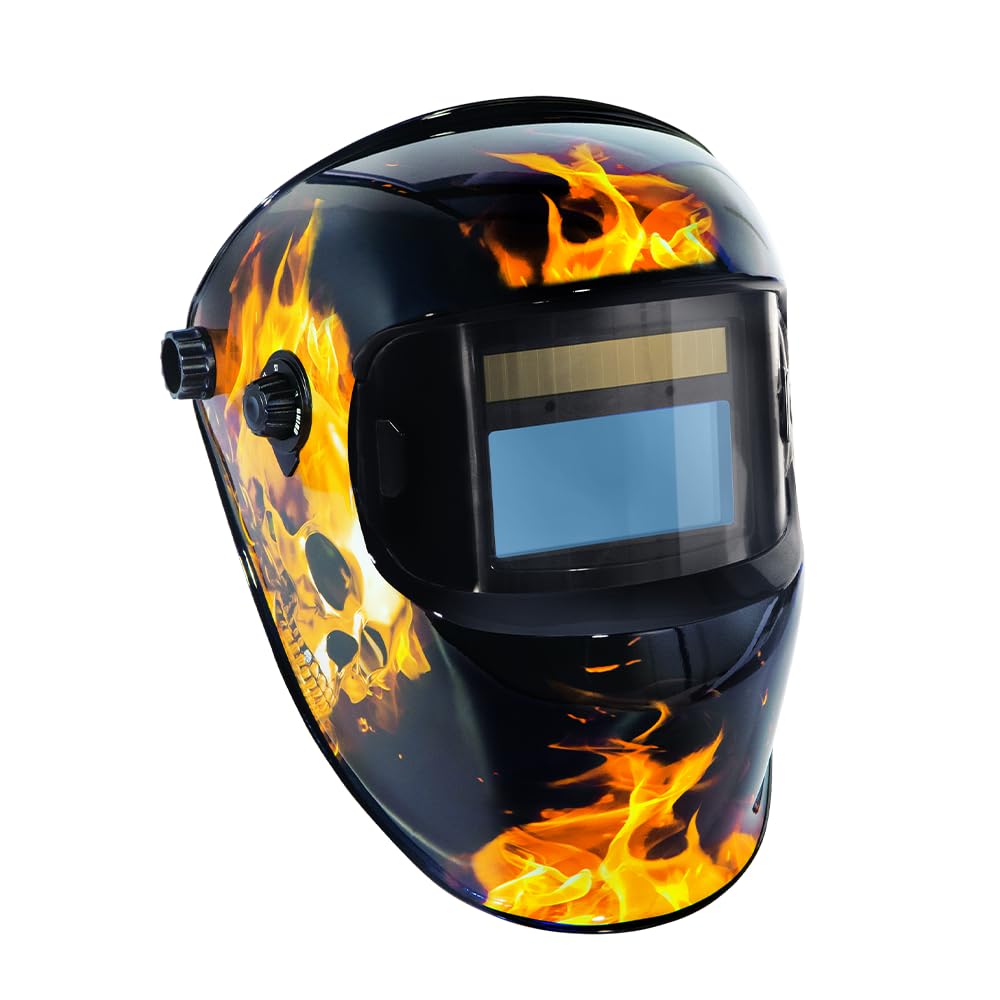
Figure 1: GYS FIREMAN LCD Welding Mask, front view.
2. Safety Information
Always prioritize safety when performing welding operations. This welding mask is a crucial piece of Personal Protective Equipment (PPE) but must be used correctly and in conjunction with other safety measures.
- Eye and Face Protection: The mask protects against harmful ultraviolet (UV) and infrared (IR) radiation, sparks, and spatter.
- Inspection Before Use: Always inspect the mask, including the lens and headband, for any damage before each use. Do not use if damaged.
- Not for Laser Welding: This mask is not suitable for laser welding applications.
- Overhead Applications: For overhead welding, additional head and shoulder protection may be required.
- Ventilation: Ensure adequate ventilation in the welding area to avoid inhaling hazardous fumes.
- Temperature Range: Do not use the mask outside its specified operating temperature range.

Figure 2: Overview of the welding mask's safety features, including viewing area and switching speed.
3. Setup
3.1 Headband Adjustment
Proper adjustment of the headband is essential for comfort and stability during welding. The GYS FIREMAN mask features a Multi Premium headband for optimal fit.
- Adjust Head Circumference: Use the knob at the back of the headband to tighten or loosen it until it fits snugly around your head.
- Adjust Head Support: Modify the top straps to adjust the height and position of the mask on your head.
- Adjust Tilt: Use the side knobs to set the tilt angle of the mask, ensuring the viewing area is optimally positioned for your work.

Figure 3: Headband adjustment points for circumference, support, and tilt.
3.2 Initial Checks
Before first use, and after any screen replacement, ensure all protective films are removed from both the inner and outer guard screens. Failure to do so will impair visibility and mask performance.
4. Operating Instructions
4.1 Automatic Darkening Function
The GYS FIREMAN welding mask is fully automatic. When the arc is struck, the mask will instantly switch from its clear state (shade 3) to the selected dark shade. When the arc stops, it will return to the clear state after a short delay.

Figure 4: Automatic welding helmet features, including clear shade and dark shade ranges.
4.2 Shade Selection
The mask offers a versatile range of dark shades to accommodate different welding processes and amperages. Use the external knob to select the appropriate shade:
- Shade 9-13: Standard range for most welding applications.
- Shade 5-9: Suitable for gas welding, cutting, and lower amperage welding.
- Shade 4-9: Special range for very low intensity welding or grinding.
4.3 Grind Mode
The mask includes a grind mode, which deactivates the auto-darkening function, allowing the user to grind without the lens darkening. This mode typically uses a clear shade (e.g., shade 3) for grinding tasks. Refer to the mask's external controls for activating and deactivating grind mode.
4.4 TRUE COLOR Technology
The integrated TRUE COLOR technology provides a significantly clearer and more natural color perception of the welding arc and workpiece. This enhances visibility and reduces eye strain, allowing for more precise welding.

Figure 5: Visual comparison demonstrating the clarity provided by True Color technology versus classic filters.
5. Maintenance
5.1 Screen Replacement
Regularly inspect and replace the inner and outer guard screens if they become scratched, pitted, or otherwise damaged to maintain optimal visibility and protection.
- Outer Guard Screen Replacement: The outer guard screen can be removed by gently placing a finger under the screen at point A of the mask and prying it out.
- Inner Guard Screen Replacement: To change the inner guard screen, slide it downwards, placing a finger on point B.
- Protective Film: When installing a new screen, remember to remove any protective film beforehand. This film cannot be removed once the guard screen is in position.

Figure 6: Instructions for replacing the outer and inner guard screens, highlighting points A and B.
5.2 Cleaning
- Lens Cleaning: Clean the auto-darkening filter and guard screens with a soft, clean cloth and a mild cleaning solution. Do not use abrasive cleaners or solvents.
- Helmet Body Cleaning: Wipe the helmet body with a damp cloth.
- Sensors: Keep the light sensors clean and unobstructed for proper operation.
6. Troubleshooting
If you encounter issues with your GYS FIREMAN welding mask, refer to the following common problems and solutions:
| Problem | Possible Cause | Solution |
|---|---|---|
| Mask does not darken when arc is struck. | Sensors are dirty or obstructed. Incorrect shade setting. Low ambient light. | Clean sensors. Adjust shade setting. Ensure sufficient light for sensors. |
| Poor visibility through the lens. | Guard screens are scratched or dirty. Protective film not removed. | Clean or replace guard screens. Ensure all protective films are removed. |
| Mask feels uncomfortable or unstable. | Headband not properly adjusted. | Re-adjust the headband for circumference, height, and tilt as described in Section 3.1. |
| Mask darkens intermittently or too slowly. | Sensors are partially obstructed. Welding current is too low for selected shade. | Clean sensors. Adjust sensitivity or select a lower shade range (e.g., 4-9 for low intensity). |
If the problem persists after attempting these solutions, please contact GYS customer support.
7. Specifications
| Feature | Specification |
|---|---|
| Model Number | 062269 |
| Manufacturer | GYS (French Manufacturer since 1964) |
| Dimensions (L x W x H) | Approx. 25.0 cm x 21.5 cm x 30.0 cm |
| Weight | 820 Grams |
| Clear Shade | 3 |
| Dark Shade Range | 5-9 / 9-13 (Adjustable) |
| Low Intensity Shade Range | 4-9 |
| Number of Light Sensors | 2 |
| TIG Welding Minimum Amperage | > 2A |
| Switching Speed | 0.08 ms |
| Optical Class | 1/1/1/2 |
| Viewing Area | 100 x 50 mm |
| True Color Technology | Yes |
| Power Source | Automatic (No batteries required) |
| Country of Origin | China |

Figure 7: Approximate dimensions of the GYS FIREMAN welding mask.
8. Warranty and Support
For warranty information, service, or technical support regarding your GYS FIREMAN welding mask, please contact GYS customer service directly. Details regarding spare parts availability are currently unavailable. Always refer to the official GYS website or your local distributor for the most up-to-date support information.


