
1. Introduction
This manual provides detailed instructions for the safe installation, operation, and maintenance of your Qazqa Clima LED Dimmable Ceiling Fan. Please read this manual thoroughly before installation and keep it for future reference.
The Qazqa Clima ceiling fan combines efficient air circulation with versatile LED lighting. It features a dimmable LED light with adjustable color temperature (3000K to 6500K) and a multi-speed fan, all controllable via the included remote.
2. Safety Instructions
- Always disconnect power at the main circuit breaker before installation, cleaning, or maintenance.
- Installation must be performed by a qualified electrician and in accordance with all local and national electrical codes.
- Ensure the mounting structure can support the weight of the fan (approximately 3.8 kg).
- Do not connect the fan to a dimmer switch not specifically designed for ceiling fans with integrated LED. Use only the provided remote control for dimming and speed control.
- Keep hands, hair, and clothing clear of the fan blades when the fan is operating.
- This appliance is intended for indoor use only (IP20 rating). Do not expose to water or high humidity.
- Do not attempt to repair or modify the fan. Contact qualified service personnel for repairs.
3. Package Contents
Carefully unpack your ceiling fan and ensure all items are present and undamaged. If any parts are missing or damaged, contact your retailer immediately.
- Qazqa Clima LED Dimmable Ceiling Fan unit
- Remote Control
- Integrated LED light source
- Mounting hardware (screws, anchors, etc.)
- User Manual (this document)
4. Product Overview
The Qazqa Clima ceiling fan features a sleek, modern design with integrated LED lighting and a compact profile.

Figure 4.1: Front view of the Qazqa Clima LED Dimmable Ceiling Fan, showing the outer light ring and central fan grille.

Figure 4.2: Close-up view of the internal fan blades and protective grille, highlighting the silver finish.
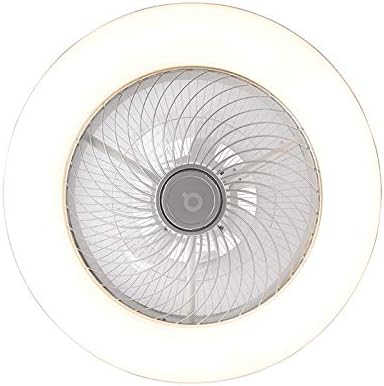
Figure 4.3: Side profile of the ceiling fan, illustrating its compact height and integrated light ring.
5. Specifications
Refer to the table below for detailed technical specifications of the Qazqa Clima ceiling fan.

Figure 5.1: Dimensional drawing of the Qazqa Clima ceiling fan, showing a diameter of 55 cm and a height of 22.5 cm.
| Feature | Specification |
|---|---|
| Model Number | 103507 |
| Brand | Qazqa |
| Dimensions (L x W x H) | 55 x 55 x 22.5 cm |
| Weight | 3.79 kg |
| Material | Plastic (with metallic finish) |
| Color | Silver |
| Light Source Type | Integrated LED |
| Max Wattage (LED) | 40W |
| Luminous Flux | 2000 lumens |
| Color Temperature | 3000K - 6500K (Dimmable) |
| Voltage | 220V/230V |
| IP Rating | IP20 (Indoor use only) |
| Control Method | Remote Control (included) |
6. Installation
Important: Ensure power is disconnected at the circuit breaker before beginning installation. It is recommended to have this product installed by a qualified electrician.
- Prepare the Mounting Location: Choose a suitable location on the ceiling that can safely support the fan's weight. Ensure there is adequate wiring available (220V/230V).
- Attach the Mounting Bracket: Secure the fan's mounting bracket to the ceiling junction box using the provided screws. Ensure it is firmly attached and level.
- Connect Electrical Wiring: Carefully connect the fan's electrical wires to your household wiring according to local electrical codes. Typically, this involves connecting live, neutral, and ground wires. Ensure all connections are secure and insulated.
- Mount the Fan Body: Lift the fan body and align it with the mounting bracket. Secure the fan body to the bracket using the designated screws. Ensure the fan is securely fastened and does not wobble.
- Restore Power: Once installation is complete and all connections are secure, restore power at the main circuit breaker.

Figure 6.1: View of the internal wiring and mounting plate, showing connection points for electrical installation.
7. Operating Instructions
The Qazqa Clima ceiling fan is operated using the included remote control. Ensure batteries are inserted correctly into the remote control (batteries not included).
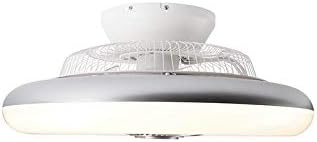
Figure 7.1: The remote control for the Qazqa Clima ceiling fan, featuring buttons for fan speed, light control, dimming, and color temperature adjustment.
7.1 Light Control
- Power On/Off: Press the light bulb icon button to turn the LED light on or off.
- Dimming: Use the '+' and '-' buttons (often labeled with sun icons) to adjust the brightness of the light.
- Color Temperature Adjustment: Use the 'K+' and 'K-' buttons (often labeled with 'K' or color temperature icons) to cycle through or adjust the light's color temperature from warm white (3000K) to cool white (6500K).
7.2 Fan Control
- Fan On/Off: Press the fan icon button to turn the fan on or off.
- Fan Speed: Use the fan speed buttons (often depicted with varying numbers of fan blades or numerical levels) to select the desired fan speed. The fan typically has multiple speed settings.
- Timer Function: Some remotes may include timer buttons (e.g., 1H, 2H, 4H) to set the fan to automatically turn off after a specified duration.
8. Maintenance
Regular maintenance ensures the longevity and optimal performance of your ceiling fan.
- Cleaning:
- Before cleaning, ensure the fan is turned off and power is disconnected at the circuit breaker.
- Wipe the fan housing and blades with a soft, damp cloth. Do not use abrasive cleaners or solvents, as these may damage the finish.
- Do not immerse the fan in water.
- Inspection: Periodically check all connections and mounting hardware to ensure they remain secure.
- LED Light Source: The integrated LED light source is designed for long life and is not user-replaceable. If the LED fails, contact customer support.
9. Troubleshooting
If you experience issues with your Qazqa Clima ceiling fan, refer to the common problems and solutions below.
| Problem | Possible Cause | Solution |
|---|---|---|
| Fan does not operate / Light does not turn on | No power supply; Loose wiring; Remote control battery dead or incorrectly inserted. | Check circuit breaker; Verify all electrical connections are secure; Replace remote control batteries and ensure correct polarity. |
| Fan makes unusual noise | Loose mounting screws; Obstruction in fan blades. | Ensure mounting screws are tightened; Check for any objects interfering with the blades. |
| Light flickers or is dim | Incorrect dimming setting; Electrical interference. | Adjust brightness using the remote control; Ensure no other dimmers are connected to the circuit. |
| Remote control not working | Dead batteries; Remote not paired (if applicable); Obstruction between remote and fan. | Replace batteries; Refer to remote pairing instructions (if provided with product); Ensure clear line of sight. |
10. Warranty and Support
This product is covered by a standard manufacturer's warranty. For specific warranty terms and conditions, please refer to the documentation provided at the time of purchase or contact your retailer.
For technical support, replacement parts, or warranty claims, please contact the seller or manufacturer directly. Keep your purchase receipt as proof of purchase.
Seller: Lampeetlumiere
For more information on recycling electrical products, please consult local regulations.