
MONSIATUG RC-737M
MONSIATUG Replacement Remote Control Instruction Manual
Compatible with Onkyo AV Receiver Models: HT-R590, HT-R591, RC-737M, HT-S7300, TX-SR309, TX-SA607S, HT-R548, HT-S3500
1. Introduction
This manual provides essential information for the proper setup, operation, and maintenance of your MONSIATUG replacement remote control. This remote is designed to function as a direct replacement for specific Onkyo AV receiver models, offering immediate functionality without complex programming.
2. Setup
2.1 Battery Installation
The remote control requires two (2) AA batteries for operation. Batteries are not included with the product.
- Locate the battery compartment cover on the back of the remote control.
- Press down on the tab and slide the cover off.
- Insert two AA batteries, ensuring the positive (+) and negative (-) terminals align correctly with the markings inside the compartment.
- Slide the battery compartment cover back into place until it clicks securely.

Figure 1: Battery compartment with cover removed, illustrating correct battery placement.
2.2 Initial Use
This replacement remote control is pre-programmed for the specified Onkyo AV receiver models. No additional programming or setup is required. Once batteries are installed, the remote is ready for immediate use.
3. Operating Instructions
The remote control features a standard layout for controlling your Onkyo AV receiver. Below is a general overview of key button functions.
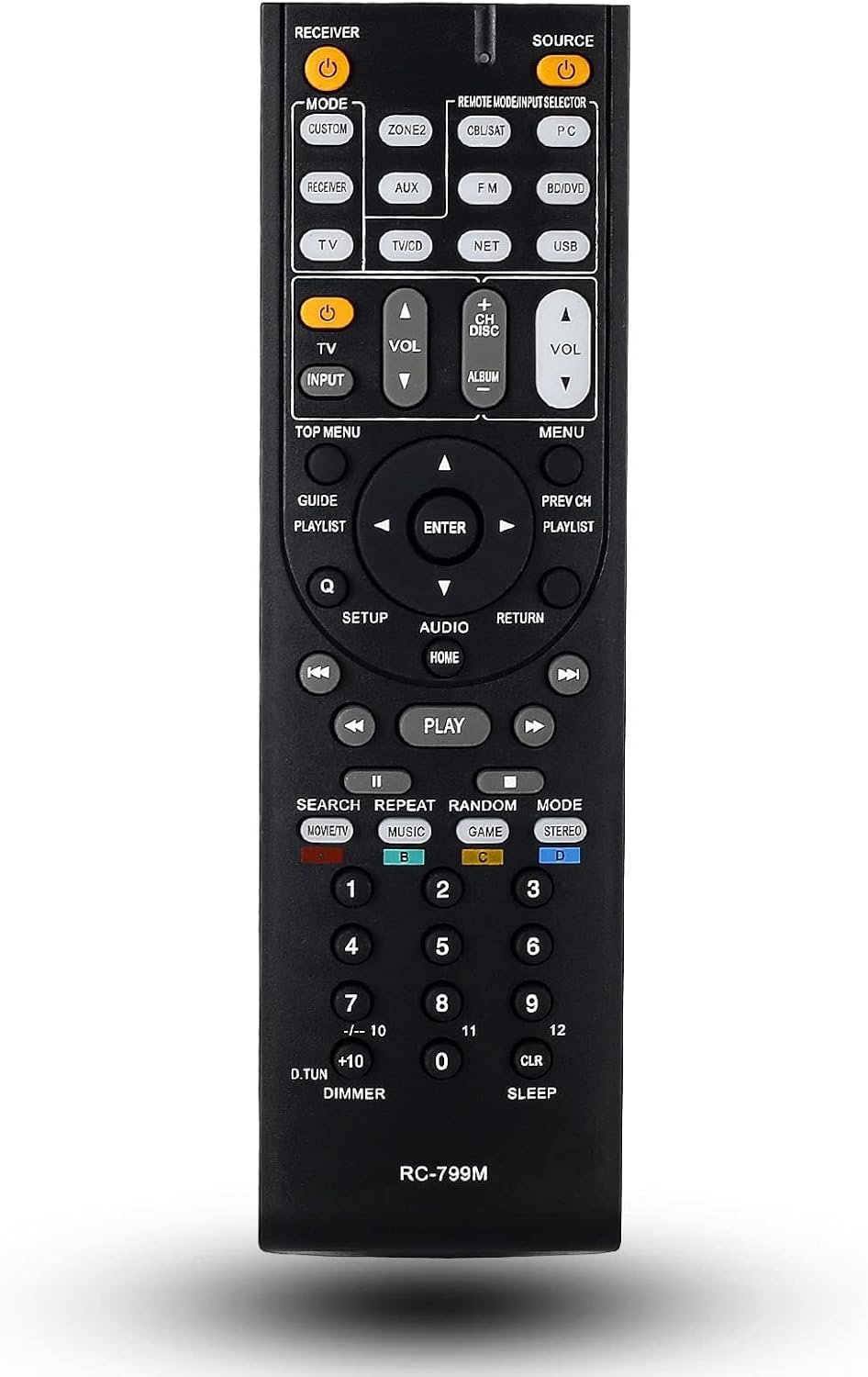
Figure 2: Front view of the remote control, displaying button layout.
- POWER (RECEIVER / SOURCE): Turns the AV receiver on or off.
- SOURCE Selection Buttons (e.g., CUSTOM, ZONE2, TV/CD, NET, USB, AUX, FM, BD/DVD, PC): Selects the input source for the receiver.
- VOLUME (+/-): Adjusts the master volume level.
- MUTE: Toggles audio mute on/off.
- Navigation Pad (UP, DOWN, LEFT, RIGHT, ENTER): Used for menu navigation and selection.
- MENU / TOP MENU: Accesses the receiver's main menu or top menu.
- SETUP: Enters the setup menu for receiver configuration.
- RETURN / EXIT: Returns to the previous screen or exits a menu.
- Playback Controls (PLAY, PAUSE, STOP, SKIP, REWIND, FAST FORWARD): Controls media playback.
- Number Buttons (0-9, +10, -/--10): Direct input for channel selection or numerical entries.
- MODE (MOVIE/TV, MUSIC, GAME, STEREO): Selects audio listening modes.
For specific functions and advanced settings, refer to your Onkyo AV receiver's original instruction manual.

Figure 3: Remote control in typical usage scenario.
4. Maintenance
4.1 Cleaning
To clean the remote control, gently wipe its surface with a soft, dry cloth. For stubborn dirt, slightly dampen the cloth with water. Avoid using harsh chemicals, abrasive cleaners, or excessive moisture, as these can damage the remote's finish or internal components.
4.2 Battery Replacement
Replace batteries when the remote control's response becomes inconsistent or stops working. Always replace both AA batteries at the same time with new ones. Do not mix old and new batteries, or different types of batteries.
5. Troubleshooting
- Remote not responding:
- Check if the batteries are inserted correctly with the correct polarity.
- Replace old batteries with new ones.
- Ensure there are no obstructions between the remote control and the AV receiver's infrared sensor.
- Confirm you are within the effective operating range and pointing the remote directly at the receiver.
- Certain functions not working:
- While this remote is designed as a replacement, some specific advanced functions or input buttons might differ slightly from your original Onkyo remote. Refer to your AV receiver's manual for expected button behavior.
- Ensure the AV receiver is powered on and the correct input source is selected.
6. Specifications
- Brand: MONSIATUG
- Model Number: RC-737M
- Compatible Devices: Onkyo AV Receivers (HT-R590, HT-R591, RC-737M, HT-S7300, TX-SR309, TX-SA607S, HT-R548, HT-S3500)
- Connectivity Technology: Infrared
- Power Source: 2 x AA Batteries (not included)
- Item Weight: Approximately 3.56 ounces
- Special Feature: Ergonomic design

Figure 4: Physical features of the remote control.
7. Warranty and Support
This product comes with a 30-day warranty from the date of purchase. For any issues or support inquiries, please contact the seller directly through your purchase platform. Ensure you have your order details available for faster assistance.
Ask a question about this manual
Ask about setup, troubleshooting, compatibility, parts, safety, or missing instructions. Manuals+ will review the question and use this page’s manual context to help answer it.