
1. Introduction
This manual provides instructions for the installation, operation, and maintenance of your LUOWAN Android 10.4-inch Tesla Style Car Radio. This unit is designed for Chevrolet Chevy Cruze models from 2009 to 2015, and 2016 Limited editions. It features an Android 10 operating system, 4GB RAM, 64GB ROM, built-in Carplay, 4G LTE, WiFi, and GPS navigation.
Please read this manual thoroughly before installation and use to ensure proper function and safety.
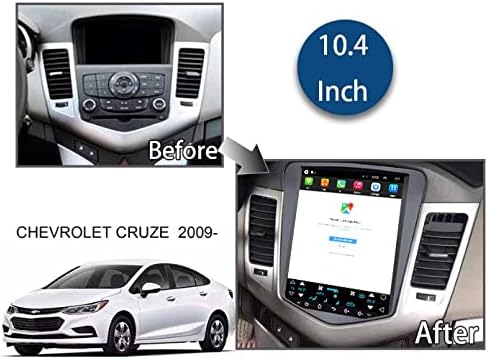
Image 1.1: Comparison of the car dashboard before and after installing the 10.4-inch Tesla Style Car Radio in a Chevrolet Cruze (2009-2016 model years).
2. Package Contents
Verify that all components are present in the package:
- 10.4-inch Tesla Style Car Radio Unit
- Power Interface Cable
- GPS Antenna
- USB Cables (2)
- RCA Cables
- 4G Antenna
- Radio Converter Head
- Canbus Decoder
- Rear View Camera (Gift)

Image 2.1: Overview of the main unit and included accessories, such as the power interface, GPS antenna, USB cables, RCA cables, 4G antenna, radio converter head, Canbus decoder, and a gift back camera.
3. Installation Guide
Professional installation is recommended. Ensure the vehicle's power is disconnected before beginning installation.
3.1 Wiring Diagram
Refer to the following diagrams for proper connection of all cables.

Image 3.1: Rear view of the car radio unit with labeled connection ports for power, 4G, GPS, radio, USB, reversing image, and RCA cables.

Image 3.2: Detailed wiring diagram illustrating how to connect the power interface, GPS antenna, USB cables, RCA cables, 4G antenna, radio converter head, and Canbus decoder to the main unit.
3.2 Installation Video
Watch this video for a visual guide on the installation process.
Video 3.1: Installation guide for the LUOWAN Car Radio in a Chevrolet Cruze. This video demonstrates the steps involved in replacing the factory radio with the new Tesla-style unit.
4. Operating Instructions
4.1 Basic Operation
- Power On/Off: Press and hold the power button (if available) or turn on the vehicle ignition.
- Touchscreen: The unit features a 10.4-inch IPS capacitive touchscreen with 1024*768 resolution. Navigate by tapping, swiping, and pinching.
- Steering Wheel Control: The unit supports original steering wheel controls for easy access to functions like volume adjustment and track changes.

Image 4.1: Demonstrates the superior clarity and viewing angles of the IPS screen compared to a normal screen, and the phone sync display feature.
4.2 GPS Navigation
The unit has built-in GPS navigation, supporting both online and offline navigation applications. You can use apps like Igo map or Waze. The GPS dual zone function allows you to listen to music or radio while navigating.
4.3 CarPlay & Android Auto
The unit includes built-in wireless CarPlay and Android Auto functionality. Connect your smartphone to access navigation, music, calls, and messages directly on the car radio screen.

Image 4.2: The CarPlay interface shown on the 10.4-inch display, demonstrating phone, music, maps, and messaging applications.
Video 4.1: Demonstration of Wireless CarPlay connection for Chevrolet Chevy Cruze, showcasing navigation and app usage.
4.4 Bluetooth Functionality
Connect your mobile device via Bluetooth for hands-free calling and audio streaming. This feature enhances driving safety by allowing you to manage calls and music without distraction.

Image 4.3: Visual representation of the Bluetooth function, highlighting its use for calls, music, and safer driving.
4.5 4G LTE & WiFi Connectivity
The unit supports 4G LTE connectivity (SIM card required, not included) and built-in WiFi, allowing internet access for online applications, streaming, and updates.
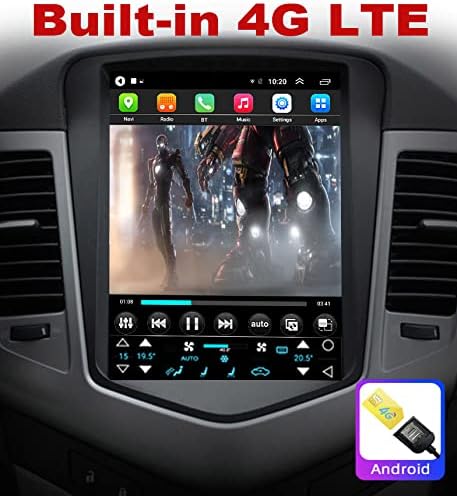
Image 4.4: The car radio screen showing an application running with 4G LTE connectivity, indicated by a 4G icon and SIM card slot graphic.
Video 4.2: Demonstrates 5G WiFi upgrade and general car radio features for Chevrolet Chevy Cruze.
4.6 Reversing Camera
The unit supports a reversing camera input, providing a clear view of the area behind your vehicle when in reverse gear. This increases safety during parking and maneuvering.

Image 4.5: The car radio display showing the view from a reversing camera, including parking guidelines.
Image 4.6: Illustrates AHD reversing camera support for increased clarity and compatibility with original car functions like the interface and USB ports.
5. Maintenance
- Screen Cleaning: Use a soft, lint-free cloth to clean the touchscreen. Avoid abrasive cleaners or solvents.
- Software Updates: Periodically check for software updates to ensure optimal performance and access to new features.
- General Care: Avoid exposing the unit to extreme temperatures, direct sunlight for prolonged periods, or excessive moisture.
6. Troubleshooting
| Problem | Possible Cause | Solution |
|---|---|---|
| Unit does not power on. | Incorrect wiring; Blown fuse; Vehicle power issue. | Check all power connections. Verify vehicle's fuse box. Consult a professional installer. |
| Screen is dim or unresponsive. | Brightness settings; Software glitch; Hardware malfunction. | Adjust screen brightness in settings. Restart the unit. If problem persists, contact technical support. |
| CarPlay/Android Auto not connecting wirelessly. | Bluetooth/WiFi interference; Incorrect settings; Phone compatibility. | Ensure Bluetooth and WiFi are enabled on your phone and the unit. Try connecting via USB cable. Check phone's compatibility and update its OS. |
| No GPS signal. | GPS antenna not connected or obstructed; Software issue. | Ensure GPS antenna is properly connected and has a clear view of the sky. Restart navigation app. |
| Poor radio reception. | Antenna connection issue; Weak signal area. | Check the radio antenna connection. Try scanning for stations in a different location. |
7. Specifications
| Feature | Detail |
|---|---|
| Brand | LUOWAN |
| Compatible Vehicle Models | Chevrolet Chevy Cruze 2009-2015, 2016 Limited |
| Operating System | Android 10 |
| RAM | 4GB |
| ROM (Internal Storage) | 64GB |
| Screen Size | 10.4 Inches |
| Display Type | IPS Capacitive Touchscreen |
| Resolution | 1024*768 (supports 4K video) |
| Connectivity | 4G LTE, WiFi, Bluetooth, USB |
| Navigation | Built-in GPS (supports online/offline maps) |
| Special Features | Built-in Wireless CarPlay, Android Auto, Steering Wheel Control Support, Reversing Camera Input |
| Included Components | Camera |
| Item Weight | 2 Kilograms |
8. Warranty and Support
This product typically comes with a return policy of 30 days for refund or replacement. For specific warranty details, please refer to your purchase documentation.
Our professional technical support team is available 24/7 to answer your questions or assist with any issues. Please contact us through the Amazon chat system for prompt assistance.