
1. Introduction
This manual provides detailed instructions for the proper installation, operation, and maintenance of your Gravity G3-12D4 12-inch car audio subwoofer and Gravity WZ3000.1D Class D amplifier, along with the included 4-gauge amplifier installation kit. Please read this manual thoroughly before beginning installation to ensure correct setup and optimal performance.
2. Safety Information
Always observe the following safety precautions during installation and operation:
- Disconnect the vehicle's negative battery terminal before any wiring to prevent electrical shorts.
- Ensure all wiring is properly routed and secured to prevent damage from sharp edges or moving parts.
- Use appropriate gauge wiring as specified in this manual to handle current loads and prevent overheating.
- Install fuses at the battery and near the amplifier as instructed to protect against power surges.
- Avoid mounting components in locations that obstruct vehicle operation or safety features.
- Do not expose components to excessive moisture or extreme temperatures.
- Seek professional assistance if you are unsure about any installation steps.
3. Package Contents
Verify that all items are present in your package:
- Gravity G3-12D4 12-inch Car Audio Subwoofer
- Gravity WZ3000.1D Class D Amplifier
- 4 Gauge Amplifier Installation Kit, including:
- 17 ft. 4 Gauge Power Cable
- 3 ft. 4 Gauge Ground Cable
- Inline AGU Fuse Holder with 80A + 100A Fuses
- 17 ft. Double Shielded RCA Cable
- 17 ft. 18 Gauge Turn-On Cable
- 20 ft. 16 Gauge Speaker Wire
- All necessary accessories and terminals
- Remote Bass Control Knob
4. Product Features
Gravity G3-12D4 Subwoofer
- Dual 4 Ohm Voice Coil Configuration
- Competition Grade Pressed Paper Cone
- High Roll Foam Surround
- Advanced Air Flow Cooling System
Gravity WZ3000.1D Amplifier
- Class D MOSFET Power Amplifier
- Stable at 1 Ohm, 2 Ohm, and 4 Ohm loads
- High and Low Level Inputs
- Variable Low Pass Crossover (LPF)
- Variable Bass Boost
- Subsonic Filter
4 Gauge Amplifier Installation Kit
- High Quality Thick 4 Gauge Power and Ground Cables
- Inline AGU Fuse Holder with multiple fuses for protection
- True Sound Double Shielded RCA Cable for clear signal transmission
- Complete set of accessories and terminals for a professional installation
5. Setup and Installation
Proper installation is crucial for performance and safety. If you are not confident in your ability to install this system, please consult a professional installer.
5.1. Mounting the Subwoofer
The G3-12D4 subwoofer requires a suitable enclosure (not included) for optimal performance. Ensure the enclosure is properly sealed and sized according to subwoofer specifications. Mount the subwoofer securely to the enclosure using appropriate screws, ensuring a tight seal around the mounting flange.

Image: Front view of the Gravity G3-12D4 12-inch subwoofer, showing the black cone with a red Gravity logo and red stitching on the foam surround.

Image: Rear view of the Gravity G3-12D4 12-inch subwoofer, displaying the magnet structure and speaker terminals.
5.2. Mounting the Amplifier
Select a mounting location for the WZ3000.1D amplifier that is dry, well-ventilated, and protected from physical damage. Common locations include under a seat, in the trunk, or mounted to a custom amplifier rack. Ensure there is sufficient airflow around the amplifier for cooling. Secure the amplifier firmly using screws.

Image: Side view of the Gravity WZ3000.1D amplifier, showing the heat sink fins for cooling.
5.3. Wiring the System
Follow these steps carefully for wiring the amplifier and subwoofer:
- Power Cable (Red 4 Gauge): Run the 17 ft. 4 gauge power cable from the vehicle's positive battery terminal to the amplifier location. Install the inline AGU fuse holder within 18 inches (45 cm) of the battery. Do not insert the fuse until all wiring is complete.
- Ground Cable (Black 4 Gauge): Connect the 3 ft. 4 gauge ground cable from the amplifier's ground terminal to a clean, unpainted metal surface on the vehicle chassis. Ensure a solid, low-resistance connection. The ground point should be as short as possible.
- Remote Turn-On Cable (Blue 18 Gauge): Connect the 17 ft. 18 gauge turn-on cable from the amplifier's REM terminal to the remote turn-on output of your head unit. This cable signals the amplifier to turn on and off with the head unit.
- RCA Signal Cables: Connect the 17 ft. double shielded RCA cable from the RCA outputs of your head unit to the RCA INPUTs on the WZ3000.1D amplifier.
- Speaker Wiring (16 Gauge): Connect the 20 ft. 16 gauge speaker wire from the amplifier's speaker output terminals to the G3-12D4 subwoofer. Ensure correct polarity (+ to + and - to -). For a single G3-12D4 (dual 4-ohm voice coils), you can wire the voice coils in parallel for a 2-ohm load or in series for an 8-ohm load. The WZ3000.1D amplifier is stable down to 1 ohm, so a 2-ohm parallel configuration is recommended for maximum power output.
- Remote Bass Control: Connect the remote bass control knob to the dedicated REMOTE port on the amplifier. Mount the knob in an accessible location for easy adjustment.
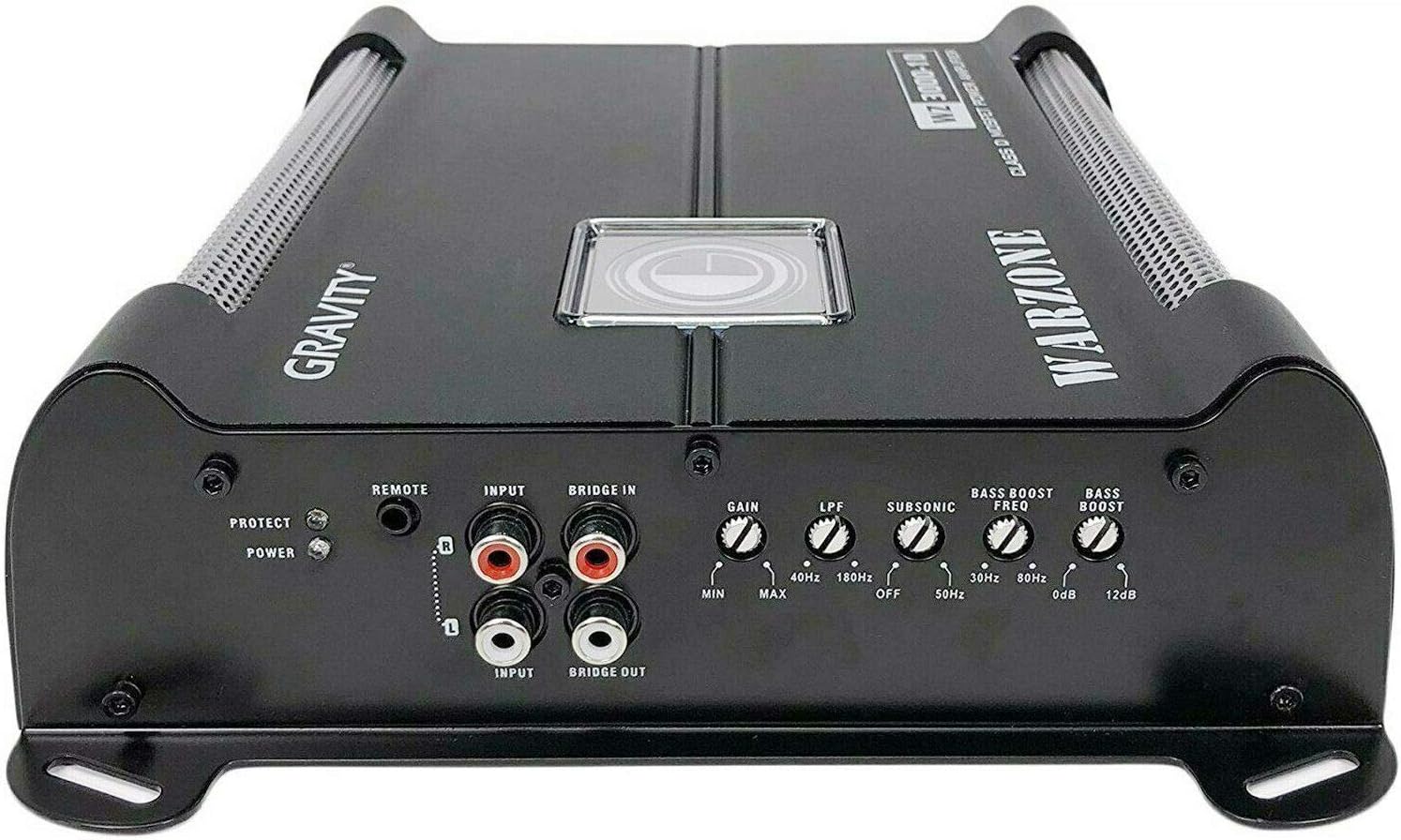
Image: Front panel of the Gravity WZ3000.1D amplifier, displaying RCA inputs, remote control port, and various adjustment knobs.

Image: Rear panel of the Gravity WZ3000.1D amplifier, showing the power input terminals (+12V, GND, REM) and speaker output terminals.

Image: The remote bass control knob, used for adjusting subwoofer output level from the driver's seat.
5.4. Final Connection
Once all wiring is securely connected and checked for shorts, insert the appropriate fuse (80A or 100A, depending on your system's power draw) into the inline AGU fuse holder near the battery. Reconnect the vehicle's negative battery terminal.
6. Operating Instructions
After installation, power on your head unit. The amplifier should turn on automatically (indicated by a power LED). Adjust the amplifier settings as follows:
- GAIN (Input Level): Start with the GAIN control at minimum. Play a familiar track with strong bass at about 75% of your head unit's maximum volume. Slowly increase the GAIN until you hear distortion, then back off slightly. This sets the amplifier's input sensitivity to match your head unit's output.
- LPF (Low Pass Filter): This control filters out high frequencies, allowing only low frequencies to pass to the subwoofer. Set the LPF between 40 Hz and 180 Hz. A common starting point is 80 Hz, but adjust to blend smoothly with your main speakers.
- SUBSONIC Filter: This filter removes extremely low frequencies below the audible range that can cause damage to the subwoofer. Set it between 0 Hz and 50 Hz. A setting around 25-30 Hz is often suitable for ported enclosures, while sealed enclosures may not require it as much.
- BASS BOOST FREQ: This selects the frequency at which the bass boost will be applied. Adjust this to enhance a specific bass frequency range.
- BASS BOOST: This control increases the output level at the selected bass boost frequency (0-12 dB). Use sparingly to avoid distortion and potential speaker damage.
- Remote Bass Control: This knob allows you to adjust the subwoofer's output level conveniently from your listening position without affecting other amplifier settings.
7. Maintenance
To ensure longevity and optimal performance of your car audio system:
- Regularly check all wiring connections for tightness and corrosion.
- Keep the amplifier and subwoofer free from dust and debris. Use a soft, dry cloth for cleaning.
- Ensure the amplifier's cooling fins are not obstructed to prevent overheating.
- Avoid exposing the subwoofer cone to direct sunlight for extended periods, as UV rays can degrade materials.
8. Troubleshooting
If you encounter issues, refer to the following common problems and solutions:
| Problem | Possible Cause | Solution |
|---|---|---|
| No Power / Amplifier does not turn on | Blown fuse Poor power or ground connection No remote turn-on signal | Check and replace fuse in fuse holder Verify all power and ground connections are secure Check remote wire connection to head unit and amplifier |
| No Sound from Subwoofer | RCA cables disconnected or faulty Speaker wires disconnected or shorted Amplifier gain too low Head unit volume too low | Check RCA connections Verify speaker wire connections and check for shorts Adjust amplifier gain Increase head unit volume |
| Distorted Sound | Gain set too high Damaged speaker or amplifier Incorrect LPF or Bass Boost settings | Reduce amplifier gain Inspect speaker and amplifier for damage Adjust LPF and Bass Boost settings |
| Amplifier Overheating | Insufficient ventilation Improper impedance load Gain set too high | Ensure proper airflow around amplifier Verify speaker impedance matches amplifier's stable load Reduce amplifier gain |
9. Specifications
Gravity G3-12D4 Subwoofer
- Speaker Size: 12 Inches
- Voice Coil Configuration: Dual 4 Ohm
- Peak Power: 2000 Watts (each)
- RMS Power: 1000 Watts (each)
- Frequency Response: 30 - 500 Hz
- Sensitivity: 87 dB
Gravity WZ3000.1D Amplifier
- Max Power: 3000W @ 1 Ohm
- Class: D
- Stable Impedance: 1 Ohm, 2 Ohm, 4 Ohm
- Signal-to-Noise Ratio (S/N): 70 dB
- Frequency Response: 8 Hz ~ 180 Hz
- Total Harmonic Distortion (THD): 0.2%
- Bass Boost Level: 0 ~ 12 dB
- Low Pass Filter (LPF): 40 Hz ~ 180 Hz
- Subsonic Filter: 0 ~ 50 Hz
- Dimensions (L×W×H): 223.5mm (8.8 in) × 211mm (8.3 in) × 64.5 mm (2.5 in)
4 Gauge Amplifier Installation Kit
- Power Cable: 17 ft. 4 Gauge
- Ground Cable: 3 ft. 4 Gauge
- Fuse Holder: Inline AGU with 80A + 100A Fuses
- RCA Cable: 17 ft. Double Shielded
- Turn-On Cable: 17 ft. 18 Gauge
- Speaker Wire: 20 ft. 16 Gauge
10. Warranty and Support
Gravity products are designed for reliability and performance. For specific warranty terms and conditions, please refer to the warranty card included with your product or contact Gravity customer support. Keep your purchase receipt as proof of purchase for any warranty claims.
For technical support or inquiries, please visit the official Gravity website or contact their customer service department.
