
SMAAIR S523P-L12-W1-1-FM
SMAAIR 52 Inch Smart Ceiling Fan User Manual
Model: S523P-L12-W1-1-FM
Introduction
Thank you for choosing the SMAAIR 52 Inch Smart Ceiling Fan. This manual provides detailed instructions for installation, operation, maintenance, and troubleshooting to ensure safe and efficient use of your new smart ceiling fan. Please read this manual thoroughly before installation and keep it for future reference.
Important Safety Information
Always follow basic safety precautions when installing and operating electrical appliances. Failure to do so may result in fire, electric shock, or personal injury.
- Ensure power is disconnected at the circuit breaker before installation or servicing.
- All wiring must be in accordance with national and local electrical codes.
- Consult a qualified electrician if you are unsure about wiring.
- Mount the fan only to an outlet box marked "Acceptable for Fan Support of 35 lbs (15.9 kg) or less" and use the mounting screws provided with the outlet box.
- Do not operate the fan with damaged blades or housing.
- Keep hands, hair, and clothing away from moving fan blades.
Package Contents
Verify that all components are present before beginning installation:
- Ceiling Fan Motor Assembly
- Fan Blades (3)
- Light Kit
- Remote Control
- Mounting Bracket
- Hardware Pack (screws, wire nuts, washers)
- User Manual

Image: SMAAIR 52 Inch Smart Ceiling Fan and its remote control.
Setup and Installation
This section guides you through the physical installation of your ceiling fan. It is recommended to have a second person assist during installation.
1. Prepare for Installation
- Turn off power at the circuit breaker or fuse box.
- Ensure the mounting location is suitable for fan support (35 lbs or 15.9 kg).
- Gather necessary tools: Phillips screwdriver, flathead screwdriver, wire strippers, electrical tape, ladder.
2. Install the Mounting Bracket
Attach the mounting bracket to the outlet box using the screws provided with the outlet box. Ensure the bracket is securely fastened.
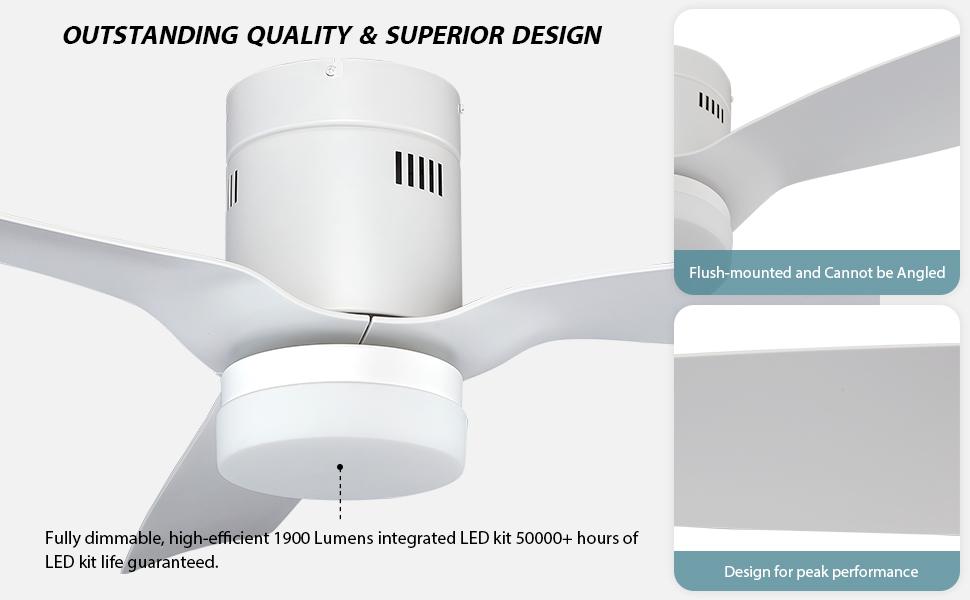
Image: Diagram illustrating the flush-mounted installation of the ceiling fan. This fan is designed for flush mounting and cannot be angled.
3. Wiring the Fan
Connect the fan's electrical wires to the household wiring according to the wiring diagram. Use wire nuts to secure connections. Ensure all connections are tight and insulated.
- Connect the green/bare copper wire from the fan to the ground wire from the outlet box.
- Connect the white wire from the fan to the neutral (white) wire from the outlet box.
- Connect the black wire from the fan to the hot (black) wire from the outlet box.
4. Attach Fan Assembly and Blades
Carefully lift the fan motor assembly and attach it to the mounting bracket. Secure it with the provided screws. Then, attach the fan blades to the motor housing following the instructions in the blade assembly section.
5. Install the Light Kit
Connect the light kit wires to the fan motor wires as instructed. Secure the light kit to the fan assembly. Install the LED light panel and glass shade.
Operating Your Smart Ceiling Fan
Your SMAAIR Smart Ceiling Fan can be controlled via the included remote, a smartphone app, or voice commands.
Remote Control Operation
The remote control allows for direct control of fan speed, light settings, and fan direction.
- Fan On/Off: Press the fan button to turn the fan on or off.
- Speed Control: Use the speed buttons to adjust between 10 fan speeds.
- Light On/Off: Press the light button to turn the light on or off.
- Light Dimming: Hold the light button to dim or brighten the light.
- Color Temperature: Cycle through 2700K (Yellow Light), 4000K (Warm Light), and 6500K (White Light) settings.
- Reverse Function: Press the reverse button to change fan direction (downdraft for summer, updraft for winter).

Image: The remote control for the SMAAIR Smart Ceiling Fan, showing buttons for fan speed, light control, and other functions.
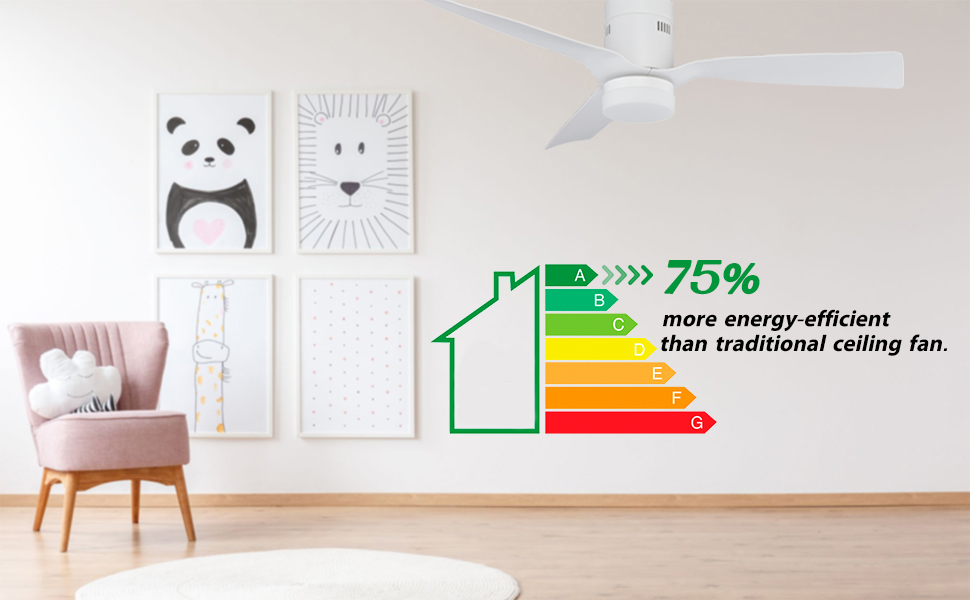
Image: Visual representation of the 0-100% dimmable light and 2700K-4000K color temperature adjustment options.
Smartphone App Control
Download the official SMAAIR app from your device's app store to unlock advanced features and control your fan from anywhere.
- Download App: Search for "SMAAIR" in the App Store or Google Play.
- Account Creation: Follow the in-app instructions to create an account.
- Pairing: Ensure your phone is connected to a 2.4GHz Wi-Fi network. Keep Bluetooth turned off before connecting the app. Follow the app's pairing guide.
- Features: The app allows for 10 wind speeds, dimming (white light - warm light - yellow light), sleep timer (1-8 hours), and scheduling to adjust speed/brightness at any time. The fan's illumination can be turned on separately.

Image: A smartphone screen displaying the SMAAIR app interface, demonstrating the ability to set schedules for fan and light operation in different rooms.

Image: A smartphone screen showing the SMAAIR app with a timer setting for the ceiling fan, allowing users to set an automatic shut-off time.
Voice Control Integration
The SMAAIR Smart Ceiling Fan is compatible with Alexa, Google Assistant, and Siri shortcuts for convenient voice control.
- Alexa/Google Home: Enable the SMAAIR skill/service in your Alexa or Google Home app and link your SMAAIR account.
- Siri Shortcuts: Set up custom shortcuts in the Apple Home app or Siri Shortcuts app.
- Commands: Use commands like "Alexa, turn on the kitchen fan," "Hey Google, set fan speed to 5," or "Hey Siri, dim the fan light."

Image: A woman interacting with a smart speaker to control her SMAAIR ceiling fan, demonstrating the voice control feature with Alexa, Google Assistant, and Siri.
Maintenance
Regular maintenance ensures the longevity and optimal performance of your SMAAIR ceiling fan.
- Cleaning: Dust the fan blades and motor housing periodically with a soft, damp cloth. Do not use abrasive cleaners or solvents.
- Blade Tightness: Check blade attachment screws annually to ensure they are tight. Loose blades can cause wobbling and noise.
- Light Kit: The LED light kit is integrated and designed for long life (50,000+ hours). Replacement of individual LEDs is not typically required.
- Motor: The DC motor is designed for quiet and efficient operation and requires no lubrication.
Troubleshooting
Before contacting customer support, please refer to the following troubleshooting guide:
| Problem | Possible Cause | Solution |
|---|---|---|
| Fan does not start. | No power to the fan; loose wire connections; remote not paired. | Check circuit breaker/fuse; ensure all wire connections are secure; re-pair remote control (press remote "Pair" button for 3 seconds). |
| Fan wobbles. | Loose blade screws; unbalanced blades; loose mounting bracket. | Tighten all blade screws; ensure blades are installed correctly; check mounting bracket for secure attachment. |
| Light does not work. | Loose wire connection to light kit; light kit failure. | Check light kit wiring connections; if problem persists, contact customer support. |
| Remote control not working or pairing. | Low battery; interference; pairing issue. | Replace remote battery; ensure no strong interference sources nearby; try re-pairing the remote by holding the "Pair" button for 3 seconds until the fan light turns off. |
| App/Voice control not working. | Incorrect Wi-Fi (not 2.4GHz); app not paired; Bluetooth on during pairing. | Ensure 2.4GHz Wi-Fi; re-pair device in app; turn off Bluetooth before app pairing. |
| Fan is noisy. | Loose screws; motor issue. | Check and tighten all screws on the fan and mounting bracket. If noise persists, contact customer support. |
Specifications
| Feature | Detail |
|---|---|
| Brand | SMAAIR |
| Model Number | S523P-L12-W1-1-FM |
| Size | 52 Inch |
| Color | White |
| Motor Type | DC Motor (10-speed, Reversible) |
| Light Kit | Integrated Dimmable LED (2700K-4000K, 2000 Lumens) |
| Control Methods | Remote Control, Smartphone App, Voice Control (Alexa, Google Home, Siri) |
| Air Flow Capacity | 3184 Cubic Feet Per Minute |
| Wattage | 27 watts |
| Voltage | 120 Volts |
| Product Dimensions | 52"D x 52"W x 11.4"H |
| Indoor/Outdoor Usage | Indoor |

Image: The SMAAIR 52 Inch Smart Ceiling Fan installed in a bedroom, showcasing its modern design and white finish.
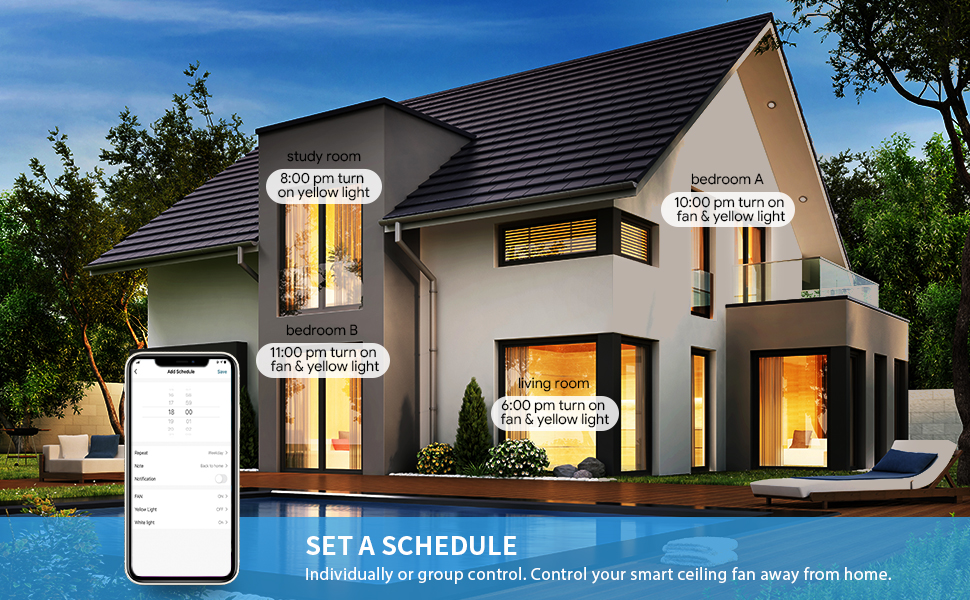
Image: An illustration highlighting the energy efficiency of the SMAAIR ceiling fan, indicating it is 75% more energy-efficient than traditional AC motor fans.
Warranty and Support
SMAAIR stands behind the quality of its products. For warranty information and customer support, please refer to the following:
- Warranty: Specific warranty details are typically provided with your purchase documentation or on the official SMAAIR website.
- Customer Service: For technical assistance, troubleshooting beyond this manual, or warranty claims, please contact SMAAIR customer support.
- Online Resources: Visit the official SMAAIR website for FAQs, updated manuals, and product registration.
You can visit the SMAAIR Store for more information: SMAAIR Store on Amazon
Product Videos
SMAAIR Ceiling Fan in Operation
Video: A demonstration of the SMAAIR ceiling fan in operation, highlighting its quiet performance and airflow. This video shows the fan blades spinning and the light illuminated.
Ask a question about this manual
Ask about setup, troubleshooting, compatibility, parts, safety, or missing instructions. Manuals+ will review the question and use this page’s manual context to help answer it.