
HCDZ SA-PM250
HCDZ Replacement Remote Control for Panasonic SA-PM250 Series Micro CD Stereo Audio System User Manual
Model: SA-PM250 Compatible Remote
Introduction
This manual provides instructions for the HCDZ replacement remote control, designed for use with Panasonic SA-PM250, SA-PM250BEBS, SA-PM250EB-S, SA-PM250EC-S, SA-PM250EE-S, SA-PM250EF-S, SA-PM250EG-K, SA-PM250EG-S, SA-PM250GN-S, and SA-PM250GS-S Micro CD Stereo Audio Systems. This remote control offers direct functionality without the need for programming.
Setup
Battery Installation
- Locate the battery compartment on the back of the remote control.
- Open the battery compartment cover.
- Insert two (2) new AAA batteries, ensuring correct polarity (+ and - terminals).
- Close the battery compartment cover securely.
Note: This remote control requires no programming. It will function immediately upon correct battery installation. Do not mix new and old batteries.
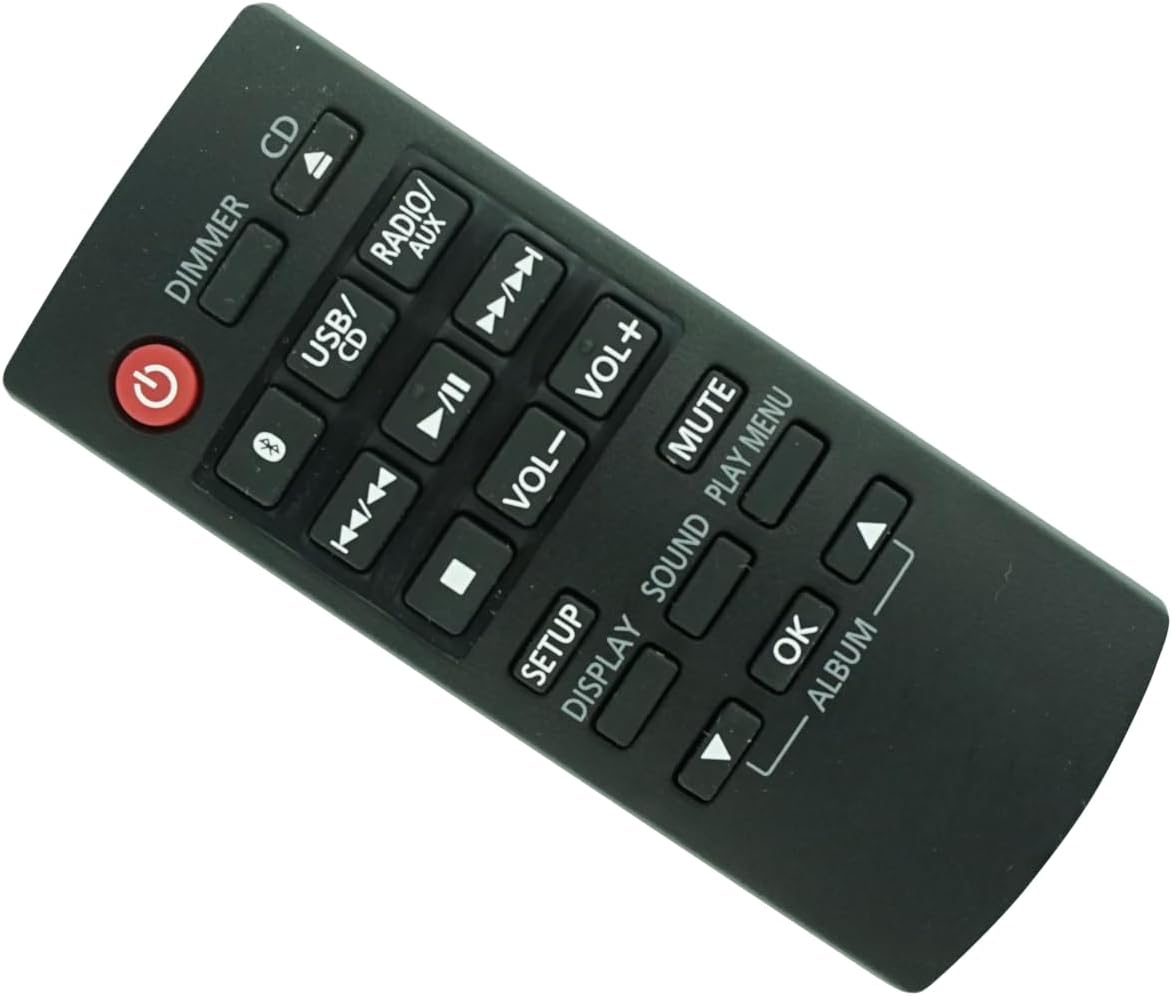
Image 1: Front view of the HCDZ replacement remote control. It is a black remote with various function buttons, including power, volume, playback controls, and input selection.
Operating Instructions
The following describes the general functions of the buttons on your replacement remote control:
- Power Button (⏻): Turns the audio system on or off.
- DIMMER: Adjusts the brightness of the display on the audio system.
- CD: Selects the CD player as the audio source.
- USB/CD: Toggles between USB and CD playback modes.
- RADIO/AUX: Selects the radio tuner or auxiliary input as the audio source.
- Bluetooth (Ⓑ): Activates or selects the Bluetooth input for wireless audio streaming.
- Play/Pause (▶/II): Starts or pauses playback of media.
- Stop (■): Stops playback of media.
- Skip Forward (⏭): Skips to the next track or chapter.
- Skip Backward (⏮): Skips to the beginning of the current track or the previous track.
- VOL+ / VOL-: Increases or decreases the volume level.
- MUTE: Silences the audio output. Press again to restore sound.
- SETUP: Accesses the system setup menu.
- DISPLAY: Changes the information shown on the system's display.
- SOUND: Accesses sound settings (e.g., equalizer, bass, treble).
- PLAY MENU: Accesses playback options or menus.
- OK: Confirms a selection in a menu.
- ALBUM (Up/Down Arrows): Navigates through albums or folders, typically in USB or CD modes.
Maintenance
- Storage: Do not leave the remote control in extremely hot or humid environments.
- Battery Care: If the remote control will not be used for an extended period, remove the batteries to prevent potential damage from leakage or corrosion.
- Sensor Protection: Avoid exposing the remote control's IR sensor to direct sunlight or strong artificial lighting, as this may cause malfunctions.
- Cleaning: Wipe the remote control with a soft, dry cloth. Do not use liquid cleaners or abrasive materials.
Troubleshooting
If the remote control is not functioning as expected, consider the following:
- No Response:
- Replace the remote control batteries with new ones.
- Check that the battery terminals are clean and correctly aligned.
- Limited Range:
- Move closer to the audio system.
- Ensure there are no obstructions between the remote control and the audio system's infrared (IR) sensor.
- System Not Responding:
- Verify that the power cord to your audio system is securely plugged in and the system is turned on.
Specifications
| Brand | HCDZ |
| Model Compatibility | Panasonic SA-PM250 Series Micro CD Stereo Audio Systems |
| Connectivity Technology | Infrared (IR) |
| Batteries Required | 2 x AAA (not included) |
| Programming | Not required; works out of the package |
| Max Supported Devices | 1 |
Warranty and Support
Specific warranty information for this HCDZ replacement remote control is not provided in the product details. For any support inquiries or further assistance, please refer to the retailer or the HCDZ brand's official support channels where the product was purchased.