
1. Introduction
The Ace Instruments AI-DP1 Digital Differential Pressure Indicator is a precision instrument designed for accurate measurement of room pressure. It is specifically engineered for critical environments such as pharmaceutical clean rooms, hospital operation theaters, and isolation rooms, as well as general HVAC applications. This manual provides essential information for the proper installation, operation, and maintenance of your AI-DP1 device.
Key features of the AI-DP1 include:
- High accuracy for critical pressure monitoring.
- Unit conversion between mm.W.C. and Pascals with a single key press.
- Integrated buzzer alarm for set point violation alerts.
- Offset provision for audit compliance.
- Compact design (42 mm depth) suitable for clean room modular wall fitment.
- RS 485 Modbus communication for seamless integration with BMS/SCADA/PLC systems.
2. Package Contents
Upon unpacking, please verify that all the following items are included in your package:
- 1 Unit of Ace Instruments AI-DP1 Digital Differential Pressure Indicator
- Power Adaptor
- Instruction Manual (this document)
- Calibration Certificate
3. Product Overview
The AI-DP1 features a robust design with an aluminium LM-6 powder-coated body and a water splash-proof polycarbonate front sticker. The integrated 4-digit red LED display provides clear readings.
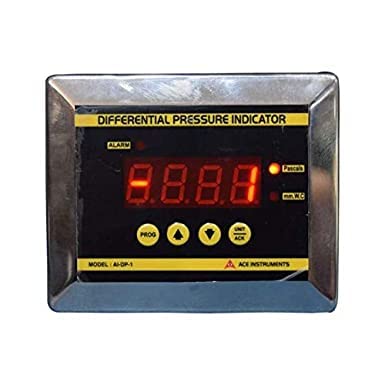
Figure 3.1: Front view of the AI-DP1 Digital Differential Pressure Indicator. It shows the 4-digit red LED display, alarm indicator, unit indicators (Pascals, mm.W.C.), and control buttons (PROG, up arrow, down arrow, UNIT/ACK).
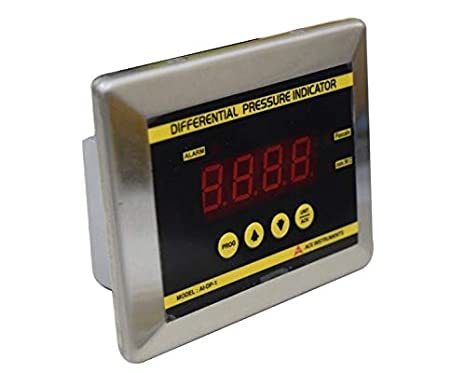
Figure 3.2: Angled view of the AI-DP1, highlighting its compact form factor and the stainless steel bezel.
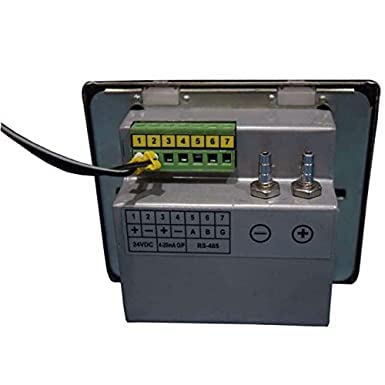
Figure 3.3: Rear view of the AI-DP1, displaying the terminal block for electrical connections (24VDC, RS-485) and two hose nipples for pressure input.
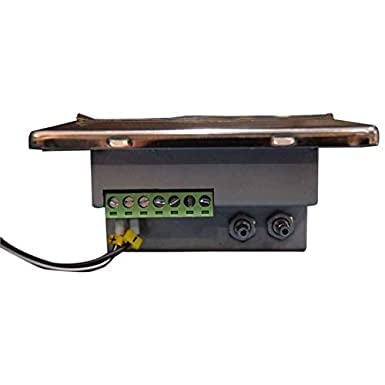
Figure 3.4: Side view of the AI-DP1, illustrating its shallow depth suitable for flush mounting.
4. Setup and Installation
4.1. Mounting
The AI-DP1 is designed for flush bezel fitment, ideal for integration into clean room modular walls. The instrument enclosure measures 75x70x40 mm (WxHxD) and requires a mounting depth of approximately 42 mm. Ensure the mounting surface is flat and secure.
4.2. Electrical Connections
Connect the provided power adaptor to the 24 Volts DC input terminals on the rear of the device. Observe correct polarity. For remote monitoring and integration, connect the isolated RS 485 Modbus communication lines to your Building Management System (BMS), SCADA, or PLC system as per the wiring diagram provided on the device's rear panel (refer to Figure 3.3).
4.3. Pressure Connections
Connect the pressure lines to the two 4 mm stainless steel hose nipples located at the back of the instrument. Ensure that the medium being measured is air or non-corrosive gases. Connect the higher pressure source to the '+' nipple and the lower pressure source to the '-' nipple for differential pressure measurement.
5. Operating Instructions
5.1. Power On
Once electrical connections are secure, apply 24V DC power. The device will power on, and the 4-digit LED display will show the current differential pressure reading.
5.2. Display and Units
The integrated 4-digit red LED display shows the measured differential pressure. The unit of measurement (mm.W.C. or Pascals) is indicated by corresponding LEDs. To switch between mm.W.C. and Pascals, press the UNIT/ACK button.
5.3. Alarm Functionality
The AI-DP1 features a built-in buzzer alarm that activates upon process violation, i.e., when the measured pressure exceeds or falls below predefined set points. The ALARM LED will illuminate. To acknowledge and silence the buzzer, press the UNIT/ACK button. The alarm LED will remain lit until the pressure returns to within the acceptable range.
5.4. Offset Provision
The device includes an offset provision to allow for minor adjustments to the reading, which can be useful for meeting specific audit requirements or fine-tuning the instrument in the field. Refer to the detailed programming guide (if available separately) or contact technical support for instructions on adjusting the offset.
5.5. Programming (PROG Button)
The PROG button, along with the up and down arrow buttons, is used to access and modify various settings such as alarm set points and offset values. Detailed programming instructions are typically found in a separate programming manual or can be obtained from Ace Instruments technical support.
6. Technical Specifications
| Parameter | Specification |
|---|---|
| Measuring Range (Standard) | -50.0 to +50.0 mm.WC / -500 to +500 Pascals |
| Accuracy | ± 0.5% of Full Scale |
| Resolution | 1 Pascals / 0.1 mm WC |
| Display | Integrated 4 Digit Red LED 7 Segment Display (0.5”) |
| Communication | Isolated RS 485 Modbus Protocol |
| Enclosure Size (WxHxD) | 75 x 70 x 40 mm |
| Hose Nipples | 2 Nos; 4 mm Stainless Steel |
| Medium | Air or Gases (Non Corrosive) |
| Maximum Over Pressure | 2 Times the rated pressure |
| Power Supply | 24 Volts DC |
| Construction | Aluminium LM-6 Powder Coated Body with Flush Bezel Fitment; Water Splash Proof Polycarbonate Front Sticker |
| Sensor Type | Integrated High Speed Differential Pressure Sensor |
| Buzzer | Built-in Buzzer Alarm for Process Violation Alert |
| Item Weight | 1.76 Pounds |
| Manufacturer | Ace Instruments |
7. Maintenance
To ensure the longevity and accurate performance of your AI-DP1, regular maintenance is recommended.
- Cleaning: Gently wipe the front panel with a soft, damp cloth. Avoid abrasive cleaners or solvents that could damage the polycarbonate sticker.
- Pressure Connections: Periodically inspect the hose nipples and tubing for any signs of wear, cracks, or blockages that could affect pressure readings.
- Calibration: The device comes with a calibration certificate. For continued accuracy, especially in regulated environments, periodic re-calibration by qualified personnel is advised. Refer to your facility's standard operating procedures for calibration intervals.
8. Troubleshooting
This section addresses common issues you might encounter with your AI-DP1. If the problem persists, please contact Ace Instruments technical support.
- No Display/Power:
- Ensure the 24V DC power supply is correctly connected and functioning.
- Check all electrical wiring for loose connections or damage.
- Incorrect Readings:
- Verify that the pressure lines are correctly connected to the '+' and '-' nipples.
- Check for any blockages or leaks in the pressure tubing.
- Ensure the measured medium is non-corrosive air or gas.
- Consider if an offset adjustment is required (refer to Section 5.4).
- If readings are consistently off, the unit may require re-calibration.
- Alarm Constantly Active:
- Check if the measured pressure is genuinely outside the set alarm limits.
- Verify the alarm set points are configured correctly (refer to Section 5.5).
- If the pressure is within limits but the alarm persists, there might be an internal fault.
- Communication Issues (RS 485 Modbus):
- Verify RS 485 wiring connections and polarity.
- Ensure correct Modbus parameters (baud rate, parity, slave ID) are configured in both the AI-DP1 and the master device (BMS/SCADA/PLC).
- Check for proper termination resistors if applicable in the Modbus network.
9. Applications
The Ace Instruments AI-DP1 Digital Differential Pressure Indicator is suitable for a wide range of applications requiring precise differential pressure monitoring, including but not limited to:
- Pharmaceutical Clean Rooms
- Laminar Air Flow Cabinets
- HVAC Systems
- Biosafety Cabinets
- Air Handling Units (AHUs)
- Hospital Operation Theaters
- Isolation Rooms
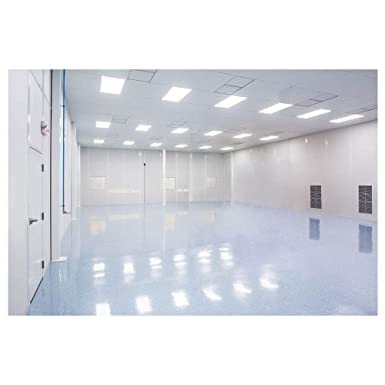
Figure 9.1: Example of a clean room environment where the AI-DP1 is typically installed to monitor differential pressure.
10. Warranty and Support
The Ace Instruments AI-DP1 Digital Differential Pressure Indicator is manufactured by Ace Instruments. For specific warranty terms and conditions, please refer to the documentation provided at the time of purchase or contact Ace Instruments directly. Technical support is available for assistance with installation, operation, troubleshooting, and any other product-related inquiries.
For support, please contact your authorized Ace Instruments distributor or visit the official Ace Instruments website for contact information.