
1. Introduction
This manual provides instructions for the proper setup, operation, and maintenance of your Bolymic BL-HS6 Headworn Unidirectional Microphone. Please read this manual thoroughly before use to ensure optimal performance and longevity of the product.
2. Product Overview
The Bolymic BL-HS6 is a professional headworn microphone designed for vocal, speech, dance, and sport applications. It features a high-class back electret condenser and a uni-directional polar pattern, making it suitable for environments requiring high vocal quality. It is specifically designed for use with Audio Technica wireless bodypack transmitters.

Figure 1: Bolymic BL-HS6 Headworn Unidirectional Microphone with 4-pin connector.
3. Key Features
- Headworn microphone headset with unidirectional polar pattern.
- Designed for Audio Technica wireless bodypack systems.
- High-class back electret condenser for clear vocal pickup.
- ABS nesting and unconstrained outline design for comfortable fit on various head forms.
- Adjustable mic arm for optimal positioning and sound pickup.
- Equipped with an excellent shield line to minimize noise.
4. Package Contents
- Bolymic BL-HS6 Headworn Microphone
- Windscreen
5. Setup Instructions
5.1. Connecting to a Wireless Bodypack
- Identify the 4-pin AT4 connector on your Bolymic BL-HS6 microphone cable.
- Locate the corresponding 4-pin input on your Audio Technica wireless bodypack transmitter. This microphone is compatible with Audio Technica T27/T31/T51/T200/T210/T300/T310 and 1100/1400/2000/3000 series bodypacks.
- Carefully align the pins and insert the microphone connector into the bodypack's input until it clicks securely into place.
- Ensure the connection is firm to prevent signal loss during use.
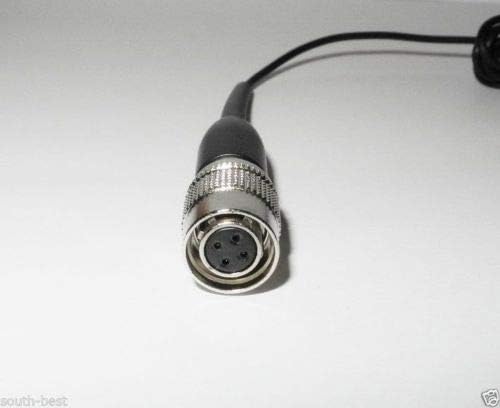
Figure 2: Detail of the 4-pin AT4 connector for Audio Technica bodypacks.
5.2. Wearing the Headset
- Gently place the headworn microphone over your ears, ensuring a comfortable and secure fit.
- Adjust the microphone arm so that the microphone capsule is positioned approximately 1-2 inches from the corner of your mouth, pointing towards it.
- Use the adjustable mic arm to fine-tune the position for optimal sound pickup.
6. Operating Instructions
Once connected to your wireless bodypack and powered on, the Bolymic BL-HS6 microphone is ready for use. Ensure your bodypack transmitter and receiver are properly synchronized and set to the correct frequency.
- Power On: Turn on your Audio Technica wireless bodypack transmitter according to its specific instructions.
- Volume Adjustment: Adjust the input gain on your bodypack transmitter and the output volume on your wireless receiver/mixer to achieve the desired audio level without distortion.
- Positioning: Maintain the microphone's position near your mouth for consistent sound quality. The unidirectional polar pattern helps to minimize background noise and focus on the speaker's voice.
7. Maintenance and Care
- Cleaning: Use a soft, dry cloth to wipe the microphone and cable. Avoid using liquid cleaners or solvents, which can damage the components.
- Storage: Store the microphone in a clean, dry place away from extreme temperatures, direct sunlight, and high humidity when not in use.
- Cable Care: Avoid sharp bends or kinks in the cable to prevent internal damage. Always grasp the connector when disconnecting, never pull the cable itself.
- Windscreen: Regularly check and replace the windscreen if it becomes worn or dirty to maintain optimal sound quality and hygiene.
8. Troubleshooting
8.1. No Sound or Low Volume
- Check if the microphone is securely connected to the bodypack transmitter.
- Verify that the bodypack transmitter is powered on and has fresh batteries.
- Ensure the bodypack and receiver are synchronized and operating on the correct frequency.
- Adjust the input gain on the bodypack and the output volume on the wireless receiver/mixer.
8.2. Distorted Sound
- Reduce the input gain on the bodypack transmitter if the sound is clipping or overdriven.
- Ensure the microphone is not positioned too close to the sound source, which can cause over-modulation.
- Check for potential radio frequency (RF) interference from other wireless devices or strong electromagnetic fields.
8.3. Intermittent Signal
- Check for loose connections at both the microphone's connector and the bodypack's input.
- Ensure there are no physical obstructions between the bodypack transmitter and the receiver.
- Verify that the operating range of the wireless system is not exceeded.
9. Technical Specifications
| Feature | Detail |
|---|---|
| Brand | Bolymic |
| Model Name | BL-HS6 |
| Item Model Number | BL-HS6 |
| UPC | 699929758330 |
| Microphone Form Factor | Headset |
| Polar Pattern | Unidirectional |
| Connectivity Technology | Auxiliary (4-pin AT4 connector) |
| Special Feature | Wireless (requires compatible bodypack) |
| Included Components | Microphone |
| Material | Acrylonitrile Butadiene Styrene (ABS) |
| Compatible Bodypacks | Audio Technica T27/T31/T51/T200/T210/T300/T310 and 1100/1400/2000/3000 series |
10. Warranty and Support
For warranty information and technical support, please refer to the documentation provided with your purchase or contact your retailer. Keep your proof of purchase for any warranty claims.
For further assistance or any questions regarding your Bolymic BL-HS6 microphone, please email the manufacturer or seller as indicated at the time of purchase.