
1. Introduction
This manual provides essential information for the safe and efficient operation of your Nikai Digital Microwave Oven, Model NMO303MDG. Please read these instructions thoroughly before using the appliance and retain them for future reference. Proper use and maintenance will ensure optimal performance and extend the lifespan of your microwave oven.
2. Important Safety Instructions
When using electrical appliances, basic safety precautions should always be followed to reduce the risk of fire, electric shock, and injury to persons:
- Read all instructions before using the appliance.
- Do not operate the oven if the cord or plug is damaged, if it is not working properly, or if it has been damaged or dropped.
- Do not heat liquids or other foods in sealed containers since they are liable to explode.
- Only allow children to use the oven without supervision when adequate instructions have been given so that the child is able to use the oven in a safe way and understands the hazards of improper use.
- Use only utensils that are suitable for use in microwave ovens.
- When heating food in plastic or paper containers, keep an eye on the oven due to the possibility of ignition.
- If smoke is observed, switch off or unplug the appliance and keep the door closed in order to stifle any flames.
- Do not overcook food.
- Do not use the cavity for storage purposes. Do not store items such as bread, cookies, etc., inside the oven.
- Remove wire twist-ties from paper or plastic bags before placing bags in oven.
- Install or locate this oven only in accordance with the provided installation instructions.
- Do not operate this appliance near water, in a wet basement or near a swimming pool.
- The temperature of accessible surfaces may be high when the appliance is operating.
3. Product Overview
Familiarize yourself with the components of your Nikai Digital Microwave Oven.

Figure 3.1: Front view of the Nikai Digital Microwave Oven NMO303MDG, showcasing its sleek black design and digital control panel.
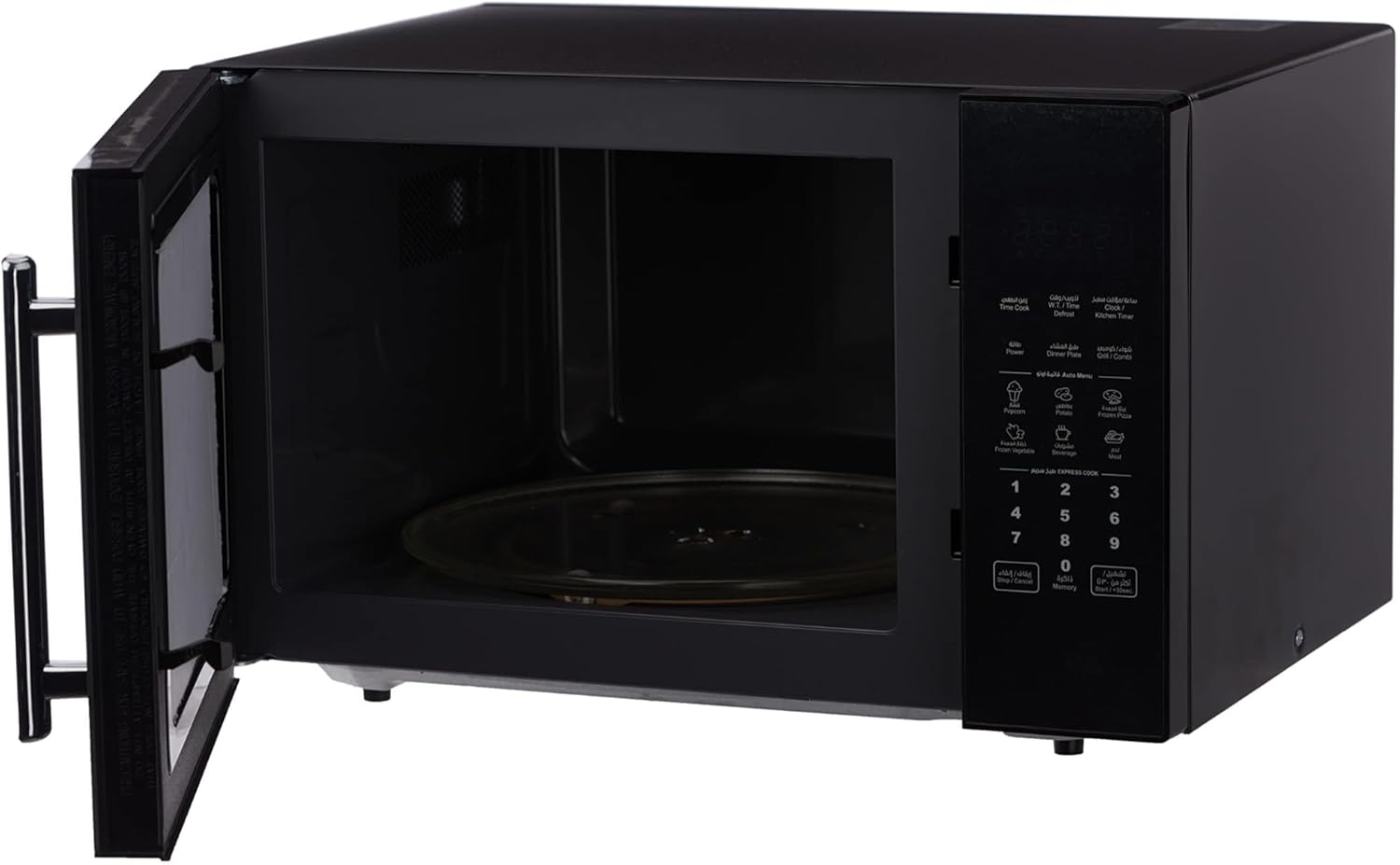
Figure 3.2: Interior view of the microwave oven with the door open, revealing the spacious 30-liter cavity and the removable glass turntable for even cooking.

Figure 3.3: The microwave interior with the included grill rack positioned on the turntable, ready for grilling functions.

Figure 3.4: A detailed view of the digital control panel, featuring push buttons for various functions like power levels, auto menus, defrost, and a numeric keypad for time input.

Figure 3.5: Rear view of the microwave oven, illustrating its physical dimensions (height, width, depth) for proper placement and installation.
4. Setup and Installation
4.1 Unpacking
- Carefully remove the microwave oven and all packing materials from the carton.
- Check the oven for any damage, such as dents or a misaligned door. Do not operate the oven if it is damaged.
- Ensure all accessories, including the glass turntable and grill rack, are present.
4.2 Placement
- Place the oven on a flat, stable surface that can support its weight.
- Ensure adequate ventilation. Leave a minimum of 10 cm (4 inches) of space at the rear, 20 cm (8 inches) at the top, and 5 cm (2 inches) on each side for proper airflow.
- Do not place the oven near heat sources or in areas with high humidity.
4.3 Electrical Connection
- Ensure the voltage specified on the rating label matches your household power supply (220 Volts).
- Plug the oven into a properly installed and grounded wall outlet. Do not use extension cords or adapters.
5. Operating Instructions
Your Nikai microwave oven features a digital control panel for precise cooking. The following sections detail its various functions.
5.1 Setting the Clock
- Press the 'Clock Setting' button once.
- Use the numeric keypad to enter the current time (e.g., 12:30).
- Press the 'Clock Setting' button again to confirm.
5.2 Microwave Cooking
- Place food in a microwave-safe container on the glass turntable. Close the door securely.
- Press the 'Power Level' button repeatedly to select the desired power level (1 to 11 levels available).
- Use the numeric keypad to enter the cooking time.
- Press the 'Start/+30sec' button to begin cooking.
5.3 Express Cook
For quick heating, simply press the 'Start/+30sec' button to cook at full power for 30 seconds. Each subsequent press adds 30 seconds to the cooking time.
5.4 Defrost Options (Weight & Time Defrost)
The oven offers both weight-based and time-based defrosting.
- Weight Defrost: Press the 'Weight Defrost' button, then use the numeric keypad to enter the food's weight. The oven will automatically calculate the defrosting time. Press 'Start/+30sec'.
- Time Defrost: Press the 'Time Defrost' button, then use the numeric keypad to enter the desired defrosting time. Press 'Start/+30sec'.
5.5 Auto Menus
The oven includes 6 pre-set auto menus for common foods:
- Press the 'Auto Menu' button repeatedly to cycle through the available options (e.g., Popcorn, Potato, Pizza, Frozen Vegetable, Beverage, Meal).
- Once the desired menu is displayed, use the numeric keypad to select the quantity or serving size if prompted.
- Press the 'Start/+30sec' button to begin.
5.6 Grill Function
To use the grill function:
- Place food on the grill rack (refer to Figure 3.3) and then onto the turntable.
- Press the 'Grill' button.
- Use the numeric keypad to enter the desired grilling time.
- Press the 'Start/+30sec' button to begin.
5.7 Kitchen Timer
The kitchen timer operates independently of cooking functions.
- Press the 'Kitchen Timer' button.
- Use the numeric keypad to enter the desired time.
- Press the 'Start/+30sec' button. The timer will count down without activating the microwave.
5.8 Cooking End Signal
The oven will emit an audible signal when a cooking cycle is complete.
6. Maintenance and Cleaning
Regular cleaning helps maintain the performance and appearance of your microwave oven.
- Always unplug the oven before cleaning.
- Clean the interior and exterior surfaces with a soft, damp cloth and mild detergent. Avoid abrasive cleaners.
- The glass turntable can be removed and washed in warm soapy water or in a dishwasher.
- For stubborn food splatters inside, place a bowl of water with lemon slices in the oven and heat for 2-3 minutes. The steam will loosen the residue, making it easier to wipe away.
- Ensure the door seals and surrounding areas are kept clean to maintain proper sealing.
7. Troubleshooting
If you encounter issues with your microwave oven, refer to the following common problems and solutions:
| Problem | Possible Cause | Solution |
|---|---|---|
| Oven does not start | Power cord not plugged in; Door not closed properly; Fuse blown or circuit breaker tripped. | Ensure power cord is securely plugged in; Close door firmly; Check household fuse or reset circuit breaker. |
| Food not heating | Incorrect cooking time or power level set; Door not closed properly. | Adjust cooking time and power level; Ensure door is fully closed. |
| Light bulb not working | Light bulb is burnt out. | Contact qualified service personnel for replacement. |
| Turntable not rotating | Turntable not properly placed; Obstruction under turntable. | Ensure turntable is correctly seated on the support ring; Remove any obstructions. |
If the problem persists after attempting these solutions, please contact customer support.
8. Specifications
| Feature | Specification |
|---|---|
| Brand | Nikai |
| Model Number | NMO303MDG |
| Capacity | 30 Liters |
| Product Dimensions (D x W x H) | 29 x 49 x 38.2 cm |
| Item Weight | 15.36 kg |
| Input Power | 800 Watts |
| Output Power (Wattage) | 700 Watts |
| Voltage | 220 Volts |
| Installation Type | Countertop |
| Control Type | Digital with Push Button |
| Special Features | Defrost, Grill, 11 Power Levels, 6 Auto Menus |
| Color | Black |
| Material Type | Metal |
| Included Components | User manual, accessories (turntable, grill rack) |
9. Warranty and Support
Your Nikai Digital Microwave Oven NMO303MDG comes with a 2-year warranty from the date of purchase, covering manufacturing defects under normal use. Please retain your purchase receipt as proof of warranty.
Installation and Service Support:
For installation assistance or service inquiries, please contact the following numbers:
- Riyadh: +966 -11- 4094006 Ext – 113
- Jeddah: +966- 12- 6577714
- Dammam: +966-13- 8343691
- Qassim: +966 581044198
- Abha: +966 593322785
For further assistance, please refer to the contact information provided in your warranty card or visit the official Nikai website.