
Hanchen LT-50
Hanchen LT-50 Semi-Automatic Round Bottle Labeling Machine User Manual
Model: LT-50
1. Introduction
This user manual provides comprehensive instructions for the safe and efficient operation, setup, and maintenance of the Hanchen LT-50 Semi-Automatic Round Bottle Labeling Machine. Please read this manual thoroughly before operating the machine to ensure optimal performance and longevity.

Figure 1: Hanchen LT-50 Semi-Automatic Round Bottle Labeling Machine. This image shows the overall view of the labeling machine, designed for applying labels to round bottles.
2. Safety Instructions
Always adhere to the following safety guidelines to prevent injury and damage to the machine:
- Ensure the machine is placed on a stable, level surface.
- Keep hands and loose clothing away from moving parts during operation.
- Disconnect power before performing any maintenance or cleaning.
- Do not operate the machine if any parts are damaged or missing.
- Use only the specified power supply.
- Keep children and unauthorized personnel away from the machine.
3. Product Overview and Components
The Hanchen LT-50 is a semi-automatic labeling machine designed for efficient application of self-adhesive labels to various round bottles. Key components are illustrated below:
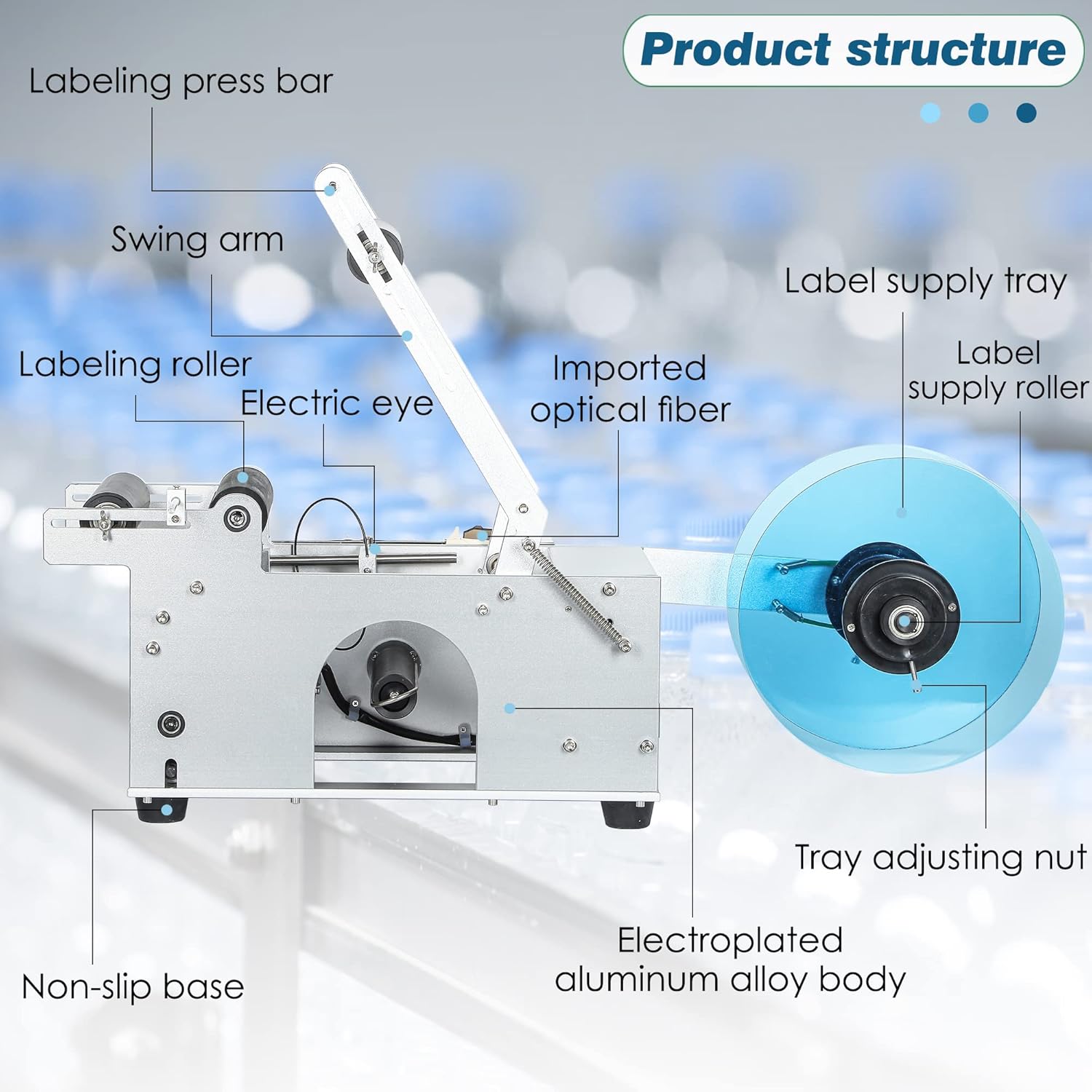
Figure 2: Product Structure. This diagram highlights the main parts of the labeling machine, including the labeling press bar, swing arm, labeling roller, electric eye, imported optical fiber, label supply tray, label supply roller, tray adjusting nut, electroplated aluminum alloy body, and non-slip base.
Included Components:
- Label Roll
- Bottle Rack
4. Specifications
The following table details the technical specifications of the Hanchen LT-50 Labeling Machine:

Figure 3: Product Parameters. This image illustrates key dimensions and performance metrics such as labeling speed, container diameter, label width, and label length.
| Specification | Value |
|---|---|
| Model Name | LT-50 |
| Labeling Speed | 20-40 pcs/min |
| Container Diameter | 15-120mm (0.6-4.7in) |
| Min. Label Size (W×L) | 25×25mm (1×1in) |
| Max. Label Size (W×L) | 150×300mm (6×12in) |
| Item Weight | 21 Kilograms (46.2 pounds) |
| Printing Technology | Thermal |
| Maximum Black and White Print Resolution | 300 dpi |
| Control Method | Push Button |
| Specific Uses For Product | Bottle Labeling, Wine Bottling |
| Compatible Devices | PC |
5. Setup
Follow these steps to set up your Hanchen LT-50 labeling machine:
- Unpacking: Carefully remove the machine and all components from the packaging. Verify that all included components (Label Roll, Bottle Rack) are present.
- Placement: Place the machine on a stable, flat, and non-slip surface. Ensure there is adequate space around the machine for operation and maintenance.
- Power Connection: Connect the power cord to the machine and then to a suitable power outlet. Ensure the power switch is in the OFF position before connecting.
- Label Roll Installation:
- Mount the label roll onto the label supply tray. Ensure the labels are oriented correctly for feeding.
- Thread the label strip through the labeling path, ensuring it passes under the electric eye sensor for accurate positioning.
- Adjust the tray adjusting nut to secure the label roll and ensure smooth feeding.
- Bottle Rack Adjustment: Adjust the bottle rack to accommodate the diameter of your bottles (15-120mm). Ensure bottles fit snugly but can rotate freely.
6. Operation
Operating the Hanchen LT-50 is straightforward. Follow these steps for efficient labeling:

Figure 4: Fast Labeling. This image demonstrates the process of turning on the micro switch and pressing the handle for automatic labeling.
- Power On: Flip the power switch to the ON position. The machine will initialize.
- Load Bottle: Place a round bottle onto the bottle rack. Ensure the bottle is a complete cylinder for proper labeling.
- Initiate Labeling: Turn on the micro switch and gently press the handle. The machine will automatically apply the label to the bottle. The intelligent positioning sensor ensures precise label placement.
- Remove Labeled Bottle: Once the label is applied, remove the bottle and place the next one for labeling.
Bottle Compatibility:
The LT-50 is designed for cylindrical bottles. Refer to the image below for compatible and incompatible bottle shapes:

Figure 5: Bottle Compatibility. This guide shows examples of cylindrical bottles that are compatible with the labeling machine ("Yes") and non-cylindrical shapes (bumpy, tapered, cap protruding) that are not compatible ("No").
Product Details and Features:
The machine features high-quality components for reliable performance:

Figure 6: Product Details. This image provides close-up views of the label supply tray with high-quality rubber rollers, the electric eye for accurate label positioning, the take-up reel for smooth operation, and the thickened swing arm design for durability.

Figure 7: Machine Components. This image offers additional close-up views of various parts of the labeling machine, highlighting the robust construction and design elements.
7. Maintenance
Regular maintenance ensures the longevity and optimal performance of your labeling machine:
- Cleaning: Regularly clean the machine's exterior with a soft, dry cloth. For stubborn dirt, use a slightly damp cloth and mild detergent, then wipe dry.
- Sensor Cleaning: Keep the electric eye sensor clean and free of dust or label residue to ensure accurate label detection. Use a soft, lint-free cloth.
- Roller Inspection: Periodically inspect the labeling rollers and take-up reel for wear or damage. Ensure they are free of adhesive buildup.
- Lubrication: Consult a qualified technician for any lubrication requirements. Do not apply lubricants unless specified.
- Storage: When not in use for extended periods, store the machine in a clean, dry environment, protected from dust and extreme temperatures.
8. Troubleshooting
This section addresses common issues you might encounter with the Hanchen LT-50. For problems not listed here, please contact customer support.
| Problem | Possible Cause | Solution |
|---|---|---|
| Machine does not power on | Power cord not connected; Power outlet faulty; Power switch off | Check power cord connection; Test power outlet; Ensure power switch is ON |
| Labels are not applying correctly | Incorrect label threading; Electric eye sensor dirty/obstructed; Bottle not cylindrical; Label roll too tight/loose | Re-thread labels correctly; Clean electric eye sensor; Use compatible cylindrical bottles; Adjust label roll tension |
| Labels are wrinkled or creased | Label tension incorrect; Rollers dirty or worn; Bottle not rotating smoothly | Adjust label roll tension; Clean/inspect rollers; Ensure bottle rack is adjusted correctly and bottle rotates freely |
| Machine is making unusual noises | Foreign object obstruction; Worn parts; Lack of lubrication | Disconnect power and inspect for obstructions; Contact customer support for inspection and service |
9. Warranty and Support
Hanchen provides a limited warranty for the LT-50 Semi-Automatic Round Bottle Labeling Machine. We are committed to providing high-quality products and continuous customer service.
- Warranty Period: The product comes with a 1-Year Free Warranty.
- Support: Hanchen offers Lifelong Support for its products.
- Contact: For technical assistance, warranty claims, or any inquiries, please visit the official Hanchen Store or contact our customer service team.
You can visit the Hanchen Store for more information and support: Hanchen Official Store
Ask a question about this manual
Ask about setup, troubleshooting, compatibility, parts, safety, or missing instructions. Manuals+ will review the question and use this page’s manual context to help answer it.