
1. Introduction
This manual provides comprehensive instructions for the installation, operation, and maintenance of your NVIDIA GeForce RTX 3060 Ti Founders Edition 8GB Graphics Card. Please read this manual thoroughly before proceeding with installation or use to ensure optimal performance and longevity of your product.
The NVIDIA GeForce RTX 30 Series GPUs are designed to deliver advanced performance for gaming and creative applications. They are powered by the Ampere architecture, NVIDIA's second-generation RTX platform, featuring enhanced RT Cores, Tensor Cores, and streaming multiprocessors for realistic ray-traced graphics and AI capabilities.
2. Product Overview
The GeForce RTX 3060 Ti Founders Edition is a high-performance graphics card engineered for demanding visual tasks. Key features include:
- NVIDIA Ampere Architecture: Provides significant advancements in performance and efficiency.
- Ray Tracing: Experience realistic lighting, shadows, and reflections in supported games.
- NVIDIA DLSS: AI rendering technology that boosts frame rates while maintaining image quality.
- NVIDIA Reflex: Reduces system latency for improved responsiveness in competitive gaming.
- Creative Application Acceleration: Enhances performance in professional creative software.
2.1. Components and Connectors
Familiarize yourself with the physical components of your graphics card.
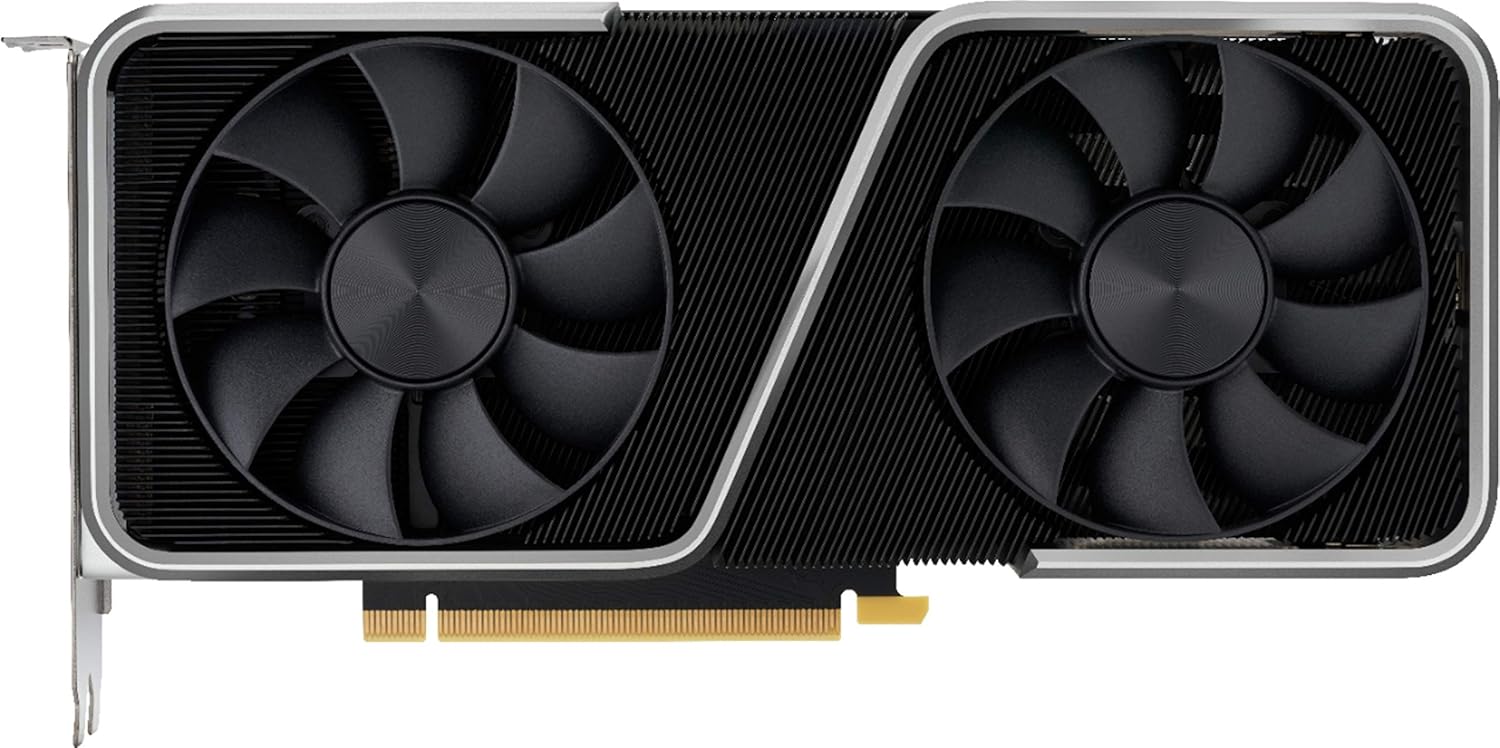
Figure 1: Front view of the graphics card with dual fans.

Figure 2: Angled view showing display output ports and PCIe interface.

Figure 3: Rear view of the graphics card backplate.
The card features standard display output ports (HDMI, DisplayPort) and requires a PCI Express 4.0 x16 slot for installation. Power is supplied via a 12-pin power connector, typically requiring an adapter for dual 8-pin PCIe power cables from your power supply unit (PSU).
3. Setup and Installation
Proper installation is crucial for the performance and stability of your graphics card. Ensure your system meets the minimum requirements before proceeding.
3.1. System Requirements
- PCI Express-compliant motherboard with one x16 graphics slot.
- Minimum 550W power supply with one 12-pin power connector (or compatible dual 8-pin adapter).
- Minimum 8GB system memory (16GB recommended).
- Microsoft Windows 10 64-bit (April 2018 Update or later) or Linux 64-bit.
- Internet connection for driver installation.
3.2. Hardware Installation
- Prepare Your System: Power off your computer and unplug all cables. Open your computer case.
- Remove Old Graphics Card (if applicable): Unscrew any retaining brackets and carefully remove your existing graphics card from the PCIe slot.
- Install New Graphics Card: Locate an available PCI Express x16 slot. Align the graphics card with the slot and press down firmly until it is securely seated. Secure the card with screws or retaining clips.
- Connect Power: Connect the 12-pin power connector from your PSU (or the dual 8-pin adapter) to the graphics card. Ensure a secure connection.
- Close Case and Reconnect: Close your computer case, reconnect all cables, and power on your system.
3.3. Driver Installation
- Boot to Operating System: Your system may boot with a basic display driver.
- Download Drivers: Visit the official NVIDIA website (www.nvidia.com/drivers) and download the latest drivers for your GeForce RTX 3060 Ti.
- Install Drivers: Run the downloaded installer and follow the on-screen prompts. A restart may be required after installation.
4. Operating Your Graphics Card
Once installed and drivers are updated, your GeForce RTX 3060 Ti is ready for use. For optimal performance and features, consider installing NVIDIA GeForce Experience software.
4.1. NVIDIA GeForce Experience
GeForce Experience is a companion application that enhances your PC gaming experience. It provides:
- Optimal Game Settings: Automatically configures game settings for the best experience.
- Driver Updates: Notifies you of new NVIDIA driver releases and allows direct installation.
- ShadowPlay: Records and shares high-quality gameplay videos and screenshots.
- GameStream: Streams games from your PC to NVIDIA SHIELD devices.
Download GeForce Experience from the official NVIDIA website.
4.2. Display Configuration
Connect your monitor(s) to the display output ports on the graphics card. Use your operating system's display settings to configure resolution, refresh rate, and multiple monitor setups.
5. Maintenance
Regular maintenance helps ensure the longevity and consistent performance of your graphics card.
- Dust Removal: Periodically clean dust from the fans and heatsink using compressed air. Ensure the system is powered off and unplugged before cleaning.
- Driver Updates: Keep your graphics drivers updated to benefit from performance improvements, bug fixes, and new features. Use NVIDIA GeForce Experience or the NVIDIA website.
- Temperature Monitoring: Utilize monitoring software to keep track of your GPU's temperature, especially during heavy loads. Ensure adequate airflow within your PC case.
6. Troubleshooting
If you encounter issues with your graphics card, refer to the following common troubleshooting steps:
- No Display Output:
- Ensure the monitor cable is securely connected to both the graphics card and the monitor.
- Verify the graphics card is fully seated in the PCIe slot.
- Confirm the 12-pin power connector is properly attached.
- Test with a different display cable or monitor if possible.
- Performance Issues (Low FPS, Stuttering):
- Ensure you have the latest NVIDIA drivers installed.
- Check GPU temperatures to prevent thermal throttling. Improve case airflow if necessary.
- Verify your power supply unit (PSU) meets the recommended wattage.
- Close unnecessary background applications.
- Driver Crashes or Instability:
- Perform a clean installation of the graphics drivers.
- Check for conflicts with other software.
For further assistance, consult the NVIDIA support website or contact their customer service.
7. Specifications
Detailed technical specifications for the NVIDIA GeForce RTX 3060 Ti Founders Edition graphics card (Model 900-1G142-2520-000).
| Feature | Specification |
|---|---|
| Model Number | 900-1G142-2520-000 |
| Graphics Coprocessor | NVIDIA GeForce RTX 3060 Ti |
| Graphics Card RAM Size | 8 GB |
| Memory Type | GDDR6 |
| Memory Speed | 1.75 GHz |
| Chipset Brand | NVIDIA |
| Card Description | Dedicated |
| Interface | PCI Express 4.0 |
| Max Screen Resolution | 3840x2160 pixels (4K) |
| Video Output Interface | HDMI, DisplayPort |
| Item Dimensions (LxWxH) | 12 x 6 x 0.1 inches |
| Item Weight | 3.89 pounds |
| Manufacturer | NVIDIA |
8. Warranty and Support
For information regarding the product warranty, please refer to the documentation included with your purchase or visit the official NVIDIA website. NVIDIA provides comprehensive support resources, including FAQs, driver downloads, and contact options for technical assistance.
NVIDIA Support Website: www.nvidia.com/support


